
 ](https://f-droid.org/packages/com.geeksville.mesh/)
[
](https://f-droid.org/packages/com.geeksville.mesh/)
[ ](https://apt.izzysoft.de/fdroid/index/apk/com.geeksville.mesh)
[
](https://apt.izzysoft.de/fdroid/index/apk/com.geeksville.mesh)
[ ](https://github.com/meshtastic/Meshtastic-Android/releases)
[
](https://github.com/meshtastic/Meshtastic-Android/releases)
[![Download at https://play.google.com/store/apps/details?id=com.geeksville.mesh]](https://play.google.com/intl/en_us/badges/static/images/badges/en_badge_web_generic.png) ](https://play.google.com/store/apps/details?id=com.geeksville.mesh&referrer=utm_source%3Dgithub-android-readme)
The play store is the last to update of these options, but if you want to join the Play Store testing program go to [this URL](https://play.google.com/apps/testing/com.geeksville.mesh) and opt-in to become a tester.
If you encounter any problems or have questions, [ask us on the discord](https://discord.gg/meshtastic), [create an issue](https://github.com/meshtastic/Meshtastic-Android/issues), or [post in the forum](https://github.com/orgs/meshtastic/discussions) and we'll help as we can.
## Documentation
The project's documentation is generated with [Dokka](https://kotlinlang.org/docs/dokka-introduction.html) and hosted on GitHub Pages. It is automatically updated on every push to the `main` branch.
[**View Documentation**](https://meshtastic.github.io/Meshtastic-Android/)
### Generating Locally
You can generate the documentation locally to preview your changes.
1. **Run the Dokka task:**
```bash
./gradlew :app:dokkaHtml
```
2. **View the output:**
The generated HTML files will be located in the `app/build/dokka/html` directory. You can open the `index.html` file in your browser to view the documentation.
## Translations
You can help translate the app into your native language using [Crowdin](https://crowdin.meshtastic.org/android).
## Building the Android App
> [!WARNING]
> Debug and release builds can be installed concurrently. This is solely to enable smoother development, and you should avoid running both apps simultaneously. To ensure proper function, force quit the app not in use.
https://meshtastic.org/docs/development/android/
Note: when building the `google` flavor locally you will need to supply your own [Google Maps Android SDK api key](https://developers.google.com/maps/documentation/android-sdk/get-api-key) `MAPS_API_KEY` in `local.properties` in order to use Google Maps.
e.g.
```properties
MAPS_API_KEY=your_google_maps_api_key_here
```
## Contributing guidelines
For detailed instructions on how to contribute, please see our [CONTRIBUTING.md](CONTRIBUTING.md) file.
For details on our release process, see the [RELEASE_PROCESS.md](RELEASE_PROCESS.md) file.
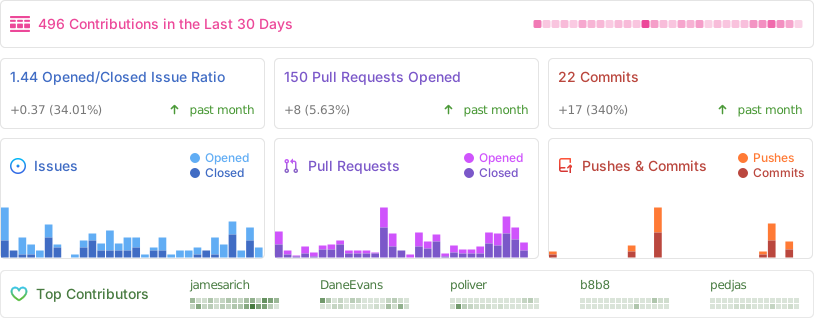
## Repository Statistics
Copyright 2025, Meshtastic LLC. GPL-3.0 license
](https://play.google.com/store/apps/details?id=com.geeksville.mesh&referrer=utm_source%3Dgithub-android-readme)
The play store is the last to update of these options, but if you want to join the Play Store testing program go to [this URL](https://play.google.com/apps/testing/com.geeksville.mesh) and opt-in to become a tester.
If you encounter any problems or have questions, [ask us on the discord](https://discord.gg/meshtastic), [create an issue](https://github.com/meshtastic/Meshtastic-Android/issues), or [post in the forum](https://github.com/orgs/meshtastic/discussions) and we'll help as we can.
## Documentation
The project's documentation is generated with [Dokka](https://kotlinlang.org/docs/dokka-introduction.html) and hosted on GitHub Pages. It is automatically updated on every push to the `main` branch.
[**View Documentation**](https://meshtastic.github.io/Meshtastic-Android/)
### Generating Locally
You can generate the documentation locally to preview your changes.
1. **Run the Dokka task:**
```bash
./gradlew :app:dokkaHtml
```
2. **View the output:**
The generated HTML files will be located in the `app/build/dokka/html` directory. You can open the `index.html` file in your browser to view the documentation.
## Translations
You can help translate the app into your native language using [Crowdin](https://crowdin.meshtastic.org/android).
## Building the Android App
> [!WARNING]
> Debug and release builds can be installed concurrently. This is solely to enable smoother development, and you should avoid running both apps simultaneously. To ensure proper function, force quit the app not in use.
https://meshtastic.org/docs/development/android/
Note: when building the `google` flavor locally you will need to supply your own [Google Maps Android SDK api key](https://developers.google.com/maps/documentation/android-sdk/get-api-key) `MAPS_API_KEY` in `local.properties` in order to use Google Maps.
e.g.
```properties
MAPS_API_KEY=your_google_maps_api_key_here
```
## Contributing guidelines
For detailed instructions on how to contribute, please see our [CONTRIBUTING.md](CONTRIBUTING.md) file.
For details on our release process, see the [RELEASE_PROCESS.md](RELEASE_PROCESS.md) file.
## Repository Statistics

Copyright 2025, Meshtastic LLC. GPL-3.0 license