Developing
This article outlines how to get Dashy running in a development environment, and outlines the basics of the architecture. If you're adding new features, you may want to check out the Development Guides docs, for tutorials covering basic tasks.
- Setting up the Development Environment
- Git Strategy
- Resources for Beginners
- App Info
- Code Style Guide
- Application Structure
- Development Tools
- Misc / Notes
Setting up the Dev Environment
Prerequisites
You will need either the latest or LTS version of Node.js to build and serve the application and Git to easily fetch the code, and push any changes. If you plan on running or deploying the container, you'll also need Docker. To avoid any unexpected issues, ensure you've got at least NPM V 7.5 or Yarn 1.22 (you may find NVM helpful for switching/ managing versions).
Running the Project
- Get Code:
git clone https://github.com/Lissy93/dashy.git - Navigate into the directory:
cd dashy - Install dependencies:
yarn - Start dev server:
yarn dev
Dashy should now be being served on http://localhost:8080/. Hot reload is enabled, so making changes to any of the files will trigger them to be rebuilt and the page refreshed.
Project Commands
Basics
yarn build- Builds the production bundle into./dist. The Vite dev/runtime server servesuser-data/conf.ymlon each request, so a rebuild is only needed when source code or assets change, not when config changesyarn start- Starts the Node server, which serves the built site from./distand the live config fromuser-data/. Runyarn buildfirst
Development
yarn dev- Starts the development server with hot reloadingyarn lint- Lints code to ensure it follows a consistent, neat styleyarn test- Runs tests, and outputs results
Utils and Checks
yarn validate-config- If you have quite a long configuration file, you may wish to check that it's all good to go, before deploying the app. This can be done withyarn validate-configordocker exec -it [container-id] yarn validate-config. Your config file needs to be in/user-data/conf.yml(or within your Docker container at/app/user-data/conf.yml). This will first check that your YAML is valid, and then validates it against Dashy's schema.yarn health-check- Checks that the application is up and running on it's specified port, and outputs current status and response times. Useful for integrating into your monitoring service, if you need to maintain high system availability
Alternate Start Commands
yarn build && yarn start- Builds the app, then starts the production Node server. Use this for a manual production-style run on bare metal. With Vite,conf.ymlis served fromuser-data/at runtime, so config changes only require a page refreshyarn pm2-start- Starts the Node server using PM2, a process manager for Node.js applications, that helps them stay alive. PM2 has some built-in basic monitoring features, and an optional management solution. If you are running the app on bare metal, it is recommended to use this start command
Notes
- If you are using NPM, replace
yarnwithnpm run - If you are using Docker, precede each command with
docker exec -it [container-id]. Container ID can be found by runningdocker ps
Environmental Variables
All environmental variables are optional. Currently there are not many environmental variables used, as most of the user preferences are stored under appConfig in the conf.yml file.
You can set variables either in your environment, or using the .env file.
NODE_ENV- Current environment, can be either development, production or testPORT- The port to expose the running application onHOST- The host that Dashy is running on, domain or IPBASE_URL- The default base path for serving up static assetsVITE_APP_DOMAIN- Usually the same as BASE_URL, but accessible in frontendINTEGRITY- Should enable SRI for build script and link resourcesIS_DOCKER- Computed automatically on build. Indicates if running in containerVITE_APP_VERSION- Again, set automatically using package.json during build timeBACKUP_DIR- Directory for conf.yml backupsDISABLE_CONFIG_BACKUPS- Set to 'true' to skip the pre-save backup step (useful on read-only filesystems or where permissions don't allow it)
Environment Modes
You can set the environment using the NODE_ENV variable. By default, the correct environment should be selected based on the script you run to start the app. The following environments are supported: production, development and test. For more info, see Vite Env Variables and Modes.
Git Strategy
Git Flow
Like most Git repos, we are following the Github Flow standard.
- Create a branch (or fork if you don'd have write access)
- Code some awesome stuff 🧑💻
- Add, commit and push your changes to your branch/ fork
- Head over to GitHub and create a Pull Request
- Fill in the required sections in the template, and hit submit
- Follow up with any reviews on your code
- Merge 🎉
Git Branch Naming
The format of your branch name should be something similar to: [TYPE]/[TICKET]_[TITLE]
For example, FEATURE/420_Awesome-feature or FIX/690_login-server-error
Commit Emojis
Using a single emoji at the start of each commit message, to indicate the type task, makes the commit ledger easier to understand, plus it looks cool.
- 🎨
:art:- Improve structure / format of the code. - ⚡️
:zap:- Improve performance. - 🔥
:fire:- Remove code or files. - 🐛
:bug:- Fix a bug. - 🚑️
:ambulance:- Critical hotfix - ✨
:sparkles:- Introduce new features. - 📝
:memo:- Add or update documentation. - 🚀
:rocket:- Deploy stuff. - 💄
:lipstick:- Add or update the UI and style files. - 🎉
:tada:- Begin a project. - ✅
:white_check_mark:- Add, update, or pass tests. - 🔒️
:lock:- Fix security issues. - 🔖
:bookmark:- Make a Release or Version tag. - 🚨
:rotating_light:- Fix compiler / linter warnings. - 🚧
:construction:- Work in progress. - ⬆️
:arrow_up:- Upgrade dependencies. - 👷
:construction_worker:- Add or update CI build system. - ♻️
:recycle:- Refactor code. - 🩹
:adhesive_bandage:- Simple fix for a non-critical issue. - 🔧
:wrench:- Add or update configuration files. - 🍱
:bento:- Add or update assets. - 🗃️
:card_file_box:- Perform database schema related changes. - ✏️
:pencil2:- Fix typos. - 🌐
:globe_with_meridians:- Internationalization and translations.
For a full list of options, see gitmoji.dev
PR Guidelines
Once you've made your changes, and pushed them to your fork or branch, you're ready to open a pull request!
For a pull request to be merged, it must:
- Must be backwards compatible
- The build, lint and tests (run by GH actions) must pass
- There must not be any merge conflicts
When you submit your PR, include the required info, by filling out the PR template. Including:
- A brief description of your changes
- The issue, ticket or discussion number (if applicable)
- For UI relate updates include a screenshot
- If any dependencies were added, explain why it was needed, state the cost associated, and confirm it does not introduce any security issues
- Finally, check the checkboxes, to confirm that the standards are met, and hit submit!
Resources for Beginners
New to Web Development? Glad you're here! Dashy is a pretty simple app, so it should make a good candidate for your first PR. Presuming that you already have a basic knowledge of JavaScript, the following articles should point you in the right direction for getting up to speed with the technologies used in this project:
- Open Source for Beginners
- Introduction to Vue.js
- Vue.js Walkthrough
- ES6 Features
- Definitive guide to SCSS
- Complete beginners guide to Docker
- Docker Classroom - Interactive Tutorials
- Quick start TypeScript guide
- Complete TypeScript tutorial series
- Using TypeScript with Vue.js
- Git cheat sheet
- Basics of using NPM
As well as Node, Git and Docker- you'll also need an IDE (e.g. VS Code or Vim) and a terminal (Windows users may find WSL more convenient).
App Info
Style Guide
Linting is done using ESLint, and using the Vue.js Styleguide, which is very similar to the AirBnB Styleguide. You can run yarn lint to report and fix issues. While the dev server is running, issues will be reported to the console automatically, and any lint errors will trigger the build to fail. Note that all lint checks must pass before any PR can be merged. Linting is also run as a git pre-commit hook
The most significant things to note are:
- Indentation should be done with two spaces
- Strings should use single quotes
- All statements must end in a semi-colon
- The final element in all objects must be preceded with a comma
- Maximum line length is 100
- There must be exactly one blank line between sections, before function names, and at the end of the file
- With conditionals, put else on the same line as your if block's closing brace
- All multiline blocks must use braces
- Avoid console statements in the frontend
Styleguides:
- Vue: Vue styleguide
- JavaScript: github.com/airbnb/javascript
Application Structure
Files in the Root: ./
╮
├── package.json        # Project meta-data, dependencies and paths to scripts
├── src/                # Project front-end source code
├── server.js           # A Node.js server to serve up the /dist directory
├── services/           # All server-side endpoints and utilities
├── vite.config.mjs     # Vite (build tool) configuration
├── Dockerfile          # The blueprint for building the Docker container
├── docker-compose.yml  # A Docker run command
├── .env                # Location for any environmental variables
├── yarn.lock           # Auto-generated list of current packages and version numbers
├── docs/               # Markdown documentation
├── README.md           # Readme, basic info for getting started
├── LICENSE             # License for use
╯
Frontend Source: ./src/
./src
├── App.vue                       # Vue.js starting file
├── assets                        # Static non-compiled assets
│  ├── fonts                      # .ttf font files
│  ├── locales                    # All app text, each language in a separate JSON file
│  ╰── interface-icons            # SVG icons used in the app
├── components                    # All front-end Vue web components
│  ├── Charts                     # Charting components for dynamically displaying widget data
│  │  ├── Gauge.vue               # A speed-dial style chart for showing 0 - 100 values
│  │  ╰── PercentageChart.vue     # A horizontal bar for showing percentage breakdowns
│  ├── Configuration              # Components relating to the user config pop-up
│  │  ├── AppInfoModal.vue        # A modal showing core app info, like version, language, etc
│  │  ├── AppVersion.vue          # Shows current version from package.json, compares with GitHub
│  │  ├── CloudBackupRestore.vue  # Form where the user manages cloud sync options
│  │  ├── ConfigContainer.vue     # Main container, wrapping all other config components
│  │  ├── CustomCss.vue           # Form where the user can input custom CSS
│  │  ╰── JsonEditor.vue          # JSON editor, where the user can modify the main config file
│  ├── FormElements               # Basic form elements used throughout the app
│  │  ├── Button.vue              # Standard button component
│  │  ├── Radio.vue               # Standard radio button input
│  │  ├── Select.vue              # Standard dropdown input selector
│  │  ├── Input.vue               # Standard text field input component
│  │  ╰── Toggle.vue              # Standard on / off toggle switch
│  ├── InteractiveEditor          # Components for the interactive UI config editor
│  │  ├── AddNewSectionLauncher   # Button that launches the EditSection form, used for adding new section
│  │  ├── EditAppConfig.vue       # Form for editing appConfig
│  │  ├── EditPageInfo.vue        # Form for editing pageInfo
│  │  ├── EditSection.vue         # Form for adding / editing sections
│  │  ├── EditItem.vue            # Form for adding or editing items
│  │  ├── EditModeSaveMenu.vue    # The bar at the bottom of screen in edit mode, containing save buttons
│  │  ├── EditModeTopBanner.vue   # The bar at the top of screen in edit mode
│  │  ├── ExportConfigMenu.vue    # Modal for viewing / exporting edited config
│  │  ├── MoveItemTo.vue          # Form for moving / copying items to other sections
│  │  ╰── SaveCancelButtons.vue   # Buttons visible in all the edit menus, to save or cancel changes
│  ├── LinkItems                  # Components for Sections and Link Items
│  │  ├── Collapsable.vue         # The collapsible functionality of sections
│  │  ├── IframeModal.vue         # Pop-up iframe modal, for viewing websites within the app
│  │  ├── Item.vue                # Main link item, which is displayed within an item group
│  │  ├── ItemGroup.vue           # Item group is a section containing icons
│  │  ├── ItemIcon.vue            # The icon used by both items and sections
│  │  ├── ItemOpenMethodIcon.vue  # A small icon, visible on hover, indicating opening method
│  │  ├── ItemContextMenu.vue     # The right-click menu, for showing Item opening methods and info
│  │  ├── SectionContextMenu.vue  # The right-click menu, for showing Section edit/ open options
│  │  ╰── StatusIndicator.vue     # Traffic light dot, showing if app is online or down
│  ├── Minimal View               # Components used for the startpage / minimal alternative view
│  │  ├── MinimalHeading.vue      # Title part of minimal view
│  │  ├── MinimalSearch.vue       # Search bar for minimal view
│  │  ╰── MinimalSection.vue      # Tabbed-Item section for minimal view
│  ├── PageStrcture               # Components relating the main structure of the page
│  │  ├── Footer.vue              # Footer, visible at the bottom of all pages
│  │  ├── Header.vue              # Header, visible at the top of pages, and includes title and nav
│  │  ├── LoadingScreen.vue       # Splash screen shown on first load
│  │  ├── Nav.vue                 # Navigation bar, includes a list of links
│  │  ╰── PageTitle.vue           # Page title and sub-title, visible within the Header
│  ├── Workspace                  # Components used for the multi-tasking/ Workspace view
│  │  ├── MultiTaskingWeb.vue     # When multi-tasking enabled, generates new iframe
│  │  ├── SideBar.vue             # The left sidebar for the workspace view
│  │  ├── SideBarItem.vue         # App item for the sidebar view
│  │  ├── SideBarSection.vue      # Collapsible collection of items within workspace sidebar
│  │  ├── WebContent.vue          # Workspace iframe view, displays content of current app
│  │  ╰── WidgetView.vue          # Workspace container for displaying widgets in main content
│  ├── Widgets                    # Directory contains all custom widget components
│  │  ╰── ....                    # Too many to list, see widget docs instead
│  ╰── Settings                   # Components relating to the quick-settings, in the top-right
│     ├── AuthButtons.vue         # Logout button and other app info
│     ├── ConfigLauncher.vue      # Icon that when clicked will launch the Configuration component
│     ├── CustomThemeMaker.vue    # Color pickers for letting user build their own theme
│     ├── ItemSizeSelector.vue    # Set of buttons used to set and save item size
│     ├── KeyboardShortcutInfo.vue# Small pop-up displaying the available keyboard shortcuts
│     ├── LanguageSwitcher.vue    # Dropdown in a modal for changing app language
│     ├── LayoutSelector.vue      # Set of buttons, letting the user select their desired layout
│     ├── SearchBar.vue           # The input field in the header, used for searching the app
│     ├── SettingsContainer.vue   # Container that wraps all the quick-settings components
│     ╰── ThemeSelector.vue       # Drop-down menu enabling the user to select and change themes
├── main.js                       # Main front-end entry point
├── registerServiceWorker.js      # Registers and manages service workers, for PWA apps
├── router.js                     # Defines all available application routes
├── styles                        # Directory of all globally used common SCSS styles
│  ├── color-palette.scss         # All color variable names and default values
│  ├── color-themes.scss          # All variable values for built-in themes
│  ├── dimensions.scss            # Dimensions and sizes as variables
│  ├── global-styles.scss         # Basics and style resets used globally
│  ├── media-queries.scss         # Screen sizes and media queries
│  ├── style-helpers.scss         # SCSS functions used for modifying values
│  ├── typography.scss            # Font and text styles used globally
│  ╰── user-defined-themes.scss   # Empty, put any custom styles or themes here
├── mixins                        # Reusable component bases, extended by other views / components
│  ├── ChartingMixin.js           # Functions for rendering charts in widget components
│  ├── GlancesMixin.js            # Functions for fetching system info from Glances for widgets
│  ├── HomeMixin.js               # Functions for homepage, used by default, minimal and workspace views
│  ╰── WidgetMixin.js             # Functions for all widgets, like data fetching, updating and error handling
├── utils                         # Directory of re-used helper functions
│  ├── ArrowKeyNavigation.js      # Functionality for arrow-key navigation
│  ├── Auth.js                    # Handles all authentication related actions
│  ├── CheckSectionVisibility.js  # Checks which parts of the page should be visible/ hidden based on config
│  ├── ClickOutside.js            # A directive for detecting click, used to hide dropdown, modal or context menu
│  ├── ConfigHelpers.js           # Helper functions for managing configuration
│  ├── CloudBackup.js             # Functionality for encrypting, processing and network calls
│  ├── ConfigSchema.json          # The schema, used to validate the users conf.yml file
│  ├── ConfigAccumulator.js       # Central place for managing and combining config
│  ├── ConfigValidator.js         # A helper script that validates the config file against schema
│  ├── CoolConsole.js             # Prints info, warning and error messages to browser console, with a cool style
│  ├── defaults.js                # Global constants and their default values
│  ├── emojis.json                # List of emojis with unicode and shortcode, used for emoji icon feature
│  ├── EmojiUnicodeRegex.js       # Regular expression to validate emoji unicode format, for emoji icons
│  ├── ErrorHandler.js            # Helper function called when an error is returned
│  ├── InitServiceWorker.js       # Initializes and manages service worker, if enabled
│  ├── Search.js                  # Helper functions for searching/ filtering items in all views
│  ├── JsonToYaml.js              # Function that parses and converts raw JSON into valid YAML
│  ├── KeycloakAuth.js            # Singleton class to manage Keycloak authentication
│  ├── OidcAuth.js               # Manages OIDC authentication with external providers
│  ├── HeaderAuth.js             # Handles header-based authentication via reverse proxy
│  ├── languages.js               # Handles fetching, switching and validating languages
│  ╰── ThemeHelper.js             # Function that handles the fetching and setting of user themes
╰── views                         # Directory of available pages, corresponding to available routes
   ├── Home.vue                   # The home page container
   ├── About.vue                  # About page
   ├── Login.vue                  # Authentication page
   ├── Minimal.vue                # The minimal view
   ├── Workspace.vue              # The workspace view with apps in sidebar
   ├── DownloadConfig.vue         # Config export page
   ╰── 404.vue                    # Not found page
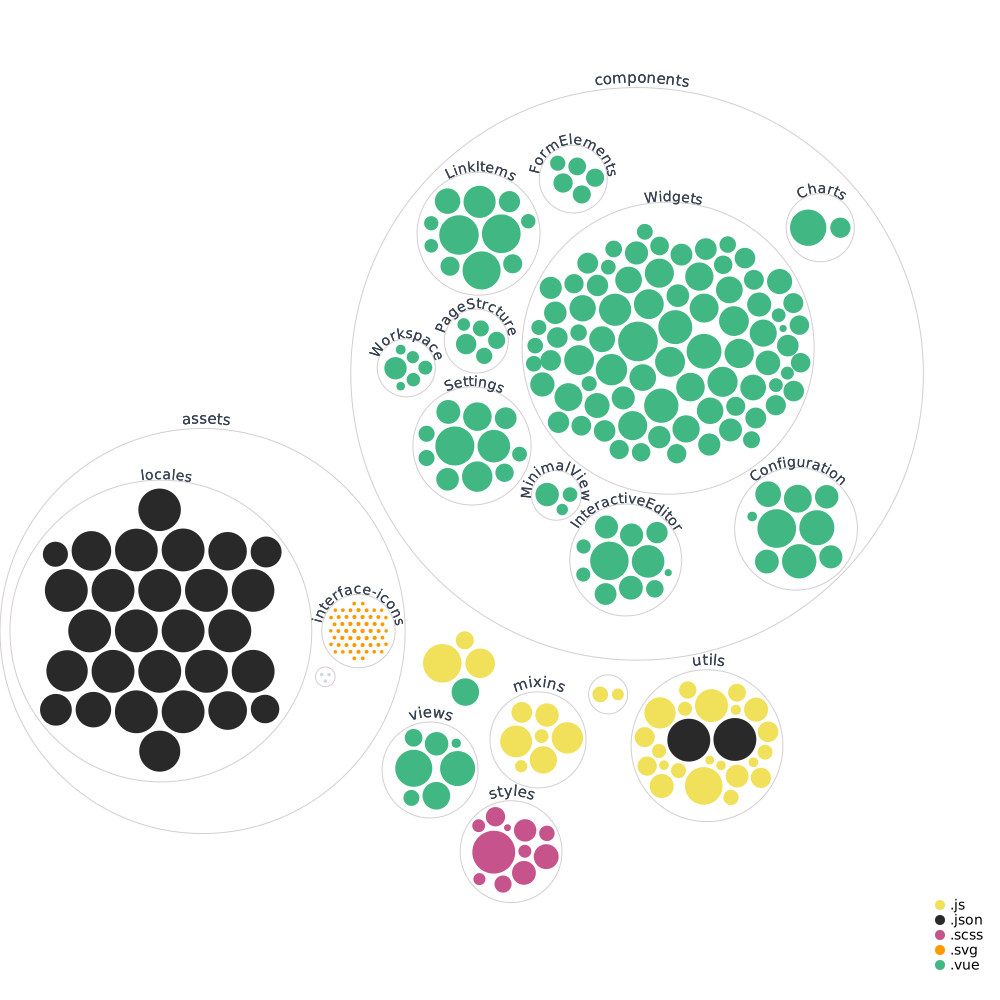
Visualisation of Source Directory
Development Tools
Performance - Lighthouse
The easiest method of checking performance is to use Chromium's build in auditing tool, Lighthouse. To run the test, open Developer Tools (usually F12) --> Lighthouse and click on the 'Generate Report' button at the bottom.
Dependencies - BundlePhobia
BundlePhobia is a really useful app that lets you analyze the cost of adding any particular dependency to an application
WARN asset size limit: The following asset(s) exceed the recommended size limit (244 KiB). - For the PWA to support Windows 10, a splash screen asset is required, and is quite large. This throws a warning, however PWA assets are not loaded until needed, so shouldn't have any impact on application performance. A similar warning is thrown for the Raleway font, and that is looking to be addressed.