 Dominik Schmidt
be8cd461b4
Dominik Schmidt
be8cd461b4
Implements the MS Graph driveItemVersion operations on files:

- GET  .../items/{id}/versions lists the versions, newest first
- GET  .../versions/{version-id} returns one version, "current" describes the file itself
- GET  .../versions/{version-id}/content redirects to a signed download url for the version
- POST .../versions/{version-id}/restoreVersion makes the version the current content

The operations map onto ListFileVersions and RestoreFileVersion of the
gateway. Version downloads point at the WebDAV meta endpoint, signed the
same way as the driveItem download url. The download url is only added
when requested via $select.

The driveItemVersion models are vendored from the regenerated client of
opencloud-eu/libre-graph-api#73 until that spec change is merged and the
dependency can be bumped.
Graph
The graph service provides the Graph API which is a RESTful web API used to access OpenCloud resources. It is inspired by the Microsoft Graph API and can be used by clients or other services or extensions. Visit the Libre Graph API for a detailed specification of the API implemented by the graph service.
Sequence Diagram
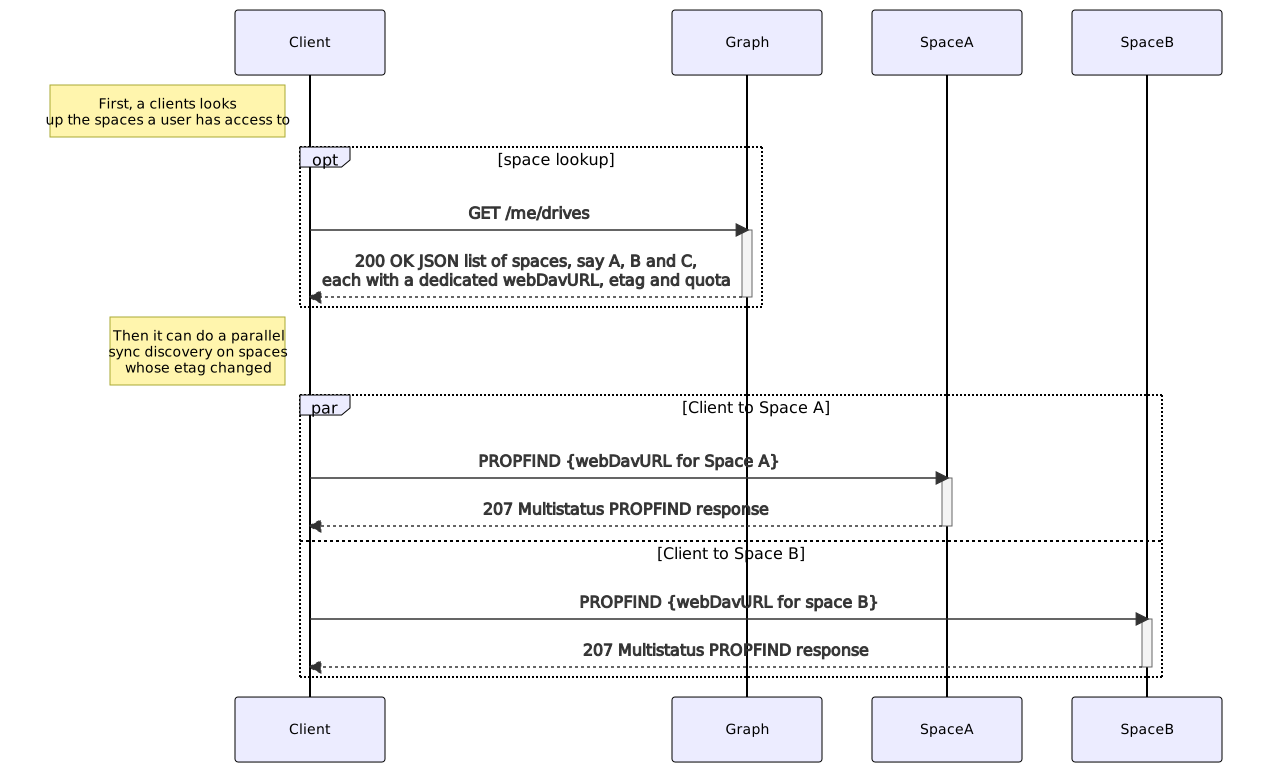
The following image gives an overview of the scenario when a client requests to list available spaces the user has access to. To do so, the client is directed with his request automatically via the proxy service to the graph service.
Users and Groups API
The graph service provides endpoints for querying users and groups. It features two different backend implementations:
ldap: This is currently the default backend. It queries user and group information from an LDAP server. Depending on the configuration, it can also be used to manage (create, update, delete) users and groups provided by an LDAP server.cs3: This backend queries users and groups using the CS3 identity APIs as implemented by theusersandgroupsservice. This backend is currently still experimental and only implements a subset of the Libre Graph API. It should not be used in production.
LDAP Configuration
The LDAP backend is configured using a set of environment variables. A detailed list of all the
available configuration options can be found in the documentation.
The LDAP related options are prefixed with OC_LDAP_ (or GRAPH_LDAP_ for settings specific to graph service).
Read-Only Access to Existing LDAP Servers
To connect the graph service to an existing LDAP server, set OC_LDAP_SERVER_WRITE_ENABLED to
false to prevent the graph service from sending write operations to the LDAP server. Also set the
various OC_LDAP_* environment variables to match the configuration of the LDAP server you are connecting
to. A more detailed explanation can be found [here](https://docs.opencloud.eu/docs/admin/configuration/authentication-and-user-management/.
Using a Write Enabled LDAP Server
To use the graph service for managing (create, update, delete) users and groups, a write enabled LDAP
server is required. In the default configuration, the graph service will use the simple LDAP server
that is bundled with OpenCloud in the idm service which provides all the required features.
It is also possible to setup up an external LDAP server with write access for use with OpenCloud. It is
recommend to use OpenLDAP for this. The LDAP server needs to fulfill a couple of requirements with
respect to the available schema:
- The LDAP server must provide the
inetOrgPersonobject class for users and thegroupOfNamesobject class for groups. - The graph service maintains a few additional attributes for users and groups that are not available in the standard LDAP schema. An schema file, ready to use with OpenLDAP, defining those additional attributes is available here
Query Filters Provided by the Graph API
Some API endpoints provided by the graph service allow to specify query filters. The filter syntax is based on the OData Specification. See the Libre Graph API for examples on the filters supported when querying users.
Caching
The graph service can use a configured store via GRAPH_CACHE_STORE. Possible stores are:
memory: Basic in-memory store and the default.redis-sentinel: Stores data in a configured Redis Sentinel cluster.nats-js-kv: Stores data using key-value-store feature of nats jetstreamnoop: Stores nothing. Useful for testing. Not recommended in production environments.
Other store types may work but are not supported currently.
Store specific notes:
- When using
redis-sentinel, the Redis master to use is configured via e.g.OC_CACHE_STORE_NODESin the form of<sentinel-host>:<sentinel-port>/<redis-master>like10.10.0.200:26379/mymaster. - When using
nats-js-kvit is recommended to setOC_CACHE_STORE_NODESto the same value asOC_EVENTS_ENDPOINT. That way the cache uses the same nats instance as the event bus. - When using the
nats-js-kvstore, it is possible to setOC_CACHE_DISABLE_PERSISTENCEto instruct nats to not persist cache data on disc.
Keycloak Configuration For The Personal Data Export
If Keycloak is used for authentication, GDPR regulations require to add all personal identifiable information that Keycloak has about the user to the personal data export. To do this, the following environment variables must be set:
OC_KEYCLOAK_BASE_PATH- The URL to the keycloak instance.OC_KEYCLOAK_CLIENT_ID- The client ID of the client that is used to authenticate with keycloak, this client has to be able to list users and get the credential data.OC_KEYCLOAK_CLIENT_SECRET- The client secret of the client that is used to authenticate with keycloak.OC_KEYCLOAK_CLIENT_REALM- The realm the client is defined in.OC_KEYCLOAK_USER_REALM- The realm the OpenCloud users are defined in.OC_KEYCLOAK_INSECURE_SKIP_VERIFY- If set to true, the TLS certificate of the keycloak instance is not verified.
Keycloak Client Configuration
The client that is used to authenticate with keycloak has to be able to list users and get the credential data. To do this, the following roles have to be assigned to the client and they have to be about the realm that contains the OpenCloud users:
view-usersview-identity-providersview-realmview-clientsview-eventsview-authorization
:::note
These roles are only available to assign if the client is in the master realm.
:::
Translations
The graph service has embedded translations sourced via transifex to provide a basic set of translated languages. These embedded translations are available for all deployment scenarios. In addition, the service supports custom translations, though it is currently not possible to just add custom translations to embedded ones. If custom translations are configured, the embedded ones are not used. To configure custom translations, the GRAPH_TRANSLATION_PATH environment variable needs to point to a base folder that will contain the translation files. This path must be available from all instances of the graph service, a shared storage is recommended. Translation files must be of type .po or .mo. For each language, the filename needs to be graph.po (or graph.mo) and stored in a folder structure defining the language code. In general the path/name pattern for a translation file needs to be:
{GRAPH_TRANSLATION_PATH}/{language-code}/LC_MESSAGES/graph.po
The language code pattern is composed of language[_territory] where language is the base language and _territory is optional and defines a country.
For example, for the language de, one needs to place the corresponding translation files to {GRAPH_TRANSLATION_PATH}/de_DE/LC_MESSAGES/graph.po.
:::warning
For the time being, the embedded OpenCloud Web frontend only supports the main language code but does not handle any territory. When strings are available in the language code language_territory, the web frontend does not see it as it only requests language. In consequence, any translations made must exist in the requested language to avoid a fallback to the default.
:::
Translation Rules
- If a requested language code is not available, the service tries to fall back to the base language if available. For example, if the requested language-code
de_DEis not available, the service tries to fall back to translations in thedefolder. - If the base language
deis also not available, the service falls back to the system's default English (en), which is the source of the texts provided by the code.
Default Language
The default language can be defined via the OC_DEFAULT_LANGUAGE environment variable. See the settings service for a detailed description.
Unified Role Management
Unified Roles are roles granted a user for sharing and can be enabled or disabled. A CLI command is provided to list existing roles and their state among other data.
:::info Note that a disabled role does not lose previously assigned permissions. It only means that the role is not available for new assignments. :::
The following roles are enabled by default:
UnifiedRoleViewerIDUnifiedRoleSpaceViewerUnifiedRoleEditorUnifiedRoleSpaceEditorUnifiedRoleFileEditorUnifiedRoleEditorLiteUnifiedRoleManager
The following role is disabled by default:
UnifiedRoleSecureViewer
To enable disabled roles like the UnifiedRoleSecureViewer, you must provide the UID(s) by one of the following methods:
- Using the
GRAPH_AVAILABLE_ROLESenvironment variable. - Setting the
available_rolesconfiguration value.
The following CLI command simplifies the process of finding out which UID belongs to which role:
opencloud graph list-unified-roles
The output of this command includes the following information for each role:
UID
The unique identifier of the role.Enabled
Whether the role is enabled or not.Description
A short description of the role.ConditionAllowed resource actions
Example output (shortened)
+--------------------------------------+----------+--------------------------------+--------------------------------+------------------------------------------+
|                 UID                  | ENABLED  |          DESCRIPTION           |           CONDITION            |         ALLOWED RESOURCE ACTIONS         |
+--------------------------------------+----------+--------------------------------+--------------------------------+------------------------------------------+
| a8d5fe5e-96e3-418d-825b-534dbdf22b99 | enabled  | View and download.             | exists @Resource.Root          | libre.graph/driveItem/path/read          |
|                                      |          |                                |                                | libre.graph/driveItem/quota/read         |
|                                      |          |                                |                                | libre.graph/driveItem/content/read       |
|                                      |          |                                |                                | libre.graph/driveItem/permissions/read   |
|                                      |          |                                |                                | libre.graph/driveItem/children/read      |
|                                      |          |                                |                                | libre.graph/driveItem/deleted/read       |
|                                      |          |                                |                                | libre.graph/driveItem/basic/read         |
+--------------------------------------+----------+--------------------------------+--------------------------------+------------------------------------------+
API Handlers
To specialize graph service instances in order to scale them independently, it is possible to disable its API handlers:
GRAPH_HTTP_DISABLE: when set totrue, the service does not listen on HTTP and only consumes events (defaults tofalse)GRAPH_EVENTS_DISABLE_CONSUMER: when set totrue, the service does not consome events and only listens on HTTP (defaults tofalse)
Download URLs
GET /drives/{drive-id}/items/{item-id}/content and the @microsoft.graph.downloadUrl annotation (requested via $select) hand out WebDAV URLs signed with OC_URL_SIGNING_SECRET. The proxy verifies the signature, so the URLs work without an Authorization header. They expire after 30 minutes. Without the secret the annotation is omitted and the content endpoint answers with an error.
Metrics
Metrics are disabled by default, and must be enabled using the following environment variables:
GRAPH_LDAP_METRICS_DISABLE: set tofalseto enable metrics for the duration of outbound LDAP client operations (defaults totrue)GRAPH_HTTP_METRICS_DISABLE: set tofalseto enable metrics for the duration of inbound Graph HTTP API requests (defaults totrue)GRAPH_IDENTITY_BACKEND_METRICS_DISABLE: set tofalseto enable metrics for the duration of Graph identity backend operations (defaults totrue)
The graph service provides the following metrics:
| Name | Description |
|---|---|
opencloud_graph_build_info{version=...} |
Contains a label version that is set to the current version of the service, and always has a value of 1 |
opencloud_graph_events_enabled |
Is set to 1 if the Events API handler is enabled, or 0 if not |
opencloud_graph_http_enabled |
Is set to 1 if the HTTP API handler is enabled, or 0 if not |
opencloud_graph_events{event=...,result=...} |
Counts the number of events that have been consumed, with a event label that contains the name of the event, and a result label that is set to success or failure |
opencloud_graph_events_invalid |
Counts the number of invalid events that are malformed or are missing required data |
opencloud_graph_events_unsupported |
Counts the numbef of consumed events that cannot be processes by this service, should always be 0 |
opencloud_graph_user_password_changes{result=...,reason=...} |
Counts the number of user password change attempts, including the reason for failure when result=failure |
opencloud_graph_http_request_duration_seconds{method=...,path=...,version=...,resource=...,code=...,result=...} |
Histogram that measures the duration of Graph HTTP API requests, in buckets |
opencloud_graph_http_requests |
Gauge that counts the number of concurrent inbound HTTP requests to the Graph API |
opencloud_graph_ldap_client_operation_duration_seconds{uri=...,write=...,operation=...,result=...} |
Histogram that measures the duration of outbound LDAP operations |
opencloud_graph_ldap_client_operations{uri=...,write=...} |
Gauge that counts the number of concurrent outbound LDAP operations |
opencloud_graph_identity_backend_api_duration_seconds{type=...,operation=...,result=...} |
Histogram that measures the duration of requests to the Graph identity backend, in buckets |
To create some moderate load on a running opencloud instance, one can use the k6 script load_test.js as follows:
k6 run --vus=10 --duration=3m ./load_test.js
The following environment variables can be used to influence its behavior:
BASE_URL: defaults tohttps://localhost:9200USERNAME: defaults toalanPASSWORD: defaults todemo
For example, to use a different user and a different URL:
k6 run --vus=10 --duration=3m -e USERNAME=lynn -e BASE_URL=https://localhost:9201 ./load_test.js
It is not meant to be a feature test suite, but merely a small k6 script to generate some read-only load in order to make Grafana displays.
Graph User Password Change Counter Metric
For opencloud_graph_user_password_changes:
resultis eithersuccess: when the password was changed successfullyfailure: when the password could not be changed, the reason being tracked in thereasonlabel
reasonis either- empty when
resultissuccess invalid: when parameters were invalid, such as the new password being an empty passworderror: when an error prevented the password change, such as a network failurewrong-password: when the password change was refused because the current password is wrong
- empty when
Graph Inbound HTTP Request Duration Metrics
For opencloud_graph_http_request_duration_seconds:
methodis the HTTP method (GET,PUT, ...)pathis the canonical request path with placeholders (e.g./v1beta1/drives/{driveID}/root/children)versionis the Graph API version (v1betaorv1.0)resourceis the top-level resource after the version (me,application,drives, ...)codeis the resulting HTTP status code (200,404,500, ...)resultis one ofsuccess,client-error,server-error
Graph Outbound LDAP Operation Duration Metrics
For opencloud_graph_ldap_client_operation_duration_seconds:
operationis the name of the LDAP operation (add,delete,modify,modify-dn, ...)resultis eithersuccess,failure,read-only(when attempting a write operation on a LDAP server that is configured as read-only in OpenCloud) ornot-founduricontains the LDAP server URI the client is connected towriteis set to1if the LDAP client is allowed to perform write operations, or to0if it is configured to be read-only
Graph Identity Backend API Duration Metrics
typeis the type of the identity backend that is being used (ldaporcs3)operationis the name of the API operation (create-user,get-users, ...)resultissuccess,failureornot-found