d8be9706d9
* fix: respect frozen-lockfile flag when migrating config dependencies

* fix: throw FROZEN_LOCKFILE_WITH_OUTDATED_LOCKFILE when installing config deps with --frozen-lockfile

* fix: correct changeset package name and clean up minor issues

- Fix changeset referencing non-existent @pnpm/config.deps-installer
  (should be @pnpm/installing.env-installer)
- Fix merge artifact in AGENTS.md
- Revert unnecessary Promise.all refactoring in migrateConfigDeps.ts
- Remove extra blank line in test file

* fix: move frozenLockfile check to call site and add missing tests

Move the frozenLockfile check from migrateConfigDepsToLockfile() to
normalizeForInstall() to minimize the number of check points.

Add unit tests for all frozenLockfile code paths:
- installConfigDeps: migration fails with frozenLockfile
- resolveAndInstallConfigDeps: old-format migration, new-format
  resolution, and up-to-date lockfile success
- resolveConfigDeps: fails with frozenLockfile

* refactor: consolidate duplicate frozenLockfile checks in resolveAndInstallConfigDeps

Merge two identical frozenLockfile throw statements into a single check
covering both lockfileChanged and depsToResolve conditions.

* Delete respect-frozen-lockfile.md

* refactor: order fields

---------

Co-authored-by: Zoltan Kochan <z@kochan.io>
简体中文 | 日本語 | 한국어 | Italiano | Português Brasileiro

Fast, disk space efficient package manager:
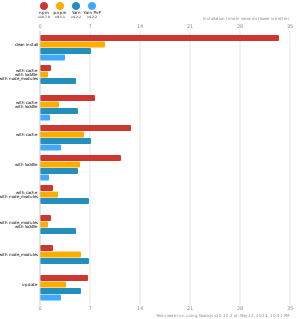
- Fast. Up to 2x faster than the alternatives (see benchmark).
- Efficient. Files inside
node_modulesare linked from a single content-addressable storage. - Great for monorepos.
- Strict. A package can access only dependencies that are specified in its
package.json. - Deterministic. Has a lockfile called
pnpm-lock.yaml. - Works as a Node.js version manager. See pnpm env use.
- Works everywhere. Supports Windows, Linux, and macOS.
- Battle-tested. Used in production by teams of all sizes since 2016.
- See the full feature comparison with npm and Yarn.
To quote the Rush team:
Microsoft uses pnpm in Rush repos with hundreds of projects and hundreds of PRs per day, and we’ve found it to be very fast and reliable.



Platinum Sponsors

|
Gold Sponsors

|

|

|

|

|

|

|

|
Silver Sponsors

|

|

|

|

|

|
|
⏱️ Time.now |
Support this project by becoming a sponsor.
Background
pnpm uses a content-addressable filesystem to store all files from all module directories on a disk. When using npm, if you have 100 projects using lodash, you will have 100 copies of lodash on disk. With pnpm, lodash will be stored in a content-addressable storage, so:
- If you depend on different versions of lodash, only the files that differ are added to the store.
If lodash has 100 files, and a new version has a change only in one of those files,
pnpm updatewill only add 1 new file to the storage. - All the files are saved in a single place on the disk. When packages are installed, their files are linked from that single place consuming no additional disk space. Linking is performed using either hard-links or reflinks (copy-on-write).
As a result, you save gigabytes of space on your disk and you have a lot faster installations!
If you'd like more details about the unique node_modules structure that pnpm creates and
why it works fine with the Node.js ecosystem, read this small article: Flat node_modules is not the only way.
💖 Like this project? Let people know with a tweet
Installation
For installation options visit our website.
Usage
Just use pnpm in place of npm/Yarn. E.g., install dependencies via:
pnpm install
For more advanced usage, read pnpm CLI on our website, or run pnpm help.
Benchmark
pnpm is up to 2x faster than npm and Yarn classic. See all benchmarks here.
Benchmarks on an app with lots of dependencies: