
Compass
Find your people — based on who they are, not how they look.
A free, open, and fully searchable directory for people who want deep, genuine connections — platonic, romantic, or collaborative.
Open the app · About · FAQ · Chat with us on Discord

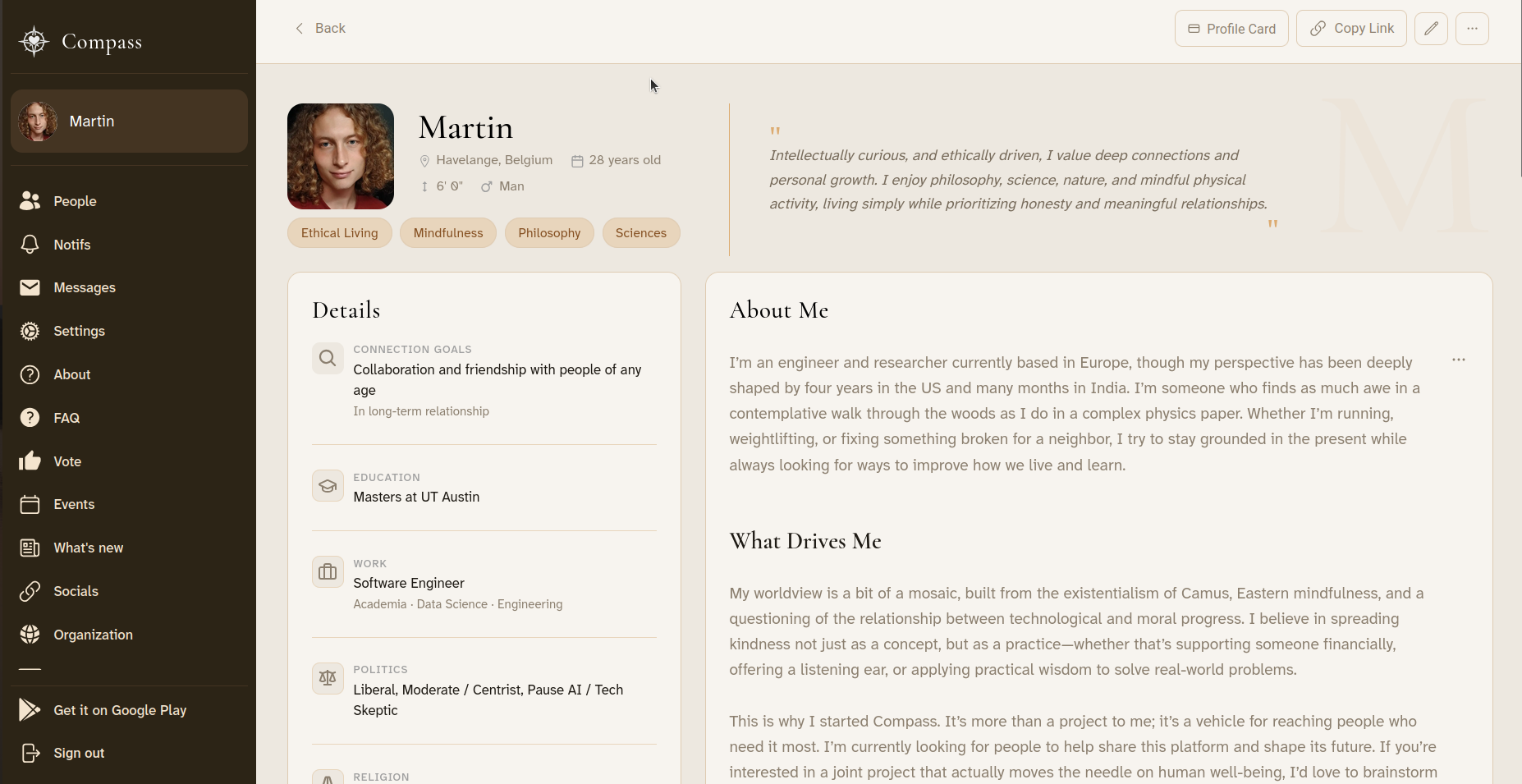
Click the image above to watch a live demo.
Why Compass exists
Most dating and networking apps ask one thing of you: pick a few photos and start swiping. An algorithm you never see decides who you are allowed to meet, and the app earns more when you keep scrolling than when you actually meet someone.
Compass works the other way around. You write a genuinely detailed profile — what you believe, what you are curious about, how you spend your time, what you are looking for. Then you search, the way you would search a library catalog. Every profile is visible to everyone, so finding the handful of people you would truly click with is a matter of asking the right question, not waiting to be served.
How it works
- Create your profile — your values, interests, personality, and the kind of connection you want (friendship, romance, collaboration, or all three). Photos are optional and never the point.
- Search the directory — filter by location, age, values, causes, politics, religion and more, or type a niche keyword like "Minimalism" or "Indie film" and see who else cares about it.
- Get notified — save a search, and Compass tells you when someone new matches it. No endless scrolling.
- Meet — message people directly, or join events such as book clubs, walking groups, and group calls, online and in person.
What makes it different
| Most apps | Compass |
|---|---|
| Photos first, endless swiping | Values, ideas, and personality first |
| A hidden algorithm decides who you see | You search and filter the whole directory yourself |
| Ads, paywalls, and paid boosts | Free, ad-free, and not-for-profit — funded by donations |
| A company owns the platform | Volunteers build, host, and moderate it |
| Closed source — you cannot see what it does | Every line of code is public and open to improvement |
Compass is also democratically governed: the people who use and build it vote on how it evolves, and every penny it costs to run is published on the financials page.
How you can help
We can’t do this alone. Compass is built entirely by volunteers, and plenty of the most useful contributions require no technical skills at all:
- Spread the word — the platform only works if the people you would want to meet are on it.
- Write and translate — improve the wording on the site, or help bring it to a new language.
- Design, moderate, or organize events — make the experience friendlier and the community healthier.
- Donate — hosting and services cost real money; small amounts genuinely help.
- Code — see Development below to get a local copy running in a few minutes.
Contribute in any way you can and help our community thrive!
Roadmap
No contribution is too small—whether it’s changing a color, resizing a button, tweaking a font, or improving wording. Bigger contributions like adding new profile fields, building modules, or improving onboarding are equally welcome. The goal is to make the platform better step by step, and every improvement counts. If you see something that could be clearer, smoother, or more engaging, please jump in!
The complete, official list of tasks is available here on ClickUp. If you are working on one task, just assign it to yourself and move its status to "in progress". If there is also a GitHub issue for that task, assign it to yourself as well.
To have edit access to the ClickUp workspace, you need an admin to manually give you permission (one time thing). To do so, use your preferred option:
- Ask or DM an admin on Discord
- Email hello@compassmeet.com
- Raise an issue on GitHub
If you want to add tasks without creating an account, you can simply email
a.t.901810339879.u-276866260.b847aba1-2709-4f17-b4dc-565a6967c234@tasks.clickup.com
Put the task title in the email subject and the task description in the email content.
Here is a tailored selection of things that would be very useful. If you want to help but don’t know where to start, just ask us on Discord.
- Authentication (user/password and Google Sign In)
- Set up PostgreSQL in Production with supabase
- Set up web hosting (vercel)
- Set up backend hosting (google cloud)
- Ask for detailed info upon registration (location, desired type of connection, prompt answers, gender, etc.)
- Set up page listing all the profiles
- Search through most profile variables
- Set up chat / direct messaging
- Set up domain name (compassmeet.com)
- Cover more than 90% with tests (unit, integration, e2e)
- Add Android mobile app
- Add iOS mobile app
- Add better onboarding (tooltips, modals, etc.)
- Add modules to learn more about each other (personality test, conflict style, love languages, etc.)
- Add modules to improve interpersonal skills (active listening, nonviolent communication, etc.)
- Add calendar integration and scheduling
- Add events (group calls, in-person meetups, etc.)
Secondary To Do
Everything is open to anyone for collaboration, but the following ones are particularly easy to do for first-time contributors.
- Clean up learn more page
- Add dark theme
- Add profile fields (intellectual interests, cause areas, personality type, etc.)
- Add profile fields: conflict style
- Add profile fields: timezone
- Add translations: Italian, Dutch, Hindi, Chinese, etc.
- Add filters to search through remaining profile fields (politics, religion, education level, etc.)
- Make the app more user-friendly and appealing (UI/UX)
- Clean up terms and conditions (convert to Markdown)
- Clean up privacy notice (convert to Markdown)
- Add other authentication methods (GitHub, Facebook, Apple, phone, etc.)
- Add email verification
- Add password reset
- Add automated welcome email
- Security audit and penetration testing
- Make
deploy-api.shrun automatically on push tomainbranch - Create settings page (change email, password, delete account, etc.)
- Improve financials page (donor / acknowledgments, etc.)
- Improve loading sign (e.g., animation of a compass moving around)
- Show compatibility score in profile page
Implementation


The web app is coded in Typescript using React as front-end. It includes:
- Supabase for the PostgreSQL database
- Google Cloud for hosting the backend API
- Firebase for authentication and media storage
- Vercel for hosting the front-end
Development
Below are the steps to contribute. If you have any trouble or questions, please don't hesitate to open an issue or contact us on Discord! We're responsive and happy to help.
Installation
Fork the repo on GitHub (button in top right). Then, clone your repo and navigating into it:
git clone https://github.com/<your-username>/Compass.git
cd Compass
Install yarn (if not already installed):
npm install --global yarn
Then, install the dependencies for this project:
yarn install --frozen-lockfile
Tests
Make sure the Jest tests pass:
yarn test
If they don't and you can't find out why, simply raise an issue! Sometimes it's something on our end that we overlooked.
Running the Development Server
Start the development server:
yarn dev
Once the server is running, visit http://localhost:3000 to start using the app. You can sign up and visit the profiles; you should see a few synthetic profiles.
Note: it's normal if page loading locally is much slower than the deployed version. It can take up to 10 seconds, it would be great to improve that though!
If you update the database schema (in the SQL files) or the database is not super clean or too large (e.g., someone clogged it up), you can reset it to a clean state by running:
yarn dev:db:reset
Full isolation
Running yarn dev:isolated spins up a local Supabase and Firebase emulator instead of pointing at the shared remote
database. This is strongly recommended for day-to-day development:
- Freedom — Reset, wipe, and reseed your local database as many times as you want without affecting other contributors.
- No conflicts — Multiple contributors can work simultaneously without stepping on each other's data or schema.
- Works offline — No internet required once services are started locally.
- Faster — No network latency on every database query.
However, running in full isolation requires installing several heavy dependencies:
- Docker (~500MB) — runs the Supabase Postgres container
- Supabase CLI — manages the local Supabase stack (10+ Docker containers, ~1-2GB RAM when running)
- Java 21+ (~300MB) — required by Firebase emulators
- Firebase CLI — manages the local Firebase emulators
First startup is slow (30-60s) and the stack uses significant memory. If your machine has less than 8GB RAM, you may notice slowdowns.
If this feels like too much, you can skip isolation entirely — yarn dev works out of the box against the shared remote
and is perfectly fine for most contributions, especially UI changes, wording fixes, or anything that doesn't touch the
database or authentication.
Setup instructions
As always, don't hesitate to raise an issue if you run into any problems!
Docker
# Ubuntu/Debian (native - recommended over snap)
curl -fsSL https://get.docker.com | sudo sh
sudo usermod -aG docker $USER
# Log out and back in for group changes to take effect

# macOS
brew install --cask docker
# Or download from https://www.docker.com/products/docker-desktop

# Verify
docker --version
Supabase CLI
# Verify it got installed from `yarn install`
npx supabase --version
Java 21+
# Ubuntu/Debian
sudo apt install openjdk-21-jdk

# macOS
brew install openjdk@21

# Verify (must be 21+)
java -version
Firebase CLI
npm install -g firebase-tools

# Verify
firebase --version
Run in isolation
yarn dev:isolated
Visit http://localhost:3000 as usual. Your local database comes preloaded with synthetic test profiles so the app looks and feels like the real thing.
Contributing
Now you can start contributing by making changes and submitting pull requests!
We recommend using a good code editor (VSCode, WebStorm, Cursor, etc.) with Typescript support and a good AI assistant ( GitHub Copilot, etc.) to make your life easier. To debug, you can use the browser developer tools (F12), specifically:
- Components tab to see the React component tree and props (you need to install the React Developer Tools extension)
- Console tab for errors and logs
- Network tab to see the requests and responses
- Storage tab to see cookies and local storage
You can also add console.log() statements in the code.
If you are new to Typescript or the open-source space, you could start with small changes, such as tweaking some web
components or improving wording in some pages. You can find those files in web/public/md/.
Resources
There is a lot of documentation in the docs folder and across the repo, namely:
- next-js.md for core fundamentals about our web / page-rendering framework.
- knowledge.md for general information about the project structure.
- development.md for additional instructions, such as adding new profile fields or languages.
- testing.md for how to write tests.
- performance-optimization.md for frontend, backend, and database performance best practices.
- database-connection-pooling.md for database connection management and troubleshooting.
- troubleshooting.md for resolving common development issues.
- web for the web.
- backend/api for the backend API.
- android for the Android app.
There are a lot of useful scripts you can use in the scripts folder.
Submission
Add the original repo as upstream for syncing:
git remote add upstream https://github.com/CompassConnections/Compass.git
Create a new branch for your changes:
git checkout -b <branch-name>
Make changes, then stage and commit:
git add .
git commit -m "Describe your changes"
Push branch to your fork:
git push origin <branch-name>
Finally, open a Pull Request on GitHub from your fork/<branch-name> → CompassConnections/Compass main branch.
Environment Variables
Almost all the features will work out of the box, so you can skip this step and come back later if you need to test the following services: email, geolocation.
We can't make the following information public, for security and privacy reasons:
- Database, otherwise anyone could access all the user data (including private messages)
- Firebase, otherwise anyone could remove users or modify the media files
- Email, analytics, and location services, otherwise anyone could use the service plans Compass paid for and run up the bill.
That's why we separate all those services between production and development environments, so that you can code freely without impacting the functioning of the deployed platform. Contributors should use the default keys for local development. Production uses a separate environment with stricter rules and private keys that are not shared.
If you do need one of the few remaining services, you need to set them up and store your own secrets as environment
variables. To do so, simply open .env and fill in the variables according to the instructions in the file.
Acknowledgements
This project is built on top of manifold.love, an open-source dating platform licensed under the MIT License. We greatly appreciate their work and contributions to open-source, which have significantly aided in the development of some core features such as direct messaging, prompts, and email notifications. We invite the community to explore and contribute to other open-source projects like manifold.love as well, especially if you're interested in functionalities that deviate from Compass' ideals of deep, intentional connections.