mirror of
https://github.com/CompassConnections/Compass.git
synced 2026-03-24 17:41:27 -04:00

344 lines
14 KiB
Markdown
344 lines
14 KiB
Markdown

|
||
[](https://github.com/CompassConnections/Compass/actions/workflows/cd.yml)
|
||
[](https://github.com/CompassConnections/Compass/actions/workflows/cd-api.yml)
|
||
[](https://github.com/CompassConnections/Compass/actions/workflows/cd-android.yml)
|
||
[](https://github.com/CompassConnections/Compass/actions/workflows/ci.yml)
|
||
[](https://github.com/CompassConnections/Compass/actions/workflows/ci-e2e.yml)
|
||
[](https://codecov.io/gh/CompassConnections/Compass)
|
||
[](https://www.compassmeet.com/stats)
|
||
|
||
# Compass
|
||
|
||
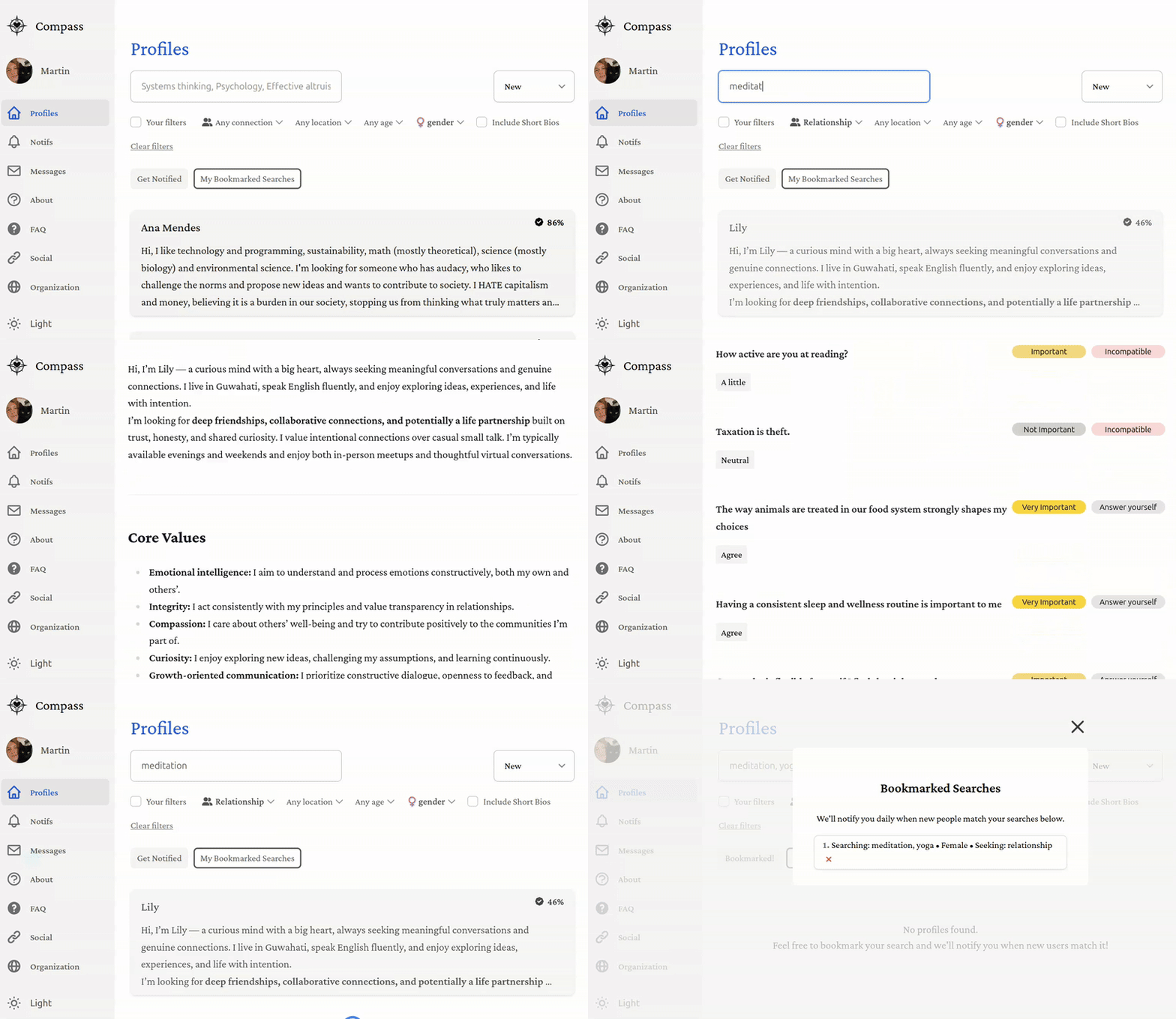
This repository contains the source code for [Compass](https://compassmeet.com) — a transparent platform for forming
|
||
deep, authentic 1-on-1 connections with clarity and efficiency.
|
||
|
||
## Features
|
||
|
||
- Extremely detailed profiles for deep connections
|
||
- Radically transparent: user base fully searchable
|
||
- Free, ad-free, not for profit (supported by donations)
|
||
- Created, hosted, maintained, and moderated by volunteers
|
||
- Open-source
|
||
- Democratically governed
|
||
|
||
You can find a lot of interesting info in the [About page](https://www.compassmeet.com/about) and
|
||
the [FAQ](https://www.compassmeet.com/faq) as well.
|
||
A detailed description of the early vision is also available in
|
||
this [blog post](https://martinbraquet.com/meeting-rational) (you can disregard the parts about rationality, as Compass
|
||
shifted to a more general audience).
|
||
|
||
**We can’t do this alone.** Whatever your skills—coding, design, writing, moderation, marketing, or even small
|
||
donations—you can make a real difference. [Contribute](https://www.compassmeet.com/support) in any way you can and help
|
||
our community thrive!
|
||
|
||
|
||
|
||
## To Do
|
||
|
||
No contribution is too small—whether it’s changing a color, resizing a button, tweaking a font, or improving wording.
|
||
Bigger contributions like adding new profile fields, building modules, or improving onboarding are equally welcome. The
|
||
goal is to make the platform better step by step, and every improvement counts. If you see something that could be
|
||
clearer, smoother, or more engaging, **please jump in**!
|
||
|
||
The complete, official list of tasks is
|
||
available [here on ClickUp](https://sharing.clickup.com/90181043445/l/h/6-901810339879-1/bbfd32f4f4bf64b). If you are
|
||
working on one task, just assign it to yourself and move its status to "in progress". If there is also a GitHub issue
|
||
for that task, assign it to yourself as well.
|
||
|
||
To have edit access to the ClickUp workspace, you need an admin to manually give you permission (one time thing). To do
|
||
so, use your preferred option:
|
||
|
||
- Ask or DM an admin on [Discord](https://discord.gg/8Vd7jzqjun)
|
||
- Email hello@compassmeet.com
|
||
- Raise an issue on GitHub
|
||
|
||
If you want to add tasks without creating an account, you can simply email
|
||
|
||
```
|
||
a.t.901810339879.u-276866260.b847aba1-2709-4f17-b4dc-565a6967c234@tasks.clickup.com
|
||
```
|
||
|
||
Put the task title in the email subject and the task description in the email content.
|
||
|
||
Here is a tailored selection of things that would be very useful. If you want to help but don’t know where to start,
|
||
just ask us on [Discord](https://discord.gg/8Vd7jzqjun).
|
||
|
||
- [x] Authentication (user/password and Google Sign In)
|
||
- [x] Set up PostgreSQL in Production with supabase
|
||
- [x] Set up web hosting (vercel)
|
||
- [x] Set up backend hosting (google cloud)
|
||
- [x] Ask for detailed info upon registration (location, desired type of connection, prompt answers, gender, etc.)
|
||
- [x] Set up page listing all the profiles
|
||
- [x] Search through most profile variables
|
||
- [x] Set up chat / direct messaging
|
||
- [x] Set up domain name (compassmeet.com)
|
||
- [ ] Cover more than 90% with tests (unit, integration, e2e)
|
||
- [x] Add Android mobile app
|
||
- [ ] Add iOS mobile app
|
||
- [x] Add better onboarding (tooltips, modals, etc.)
|
||
- [ ] Add modules to learn more about each other (personality test, conflict style, love languages, etc.)
|
||
- [ ] Add modules to improve interpersonal skills (active listening, nonviolent communication, etc.)
|
||
- [ ] Add calendar integration and scheduling
|
||
- [x] Add events (group calls, in-person meetups, etc.)
|
||
|
||
#### Secondary To Do
|
||
|
||
Everything is open to anyone for collaboration, but the following ones are particularly easy to do for first-time
|
||
contributors.
|
||
|
||
- [x] Clean up learn more page
|
||
- [x] Add dark theme
|
||
- [x] Add profile fields (intellectual interests, cause areas, personality type, etc.)
|
||
- [ ] Add profile fields: conflict style
|
||
- [ ] Add profile fields: timezone
|
||
- [ ] Add translations: Italian, Dutch, Hindi, Chinese, etc.
|
||
- [x] Add filters to search through remaining profile fields (politics, religion, education level, etc.)
|
||
- [ ] Make the app more user-friendly and appealing (UI/UX)
|
||
- [ ] Clean up terms and conditions (convert to Markdown)
|
||
- [ ] Clean up privacy notice (convert to Markdown)
|
||
- [ ] Add other authentication methods (GitHub, Facebook, Apple, phone, etc.)
|
||
- [x] Add email verification
|
||
- [x] Add password reset
|
||
- [x] Add automated welcome email
|
||
- [ ] Security audit and penetration testing
|
||
- [x] Make `deploy-api.sh` run automatically on push to `main` branch
|
||
- [x] Create settings page (change email, password, delete account, etc.)
|
||
- [ ] Improve [financials](web/public/md/financials.md) page (donor / acknowledgments, etc.)
|
||
- [x] Improve loading sign (e.g., animation of a compass moving around)
|
||
- [x] Show compatibility score in profile page
|
||
|
||
## Implementation
|
||
|
||
The web app is coded in Typescript using React as front-end. It includes:
|
||
|
||
- [Supabase](https://supabase.com/) for the PostgreSQL database
|
||
- [Google Cloud](https://console.cloud.google.com) for hosting the backend API
|
||
- [Firebase](https://firebase.google.com/) for authentication and media storage
|
||
- [Vercel](https://vercel.com/) for hosting the front-end
|
||
|
||
## Development
|
||
|
||
Below are the steps to contribute. If you have any trouble or questions, please don't hesitate to open an issue or
|
||
contact us on [Discord](https://discord.gg/8Vd7jzqjun)! We're responsive and happy to help.
|
||
|
||
### Installation
|
||
|
||
Fork the [repo](https://github.com/CompassConnections/Compass) on GitHub (button in top right). Then, clone your repo
|
||
and navigating into it:
|
||
|
||
```bash
|
||
git clone https://github.com/<your-username>/Compass.git
|
||
cd Compass
|
||
```
|
||
|
||
Install `yarn` (if not already installed):
|
||
|
||
```bash
|
||
npm install --global yarn
|
||
```
|
||
|
||
Then, install the dependencies for this project:
|
||
|
||
```bash
|
||
yarn install --frozen-lockfile
|
||
```
|
||
|
||
### Tests
|
||
|
||
Make sure the Jest tests pass:
|
||
|
||
```bash
|
||
yarn test
|
||
```
|
||
|
||
If they don't and you can't find out why, simply raise an issue! Sometimes it's something on our end that we overlooked.
|
||
|
||
### Running the Development Server
|
||
|
||
Start the development server:
|
||
|
||
```bash
|
||
yarn dev
|
||
```
|
||
|
||
Once the server is running, visit http://localhost:3000 to start using the app. You can sign up and visit the profiles;
|
||
you should see a few synthetic profiles.
|
||
|
||
Note: it's normal if page loading locally is much slower than the deployed version. It can take up to 10 seconds, it
|
||
would be great to improve that though!
|
||
|
||
#### Full isolation
|
||
|
||
Running `yarn dev:isolated` spins up a local Supabase and Firebase emulator instead of pointing at the shared remote
|
||
database. This is strongly recommended for day-to-day development:
|
||
|
||
- **Freedom** — Reset, wipe, and reseed your local database as many times as you want without affecting other
|
||
contributors.
|
||
- **No conflicts** — Multiple contributors can work simultaneously without stepping on each other's data or schema.
|
||
- **Works offline** — No internet required once services are started locally.
|
||
- **Faster** — No network latency on every database query.
|
||
|
||
However, running in full isolation requires installing several heavy dependencies:
|
||
|
||
- **Docker** (~500MB) — runs the Supabase Postgres container
|
||
- **Supabase CLI** — manages the local Supabase stack (10+ Docker containers, ~1-2GB RAM when running)
|
||
- **Java 21+** (~300MB) — required by Firebase emulators
|
||
- **Firebase CLI** — manages the local Firebase emulators
|
||
|
||
First startup is slow (30-60s) and the stack uses significant memory. If your machine has less than 8GB RAM, you may
|
||
notice slowdowns.
|
||
|
||
If this feels like too much, you can skip isolation entirely — `yarn dev` works out of the box against the shared remote
|
||
and is perfectly fine for most contributions, especially UI changes, wording fixes, or anything that doesn't touch the
|
||
database or authentication.
|
||
|
||
###### Setup instructions
|
||
|
||
As always, don't hesitate to raise an issue if you run into any problems!
|
||
|
||
Docker
|
||
|
||
```bash
|
||
# Ubuntu/Debian (native - recommended over snap)
|
||
curl -fsSL https://get.docker.com | sudo sh
|
||
sudo usermod -aG docker $USER
|
||
# Log out and back in for group changes to take effect
|
||
|
||
# macOS
|
||
brew install --cask docker
|
||
# Or download from https://www.docker.com/products/docker-desktop
|
||
|
||
# Verify
|
||
docker --version
|
||
```
|
||
|
||
Supabase CLI
|
||
|
||
```bash
|
||
# Verify it got installed from `yarn install`
|
||
npx supabase --version
|
||
```
|
||
|
||
Java 21+
|
||
|
||
```bash
|
||
# Ubuntu/Debian
|
||
sudo apt install openjdk-21-jdk
|
||
|
||
# macOS
|
||
brew install openjdk@21
|
||
|
||
# Verify (must be 21+)
|
||
java -version
|
||
```
|
||
|
||
Firebase CLI
|
||
|
||
```bash
|
||
npm install -g firebase-tools
|
||
|
||
# Verify
|
||
firebase --version
|
||
```
|
||
|
||
Run in isolation
|
||
|
||
```bash
|
||
yarn dev:isolated
|
||
```
|
||
|
||
Visit `http://localhost:3000` as usual. Your local database comes preloaded with synthetic test profiles so the app
|
||
looks and feels like the real thing.
|
||
|
||
### Contributing
|
||
|
||
Now you can start contributing by making changes and submitting pull requests!
|
||
|
||
We recommend using a good code editor (VSCode, WebStorm, Cursor, etc.) with Typescript support and a good AI assistant (
|
||
GitHub Copilot, etc.) to make your life easier. To debug, you can use the browser developer tools (F12), specifically:
|
||
|
||
- Components tab to see the React component tree and props (you need to install
|
||
the [React Developer Tools](https://react.dev/learn/react-developer-tools) extension)
|
||
- Console tab for errors and logs
|
||
- Network tab to see the requests and responses
|
||
- Storage tab to see cookies and local storage
|
||
|
||
You can also add `console.log()` statements in the code.
|
||
|
||
If you are new to Typescript or the open-source space, you could start with small changes, such as tweaking some web
|
||
components or improving wording in some pages. You can find those files in `web/public/md/`.
|
||
|
||
##### Resources
|
||
|
||
There is a lot of documentation in the [docs](docs) folder and across the repo, namely:
|
||
|
||
- [Next.js.md](docs/Next.js.md) for core fundamentals about our web / page-rendering framework.
|
||
- [knowledge.md](docs/knowledge.md) for general information about the project structure.
|
||
- [development.md](docs/development.md) for additional instructions, such as adding new profile fields or languages.
|
||
- [TESTING.md](docs/TESTING.md) for how to write tests.
|
||
- [PERFORMANCE_OPTIMIZATION.md](docs/PERFORMANCE_OPTIMIZATION.md) for frontend, backend, and database performance best practices.
|
||
- [DATABASE_CONNECTION_POOLING.md](docs/DATABASE_CONNECTION_POOLING.md) for database connection management and troubleshooting.
|
||
- [TROUBLESHOOTING.md](docs/TROUBLESHOOTING.md) for resolving common development issues.
|
||
- [web](web) for the web.
|
||
- [backend/api](backend/api) for the backend API.
|
||
- [android](android) for the Android app.
|
||
|
||
There are a lot of useful scripts you can use in the [scripts](scripts) folder.
|
||
|
||
### Submission
|
||
|
||
Add the original repo as upstream for syncing:
|
||
|
||
```bash
|
||
git remote add upstream https://github.com/CompassConnections/Compass.git
|
||
```
|
||
|
||
Create a new branch for your changes:
|
||
|
||
```bash
|
||
git checkout -b <branch-name>
|
||
```
|
||
|
||
Make changes, then stage and commit:
|
||
|
||
```bash
|
||
git add .
|
||
git commit -m "Describe your changes"
|
||
```
|
||
|
||
Push branch to your fork:
|
||
|
||
```bash
|
||
git push origin <branch-name>
|
||
```
|
||
|
||
Finally, open a Pull Request on GitHub from your `fork/<branch-name>` → `CompassConnections/Compass` main branch.
|
||
|
||
### Environment Variables
|
||
|
||
Almost all the features will work out of the box, so you can skip this step and come back later if you need to test the
|
||
following services: email, geolocation.
|
||
|
||
We can't make the following information public, for security and privacy reasons:
|
||
|
||
- Database, otherwise anyone could access all the user data (including private messages)
|
||
- Firebase, otherwise anyone could remove users or modify the media files
|
||
- Email, analytics, and location services, otherwise anyone could use the service plans Compass paid for and run up the
|
||
bill.
|
||
|
||
That's why we separate all those services between production and development environments, so that you can code freely
|
||
without impacting the functioning of the deployed platform.
|
||
Contributors should use the default keys for local development. Production uses a separate environment with stricter
|
||
rules and private keys that are not shared.
|
||
|
||
If you do need one of the few remaining services, you need to set them up and store your own secrets as environment
|
||
variables. To do so, simply open `.env` and fill in the variables according to the instructions in the file.
|
||
|
||
## Acknowledgements
|
||
|
||
This project is built on top of [manifold.love](https://github.com/sipec/polylove), an open-source dating platform
|
||
licensed under the MIT License. We greatly appreciate their work and contributions to open-source, which have
|
||
significantly aided in the development of some core features such as direct messaging, prompts, and email notifications.
|
||
We invite the community to explore and contribute to other open-source projects like manifold.love as well, especially
|
||
if you're interested in functionalities that deviate from Compass' ideals of deep, intentional connections.
|