 dd3bb992e6
This commit refactors the monolithic `MeshService` by decomposing its responsibilities into smaller, more focused, and testable classes. This improves modularity, separation of concerns, and the overall maintainability of the service layer.

The new class structure is as follows:
- `MeshConnectionManager`: Manages the radio connection lifecycle, state changes (connected, sleeping, disconnected), and triggers connection-related actions.
- `MeshMessageProcessor`: Handles the initial parsing and routing of all incoming `FromRadio` messages. It also manages a buffer for packets that arrive before the node DB is ready.
- `MeshNodeManager`: Manages the in-memory node database (`nodeDB`), including creating, updating, and caching node information.
- `MeshCommandSender`: Centralizes the logic for creating and sending commands and data packets to the radio.
- `MeshDataHandler`: Processes decoded `MeshPacket` data, such as text messages, telemetry, and waypoints.
- `MeshConfigHandler`: Manages received device, module, and channel configurations.
- `MeshConfigFlowManager`: Orchestrates the two-stage config/node-info download process upon connection.
- `MeshHistoryManager`: Encapsulates logic for requesting message history from the device.
- `MeshMqttManager`: Handles the lifecycle and message proxying for the MQTT client.
- `MeshLocationManager`: Manages GPS location updates to be sent to the mesh.
- `MeshTracerouteHandler`: Handles traceroute responses.
- `MeshActionHandler`: Processes `ServiceAction` events from other parts of the application.
- `MeshDataMapper`: Provides mapping functions between protobuf `MeshPacket` and the `DataPacket` model.
- `MeshRouter`: A central access point that holds references to the various handler classes.

Key Changes:
- The core logic from `MeshService` has been extracted and distributed among the new classes.
- `MeshService` is now a much leaner Android `Service` class, responsible for lifecycle management and delegating work to the new components.
- Concurrency helper classes `DeferredExecution` and `SyncContinuation` have been removed.
- Unit tests have been added for `MeshCommandSender`, `MeshNodeManager`, and `MeshDataMapper`.
- The timeout in `PacketHandler` has been increased to 5 seconds to be more tolerant of slow device responses.
- All new service-layer classes are injected via Hilt, promoting dependency injection and testability.

Signed-off-by: James Rich <2199651+jamesarich@users.noreply.github.com>

Meshtastic-Android





This is a tool for using Android with open-source mesh radios. For more information see our webpage: meshtastic.org. If you are looking for the the device side code, see here.
This project is currently beta testing across various providers. If you have questions or feedback please Join our discussion forum or the Discord Group . We would love to hear from you!
Get Meshtastic
The easiest, and fastest way to get the latest beta releases is to use our github releases. It is recommend to use these with Obtainum to get the latest updates.
Alternatively, these other providers are also available, but may be slower to update.



![Download at https://play.google.com/store/apps/details?id=com.geeksville.mesh]](https://play.google.com/intl/en_us/badges/static/images/badges/en_badge_web_generic.png)
The play store is the last to update of these options, but if you want to join the Play Store testing program go to this URL and opt-in to become a tester. If you encounter any problems or have questions, ask us on the discord, create an issue, or post in the forum and we'll help as we can.
Documentation
The project's documentation is generated with Dokka and hosted on GitHub Pages. It is automatically updated on every push to the main branch.
Generating Locally
You can generate the documentation locally to preview your changes.
- Run the Dokka task:
./gradlew :app:dokkaHtml - View the output:
The generated HTML files will be located in the
app/build/dokka/htmldirectory. You can open theindex.htmlfile in your browser to view the documentation.
Translations
You can help translate the app into your native language using Crowdin.
Building the Android App
Warning
Debug and release builds can be installed concurrently. This is solely to enable smoother development, and you should avoid running both apps simultaneously. To ensure proper function, force quit the app not in use.
https://meshtastic.org/docs/development/android/
Note: when building the google flavor locally you will need to supply your own Google Maps Android SDK api key MAPS_API_KEY in local.properties in order to use Google Maps.
e.g.
MAPS_API_KEY=your_google_maps_api_key_here
Contributing guidelines
For detailed instructions on how to contribute, please see our CONTRIBUTING.md file. For details on our release process, see the RELEASE_PROCESS.md file.
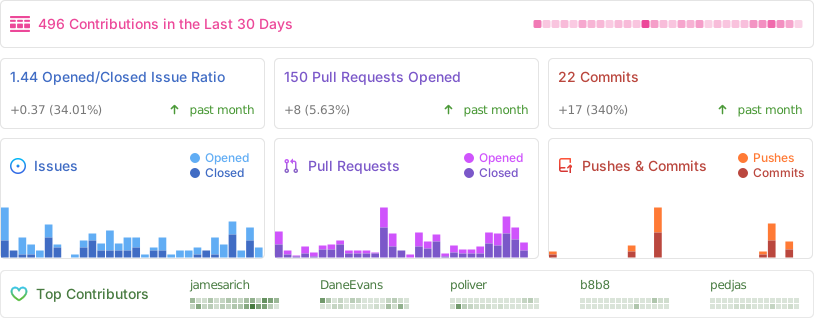
Repository Statistics
Copyright 2025, Meshtastic LLC. GPL-3.0 license