 a55427550c
When the licensed amateur radio toggle is on for the locally connected
node, the User config screen repurposes the long-name field as the
callsign (max 8 chars, iOS parity) and saving sends
AdminMessage(set_ham_mode) instead of set_owner. Current LoRa
tx_power/override_frequency are echoed into the HamParameters so a
re-send while already licensed never wipes the node's overrides
(firmware applies them verbatim). The node entry is optimistically
updated pending the device's authoritative NodeInfo.

Closes #5759

Co-Authored-By: Claude Fable 5 <noreply@anthropic.com>

Meshtastic-Android





This is a tool for using Android (and Compose Desktop) with open-source mesh radios. For more information see our webpage: meshtastic.org. If you are looking for the device side code, see here.
If you have questions or feedback please Join our discussion forum or the Discord Group. We would love to hear from you!
Features
Highlights from the latest release:
- Full-text message search across your conversation history.
- Mesh network discovery to surface nodes and channels around you.
- Android Auto support for hands-free use while driving (
googleflavor). - Air-quality telemetry — PM1.0, PM2.5, PM10, and CO₂ readings from supported sensors.
- Device hardware links via msh.to for quick access to hardware details.
- App Functions / system-AI integration so on-device assistants can trigger common workflows.
Get Meshtastic
The easiest and fastest way to get the latest releases is to use our GitHub releases. It is recommended to use these with Obtainium to get the latest updates automatically.
Alternatively, these other providers are also available, but may be slower to update.



![Download at https://play.google.com/store/apps/details?id=com.geeksville.mesh]](https://play.google.com/intl/en_us/badges/static/images/badges/en_badge_web_generic.png)
The play store is the last to update of these options, but if you want to join the Play Store testing program go to this URL and opt-in to become a tester. If you encounter any problems or have questions, ask us on the discord, create an issue, or post in the forum and we'll help as we can.
Desktop
Meshtastic Desktop installers (macOS DMG, Windows MSI/EXE, Linux DEB/RPM/AppImage) are available from GitHub Releases. A Flatpak package is maintained at vidplace7/org.meshtastic.desktop.
Documentation
Both sites are deployed to GitHub Pages automatically on every push to main.
| Site | URL | Contents |
|---|---|---|
| User & Developer Docs | meshtastic.github.io/Meshtastic-Android | Jekyll site — user guide, developer guide, in-app doc content |
| API Reference | meshtastic.github.io/Meshtastic-Android/api | Dokka-generated KDoc for all public APIs |
Generating Locally
User & Developer Docs (Jekyll):
./gradlew generateDocsBundle publishDocsSite
BUNDLE_GEMFILE=docs/Gemfile bundle exec jekyll serve \
  --source build/_site --baseurl ""
API Reference (Dokka):
./gradlew dokkaGeneratePublicationHtml
# Output: build/dokka/html/index.html
Architecture
Modern Android Development (MAD)
The app follows modern Android development practices, built on top of a shared Kotlin Multiplatform (KMP) Core:
- KMP Modules: Business logic (
core:domain), data sources (core:data,core:database,core:datastore), and communications (core:network,core:ble) are entirely platform-agnostic, targeting Android and Compose Desktop. - UI: JetBrains Compose Multiplatform (Material 3) using Compose Multiplatform resources.
- State Management: Unidirectional Data Flow (UDF) with ViewModels, Coroutines, and Flow.
- Dependency Injection: Koin with Koin Annotations (K2 Compiler Plugin).
- Navigation: JetBrains Navigation 3 (Multiplatform routing with RESTful deep linking).
- Data Layer: Repository pattern with Room KMP (local DB), DataStore (prefs), and Protobuf (device comms). Protobuf models are consumed from the upstream
org.meshtastic:protobufsMaven artifact, pinned ingradle/libs.versions.toml.
Bluetooth Low Energy (BLE)
The BLE stack uses a multiplatform interface-driven architecture. Platform-agnostic interfaces live in commonMain, utilizing the Kable multiplatform BLE library to handle device communication across all supported targets (Android, Desktop). This provides a robust, Coroutine-based architecture for reliable device communication while remaining fully KMP compatible. See core/ble/README.md for details.
Module Documentation
Each module has its own README with details on its responsibilities, API surface, and internal design.
| Module | Description |
|---|---|
| core/domain | Business-logic use cases (radio config, sessions, exports) |
| core/repository | Data & infrastructure contracts (RadioTransport, NodeRepository, ServiceRepository) |
| core/takserver | Meshtastic ↔ TAK (ATAK/iTAK) bridge — CoT server & conversion |
| core/ble | Multiplatform BLE transport (Kable) |
| core/network | Internet comms: firmware metadata, map tiles, radio transports |
| core/data | Repository layer — orchestrates DB, network, and service data |
| core/database | Room KMP local persistence |
| core/datastore | DataStore preferences |
| core/service | Meshtastic Android service abstractions |
| core/navigation | Type-safe Navigation 3 route model |
| core/resources | Centralised CMP string & drawable resources |
| core/model | Shared domain models |
| core/ui | Shared UI components |
| core/common | Common utilities |
| core/di | Koin DI modules |
| core/testing | Shared test fakes & utilities |
| core/nfc | NFC support |
| core/prefs | Legacy preference helpers |
| core/barcode | Barcode / QR scanning |
| feature/messaging | Messaging UI feature |
| feature/map | Map UI feature |
| feature/node | Node detail UI feature |
| feature/settings | Settings UI feature |
| feature/firmware | Firmware update UI feature |
| feature/intro | Onboarding / intro UI feature |
| feature/wifi-provision | Wi-Fi provisioning UI feature |
| feature/connections | Device discovery & connection management (BLE / USB / TCP) |
| feature/discovery | Mesh network discovery |
| feature/docs | In-app documentation browser with Chirpy AI assistant |
| feature/widget | Android home-screen Glance widget (live mesh stats) |
| feature/car | Android Auto integration (Car App Library, google flavor) |
| baselineprofile | Macrobenchmark Baseline Profile generation for :androidApp |
Translations
You can help translate the app into your native language using Crowdin.
Integration
The app includes a built-in Local TAK Server feature that can be enabled in settings. This runs a local TCP server on port 8089 to allow ATAK clients to connect directly and route their traffic over the mesh.
Building the Android App
Warning
Debug and release builds can be installed concurrently. This is solely to enable smoother development, and you should avoid running both apps simultaneously. To ensure proper function, force quit the app not in use.
https://meshtastic.org/docs/development/android/
Note: when building the google flavor locally you will need to supply your own Google Maps Android SDK api key MAPS_API_KEY in local.properties in order to use Google Maps.
e.g.
MAPS_API_KEY=your_google_maps_api_key_here
Contributing guidelines
For detailed instructions on how to contribute, please see our CONTRIBUTING.md file. For details on our release process, see the RELEASE_PROCESS.md file.
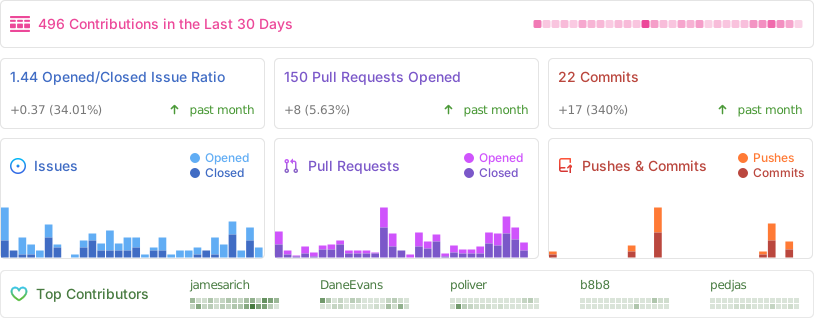
Repository Statistics
Copyright 2025, Meshtastic LLC. GPL-3.0 license