 Mauricio CamayoandClaude Sonnet 5
f564448617
Mauricio CamayoandClaude Sonnet 5
f564448617
Addresses 5 of the 6 actionable comments from CodeRabbit's review of
PR #1765 (netalertx/NetAlertX#1765), plus adds test coverage:

- fetch_top_blocked_clients() returns None on failure instead of {},
  so a failed request can no longer be mistaken for "genuinely zero
  blocked queries this run" and silently write a false 0 into a
  device's rolling history baseline. main() now tracks a
  stats_complete flag and skips anomaly evaluation + history
  persistence entirely for a run with incomplete blocked-query data.
- fetch_top_blocked_clients() is now called with count=max_clients
  (the existing PIHOLEMON_API_MAXCLIENTS setting) instead of a
  hardcoded default of 50, so clients beyond the top 50 are no longer
  silently dropped from anomaly detection.
- New build_ip_to_mac() derives the IP->MAC identity map from every
  gathered device entry instead of from merge_device_entries()'s
  by-MAC-deduplicated output, which only kept one IP per device and
  silently lost a multi-IP device's other IPs (misattributing their
  blocked-query traffic to a bare IP instead of the real MAC).
- PIHOLEMON_HISTORY_LENGTH is clamped to at least 1, so a negative
  setting can no longer reach the history[-history_length:] slice
  with a nonsensical negative-of-negative length.
- PIHOLEMON_VERIFY_SSL now defaults to true (was false, matching the
  official PIHOLEAPI plugin's convention). README documents the
  http:// vs https:// credentials trade-off explicitly rather than
  forcing https:// - most home Pi-hole setups, including the one this
  plugin targets, run over plain HTTP on a trusted LAN.
- Added test/plugins/test_pihole_monitor.py (37 tests, 99% line and
  branch coverage of pihole_monitor.py per pytest-cov - only the
  `if __name__ == '__main__':` entry-point guard is unreached):
  auth and deauth success/failure paths, the None-sentinel-on-failure
  contract, fetch_devices()'s own failure path, build_ip_to_mac()'s
  multi-IP fix, gather_device_entries()'s skip branches and fake-MAC
  fallback, netalertx_device_owner()'s success/failure/no-URL paths,
  and main()-level coverage for source aggregation, the
  stats_complete gate, the history_length boundary clamp, the
  CONSIDER_ONLINE fallback, an unconfigured-sources run, and the
  offline-device / invalid-MAC / unknown-IP / owner-lookup branches
  together in one run.

Not addressed: CodeRabbit's suggestion to hard-reject http:// URLs in
auth(). Diverges deliberately - it would break the plugin's majority
use case (Pi-hole admin API on a trusted home LAN without TLS), which
this repo's own PIHOLEAPI plugin also targets over plain HTTP.

Co-Authored-By: Claude Sonnet 5 <noreply@anthropic.com>
Claude-Session: https://claude.ai/code/session_01CHJAArRiet4GmXUsxnNLdW





NetAlertX - Network Visibility & Asset Intelligence Framework


NetAlertX is a network visibility and asset intelligence platform for homelabs, IT teams, MSPs, and distributed environments. It provides centralized network visibility and continuous asset discovery across remote sites, VLANs, branch offices, and segmented networks from a single interface.
NetAlertX gives you a real-time source of truth for connected devices, helps identify shadow IT and unauthorized hardware, supports compliance initiatives, and automates operational workflows across distributed customer environments.
Use NetAlertX to spot shadow IT, unauthorized hardware, IPAM drift, and other changes that matter to service teams. With multi-site sync, reporting, workflows, and webhooks, it helps MSPs stay ahead of problems without the overhead of a full NMS or SIEM.
Table of Contents
Quick Start
Warning
⚠️ Important: The docker-compose has recently changed. Carefully read the Migration guide for detailed instructions.
Start NetAlertX in seconds with Docker:
docker run -d \
  --network=host \
  --restart unless-stopped \
  --cap-add=NET_RAW \
  --cap-add=NET_ADMIN \
  --cap-add=NET_BIND_SERVICE \
  -v /local_data_dir:/data \
  -v /etc/localtime:/etc/localtime:ro \
  --tmpfs /tmp:uid=20211,gid=20211,mode=1700 \
  -e PORT=20211 \
  -e APP_CONF_OVERRIDE='{"GRAPHQL_PORT":"20214"}' \
  ghcr.io/netalertx/netalertx:latest
Note: Your /local_data_dir should contain a config and db folder.
To deploy a containerized instance directly from the source repository, execute the following BASH sequence:
git clone https://github.com/netalertx/NetAlertX.git
cd NetAlertX
docker compose up --force-recreate --build
# To customize: edit docker-compose.yaml and run that last command again
Need help configuring it? Check the usage guide or full documentation.
For Home Assistant users: Click here to add NetAlertX
For other install methods, check the installation docs
|| Docker guide || Releases || Docs || Plugins || Website
Features
Discovery & Asset Intelligence
Continuous monitoring for unauthorized asset discovery, connection state changes, and IP address management (IPAM) drift. Discovery & scan methods include: arp-scan, Pi-hole - DB import, Pi-hole - DHCP leases import, Generic DHCP leases import, UNIFI controller import, SNMP-enabled router import. Check the Plugins docs for a full list of avaliable plugins.
Notification gateways
Send notifications to more than 80+ services, including Telegram via Apprise, or use native Pushsafer, Pushover, or NTFY publishers.
Integrations and Plugins
Feed your data and device changes into Home Assistant, read API endpoints, or use Webhooks to setup custom automation flows. You can also build your own scanners with the Plugin system in as little as 15 minutes.
Workflows
The workflows module automates IT governance by enforcing device categorization and cleanup policies. Whether you need to assign newly discovered devices to a specific Network Node, auto-group devices from a given vendor, unarchive a device if detected online, or automatically delete devices, this module provides the flexibility to tailor the automations to your needs.
MSP & Multi-Site Monitoring
NetAlertX enables centralized monitoring across remote sites and isolated environments through Sync Nodes for VLANs and branch offices, providing unified visibility of assets across multiple networks. It supports NOC-style wallboard dashboards, Prometheus metrics export, workflow automation for device governance, and distributed discovery with centralized alerting for scalable network operations.
Documentation
Explore all the documentation here or navigate to a specific installation option below.
Supported browsers: Chrome, Firefox
- [Installation] Docker
- [Installation] Home Assistant
- [Installation] Bare metal
- [Installation] Unraid App
- [Setup] Usage and Configuration
- [Development] API docs
- [Development] Custom Plugins
Security & Privacy
NetAlertX scans your local network and can store metadata about connected devices. By default, all data is stored locally. No information is sent to external services unless you explicitly configure notifications or integrations.
Compliance & Hardening:
- Run it behind a reverse proxy with authentication
- Use firewalls to restrict access to the web UI
- Regularly update to the latest version for security patches
- Role-Based Access Control (RBAC) via Reverse Proxy: Integrate with your existing SSO/Identity provider for secure dashboard access.
See Security Best Practices for more details.
Designed for MSPs, NOCs & Distributed Networks
NetAlertX supports centralized monitoring across VLANs, branch offices, customer environments, isolated networks, and remote sites.
Using Sync Nodes, distributed collectors securely send device inventory and network visibility data back to a central hub, enabling unified monitoring, alerting, and asset tracking across all locations.
This provides MSPs and NOCs with a single operational view of many independent networks, without requiring direct access or centralized scanning infrastructure.
Common deployments include MSP wallboards, NOC dashboards, multi-site inventory monitoring, and remote office discovery.
FAQ
Q: How do I monitor VLANs or remote subnets?
A: Ensure the container has proper network access (e.g., use --network host on Linux). Also check that your scan method is properly configured in the UI.
Q: What is the recommended deployment for high-availability? A: We recommend deploying via Docker with persistent volume mounts for database integrity and running behind a reverse proxy for secure access.
Q: Will this send any data to the internet? A: No. All scans and data remain local, unless you set up cloud-based notifications.
Q: Can I use this without Docker? A: You can install the application directly on your own hardware by following the bare metal installation guide.
Q: Where is the data stored?
A: In the /data/config and /data/db folders. Back up these folders regularly.
Troubleshooting Tips
- Some scanners (e.g. ARP) may not detect devices on different subnets. See the Remote networks guide for workarounds.
- Wi-Fi-only networks may require alternate scanners for accurate detection.
- Notification throttling may be needed for large networks to prevent spam.
- On some systems, elevated permissions (like
CAP_NET_RAW) may be needed for low-level scanning.
Check the GitHub Issues for the latest bug reports and solutions and consult the official documentation.
Everything else
📧 Get notified what's new
Get notified about a new release, what new functionality you can use and about breaking changes.

🔀 Other Alternative Apps
- Fing - Network scanner app for your Internet security (Commercial, Phone App, Proprietary hardware)
- NetBox - The gold standard for Network Source of Truth (NSoT) and IPAM.
- Zabbix or Nagios - Strong focus on infrastructure monitoring.
- Domotz - Commercial network monitoring and remote management platform aimed at MSPs, IT teams, and multi-site environments.
- NetAlertX - The streamlined, discovery-focused choice for real-time asset intelligence and noise-free alerting.
💙 Donations
Thank you to everyone who appreciates this tool and donates.
Click for more ways to donate
 |
 |
|---|
- Bitcoin:
1N8tupjeCK12qRVU2XrV17WvKK7LCawyZM - Ethereum:
0x6e2749Cb42F4411bc98501406BdcD82244e3f9C7
📧 Email me at support@netalertx.com if you want to get in touch or if I should add other sponsorship platforms.
🏗 Contributors
This project would be nothing without the amazing work of the community, with special thanks to:
pucherot/Pi.Alert (the original creator of PiAlert), leiweibau: Dark mode (and much more), Macleykun (Help with Dockerfile clean-up), vladaurosh for Alpine re-base help, Final-Hawk (Help with NTFY, styling and other fixes), TeroRERO (Spanish translations), Data-Monkey, (Split-up of the python.py file and more), cvc90 (Spanish translation and various UI work) to name a few. Check out all the amazing contributors.
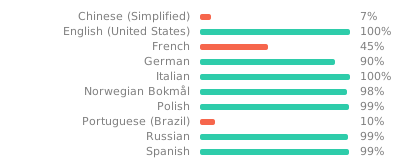
🌍 Translations
Proudly using Weblate. Help out and suggest languages in the online portal of Weblate.
License
GPL 3.0 | Read more here | Source of the animated GIF (Loading Animation) | Source of the selfhosted Fonts

All product names, logos, and brands are property of their respective owners. All company, product and service names used in this website are for identification purposes only. Use of these names, logos, and brands does not imply endorsement.