## Motivation

<!-- Why is this change needed? What problem does it solve? -->
<!-- If it fixes an open issue, please link to the issue here -->

## Changes

<!-- Describe what you changed in detail -->

## Why It Works

<!-- Explain why your approach solves the problem -->

## Test Plan

### Manual Testing
<!-- Hardware: (e.g., MacBook Pro M1 Max 32GB, Mac Mini M2 16GB,
connected via Thunderbolt 4) -->
<!-- What you did: -->
<!-- - -->

### Automated Testing
<!-- Describe changes to automated tests, or how existing tests cover
this change -->
<!-- - -->
## Motivation

In the dashboard model picker sidebar, the Gemma 4 models were showing
up under a "Gemma" family with the generic fallback tick/checkmark icon
(the default case in `FamilyLogos.svelte`), since no dedicated logo
branch existed for `family === "gemma"`. Every other vendor (Meta,
NVIDIA, OpenAI, DeepSeek, Qwen, …) has its own brand mark.

Gemma is Google's model family, so it should live under a **Google**
bucket that future Google-authored models can join, and it should render
with a proper Google logo in the same style as its neighbors.

## Changes

- `dashboard/src/lib/components/FamilyLogos.svelte`: added a `family ===
"google"` branch rendering a monochrome Google "G" as a single `<path>`
inside the shared `24×24` viewBox with `fill="currentColor"`, matching
the other vendor logos.
- `dashboard/src/lib/components/FamilySidebar.svelte`: added `google:
"Google"` to the `familyNames` display map.
- `dashboard/src/lib/components/ModelPickerModal.svelte`: inserted
`"google"` into the `familyOrder` array (next to `"llama"`) so the
vendor has a deterministic sort position.
- `resources/inference_model_cards/mlx-community--gemma-4-*.toml` (16
files): changed `family = "gemma"` → `family = "google"`. `base_model =
"Gemma 4 …"` is unchanged, so the model titles still read "Gemma".

## Why It Works

The sidebar builds its family list from whatever values appear in
`model.family` across the loaded model cards (`ModelPickerModal.svelte`
`uniqueFamilies`). Renaming the family string on the 16 Gemma cards from
`"gemma"` to `"google"` collapses them into a single "Google" bucket,
and the new logo branch + display-name map entry gives that bucket a
real brand mark and label. All other logos share the same `w-6 h-6 /
viewBox="0 0 24 24" / fill="currentColor"` shape, so inheriting
`text-exo-yellow` / `text-white/50` just works.

## Test Plan

### Manual Testing
<!-- Hardware: MacBook Pro M3 Max -->
- `cd dashboard && npm install && npm run build` — dashboard builds
cleanly.
- `uv run exo`, opened `http://localhost:52415`, clicked **SELECT
MODEL**:
- sidebar shows a **Google** entry with a monochrome Google "G" logo in
the same style as Meta / NVIDIA / etc.
  - old "Gemma" entry with the generic tick is gone.
- clicking **Google** filters to the Gemma 4 variants (e2b / e4b / 26B
A4B / 31B).
- hover/selected color states switch between `text-white/50` and
`text-exo-yellow` correctly.

### Automated Testing
- No new tests — this is a cosmetic grouping/logo change. Existing
dashboard build verifies the Svelte + TS compiles.
## Motivation

PDF attachments weren't working on Safari

## Changes

Create async readable stream if none exists

## Why It Works
pdfjs-dist requires an async readable stream internally

## Test Plan

### Manual Testing
pdf attachments now work on Safari, still work on Firefox
## Motivation

The exo backend already supports `--fast-synch` / `--no-fast-synch` CLI
flags and the `EXO_FAST_SYNCH` environment variable, but there was no
way to toggle this from the macOS app UI. Users who want fast CPU-to-GPU
synchronization for RDMA with Tensor Parallelism had to use CLI flags.

## Changes

- **ExoProcessController.swift**: Added `fastSynchEnabled`
UserDefaults-backed property and pass `EXO_FAST_SYNCH=on` to the exo
process environment when enabled.
- **SettingsView.swift**: Added a "Performance" section to the Advanced
tab with a "Fast Synch Enabled" toggle, an info icon (ⓘ) tooltip
explaining the feature and trade-offs, and a "Save & Restart" button.

## Why It Works

Follows the exact same pattern as the existing `offlineMode` and
`enableImageModels` settings — UserDefaults persistence, `@Published`
property with `didSet`, environment variable passthrough in
`makeEnvironment()`, and pending state with Save & Restart in the
settings UI. The `EXO_FAST_SYNCH=on` value matches what the Python
backend already reads in `main.py`.

## Test Plan

### Manual Testing
<!-- Hardware: macOS app -->
- Open Settings → Advanced tab → verify "Performance" section with "Fast
Synch Enabled" toggle appears
- Hover the ⓘ icon → verify tooltip explains the feature and GPU lock
trade-off
- Toggle on → click "Save & Restart" → verify process restarts with
`EXO_FAST_SYNCH=on` in env
- Close and reopen Settings → verify the toggle state persists
- Verify "Save & Restart" button is disabled when no changes are pending

### Automated Testing
- Existing settings patterns are well-established; no new automated
tests needed for this UI toggle

---------

Co-authored-by: Claude Opus 4.6 (1M context) <noreply@anthropic.com>
## Changes

Mostly chore changes around vscode and jetbrains workspace settings, and
some basedpyright settings tweaks, to allow direnv to work and nixd
autocomplete with flake parts to work
## Motivation

No way to pause active downloads or delete partial/failed downloads from
the dashboard.

## Changes

- **Backend:** Added `POST /download/cancel` endpoint with
`CancelDownloadParams`/`CancelDownloadResponse` types. Wires into the
existing `CancelDownload` command + coordinator handler.
- **Dashboard store:** Added `cancelDownload(nodeId, modelId)` function.
- **Dashboard UI:**
  - Pause + delete buttons on active (downloading) cells
  - Delete button on paused/pending and failed cells
- Extracted duplicated SVG icons into `{#snippet}` blocks (`trashIcon`,
`downloadIcon`, `pauseIcon`, `deleteButton`)
- **Tests:** 3 coordinator-level tests for cancel: active download →
pending, nonexistent → no-op, cancel then resume.

## Why It Works

`CancelDownload` command and coordinator handler already existed — just
needed an HTTP endpoint and dashboard wiring. Delete endpoint already
supported all download states.

## Test Plan

### Manual Testing

Started a model download, paused it. Deleted some paused downloads.
Deleted some ongoing downloads.

### Automated Testing

- `test_cancel_active_download_transitions_to_pending` — cancels
in-progress download, asserts `DownloadPending` event and cleanup
- `test_cancel_nonexistent_download_is_noop` — no events emitted
- `test_cancel_then_resume_download` — restart after cancel works
## Motivation

<!-- Why is this change needed? What problem does it solve? -->
<!-- If it fixes an open issue, please link to the issue here -->

## Changes

<!-- Describe what you changed in detail -->

## Why It Works

<!-- Explain why your approach solves the problem -->

## Test Plan

### Manual Testing
<!-- Hardware: (e.g., MacBook Pro M1 Max 32GB, Mac Mini M2 16GB,
connected via Thunderbolt 4) -->
<!-- What you did: -->
<!-- - -->

### Automated Testing
<!-- Describe changes to automated tests, or how existing tests cover
this change -->
<!-- - -->
This PR builds on https://github.com/exo-explore/exo/pull/1677 to enable
custom prompts sent from Firefox `browser.ml.chat` to EXO dashboard
using URL parameters in sidebar for summary and other browser
interactions. See "Summarize page" example below.
## Summary
- Parse `?q=<encoded prompt>` URL parameter on page load and auto-submit
it as a chat message
- Clean up the URL with `history.replaceState` to prevent re-submission
on refresh
- Defer auto-send until both cluster state and model list are loaded so
model auto-selection works correctly
## Context
Firefox's built-in AI sidebar (`about:config: browser.ml.chat.enabled`)
integrates with chat providers by appending the user's prompt as
`?q=<URL-encoded prompt>`. Previously the exo dashboard ignored this
parameter. Users can now configure `http://localhost:52415` as a Firefox
AI chatbot provider.
See: https://support.mozilla.org/en-US/kb/ai-chatbot
## Technical notes
- Frontend-only change in `dashboard/src/routes/+page.svelte`
- Uses a Svelte `$effect` that reacts to `pendingFirefoxQuery`, `data`
(cluster state), and `models.length` — fires exactly once when all three
are ready
- If no model is selected, `handleAutoSend` auto-picks the best
available model; if no model fits memory, a toast is shown
- If a model is selected but not running, the message is queued until
the model loads
## Testing
```
http://localhost:52415/?q=Hello+worldhttp://localhost:52415/?q=Summarize+this+page%3A+%5Bpage+title%5D+%5Bpage+url%5D
```
<img width="2056" height="1329" alt="image"
src="https://github.com/user-attachments/assets/74463eb4-ca1a-400d-806a-c19ba93147b9"
/>
## Motivation

Adding a custom model from the Hub tab shows "Added" toast but the model
doesn't appear in the All tab. You have to add it a second time for it
to work. Also, the "All" button in the model picker sidebar is too small
to read comfortably.

## Changes

**Race condition fix (`src/exo/api/main.py`):**
- Call `add_to_card_cache(card)` directly in `add_custom_model()` after
sending the `ForwarderCommand`, before the API response returns

**Sidebar sizing
(`dashboard/src/lib/components/FamilySidebar.svelte`):**
- Increased sidebar min-width from 72/64px to 80/72px
- Increased "All" icon from `w-5 h-5` to `w-6 h-6`
- Increased all sidebar labels from 9px to 11px

## Why It Works

`POST /models/add` sends a `ForwarderCommand(AddCustomModelCard)` and
returns immediately. The frontend then calls `GET /models` which reads
from `_card_cache`. But the cache was only updated by the worker event
handler after the event round-trips through the master — a race the
frontend almost always loses. By updating the cache directly in the API
handler, `GET /models` immediately reflects the new model. The worker's
later `add_to_card_cache` call is idempotent (dict key assignment).

## Test Plan

### Manual Testing
<!-- Hardware: any Mac -->
- Open model picker → Hub tab → add a custom model → verify it appears
in All tab on the first attempt
- Verify sidebar "All" button and other labels are visually larger and
readable

### Automated Testing
- `uv run basedpyright` passes with 0 errors
- `uv run ruff check` passes

---------

Co-authored-by: Claude Opus 4.6 (1M context) <noreply@anthropic.com>
## Motivation

Support cancelling image generation, similar to existing support for
cancelling text generation

## Changes

- Dashboard (app.svelte.ts): Wire up AbortController for both
generateImage and editImage API calls. On abort, show "Cancelled"
instead of an error. Clean up the controller in finally.
- Pipeline runner (pipeline/runner.py): Introduce a cancel_checker
callback and NaN-sentinel cancellation protocol for distributed
diffusion:
  - _check_cancellation() - only rank 0 polls the cancel callback
- _send() - replaces data with NaN sentinels when cancelling, so
downstream ranks detect cancellation via _recv_and_check()
  - _recv() / _recv_like() wrappers that eval and check for NaN sentinel
  - After cancellation, drains any pending ring recv to prevent deadlock
  - Skips partial image yields and final decode when cancelled
- Image runner (runner/image_models/runner.py): Deduplicate the
ImageGeneration and ImageEdits match arms into a shared
_run_image_task() method. Thread a cancel_checker closure (backed by the
existing cancel_receiver + cancelled_tasks set) into generate_image().
- Plumbing (distributed_model.py, generate.py): Pass cancel_checker
through the call chain.

## Why It Works

- Rank 0 is the only node that knows about task-level cancellation. When
it detects cancellation, it sends NaN tensors instead of real data.
Higher-order ranks detect the NaN sentinel on recv, set their own
_cancelling flag, and propagate NaN forward
- A drain step after the loop prevents the deadlock case where the last
rank already sent patches that the first would never consume.
- For single-node mode, the loop simply breaks immediately on
cancellation.

## Test Plan

### Automated Testing

New tests in src/exo/worker/tests/unittests/test_image
## Motivation

The Nemotron model family in the model picker sidebar was displaying as
"Nemotron" with a generic checkmark icon. Since these models are
NVIDIA's Nemotron models, the category should be branded as "NVIDIA"
with the official NVIDIA logo, consistent with how other families are
branded (e.g., "llama" → "Meta", "gpt-oss" → "OpenAI").

## Changes

- **FamilySidebar.svelte**: Added `nemotron: "NVIDIA"` to the
`familyNames` mapping so the sidebar displays "NVIDIA" instead of
"Nemotron"
- **FamilyLogos.svelte**: Added the NVIDIA "eye" logo as an inline SVG
for the `nemotron` family, matching the `viewBox="0 0 24 24"` /
`fill="currentColor"` pattern used by all other brand logos
- **ModelPickerModal.svelte**: Added `"nemotron"` to the `familyOrder`
array so NVIDIA appears in a consistent position in the sidebar

## Why It Works

The model picker derives categories from the `family` field in TOML
model cards. Nemotron models already have `family = "nemotron"`, but the
three UI components (display name, logo, sort order) lacked explicit
entries for it, causing fallback behavior (auto-capitalized name,
checkmark icon, alphabetical sorting). Adding explicit entries for all
three aligns NVIDIA with the existing brand pattern.

## Test Plan

### Manual Testing
<!-- Hardware: N/A - dashboard UI change only -->
- Built dashboard successfully (`npm run build`)
- Verified the NVIDIA logo renders in the sidebar alongside existing
brand logos

### Automated Testing
- No test changes needed — this is a purely cosmetic dashboard change

---------

Co-authored-by: Claude Opus 4.6 (1M context) <noreply@anthropic.com>
## Motivation

Batch generation reports incorrect statistics, as mlx lm never clears
the original stats, meaning they get polluted over time.
The dashboard also seems considerably slower than bench statistics.
We also have a large discrepancy between B=1 batch generating and
mlx_generate.
Extracting logprobs is massively expensive, causing up to a 25% slowdown
compared to pure batching.
```
[ 12:02:01.1240AM | INFO    ] step overhead: 3.49ms (next=12.49ms total=15.99ms)
[ 12:02:02.1600AM | INFO    ] step overhead: 3.23ms (next=13.01ms total=16.24ms)
[ 12:02:03.2228AM | INFO    ] step overhead: 3.28ms (next=13.38ms total=16.66ms)
[ 12:02:04.2798AM | INFO    ] step overhead: 3.25ms (next=12.84ms total=16.10ms)
[ 12:02:05.3152AM | INFO    ] step overhead: 3.18ms (next=12.61ms total=15.79ms)
[ 12:02:06.3522AM | INFO    ] step overhead: 3.41ms (next=12.83ms total=16.25ms)
[ 12:02:07.3987AM | INFO    ] step overhead: 3.38ms (next=13.14ms total=16.52ms)
[ 12:02:08.4537AM | INFO    ] step overhead: 1.84ms (next=19.44ms total=21.28ms)
```

## Changes

1. Report stats ourselves instead of using mlx lm's stats for batch
generation (they use perf_counter anyway).
2. Adjust exo bench to match
3. Improve logprobs extraction speed by 10x, improving tps for dashboard
& any requests for logprobs
4. Use an SSE comment to align the speed to the real numbers at the end
of generation
5. Patch mlx for several optimizations given our assumptions and use
cases (e.g. use vllm style RoPE).
6. Switch MLX LM version to latest main, including support for Nemotron
Super and some Qwen3.5 fixes.

## Why It Works
1. Exo bench no longer reports polluted stats
2. Exo bench now handles the reported per-request stats rather than the
aggregate stats
3. The decode speed now jumps back to a real number at the end of the
generation
4. Large batch speedup for rotating KV cache models + 1:1 matching cache
with vllm

## Test Plan

### Manual Testing
Needs testing on OpenCode and CC
Needs eval testing

### Automated Testing
Only going to show the performance optimization difference after the
accurate reporting:

**GPT OSS 20B MXFP4 Q8 (large change)**
Before:
<img width="2466" height="1534" alt="image"
src="https://github.com/user-attachments/assets/88b50637-fca2-4db4-9413-b9eee6e2057e"
/>
<img width="2410" height="1240" alt="image"
src="https://github.com/user-attachments/assets/21e5c76a-2f5f-44d2-8953-121b3ebdbd68"
/>


After:
<img width="2476" height="1472" alt="image"
src="https://github.com/user-attachments/assets/fec5cfbd-fff8-430a-b12e-a329410107a2"
/>
<img width="2454" height="1236" alt="image"
src="https://github.com/user-attachments/assets/0400344b-a4a6-42c0-a9dd-4ee91ade714a"
/>


**Qwen 3.5 35B A3B 8bit (No change)**
Before:
<img width="2414" height="1396" alt="image"
src="https://github.com/user-attachments/assets/e75f0b38-df5d-49fd-ab90-bc1667d981b3"
/>


After:
<img width="2346" height="1234" alt="image"
src="https://github.com/user-attachments/assets/eabfb59c-851f-4d88-b927-e1e699a75cc6"
/>


**Llama 3.2 1B Instruct 4bit (small change)**
Before:
<img width="2516" height="1220" alt="image"
src="https://github.com/user-attachments/assets/c2873655-acff-4536-8263-fb8aea33db80"
/>

After:
<img width="2566" height="1370" alt="image"
src="https://github.com/user-attachments/assets/15f95c75-1c2f-4474-85a2-88c4d0a32543"
/>
## Motivation

Download progress in the dashboard was broken: mainly treating all
download statuses as ongoing

## Changes

- Backend (apply.py): Deduplicate download progress events by model_id
instead of full shard_metadata, preventing duplicate entries per node
- Dashboard (+page.svelte): Extract shared collectDownloadStatus()
helper that both getModelDownloadStatus and getInstanceDownloadStatus
use, eliminating ~100 lines of duplicated logic. Adds proper handling
for
DownloadCompleted/DownloadFailed events, uses a Map to deduplicate
per-node entries, and introduces a typed NodeDownloadStatus with
explicit status states (downloading/completed/partial/pending)
- ModelCard: Replace single aggregate progress bar with per-node
download bars, each color-coded by status. Instance preview now scopes
download status to participating nodes only

## Why It Works

- Deduplicating by model_id in apply.py ensures each node has exactly
one download entry per model
- The perNodeMap in the frontend keeps only the latest event per node,
preventing duplicate bars
- Handling DownloadCompleted allows the UI to show finished downloads
instead of dropping them
- Scoping instance previews to assigned nodes avoids showing irrelevant
download progress
## Motivation

Image generation/editing from the dashboard was broken. ChatForm
bypassed the parent's model-launch logic, so image requests fell through
to text chat.

## Changes

- Moved image routing logic from ChatForm.svelte to +page.svelte
(routeMessage())
- ChatForm now always delegates to parent via onAutoSend (made required)
- Fixed missing updateActiveConversation() call on message retry

## Why It Works

All sends now go through the parent's launch-then-route path, so image
models get launched before the request is dispatched to the correct
endpoint.
## Motivation

<!-- Why is this change needed? What problem does it solve? -->
<!-- If it fixes an open issue, please link to the issue here -->
This was to fix a small issue which was that the StepFun logo was not
included in the sidebar, and I also noticed it from an open issue:
- #1662

## Changes

<!-- Describe what you changed in detail -->
I added a condition to the FamilyLogos where if the family is "step"
then the logo will be included in the sidebar.

## Test Plan
Open exo, go choose a model, and scroll down the sidebar until you see
the step logo, which should be there.

### Manual Testing
<!-- Hardware: (e.g., MacBook Pro M1 Max 32GB, Mac Mini M2 16GB,
connected via Thunderbolt 4) -->
<!-- What you did: -->
<!-- - -->
Check for the step logo in the sidebar.
## Summary
- Dashboard now shows partial download progress for models that were
partially downloaded in a previous session, instead of showing 0%
- Both `getModelDownloadStatus()` and `getInstanceDownloadStatus()` now
handle `DownloadPending` entries that carry non-zero
`downloaded`/`total` bytes
Fixes#1042
## Root cause
When exo restarts with partially downloaded models, the
`DownloadCoordinator` emits `DownloadPending` events (because
`downloaded_this_session` is 0, even though real bytes exist on disk).
The main page dashboard only checked for `DownloadOngoing` entries, so
these partially downloaded models showed as 0%.
The dedicated `/downloads` page already handled this correctly — it
renders `DownloadPending` entries with a progress bar when `downloaded >
0`. This fix brings the same behavior to the main page.
## Changes
For both `getModelDownloadStatus()` and `getInstanceDownloadStatus()` in
`+page.svelte`:
- Accept `DownloadPending` in addition to `DownloadOngoing`
- For `DownloadPending` entries with `downloaded > 0` or `total > 0`,
synthesize a `DownloadProgress` object from the top-level fields (with
`speed: 0` and `etaMs: 0` since no active download is in progress)
- Skip `DownloadPending` entries where both `downloaded` and `total` are
0 (truly pending, not yet started)
## Test plan
- [ ] Partially download a model, quit exo, relaunch — dashboard should
show partial progress instead of 0%
- [ ] Fully downloaded models still show as complete
- [ ] Active downloads still show real-time progress with speed/ETA
- [ ] Models never downloaded show as not started (not falsely showing
progress)
- [ ] Dashboard builds without errors (`cd dashboard && npm run build`)
---------
Co-authored-by: Evan <evanev7@gmail.com>
## Summary

- Adds mobile-friendly drawer UI for the chat sidebar and model family
sidebar
- Introduces responsive header navigation with mobile-specific toggle
buttons
- Uses slide-in drawer overlay pattern on small screens instead of
collapsible sidebars
- Stores mobile drawer state in app store for consistent state
management

## Testing

Tested on desktop (responsive mode) and mobile viewport widths. Sidebars
now slide in as drawers on small screens with proper z-index layering
and close-on-outside-click behavior.
## Motivation
Fixes#1648. Users adding custom models from HuggingFace got no clear
feedback that the model was successfully added — the model didn't appear
prominently in the list. Additionally, searches were limited to
`mlx-community` models with no fallback.
## Changes
- **Success feedback**: After adding a custom model, a toast
notification appears, the view auto-switches to "All Models", and the
newly added model is scrolled into view with a green highlight that
fades over 4 seconds.
- **HuggingFace search fallback**: The `/models/search` endpoint now
searches `mlx-community` first; if no results are found, it falls back
to searching all of HuggingFace.
- **Inline HF results**: When the main search bar finds no local
matches, HuggingFace search results appear inline with "+ Add" buttons
and a "See all results on Hub" link.
- **Full repo ID for non-mlx models**: Non-mlx-community models now
display the full repo ID (e.g., `meta-llama/Llama-3.1-8B`) instead of
just the short name.
## Why It Works
The toast + scroll + highlight gives immediate, unambiguous feedback
that the model was added and where it lives in the list. The HF search
fallback broadens discoverability while still prioritising mlx-community
models. Inline results in the main search bar mean users don't need to
navigate to the HF tab to discover new models.
## Test Plan
### Manual Testing
- Open model picker → HuggingFace Hub tab → search for a model → click
"+ Add"
- Verify: toast appears, view switches to All Models, model highlighted
with green glow
- Search for a term with no mlx-community results → verify fallback to
full HF search
- Non-mlx-community results show full repo ID (e.g., `org/model-name`)
- On All Models tab, search for a model not in the local list → verify
"From HuggingFace" section appears
### Automated Testing
- Existing tests cover the model catalog and API; no new automated tests
needed for UI behaviour changes
---------
Co-authored-by: Evan <evanev7@gmail.com>
Fixes#1657
## Motivation
The copy button on code blocks in the dashboard does nothing when
clicked. This affects all code blocks in assistant responses.
## Root Cause
In `MarkdownContent.svelte`, click event listeners are bound to
`.copy-code-btn` elements via `setupCopyButtons()` inside a Svelte 5
`$effect`. However, the effect fires before the DOM has been updated
with the new HTML, so `querySelectorAll(".copy-code-btn")` finds zero
buttons.
Additionally, during streaming, the `content` prop updates on every
token, causing the entire `{@html processedHtml}` to be re-rendered.
This destroys all previously bound event listeners, even if they were
successfully attached.
## Changes
Replaced the per-button `addEventListener` approach with **event
delegation** — a single click listener on the container element that
catches clicks bubbling up from any `.copy-code-btn` or
`.copy-math-btn`. This:
- Eliminates the timing issue (the listener exists before the buttons
are rendered)
- Survives HTML re-renders during streaming (no need to re-bind)
- Removes the need for `setupCopyButtons()` and the `data-listenerBound`
tracking
## Testing
1. Load any model
2. Prompt it to generate a code block (e.g. "write a hello world in
Python")
3. Click the copy button on the code block
4. Paste — the code is copied correctly
5. Verified the button also works during streaming (before generation
completes)
Co-authored-by: Wysie <wysie@users.noreply.github.com>
## Motivation

Clicking on the mini topology view in the right sidebar during chat was
selecting/filtering nodes instead of navigating back to the home view.
The entire mini topology section is wrapped in a button that calls
`handleGoHome()`, but individual node clicks were intercepting the event
via `stopPropagation()`.

## Changes

- Removed `onNodeClick={togglePreviewNodeFilter}` from the mini
sidebar's `TopologyGraph` component
- Added `pointer-events-none` to the topology graph container so all
clicks pass through to the parent button

## Why It Works

`TopologyGraph` only registers click/hover handlers when `onNodeClick`
is provided. Removing it disables node interaction entirely in the mini
view. The `pointer-events-none` class ensures no SVG element can
intercept clicks — they all bubble up to the parent `<button
onclick={handleGoHome}>`, which resets the chat state and returns to the
main topology view.

## Test Plan

### Manual Testing
<!-- Hardware: (e.g., MacBook Pro M1 Max 32GB, Mac Mini M2 16GB,
connected via Thunderbolt 4) -->
<!-- What you did: -->
- Start exo and open the dashboard
- Start a chat to trigger the mini topology sidebar
- Click on the mini topology view → should navigate back to home
- Confirm nodes in the mini topology are not selectable or hoverable

### Automated Testing
- Dashboard builds successfully (`npm run build`)
## Motivation

Enable using the dashboard to delete traces

## Changes

- Backend (src/exo/master/api.py): Added POST /v1/traces/delete endpoint
that deletes trace files by task ID, with path traversal protection
- API types (src/exo/shared/types/api.py): Added DeleteTracesRequest and
DeleteTracesResponse models
  - Dashboard store (app.svelte.ts): Added deleteTraces() method
- Traces page (+page.svelte): Added multi-select UI (click to select,
select all/deselect all) with a bulk delete button and confirmation
dialog

## Why It Works

- Uses existing _get_trace_path helper (now hardened against path
traversal) to resolve and delete trace files
- Dashboard selection state is reactive via Svelte 5 runes; deleted
traces refresh the list automatically

## Test Plan

### Manual Testing

- Select individual traces, select all, delete with confirmation dialog
  - Verify traces are removed from disk and list refreshes
## Motivation

When navigating back to a previous conversation that used a different
model than the one currently loading, the UI incorrectly displayed the
other model's loading/download progress bar instead of the conversation
messages. Additionally, attempting to continue that old conversation by
sending a message would create an entirely new chat rather than
continuing the existing one.

## Changes

All changes in `dashboard/src/routes/+page.svelte`:

1. **Added fallthrough reset in the `chatLaunchState` restore
`$effect`**: When switching to a conversation whose model has no active
instance (not running, not downloading, not loading), the effect now
resets `chatLaunchState` to `"idle"` instead of leaving stale state from
a different model.

2. **Added `skipCreate` parameter to `launchModelForChat()`**: When
continuing an existing conversation (has messages),
`createConversation()` is skipped so the old conversation is preserved
rather than replaced with a new empty one.

3. **Reordered view conditional**: Progress views
(downloading/loading/launching) take priority, then conversation
messages (when idle with messages or model ready), then model selector
(idle with no messages). This ensures:
   - Old conversations display normally when their model isn't running
- Download progress shows when relaunching a model for any conversation
   - Model selector only appears when there are no messages

## Why It Works

- The `$effect` fallthrough prevents `chatLaunchState` from retaining a
stale value (e.g., `"downloading"`) from Model A when the user switches
to a conversation using Model B that has no active state.
- The `skipCreate` flag ensures `launchModelForChat` can be reused for
both new conversations (from model picker) and continuing existing ones
(from chat input) without always creating a new conversation.
- The reordered view logic ensures each state maps to the correct UI:
active launch → progress, existing messages → chat view, nothing → model
selector.

## Test Plan

### Manual Testing
- Load an old conversation while a different model is downloading →
should see conversation messages, not the other model's loading bar
- Send a message from that old conversation → model should
launch/download with progress shown → conversation continues with the
response appended
- Select a new model from the picker → should still create a new
conversation as before
- New conversation with model download → progress bar shows correctly

---------

Co-authored-by: Claude Opus 4.6 <noreply@anthropic.com>
## Motivation

The "Load Model" dropdown in the right sidebar and the model selector
above the chat input were operating on independent state
(`selectedPreviewModelId` vs `selectedChatModel`). This caused several
UX issues:
- Selecting a model in one selector didn't update the other
- After going home from a chat, the chat selector showed "SELECT MODEL"
while the sidebar still showed the model
- On page refresh, only the sidebar restored the saved model
- Sending a chat message with a running model briefly showed the
recommended models view instead of starting the chat

## Changes

- **`handleModelPickerSelect`**: Also sets `selectedChatModel` when a
model is picked from the sidebar dropdown
- **`handleChatPickerSelect`**: Also sets `selectedPreviewModelId` when
a model is picked from the chat selector
- **`handleGoHome`**: Restores `selectedChatModel` from the sidebar's
`selectedModelId` instead of clearing it
- **`applyLaunchDefaults`**: Syncs `selectedChatModel` when restoring
saved defaults on page load
- **`handleChatSend`**: Sets `chatLaunchState = "ready"` before calling
`sendMessage` when the model is already running, ensuring the chat view
renders correctly on view transition

## Why It Works

The two selectors were backed by different store properties that were
never kept in sync. By updating both properties in every selection path
(sidebar pick, chat pick, go-home, page restore), they always reflect
the same model. The `chatLaunchState = "ready"` fix mirrors what
`launchModelForChat` already does (line 2649) and prevents the chat
state from being "idle" when transitioning from the welcome view to the
chat view.

## Test Plan

### Manual Testing
<!-- Hardware: MacBook Pro M4 Max 48GB -->
- Select a model from sidebar "Load Model" dropdown → chat input
selector updates to match
- Select a model from chat input selector → sidebar dropdown updates to
match
- Launch a model, chat with it, click "Go Home" → both selectors show
the same model
- Refresh the page → both selectors show the previously selected model
- With a running model, type and send a message from the welcome view →
chat starts directly without flashing the recommended models view

### Automated Testing
No new automated tests — this is a UI state synchronization fix in the
Svelte dashboard with no backend changes.

🤖 Generated with [Claude Code](https://claude.com/claude-code)

Co-authored-by: Claude Opus 4.6 <noreply@anthropic.com>
## Motivation

Follow-up to #1601 (downloads page contrast fix). The HOME and DOWNLOADS
navigation links in the top-right header use `text-exo-light-gray`
(`oklch(0.6 0 0)`) which is too dim against the dark header background.

## Changes

Changed both nav links in `HeaderNav.svelte` from `text-exo-light-gray`
to `text-white/70` for better visibility. Hover state
(`text-exo-yellow`) is unchanged.

## Why It Works

`text-white/70` provides noticeably better contrast against
`bg-exo-dark-gray` while still looking subdued relative to the yellow
accent color on hover. This is consistent with the approach used in
#1601.

## Test Plan

### Manual Testing
- Verified both links are clearly readable on the home page and
downloads page
- Hover state still transitions to yellow as expected

### Automated Testing
- Dashboard builds successfully

---------

Co-authored-by: Claude Opus 4.6 <noreply@anthropic.com>
## Summary
- Bumps opacity on dark-grey text/icons on the downloads page that were
nearly invisible against the dark background
- Informational text (GB sizes, speeds, disk free, model IDs) → full
`text-exo-light-gray`
- Interactive icons (delete, resume, retry) → `/70` at rest
- Hover-only elements (download button) → `/60`

## Test plan
- [ ] Open http://localhost:52415/downloads with models downloaded
- [ ] Verify GB downloaded amounts are clearly visible
- [ ] Verify delete trash icons are visible (not just on hover)
- [ ] Verify download speed text is readable
- [ ] Verify "paused" labels and resume buttons are visible
- [ ] Verify "X GB free" disk labels in column headers are readable

🤖 Generated with [Claude Code](https://claude.com/claude-code)

---------

Co-authored-by: Claude Opus 4.6 <noreply@anthropic.com>
## Summary
- Adds a **resume button** (download icon) to paused pending downloads
(those with partial progress)
- Adds a **download button** to not-started pending downloads
- Both buttons call the existing `startDownload()` function which
handles both new downloads and resuming partial ones
- Previously, paused downloads only showed a "paused" label with no
action, and not-started downloads showed "..." with no way to trigger
them

## Test plan
- [ ] Build dashboard (`cd dashboard && npm run build`)
- [ ] Start exo, navigate to Downloads tab
- [ ] Verify paused downloads show a clickable resume (download arrow)
icon below the progress bar
- [ ] Verify not-started pending downloads show a clickable download
icon
- [ ] Click both button types and confirm downloads start/resume

> Note: Screenshot could not be captured because the dashboard requires
the exo backend API to render, and exo has a pre-existing
`Keypair.generate()` startup bug on main.

🤖 Generated with [Claude Code](https://claude.com/claude-code)

---------

Co-authored-by: Claude Opus 4.6 <noreply@anthropic.com>
## Motivation

When a model has multiple quantization variants (e.g., 4-bit, 8-bit),
expanding the group shows each variant's quantization and size — but
there's no way to see which specific nodes have each variant downloaded.
The top-level model group has an (i) info button, but the individual
variant rows don't. This makes it hard to tell which nodes have which
quantization.

## Changes

- Added an (i) info button to each expanded variant row in
`ModelPickerGroup.svelte`
- When clicked, opens the existing info modal scoped to that single
variant (showing its quantization, size, and which nodes have it
downloaded)
- Changed the variant row element from `<button>` to `<div
role="button">` to allow nesting the info `<button>` (matching the
pattern used by the top-level model row)

## Why It Works

Reuses the existing `onShowInfo` callback and info modal by constructing
a synthetic single-variant `ModelGroup` from the clicked variant. No
changes needed to `ModelPickerModal.svelte` — the info modal already
handles single-variant groups correctly.

## Test Plan

### Manual Testing
<!-- Hardware: MacBook Pro -->
- Open dashboard, open model picker
- Expand a model with multiple variants — each variant row now has an
(i) icon
- Click a variant's (i) — the info modal shows that single variant's
quantization/size and which nodes have it downloaded

### Automated Testing
- Dashboard builds successfully with `npm run build`
- `nix fmt` passes

Co-authored-by: Claude Opus 4.6 <noreply@anthropic.com>
## Motivation

The current chat experience requires users to manually select a model
before they can start chatting. This creates unnecessary friction —
especially for new users who may not know which model to pick.
Additionally, models that are already running or downloading appear
greyed out in the picker if available memory is low, making them
impossible to select even though they're already loaded.

## Changes

### New: ChatModelSelector component
- Category-based model recommendations (Best for Coding, Writing,
Agentic, Biggest) shown on the idle chat screen
- Tiered model ranking system (`AUTO_TIERS`) that picks the best model
fitting available memory
- Fixed-position tooltips that escape overflow-hidden ancestors

### Auto model selection from chat
- Typing in an empty chat auto-picks the best model using tier rankings
- Prefers already-running models over launching smaller new ones (avoids
the "launched a big model but recommends a smaller one" bug)
- If a model is already downloading/loading, attaches to existing
progress instead of launching a duplicate

### Launch-from-chat state machine
- Full `idle → launching → downloading → loading → ready` flow with
inline progress display
- `pendingAutoMessage` queue: messages typed during model launch are
remembered and sent once model is ready
- Fixed `$effect` race condition where restore effect competed with
auto-advance effect, causing lost messages

### Model picker improvements
- Instance status badges: green dot (ready), blue pulsing (downloading),
yellow pulsing (loading) on both group and variant rows
- "Ready" availability filter in ModelFilterPopover
- **Models with active instances (ready, downloading, loading) are never
greyed out** regardless of memory — they're already loaded/in-progress
and must be selectable

### Home page model display
- Model picker button shows the best running model name instead of "—
SELECT MODEL —" when a model is already active
- Uses the same `bestRunningModelId` tier-based derived as the chat
auto-selection

### Chat sidebar & form
- ChatSidebar conversation management with rename, delete, "New Chat"
- `userForcedIdle` guard prevents reactive effects from overriding
explicit user actions (e.g., clicking "New Chat")
- ChatForm simplified: uses ModelPickerModal instead of inline dropdown,
`modelDisplayOverride` prop for showing auto-selected models

## Why It Works

The tier-based auto-selection (`getAutoTierIndex` + `pickAutoModel`)
ensures users always get the best model their cluster can run. By
checking running instances first and comparing tiers, we avoid the bug
where loading a large model reduces available memory and causes a
smaller model to be recommended. The `$effect` ordering fix (moving the
`chatLaunchState === "ready"` guard after the `hasRunningInstance`
check) ensures pending messages are always delivered. The instance
status override in ModelPickerGroup (`anyVariantHasInstance`) ensures
models with active instances bypass memory-based greying regardless of
available RAM.

## Test Plan

### Manual Testing
<!-- Hardware: (e.g., MacBook Pro M1 Max 32GB, Mac Mini M2 16GB,
connected via Thunderbolt 4) -->
<!-- What you did: -->
- Launch exo, navigate to Chat view
- Verify idle chat shows category recommendations (Coding, Writing,
Agentic, Biggest) based on available memory
- Type a message without selecting a model → verify auto-selection picks
the best tier model
- Launch a model, go to New Chat → verify the input bar shows the
running model name (not "SELECT MODEL")
- Launch a model, go to Home → verify model picker button shows the
running model
- While a model is downloading, send a message → verify download
progress appears and message is queued
- Open model picker with a model running → verify it is NOT greyed out
and is selectable
- Click "New Chat" while in a conversation → verify it resets to idle
with model selector

### Automated Testing
- Dashboard builds successfully (`cd dashboard && npm run build`)
- No TypeScript errors in the build output


🤖 Generated with [Claude Code](https://claude.com/claude-code)

---------

Co-authored-by: Claude Opus 4.6 <noreply@anthropic.com>
## Summary
- **Complete onboarding wizard**: 7-step flow guiding new users from
Welcome → Your Devices (topology) → Add More Devices (animation) →
Choose Model → Download → Load → Chat
- **Native macOS integration**: NSPopover welcome callout anchored to
menu bar icon on first launch, polished DMG installer with
drag-to-Applications arrow
- **Dashboard UX polish**: auto-download on model select, toast
notifications, connection banner, skeleton loading, download progress in
header, recommended model tags, sidebar hidden in home state for cleaner
first impression
- **Settings & menu bar overhaul**: native Settings window with Advanced
tab, onboarding reset, chat sidebar toggle

## Test plan
- [ ] Fresh install: verify onboarding wizard appears and flows Welcome
→ Topology → Animation → Model → Download → Load → Chat
- [ ] Verify topology shows real device data in onboarding step 2
- [ ] Verify selecting a model in the main dashboard picker
auto-triggers download
- [ ] Verify chat sidebar is hidden on home view, appears when chat is
active
- [ ] Verify DMG installer has white background with curved arrow
- [ ] Verify NSPopover appears anchored to menu bar icon on first launch

🤖 Generated with [Claude Code](https://claude.com/claude-code)

---------

Co-authored-by: Claude Opus 4.6 <noreply@anthropic.com>
Co-authored-by: Ryuichi Leo Takashige <leo@exolabs.net>
## Summary
- Remove legacy MlxIbvInstance references from ChatSidebar and ModelCard
components
- MlxIbv was replaced by MlxJaccl; these are leftover type checks
- Split from #1519 for independent review

## Test plan
- [x] Visual inspection of dashboard components

🤖 Generated with [Claude Code](https://claude.com/claude-code)

Co-authored-by: Claude Opus 4.6 <noreply@anthropic.com>
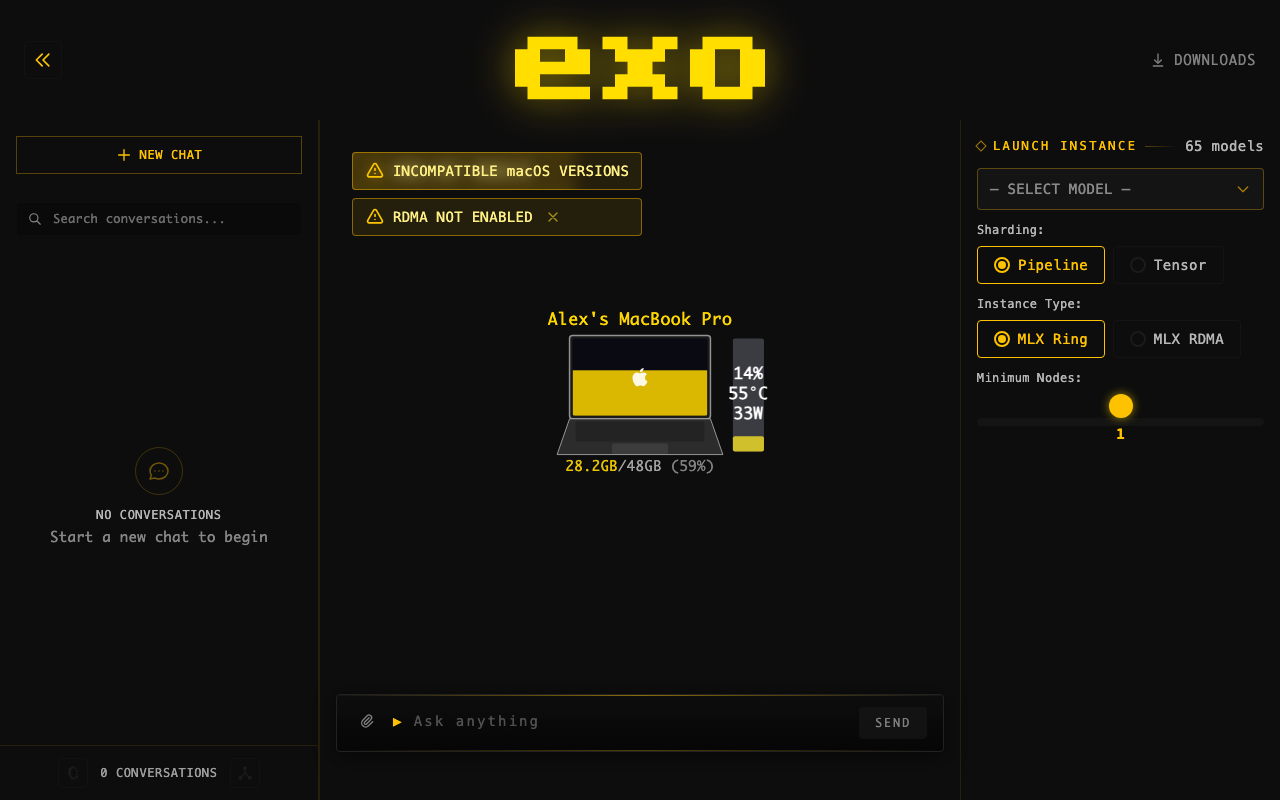
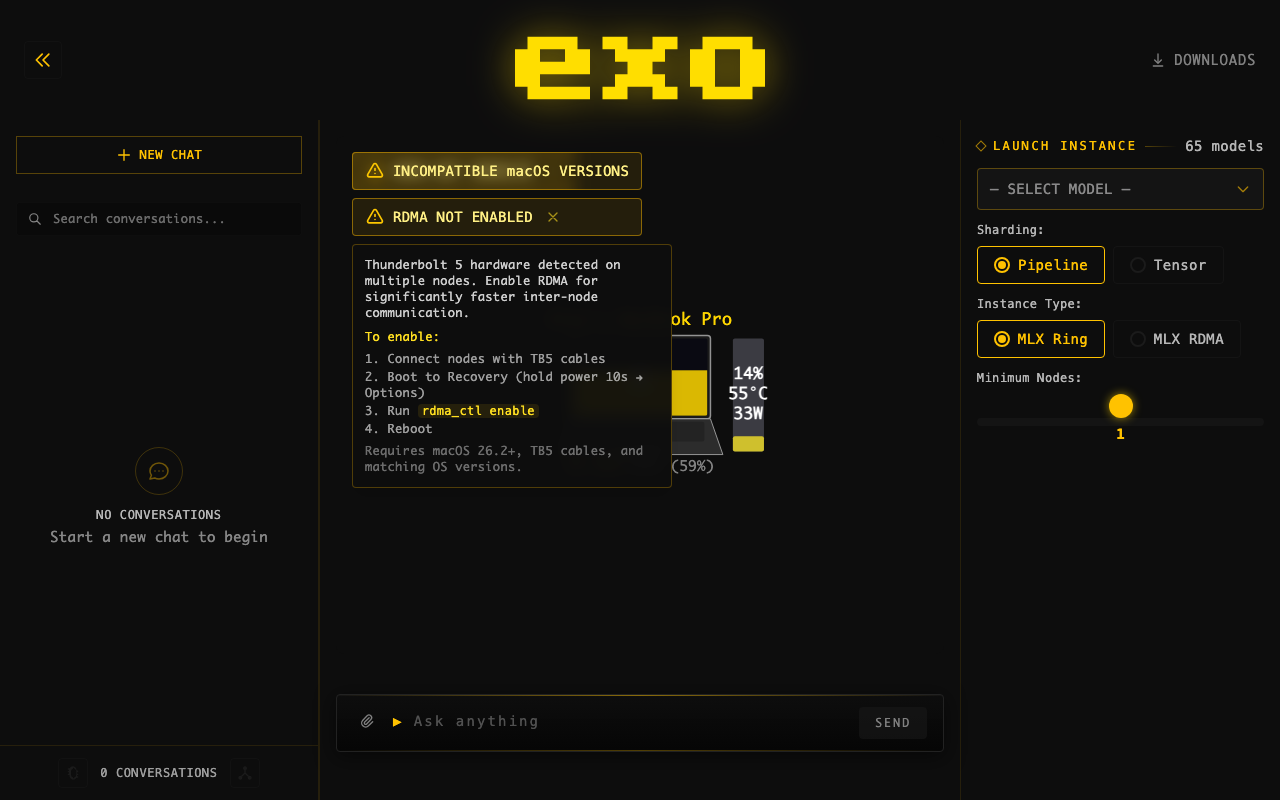
## Summary
- Changed blue info badge "RDMA AVAILABLE" to yellow warning badge "RDMA
NOT ENABLED" — more accurately describes the state
- Added hover tooltip with enable instructions to all views (was missing
in 2 of 4 instances)
- Warning icon instead of info icon, consistent with other cluster
warnings (TB cycle, macOS mismatch)
## Screenshots
**Badge (yellow warning):**
**Hover tooltip with instructions:**
## Test plan
- [x] Dashboard builds successfully
- [ ] Verify badge appears when 2+ TB5 nodes have RDMA disabled
- [ ] Verify hover tooltip shows in normal layout
- [ ] Verify hover tooltip shows in topology-only mode
- [ ] Verify dismiss button works
- [ ] Verify compact badge in status bar shows yellow warning
🤖 Generated with [Claude Code](https://claude.com/claude-code)
---------
Co-authored-by: Claude Opus 4.6 <noreply@anthropic.com>
Co-authored-by: rltakashige <rl.takashige@gmail.com>
## Summary
- Add downloaded_bytes field to existing DownloadPending event for
accurate resume progress
- Minimal change per maintainer directive — no new download states
introduced

## Test plan
- [x] 42 tests passed, 1 skipped
- [x] Verified downloaded_bytes populates correctly for partial
downloads

🤖 Generated with [Claude Code](https://claude.com/claude-code)

---------

Co-authored-by: Claude Opus 4.6 <noreply@anthropic.com>
Co-authored-by: rltakashige <rl.takashige@gmail.com>
## Summary
- Show estimated time remaining during prefill (prompt processing phase)
- Track prefill start time via performance.now() and extrapolate from
observed token throughput
- Display ~Xs remaining or ~Xm Ys remaining next to the percentage on
the progress bar
- Wait 200ms before showing ETA to ensure a stable sample window

## Changes
**PrefillProgressBar.svelte**: Add etaText derived computation that
calculates remaining time from (remainingTokens / tokensPerMs). Renders
in a new flex row below the progress bar alongside the percentage.

**app.svelte.ts**: Add startedAt: number field to PrefillProgress
interface. Set on first prefill_progress SSE event, preserved across
subsequent updates.

## Test plan
- [ ] Start inference with a long prompt (10k+ tokens) on a multi-node
cluster
- [ ] Verify the progress bar shows ~Xs remaining after ~200ms of
prefill
- [ ] Verify the ETA decreases as prefill progresses
- [ ] Verify short prefills (<200ms) dont flash a briefly-visible ETA
- [ ] Verify ETA disappears when prefill completes and token generation
begins

Co-authored-by: Claude Opus 4.6 <noreply@anthropic.com>
Co-authored-by: rltakashige <rl.takashige@gmail.com>
## Motivation

OpenCode shows <think> tags and not thinking blocks as we aren't
following the API specs properly.

Claude was also getting horrible prefix cache hits because it sends
headers.

## Changes

Handle thinking tokens properly by placing them in think tags for each
of the API endpoints.
Also support DeepSeekV3.2 tool calling properly as a minor feature.
Strips Claude headers at the API level.

## Test Plan

### Manual Testing
Tested OpenCode manually
Needs testing with Claude.

### Automated Testing
All CI and tests passing - added a new e2e test for DeepSeekV32 tool
parsing.
Rebuilt from scratch (replaces PR #1543). Detects when Mac Studio uses
RDMA over en2 (TB5 port next to Ethernet) which does not support RDMA.
Shows dismissible warning banner with hover tooltip showing affected
devices, SVG rear panel illustration, and fix instructions. 205 lines in
+page.svelte.

---------

Co-authored-by: Claude Opus 4.6 <noreply@anthropic.com>
Co-authored-by: rltakashige <rl.takashige@gmail.com>
## Motivation
There's no way to easily use the cancellation features we added! Also,
prefill can take ages so let's allow cancelling out of that.

## Changes

Wiring up our existing functionality to easily cancel during generation
(and adding stuff to do so during prefill)

## Test Plan

### Manual Testing
Tested it works during both prefill and decode.

### Automated testing
Needs testing to see if this causes a GPU timeout error on large prefill
on large models in pipeline parallel. However, from manually testing GLM
5 pipeline ring on 2 nodes, and from reading the code, it does not seem
like this will be the case.
## Motivation

Users processing long prompts have no visibility into when token
generation will start. This feature adds a progress bar showing prefill
progress, giving users real-time feedback during prompt processing.

## Changes

### Backend
- Added `PrefillProgress` event type with `command_id`,
`processed_tokens`, `total_tokens`
- Added `PrefillProgressResponse` type (though now using direct callback
approach)
- Wired `prompt_progress_callback` through MLX's `stream_generate()`
- Progress events sent directly from callback for real-time updates (not
batched)
- API generates SSE named events: `event: prefill_progress\ndata: {...}`
- Added `PrefillProgressData` dataclass and `StreamEvent` union type in
API

### Dashboard
- Added `PrefillProgress` interface to store
- Updated SSE parsing to handle `event:` lines (named events)
- Created `PrefillProgressBar.svelte` with animated progress bar
- Shows "Processing prompt: X/Y tokens" with percentage
- Progress bar disappears when first token arrives

## Why It Works

MLX's `stream_generate()` accepts a `prompt_progress_callback(processed,
total)` that's called after each prefill chunk. By sending events
directly from this callback (rather than yielding from the generator),
progress updates are sent in real-time during prefill.

Using SSE named events (`event: prefill_progress`) maintains full
OpenAI/Claude API compatibility - standard clients ignore named events
they don't recognize, while the exo dashboard explicitly listens for
them.

## Test Plan

### Manual Testing
- Hardware: MacBook Pro M3 Max
- Set `prefill_step_size=256` for more frequent updates
- Tested with long prompts (pasted large documents)
- Verified progress bar updates incrementally during prefill
- Confirmed progress bar disappears when generation starts
- Tested with curl - standard `data:` events still work normally

Here is it working:


https://github.com/user-attachments/assets/5cc6f075-c5b2-4a44-bb4d-9efb246bc5fe


### Automated Testing
- Type checker passes (0 errors)
- All 192 tests pass
- Dashboard builds successfully

### API Compatibility
- Named SSE events are ignored by OpenAI SDK clients
- Regular token data uses standard `data: {...}` format
- `[DONE]` sentinel works as expected

---

**Note:** `prefill_step_size` is temporarily set to 256 for testing.
Should be changed back to 2048 before merging for production
performance.

---------

Co-authored-by: Claude Opus 4.5 <noreply@anthropic.com>
Co-authored-by: Evan <evanev7@gmail.com>
Co-authored-by: Ryuichi Leo Takashige <leo@exolabs.net>
## Summary
- Adds `thinking_toggle` capability to 26 model cards that support
toggling thinking mode on/off
- GPT-OSS models (20b, 120b) excluded — they always think and don't
support toggling
- Dashboard UI updated to check for `thinking_toggle` capability before
showing the toggle button

## Test plan
- [x] `uv run basedpyright` — 0 errors
- [x] `uv run ruff check` — all checks passed
- [x] `nix fmt` — 0 files changed
- [x] `uv run pytest` — 188 passed, 0 failed
- [x] Security review passed (no secrets, eval/exec, innerHTML, or dep
changes)

🤖 Generated with [Claude Code](https://claude.com/claude-code)

Co-authored-by: Claude Opus 4.6 <noreply@anthropic.com>
## Motivation

- Image editing previously ignored input image dimensions, always
defaulting to 1024x1024
- Size dropdown was hidden in edit mode, giving users no control over
output dimensions
- Portrait/landscape presets used non-standard aspect ratios (1024x1365
/ 1365x1024)

## Changes

- Added "auto" size option that uses input image dimensions for edits,
defaults to 1024x1024 for generation
- Introduced ImageSize Literal type and normalize_image_size() validator
(replaces raw str size fields)
  - Updated portrait/landscape presets to standard 1024x1536 / 1536x1024
  - Made size selector visible in edit mode (previously hidden)
  - Default size changed from "1024x1024" to "auto"

## Why It Works

- "auto" reads actual input image dimensions via PIL at generation time,
so edits preserve the original aspect ratio
- Pydantic field_validator on both ImageGenerationTaskParams and
ImageEditsTaskParams normalizes None → "auto", keeping the API
backward-compatible

## Test Plan

### Manual Testing

- Verify image edits output at the input image's native resolution when
size is "auto"
- Verify size dropdown appears and works in both generate and edit modes
## Summary

- **Auto-open dashboard** in browser on first launch (uses
`~/.exo/.dashboard_opened` marker)
- **Welcome overlay** with "Choose a Model" CTA button when no model
instance is running
- **Tutorial progress messages** during model download → loading → ready
lifecycle stages
- **Fix conversation sidebar** text contrast — bumped to white text,
added active state background
- **Simplify technical jargon** — sharding/instance type/min nodes
hidden behind collapsible "Advanced Options" toggle; strategy display
hidden behind debug mode
- **Polished DMG installer** with drag-to-Applications layout, custom
branded background, and AppleScript-configured window positioning

## Test plan

- [ ] Launch exo for the first time (delete `~/.exo/.dashboard_opened`
to simulate) — browser should auto-open
- [ ] Verify welcome overlay appears on topology when no model is loaded
- [ ] Launch a model and verify download/loading/ready messages appear
in instance cards
- [ ] Check conversation sidebar text is readable (white on dark, yellow
when active)
- [ ] Verify "Advanced Options" toggle hides/shows sharding controls
- [ ] Build DMG with `packaging/dmg/create-dmg.sh` and verify
drag-to-Applications layout

🤖 Generated with [Claude Code](https://claude.com/claude-code)

---------

Co-authored-by: Claude Opus 4.6 <noreply@anthropic.com>
## Motivation

Users currently manage instances directly, which means if a node
disconnects or connections break, the instance dies and nothing
recreates it. MetaInstance is a declarative primitive: "ensure an
instance matching these parameters always exists." The reconciler
watches for unhealthy or missing backing instances and re-places them
automatically.

## Changes

- **MetaInstance type** (`meta_instance.py`): declarative constraint
with `model_id`, `min_nodes`, optional `node_ids`, and `sharding`
- **Reconciler** (`reconcile.py`): `find_unsatisfied_meta_instances`
checks which MetaInstances lack a healthy backing instance,
`try_place_for_meta_instance` creates one
- **Master loop** (`main.py`): periodically reconciles unsatisfied
MetaInstances; immediate placement on `CreateMetaInstance` command
- **API** (`api.py`): `create_meta_instance` / `delete_meta_instance` /
`GET /meta_instances` endpoints; delete cascades to backing instances
with task cancellation
- **Binding via `meta_instance_id` on Instance** (`instances.py`): no
separate binding event or backing map — the instance carries its parent
MetaInstance ID directly, eliminating race conditions in the reconciler
- **Dashboard**: sidebar shows MetaInstances with their backing instance
status; orphan instances (created directly) still shown separately
- **Tests**: constraint matching, connection health, unsatisfied
detection, exclusive binding, cascade delete with task cancellation

### Recent improvements

- **fix: cancel active tasks on cascade delete** — `DeleteMetaInstance`
now emits `TaskStatusUpdated(Cancelled)` for any Pending/Running tasks
on backing instances before emitting `InstanceDeleted`. Previously,
cascade-deleting backing instances left orphaned task references in
state.
- **Lifecycle logging** — added `logger.info`/`logger.warning` for:
`CreateMetaInstance` (model, min_nodes, sharding), `DeleteMetaInstance`
(with cascade count), reconciler placement success/failure, and retry
decisions with attempt counts in `InstanceHealthReconciler`.
- **GET `/meta_instances` endpoint** — lists all meta-instances without
needing to fetch full state.
- **2 regression tests** — `test_cascade_delete_cancels_active_tasks`
and `test_cascade_delete_skips_completed_tasks` verify the
cascade-delete event sequence.

## Why It Works

Putting `meta_instance_id` on `BaseInstance` makes binding inherent to
instance creation. When the reconciler creates an instance for a
MetaInstance, it tags it via `model_copy`. When the instance is deleted,
the binding disappears with it. This avoids the two bugs that a separate
binding mechanism would introduce:
1. Stale exclusion sets — the reconciler loop can't accidentally bind
two MetaInstances to the same instance
2. Delete ordering race — no window between deleting an instance and its
binding where the reconciler could re-place

## Test Plan

### Manual Testing
<!-- Hardware: (e.g., MacBook Pro M1 Max 32GB, Mac Mini M2 16GB,
connected via Thunderbolt 4) -->
- Created MetaInstance via dashboard, verified instance placed
- Verified delete cascades (deleting MetaInstance removes backing
instance)
- Verified orphan instances still work independently

### Automated Testing
- 30 tests in `test_meta_instance_edge_cases.py`: lifecycle, retry
logic, error handling, concurrent operations, cascade delete with task
cancellation
- 24 tests in `test_reconcile.py`: constraint matching, connection
health (single/multi-node, edge removal, IP changes), unsatisfied
detection, exclusive binding, idempotency
- All 261 tests pass
- basedpyright 0 errors, ruff clean, dashboard builds

---------

Co-authored-by: Claude Opus 4.6 <noreply@anthropic.com>
## Motivation

The current downloads page uses a node-centric card grid layout that is
messy and hard to read — the same model across different nodes appears
in separate cards, and deep nesting wastes space. This makes it
difficult to quickly see which models are on which nodes.

## Changes

Rewrote the downloads page
(`dashboard/src/routes/downloads/+page.svelte`) from a card grid to a
clean table layout:

- **Rows** = models (unique across all nodes)
- **Columns** = nodes (with disk free shown in header)
- **Cells** show status at a glance:
  - ✅ Green checkmark + size for completed downloads
  - 🟡 Yellow percentage + mini progress bar + speed for active downloads
  - `...` for pending downloads
  - ❌ Red X for failed downloads
  - `--` for models not present on a node
- Delete/download action buttons appear on row hover
- Model name column is sticky on horizontal scroll (for many-node
clusters)
- Models sorted by number of nodes with completed downloads
- Imported shared utilities from `$lib/utils/downloads` instead of
inline re-implementations

### Backend: model directory in download events

- Added `model_directory` field to `BaseDownloadProgress` so all
download status events include the on-disk path
- Added `_model_dir()` helper to `DownloadCoordinator` to compute the
path from `EXO_MODELS_DIR`
- Dashboard uses this to show file location and enable "open in Finder"
for completed downloads

### Info modal

- Clicking a model name opens an info modal showing card details
(family, quantization, capabilities, storage size, layer count, tensor
parallelism support)

### Other fixes

- Fixed model name truncation in the table
- Excluded `tests/start_distributed_test.py` from pytest collection (CLI
script that calls `sys.exit()` at import time)

## Test Plan

- [x] `uv run basedpyright` — 0 errors
- [x] `uv run ruff check` — all passed
- [x] `nix fmt` — clean
- [x] `uv run pytest` — 188 passed, 1 skipped

🤖 Generated with [Claude Code](https://claude.com/claude-code)

---------

Co-authored-by: Claude Opus 4.6 <noreply@anthropic.com>
## Motivation

When a user deletes a message during an active streamed generation, it
can cause unexpected behavior. The delete confirmation text was also
misleading — it said "all responses after it" only for user messages,
which didn't accurately describe the behavior (all messages after the
deleted one are removed, regardless of role)

## Changes

- Prevent deletion during streaming: Disabled the delete button and
blocked handleDeleteClick when loading is true, with a visual indication
(dimmed button, cursor-not-allowed, tooltip change)
- Clarified delete confirmation text: Replaced role-specific wording
with a simpler, accurate message:
    - Last message: "Delete this message?"
- Any other message: "Delete this message and all messages after it?"

## Why It Works

Guarding on the loading state at both the click handler and the button's
disabled attribute ensures no deletion can be triggered while a response
is being streamed

## Test Plan

### Manual Testing

- Verify the delete button is visually disabled and non-clickable while
a response is streaming
- Verify the tooltip shows "Cannot delete while generating" during
streaming
  - Verify the last message shows "Delete this message?" confirmation
- Verify non-last messages show "Delete this message and all messages
after it?" confirmation
  - Verify deletion works normally when not streaming
## Motivation

Models that only support image editing (ImageToImage but not
TextToImage) would silently attempt text-to-image generation when a user
submitted a text prompt without an attached image

## Changes

- Added an early return guard in handleSubmit() that prevents submission
when the selected model only supports image editing and no image is
attached (isEditOnlyWithoutImage)
- Fixed the text-to-image generation branch to use the more specific
modelSupportsTextToImage() check instead of the broad isImageModel(),
ensuring only models with TextToImage capability trigger generation from
text alone
- The existing isEditOnlyWithoutImage derived state (which was already
used for UI hints like placeholder text and button disabling) now also
blocks the actual submit path

## Why It Works

The text-to-image fallback now correctly checks
modelSupportsTextToImage() directly, so edit-only models no longer fall
through to the generation path


## Test Plan

### Manual Testing

- Select an edit-only image model (e.g., one with only ImageToImage
capability)
- Verify the send button is disabled and placeholder reads "Attach an
image to edit..." when no image is attached
  - Attach an image and verify the form becomes submittable
- Select a text-to-image model and verify text-only prompts still
trigger generation normally
  - Ensure pressing `enter` doesn't bypass check


