 Julio López
5dbc8a478a
Julio López
5dbc8a478a
Followups to #3655

* wrap fs.Reader
* nit: remove unnecessary intermediate variable
* nit: rename local variable
* cleanup: move restore.Progress interface to cli pkg
* move cliRestoreProgress to a separate file
* refactor(general): replace switch with if/else for clarity
  Removes a tautology for `err == nil`, which was guaranteed
  to be true in the second case statement for the switch.
  Replacing the switch statement with and if/else block is clearer.
* initialize restoreProgress in restore command
* fix: use error.Wrapf with format string and args


Simplify SetCounters signature:

Pass arguments in a `restore.Stats` struct.
  `SetCounters(s restore.Stats)`
Simplifies call sites and implementation.
In this case it makes sense to pass all the values
using the restore.Stats struct as it simplifies
the calls.
However, this pattern should be avoided in general
as it essentially makes all the arguments "optional".
This makes it easy to miss setting a value and simply
passing 0 (the default value), thus it becomes error
prone.
In this particular case, the struct is being passed
through verbatim, thus eliminating the risk of
missing a value, at least in the current state of
the code.

Kopia








n.
Kopia is a fast and secure open-source backup/restore tool that allows you to create encrypted snapshots of your data and save the snapshots to remote or cloud storage of your choice, to network-attached storage or server, or locally on your machine. Kopia does not 'image' your whole machine. Rather, Kopia allows you to backup/restore any and all files/directories that you deem are important or critical.
Kopia has both CLI (command-line interface) and GUI (graphical user interface) versions, making it the perfect tool for both advanced and regular users. You can read more about Kopia's unique features -- which include compression, deduplication, end-to-end 'zero knowledge' encryption, and error correction -- to get a better understanding of how Kopia works.
When ready, head to the installation page to download and install Kopia, and make sure to read the Getting Started Guide for a step-by-step walkthrough of how to use Kopia.
Pick the Cloud Storage Provider You Want
Kopia supports saving your encrypted and compressed snapshots to all of the following storage locations:
- Amazon S3 and any cloud storage that is compatible with S3
- Azure Blob Storage
- Backblaze B2
- Google Cloud Storage
- Any remote server or cloud storage that supports WebDAV
- Any remote server or cloud storage that supports SFTP
- Some of the cloud storage options supported by Rclone
- Requires you to download and setup Rclone in addition to Kopia, but after that Kopia manages/runs Rclone for you
- Rclone support is experimental: not all the cloud storage products supported by Rclone have been tested to work with Kopia, and some may not work with Kopia; Kopia has been tested to work with Dropbox, OneDrive, and Google Drive through Rclone
- Your local machine and any network-attached storage or server
- Your own server by setting up a Kopia Repository Server
And Kopia uses data deduplication to save you money! Read the repositories help page for more information on supported storage locations.
With Kopia you are in full control of where to store your snapshots, that is, you pick the storage provider you want to use. You must provision and pay for the storage provider for whatever storage locations you want to use, and then tell Kopia what those storage locations are. You can even use multiple storage locations for different backup repositories if you want. Kopia also supports backing up multiple machines to the same storage location.
Kopia in Action
Using Kopia via command-line interface:

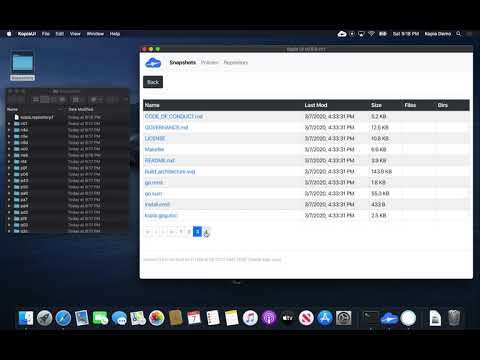
Using Kopia via graphical user interface (note: the video is of an older version of Kopia and the interface is different in the current version of Kopia, but the main principles of the interface are the same):
Getting Started
See Kopia Documentation for more information.
Building Kopia
See Build Infrastructure for more information on building Kopia and working with the source code.
Licensing
Kopia is licensed under the Apache License, Version 2.0. See LICENSE for the full license text.
Contribution Guidelines
Kopia is open source and contributions are welcome. For more information on how to contribute see the Contribution Guidelines.
Reporting Security Issues
If you find a security issue you'd like to disclose privately, please contact security@kopia.io or via direct message to maintainers on Slack.