mirror of
https://github.com/pdfme/pdfme.git
synced 2026-04-18 13:09:38 -04:00
 9b95ea7e58
* Change website keyword

* website image optimize

* website: Add pdfme Cloud link to navigation bar

* website: Add pdfme Cloud link to footer

* update docusaurus

* add SidebarBanner

* Update readme
327 lines
12 KiB
Markdown
327 lines
12 KiB
Markdown
# PDFME
|
||
|
||
<p align="center">
|
||
<img src="https://raw.githubusercontent.com/pdfme/pdfme/main/website/static/img/logo.svg" width="300"/>
|
||
</p>
|
||
|
||
<h4 align="center">
|
||
<a href="https://pdfme.com/">Website</a> |
|
||
<a href="https://app.pdfme.com/">pdfme Cloud</a> |
|
||
<a href="https://discord.gg/xWPTJbmgNV">Discord</a>
|
||
</h4>
|
||
|
||
<p align="center">
|
||
<a href="https://github.com/pdfme/pdfme/blob/master/LICENSE.md">
|
||
<img src="https://img.shields.io/badge/license-MIT-blue.svg" alt="pdfme is released under the MIT license." />
|
||
</a>
|
||
<a href="https://github.com/pdfme/pdfme/actions/workflows/nodejs.yml">
|
||
<img src="https://github.com/pdfme/pdfme/workflows/Unit%20Testing/badge.svg" alt="Unit Testing status" />
|
||
</a>
|
||
<a href="https://www.npmjs.com/package/@pdfme/generator">
|
||
<img src="https://img.shields.io/npm/v/@pdfme/generator.svg" alt="Current npm package version." />
|
||
</a>
|
||
<a href="https://npmcharts.com/compare/@pdfme/common?minimal=true">
|
||
<img src="https://img.shields.io/npm/dm/@pdfme/common.svg" alt="Downloads per month on npm." />
|
||
</a>
|
||
</p>
|
||
|
||
<p align="center">TypeScript base PDF generator and React base UI. Open source, developed by the community, and completely free to use under the MIT license!</p>
|
||
|
||
|
||
## Features
|
||
|
||
| Fast PDF Generator | Easy PDF template design | Simple JSON template |
|
||
| -------------------------------------------------------------------------------------------- | ----------------------------------------------------- | -------------------------------------------------------------- |
|
||
| Works on node and browser. Use templates to generate PDF, Complex operations are not needed. | Anyone can easily create templates with the designer. | Templates are JSON data that is easy to understand and handle. |
|
||
|
||
---
|
||
|
||
<!--
|
||
This is a copy of website/docs/getting-started.md from below.
|
||
- Replace the image path: /img/image.png -> /website/static/img/image.png
|
||
- Replace the link: / -> https://pdfme.com/
|
||
-->
|
||
|
||
## Introduction
|
||
|
||
pdfme was created to simplify the design and generation process of a PDF. It is especially useful for the following use cases:
|
||
|
||
- Need to create a designed PDF with short code.
|
||
- Need to integrate PDF editor features into an application.
|
||
- Need to create a large number of PDFs without compromising performance
|
||
|
||
As an example, the author's service [https://labelmake.jp/](https://labelmake.jp/) can create more than 100 varieties of PDFs and generates more than 100,000 PDF files per month. Notably, the monthly server cost, utilizing Cloud Functions For Firebase, remains below $10.
|
||
|
||
## Installation
|
||
|
||
The operating requirements should be the node environment `>=16`.
|
||
There are two packages in pdfme, generator and UI.
|
||
|
||
The package for generating PDF can be installed with the following command.
|
||
|
||
```
|
||
npm i @pdfme/generator @pdfme/common
|
||
```
|
||
|
||
The packages for using PDF designer, forms and viewers can be installed with the following commands.
|
||
|
||
```
|
||
npm i @pdfme/ui @pdfme/common
|
||
```
|
||
|
||
\*You must install `@pdfme/common` regardless of which package you use.
|
||
|
||
On NPM stable releases are published to the `latest` tag, and pre-releases are published to the `next` tag.
|
||
On the `dev` tag you can find releases for every commit to the `main` branch.
|
||
|
||
The following type, function and classes are available in pdfme.
|
||
|
||
`@pdfme/common`
|
||
|
||
- [Template](https://pdfme.com/docs/getting-started#template)
|
||
|
||
`@pdfme/generator`
|
||
|
||
- [generate](https://pdfme.com/docs/getting-started#generator)
|
||
|
||
`@pdfme/ui`
|
||
|
||
- [Designer](https://pdfme.com/docs/getting-started#designer)
|
||
- [Form](https://pdfme.com/docs/getting-started#form)
|
||
- [Viewer](https://pdfme.com/docs/getting-started#viewer)
|
||
|
||
If your environment uses webpack, import the necessary items as shown below.
|
||
|
||
```ts
|
||
import type { Template } from '@pdfme/common';
|
||
import { generate } from '@pdfme/generator';
|
||
```
|
||
|
||
```ts
|
||
import type { Template } from '@pdfme/common';
|
||
import { Designer, Form, Viewer } from '@pdfme/ui';
|
||
```
|
||
|
||
**All objects use `Template`, which will be briefly explained in the next section.**
|
||
|
||
## Template
|
||
|
||
The core of pdfme library are Templates.
|
||
Template Type can be imported by both `@pdfme/generator` or `@pdfme/ui`. Templates are used everywhere.
|
||
|
||
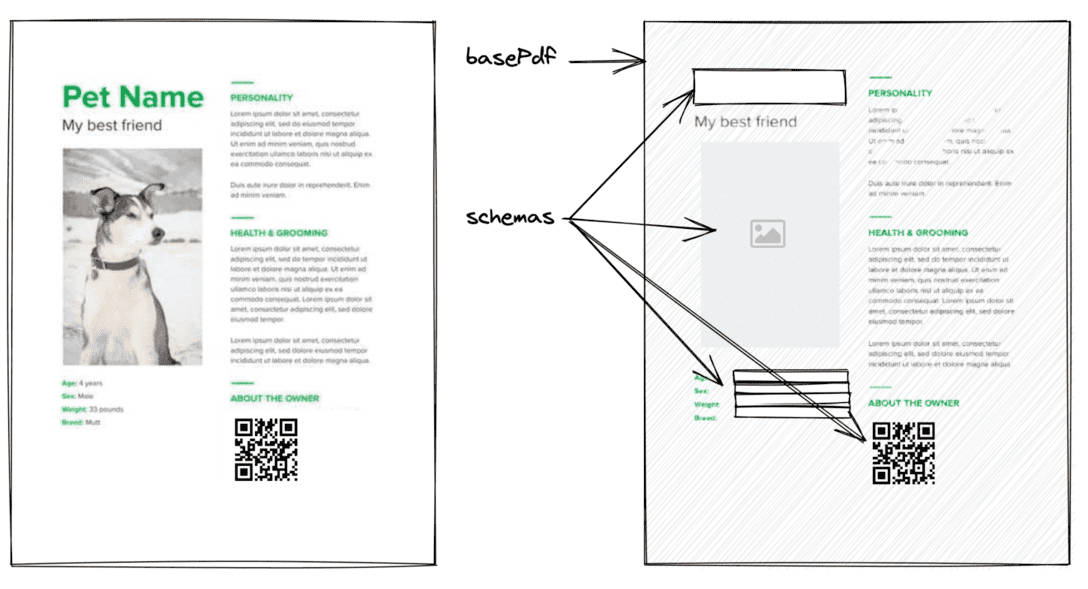
A template can be divided into two parts: a fixed part and a variable part.
|
||
We call them basePdf and schema.
|
||
The following image is a good illustration of a template.
|
||
|
||
|
||
|
||
- **basePdf**: PDF data for the fixed part of the PDF to be generated.
|
||
- **schemas**: Definition data for the variable part of the PDF to be generated.
|
||
|
||
**basePdf** can be given a `string`(base64), `ArrayBuffer`, or `Uint8Array`.
|
||
A blank A4 PDF can be imported with `BLANK_PDF`. You can use it to check how it works.
|
||
|
||
**schemas** can only utilize text by default, but you can load images and various barcodes like QR codes as plugins from the `@pdfme/schemas` package.
|
||
Additionally, you can create your own schemas, allowing you to render types other than the ones mentioned above.
|
||
Check detail about [Custom Schemas](https://pdfme.com/docs/custom-schemas) from here
|
||
|
||
Let's take a look at some specific data.
|
||
(If you are using TypeScript, you can import the Template type.)
|
||
|
||
### Minimal Template
|
||
|
||
```ts
|
||
import { Template, BLANK_PDF } from '@pdfme/common';
|
||
|
||
const template: Template = {
|
||
basePdf: BLANK_PDF,
|
||
schemas: [
|
||
{
|
||
a: {
|
||
type: 'text',
|
||
position: { x: 0, y: 0 },
|
||
width: 10,
|
||
height: 10,
|
||
},
|
||
b: {
|
||
type: 'text',
|
||
position: { x: 10, y: 10 },
|
||
width: 10,
|
||
height: 10,
|
||
},
|
||
c: {
|
||
type: 'text',
|
||
position: { x: 20, y: 20 },
|
||
width: 10,
|
||
height: 10,
|
||
},
|
||
},
|
||
],
|
||
};
|
||
```
|
||
|
||
You can create a template from [Template Design page](https://pdfme.com/template-design). Or, if you want to integrate the template creation feature into your application, check out the [Designer section](https://pdfme.com/docs/getting-started#designer).
|
||
|
||
## Generator
|
||
|
||
The PDF generator function, `generate`, takes 2 arguments of `template` and `inputs` for generate a PDF. It works both in Node.js and in the browser.
|
||
|
||
The code to generate a PDF file using the [template created above](https://pdfme.com/docs/getting-started#sample-template) is shown below.
|
||
|
||
```ts
|
||
import type { Template } from '@pdfme/common';
|
||
import { generate } from '@pdfme/generator';
|
||
|
||
const template: Template = {
|
||
// skip... Check the Template section.
|
||
};
|
||
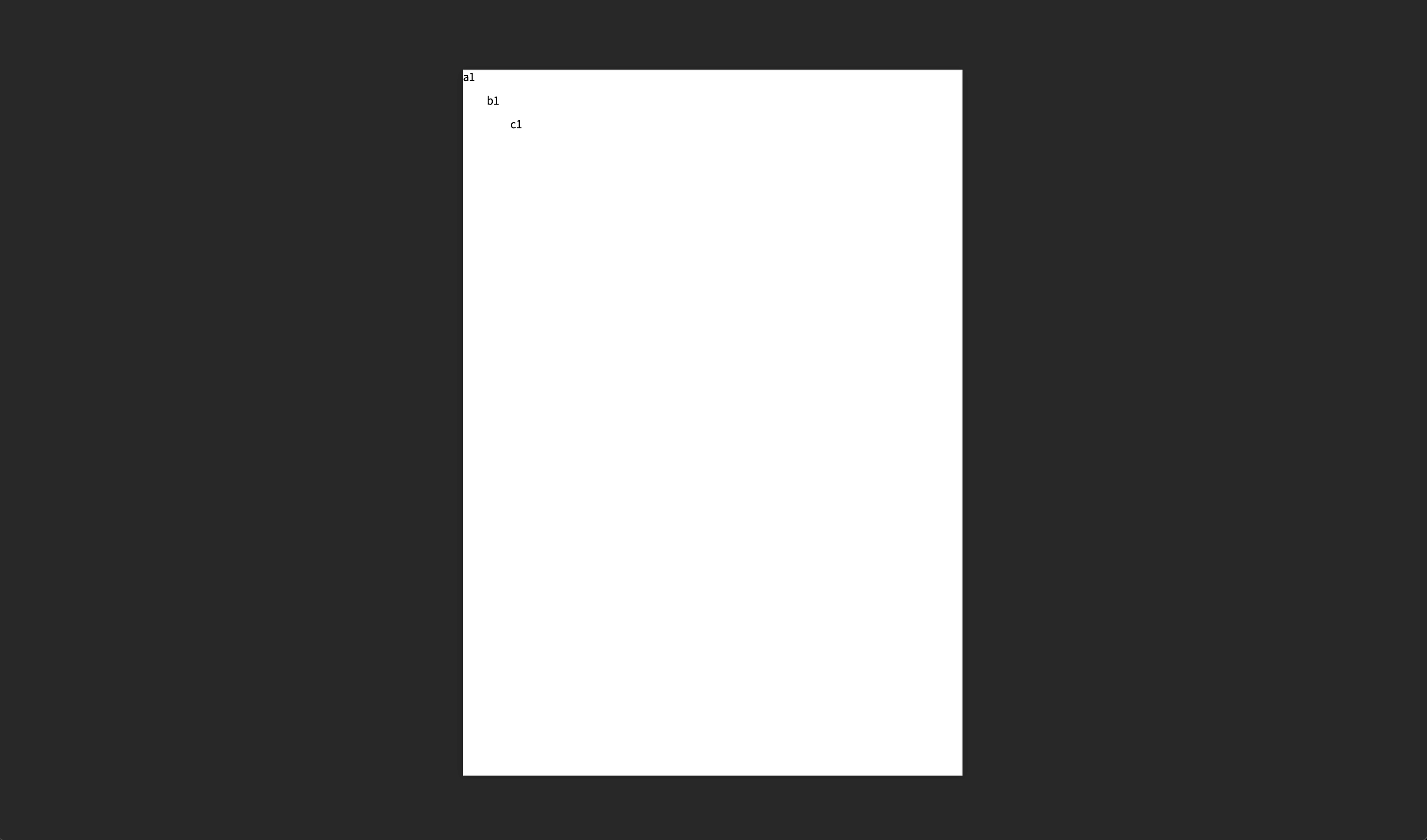
const inputs = [{ a: 'a1', b: 'b1', c: 'c1' }];
|
||
|
||
generate({ template, inputs }).then((pdf) => {
|
||
console.log(pdf);
|
||
|
||
// Browser
|
||
// const blob = new Blob([pdf.buffer], { type: 'application/pdf' });
|
||
// window.open(URL.createObjectURL(blob));
|
||
|
||
// Node.js
|
||
// fs.writeFileSync(path.join(__dirname, `test.pdf`), pdf);
|
||
});
|
||
```
|
||
|
||
You can create a PDF file like the below.
|
||
|
||
|
||
|
||
Also, each element in the inputs array corresponds to a page in the PDF, you can create a multi-page PDF file by providing multiple elements of inputs.
|
||
|
||
## UI
|
||
|
||
The UI is composed of the [Designer](https://pdfme.com/docs/getting-started#designer), [Form](https://pdfme.com/docs/getting-started#form), and [Viewer](https://pdfme.com/docs/getting-started#viewer) classes.
|
||
|
||
### Designer
|
||
|
||
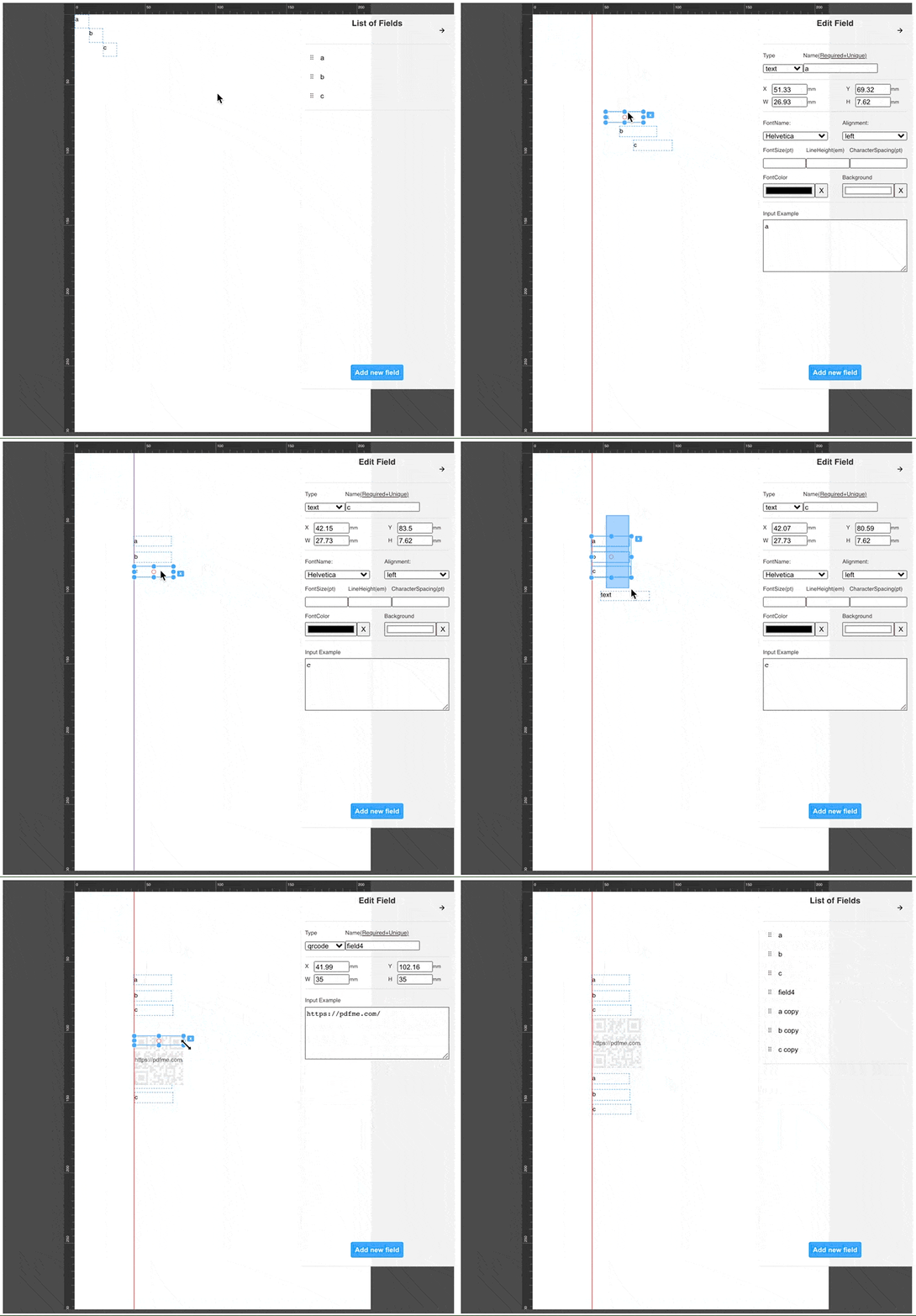
The Designer allows you to edit the Template schemas, making it easy for anyone to create Template json objects.
|
||
|
||
You can design your own template from [Template Design page](https://pdfme.com/template-design), or you can integrate the designer into your application.
|
||
|
||
Let's integrate the designer using the template created above as the default template.
|
||
|
||
```ts
|
||
import type { Template } from '@pdfme/common';
|
||
import { Designer } from '@pdfme/ui';
|
||
|
||
const domContainer = document.getElementById('container');
|
||
const template: Template = {
|
||
// skip... Check the Template section.
|
||
};
|
||
|
||
const designer = new Designer({ domContainer, template });
|
||
```
|
||
|
||
The Designer class is instantiated as shown above, and the template designer is displayed in the `domContainer`.
|
||
You can edit the template as shown below. The operation is like Google Slides, etc., so you can use common keyboard shortcuts.
|
||
|
||
|
||
|
||
The designer instance can be manipulated with the following methods.
|
||
|
||
- `saveTemplate`
|
||
- `updateTemplate`
|
||
- `getTemplate`
|
||
- `onChangeTemplate`
|
||
- `onSaveTemplate`
|
||
- `destroy`
|
||
|
||
### Form
|
||
|
||
You can use templates to create forms and PDF viewers.
|
||
|
||
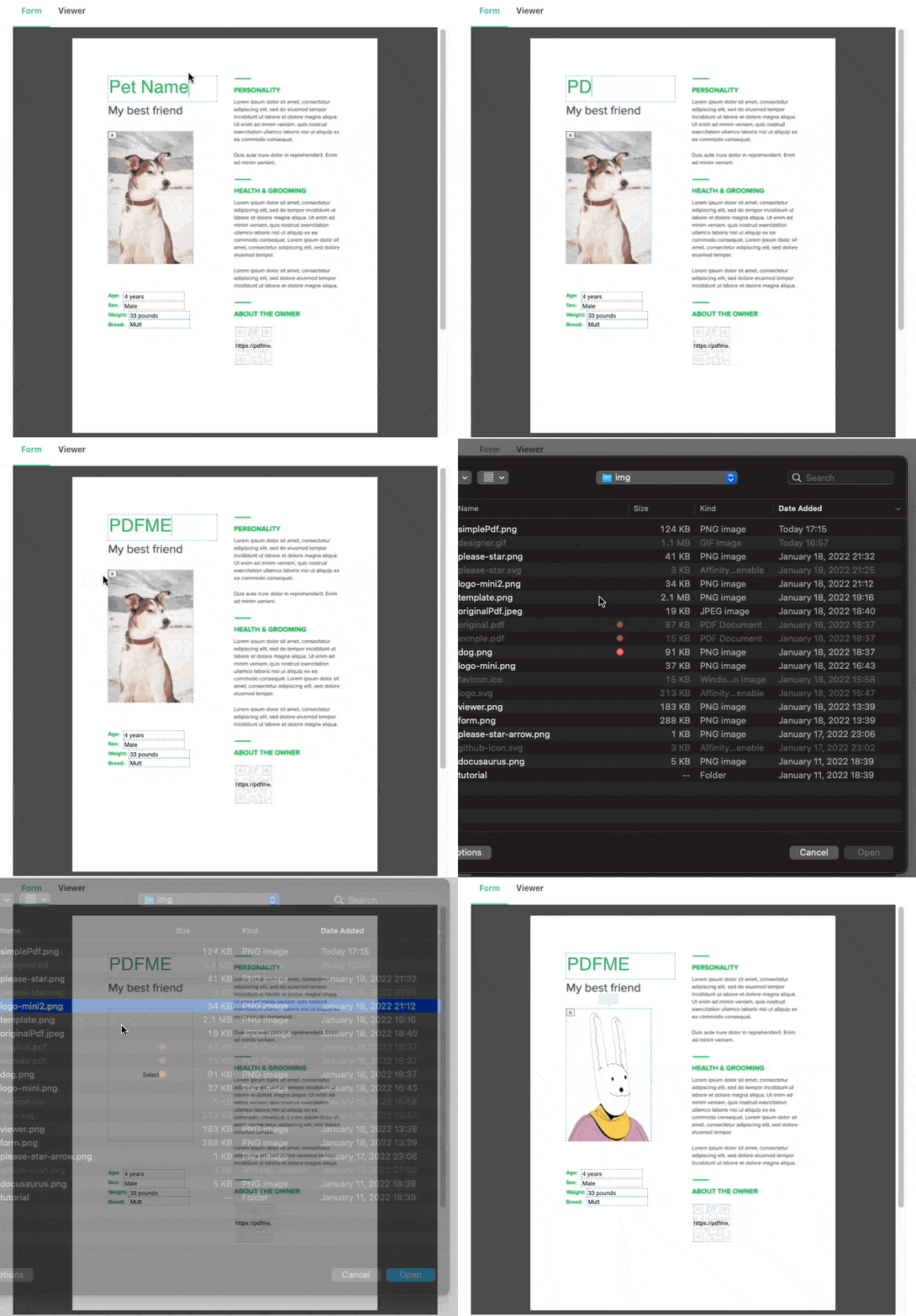
The Form creates a UI for the user to enter schemas based on the template.
|
||
|
||
```ts
|
||
import type { Template } from '@pdfme/common';
|
||
import { Form } from '@pdfme/ui';
|
||
|
||
const domContainer = document.getElementById('container');
|
||
const template: Template = {
|
||
// skip...
|
||
};
|
||
// This is initial data.
|
||
const inputs = [{ a: 'a1', b: 'b1', c: 'c1' }];
|
||
|
||
const form = new Form({ domContainer, template, inputs });
|
||
```
|
||
|
||
|
||
|
||
The form instance has a method `getInputs` to get the user's input.
|
||
|
||
You can generate a PDF file based on the user's input by passing the data you get from `getInputs` as inputs to generate, as shown in the code below.
|
||
|
||
```ts
|
||
generate({ template, inputs: form.getInputs() }).then((pdf) => {
|
||
const blob = new Blob([pdf.buffer], { type: 'application/pdf' });
|
||
window.open(URL.createObjectURL(blob));
|
||
});
|
||
```
|
||
|
||
### Viewer
|
||
|
||
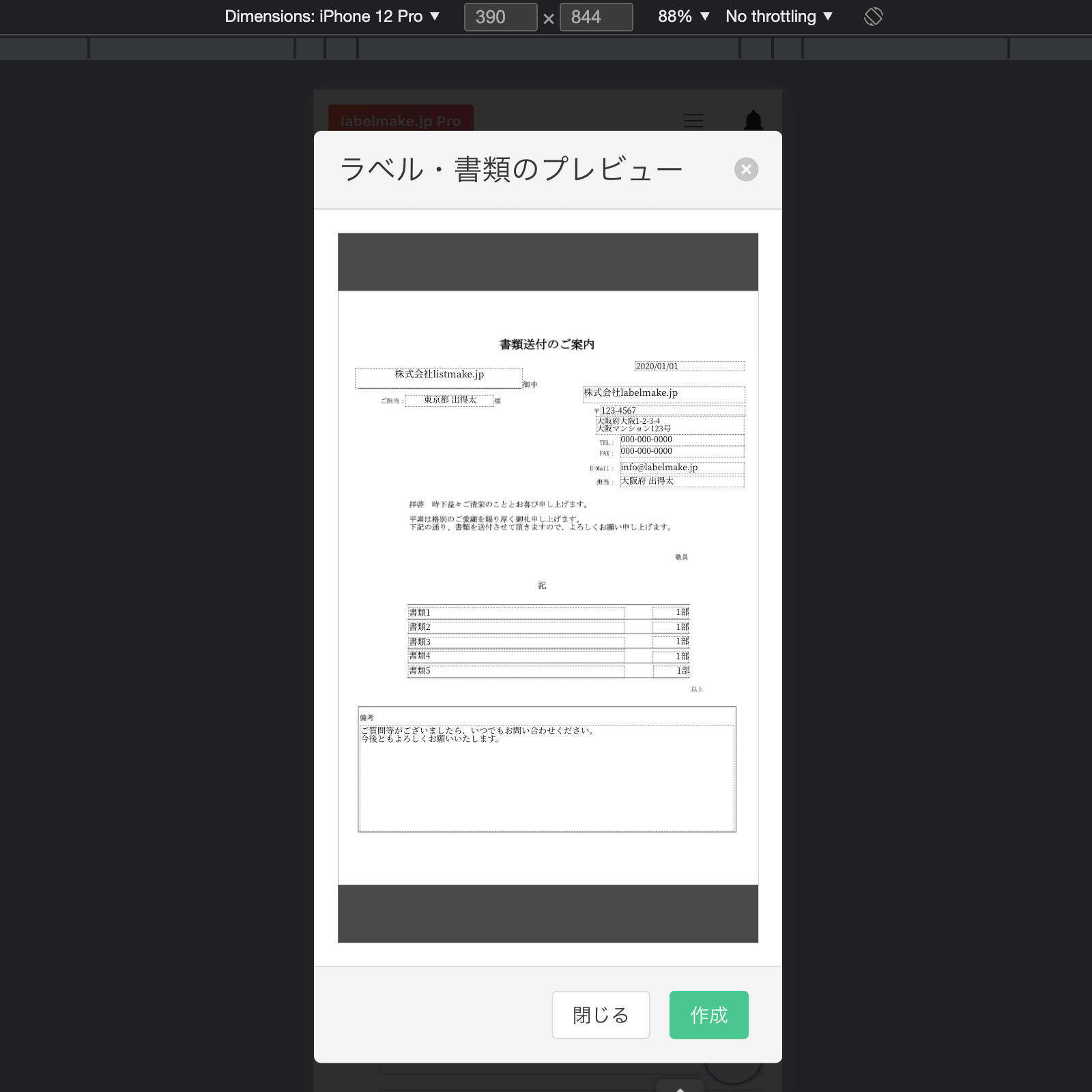
Viewing a PDF file in a mobile browser is a pain, because it doesn't display well in an iframe.
|
||
|
||
The Viewer is a byproduct of the Form development process, but it allows you to show your users a preview of the PDF file you will create.
|
||
|
||
Using the Viewer is basically the same as using the Form, except that user cannot edit it.
|
||
|
||
```ts
|
||
import type { Template } from '@pdfme/common';
|
||
import { Viewer } from '@pdfme/ui';
|
||
|
||
const domContainer = document.getElementById('container');
|
||
const template: Template = {
|
||
// skip...
|
||
};
|
||
const inputs = [{ a: 'a1', b: 'b1', c: 'c1' }];
|
||
|
||
const viewer = new Viewer({ domContainer, template, inputs });
|
||
```
|
||
|
||
|
||
|
||
## Examples using pdfme
|
||
|
||
If you are looking for code examples using pdfme to get started, please check out the [pdfme-playground](https://github.com/pdfme/pdfme-playground) repository
|
||
or look at the examples in the `websit/src/pages/` folder of this repository. Settings these up is covered in the [DEVELOPMENT.md](DEVELOPMENT.md) file.
|
||
|
||
## Special Thanks
|
||
|
||
- [pdf-lib](https://pdf-lib.js.org/): Used in PDF generation.
|
||
- [fontkit](https://github.com/foliojs/fontkit): Used in font rendering.
|
||
- [PDF.js](https://mozilla.github.io/pdf.js/): Used in PDF viewing.
|
||
- [React](https://reactjs.org/): Used in building the UI.
|
||
- [form-render](https://xrender.fun/form-render): Used in building the UI.
|
||
- [antd](https://ant.design/): Used in building the UI.
|
||
- [react-moveable](https://daybrush.com/moveable/), [react-selecto](https://github.com/daybrush/selecto), [@scena/react-guides](https://daybrush.com/guides/): Used in Designer UI.
|
||
- [dnd-kit](https://github.com/clauderic/dnd-kit): Used in Designer UI.
|
||
|
||
I definitely could not have created pdfme without these libraries. I am grateful to the developers of these libraries.
|
||
|
||
If you want to contribute to pdfme, please check the [Development Guide](https://pdfme.com/docs/development-guide) page.
|
||
We look forward to your contribution!
|
||
|
||
## Cloud Service Option
|
||
|
||
While pdfme is a powerful open-source library, we understand that some users might prefer a managed solution. For those looking for a ready-to-use, scalable PDF generation service without the need for setup and maintenance, we offer pdfme Cloud.
|
||
|
||
**[Try pdfme Cloud - Hassle-free PDF Generation](https://app.pdfme.com/)**
|
||
|
||
pdfme Cloud provides all the features of the open-source library, plus:
|
||
|
||
- PDF generation at scale without infrastructure management
|
||
- Hosted WYSIWYG template designer
|
||
- Simple API integration
|
||
- Automatic updates and maintenance
|
||
|
||
\*pdfme is and will always remain open-source. The cloud service is an optional offering for those who prefer a managed solution.
|