 Zoltan Kochan
162be75306
Zoltan Kochan
162be75306
`python.executable` named one interpreter for the whole workspace, and a
project whose `requires-python` that interpreter did not satisfy failed the
install. A monorepo whose projects support different Python versions had no
way to express that, and the `.python-version` file four of the eight
repositories in pnpm/pnpm#14945 pin their interpreter with was not read at
all.

Each project now gets the first interpreter this machine has that its
`requires-python` accepts. `python.executable` still names one for every
project when a workspace wants that, and is the only interpreter tried when
it is set, so its range check stays a hard error.

The search runs in two rounds so that a project constraining nothing starts
one interpreter, as it did when pnpm always ran `python3`. The first round
is `python3`, `python`, and the requested version by name (the launcher's
`-3.13` on Windows); the second reads the PATH for every `python3.<minor>`
and asks the Windows launcher what it can run, newest first. Each is a
candidate by its own path, so one minor version installed in two directories
is two candidates, while paths reaching the same file are one. Probes and
the scan are cached per install, so a workspace of projects that accept the
same interpreter pays for one.

Interpreters inside the workspace are not searched. An install started from
a script has the workspace's `node_modules/.bin` on its PATH, where a
dependency could otherwise ship the interpreter that installs a project.

The nearest `.python-version` file, searched from the project up to the
workspace root, asks for a version that `3.13` reads as every 3.13.x. It is
a preference rather than a requirement: pnpm cannot install an interpreter
yet, so a pin this machine cannot meet warns and installs with one the
project's own range accepts instead of failing an install that worked
before. The file belongs to pyenv and others too, so a line naming a
distribution rather than a version is reported and ignored.

When nothing fits, the error names the range, the pin, and every
interpreter that was tried with the version it reported.

Related to pnpm/pnpm#14945.
简体中文 | 日本語 | 한국어 | Italiano | Português Brasileiro

Fast, disk space efficient package manager:
- Fast. Up to 2x faster than the alternatives (see benchmark).
- Efficient. Files inside
node_modulesare linked from a single content-addressable storage. - Great for monorepos.
- Strict. A package can access only dependencies that are specified in its
package.json. - Deterministic. Has a lockfile called
pnpm-lock.yaml. - Works as a Node.js version manager. See pnpm runtime.
- Works everywhere. Supports Windows, Linux, and macOS.
- Battle-tested. Used in production by teams of all sizes since 2016.
- Experimental Rust port. Includes pacquet, an experimental port of the CLI written in Rust.
- See the full feature comparison with npm and Yarn.
To quote the Rush team:
Microsoft uses pnpm in Rush repos with hundreds of projects and hundreds of PRs per day, and we’ve found it to be very fast and reliable.



Platinum Sponsors

|

|

|

|
Gold Sponsors

|

|

|

|

|

|

|

|
Silver Sponsors
|

|

|

|

|

|

|

|
|
| ⏱️ Time.now |
Support this project by becoming a sponsor.
Background
pnpm uses a content-addressable filesystem to store all files from all module directories on a disk. When using npm, if you have 100 projects using lodash, you will have 100 copies of lodash on disk. With pnpm, lodash will be stored in a content-addressable storage, so:
- If you depend on different versions of lodash, only the files that differ are added to the store.
If lodash has 100 files, and a new version has a change only in one of those files,
pnpm updatewill only add 1 new file to the storage. - All the files are saved in a single place on the disk. When packages are installed, their files are linked from that single place consuming no additional disk space. Linking is performed using either hard-links or reflinks (copy-on-write).
As a result, you save gigabytes of space on your disk and you have a lot faster installations!
If you'd like more details about the unique node_modules structure that pnpm creates and
why it works fine with the Node.js ecosystem, read this small article: Flat node_modules is not the only way.
💖 Like this project? Let people know with a tweet
Getting Started
Benchmark
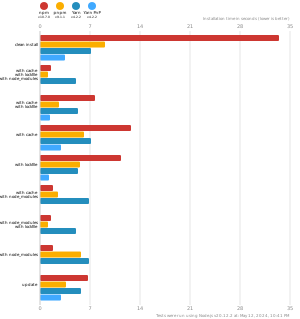
pnpm is up to 2x faster than npm and Yarn classic. See all benchmarks here.
Benchmarks on an app with lots of dependencies:
License
MIT, except the pnpr/ directory, which is source-available under the PolyForm Shield License 1.0.0.