 Zoltan Kochan
338ac4d8b3
Zoltan Kochan
338ac4d8b3
A project whose `requires-python` no interpreter on the machine satisfied
was reported and left uninstalled, and a `.python-version` naming a version
the machine did not have was warned about. Four of the eight repositories in
pnpm/pnpm#14945 pin an interpreter that way, so the install stopped before
resolving anything.

pnpm now installs one. The builds are python-build-standalone's, which uv,
rye, hatch and mise install too, so the interpreter a Python developer
expects is the one that arrives. A release holds an interpreter of every
version line it supports, and its `SHA256SUMS` is both the list of what pnpm
can install and the digest every download is checked against; it is cached
for a day. The newest build the project accepts is the one installed, so a
range takes the newest release inside it and a pin takes the version it
names.

An interpreter lands under `<store>/python/`, shared by every project and
repository on the machine, and is found there afterwards like any other
interpreter: a later install uses it without reading the release at all, an
offline one included. It is unpacked beside where it belongs and moved
there, so a directory under `python` is one an install can use and never a
download that stopped halfway, and two installs racing for one build end
with the interpreter either of them unpacked.

`downloads: never` keeps pnpm from installing any, and an offline install
installs none. Both report the project, saying which of the two refused.
`downloadUrl` names a mirror of the releases.

Related to pnpm/pnpm#14945.
简体中文 | 日本語 | 한국어 | Italiano | Português Brasileiro

Fast, disk space efficient package manager:
- Fast. Up to 2x faster than the alternatives (see benchmark).
- Efficient. Files inside
node_modulesare linked from a single content-addressable storage. - Great for monorepos.
- Strict. A package can access only dependencies that are specified in its
package.json. - Deterministic. Has a lockfile called
pnpm-lock.yaml. - Works as a Node.js version manager. See pnpm runtime.
- Works everywhere. Supports Windows, Linux, and macOS.
- Battle-tested. Used in production by teams of all sizes since 2016.
- Experimental Rust port. Includes pacquet, an experimental port of the CLI written in Rust.
- See the full feature comparison with npm and Yarn.
To quote the Rush team:
Microsoft uses pnpm in Rush repos with hundreds of projects and hundreds of PRs per day, and we’ve found it to be very fast and reliable.



Platinum Sponsors

|

|

|

|
Gold Sponsors

|

|

|

|

|

|

|

|
Silver Sponsors
|

|

|

|

|

|

|

|
|
| ⏱️ Time.now |
Support this project by becoming a sponsor.
Background
pnpm uses a content-addressable filesystem to store all files from all module directories on a disk. When using npm, if you have 100 projects using lodash, you will have 100 copies of lodash on disk. With pnpm, lodash will be stored in a content-addressable storage, so:
- If you depend on different versions of lodash, only the files that differ are added to the store.
If lodash has 100 files, and a new version has a change only in one of those files,
pnpm updatewill only add 1 new file to the storage. - All the files are saved in a single place on the disk. When packages are installed, their files are linked from that single place consuming no additional disk space. Linking is performed using either hard-links or reflinks (copy-on-write).
As a result, you save gigabytes of space on your disk and you have a lot faster installations!
If you'd like more details about the unique node_modules structure that pnpm creates and
why it works fine with the Node.js ecosystem, read this small article: Flat node_modules is not the only way.
💖 Like this project? Let people know with a tweet
Getting Started
Benchmark
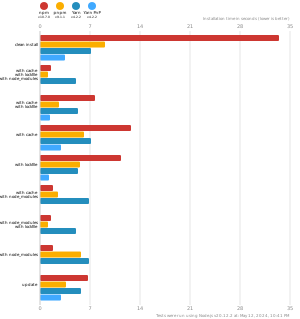
pnpm is up to 2x faster than npm and Yarn classic. See all benchmarks here.
Benchmarks on an app with lots of dependencies:
License
MIT, except the pnpr/ directory, which is source-available under the PolyForm Shield License 1.0.0.