Zoltan Kochan
42e6490d18
Zoltan Kochan
42e6490d18
When a new package is being added to the store, its manifest is streamed
in the memory. So instead of reading the manifest from the filesystem,
we can parse the stream from the memory.

PR #2525

pnpm
Fast, disk space efficient package manager


Features:
- Fast. As fast as npm and Yarn.
- Efficient. Files inside
node_modulesare linked from a single content-addressable storage. - Great for monorepos.
- Strict. A package can access only dependencies that are specified in its
package.json. - Deterministic. Has a lockfile called
pnpm-lock.yaml. - Works everywhere. Works on Windows, Linux, and OS X.
Like this project? Let people know with a tweet.
Table of Contents
Background
pnpm uses a content-addressable filesystem to store all files from all module directories on a disk. When using npm or Yarn, if you have 100 projects using lodash, you will have 100 copies of lodash on disk. With pnpm, lodash will be stored in a content-addressable storage, so:
- If you depend on different versions of lodash, only the files that differ are added to the store.
If lodash has 100 files, and a new version has a change only in one of those files,
pnpm updatewill only add 1 new file to the storage. - All the files are saved in a single place on the disk. When packages are installed, their files are hard-linked from that single place consuming no additional disk space.
As a result, you save gigabytes of space on your disk and you have a lot faster installations!
If you'd like more details about the unique node_modules structure that pnpm creates and
why it works fine with the Node.js ecosystem, read this small article: Flat node_modules is not the only way.
Install
Using a standalone script:
curl -L https://raw.githubusercontent.com/pnpm/self-installer/master/install.js | node
On Windows (PowerShell):
(Invoke-WebRequest 'https://raw.githubusercontent.com/pnpm/self-installer/master/install.js').Content | node
Via npx:
npx pnpm add -g pnpm
Once you first installed pnpm, you can upgrade it using pnpm:
pnpm add -g pnpm
Do you wanna use pnpm on CI servers? See: Continuous Integration.
Usage
pnpm CLI
Just use pnpm in place of npm. For instance, to install run:
pnpm install
For more advanced usage, read pnpm CLI on our website.
For using the programmatic API, use pnpm's engine: supi.
pnpx CLI
npm has a great package runner called npx.
pnpm offers the same tool via the pnpx command. The only difference is that pnpx uses pnpm for installing packages.
The following command installs a temporary create-react-app and calls it, without polluting global installs or requiring more than one step!
pnpx create-react-app my-cool-new-app
Benchmark
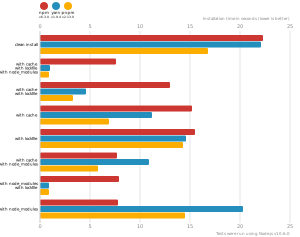
pnpm is as fast as npm and Yarn. See all benchmarks here.
Benchmarks on a React app:
Support
Contributors
This project exists thanks to all the people who contribute. [Contribute].

Backers
Thank you to all our backers! 🙏 [Become a backer]

Sponsors
Support this project by becoming a sponsor. Your logo will show up here with a link to your website. [Become a sponsor]