Zoltan Kochan
45a6cb6b2a
Zoltan Kochan
45a6cb6b2a
Replaces the dual `authConfig` (raw .npmrc) + `authInfos` (parsed auth) + `sslConfigs` (parsed SSL) pattern with a single structured `configByUri: Record<string, RegistryConfig>` field on Config.

### New types (`@pnpm/types`)
- **`RegistryConfig`** — per-registry config: `{ creds?: Creds, tls?: TlsConfig }`
- **`Creds`** — auth credentials: `{ authToken?, basicAuth?, tokenHelper? }`
- **`TlsConfig`** — TLS config: `{ cert?, key?, ca? }`

### Key changes
- Rewrite `createGetAuthHeaderByURI` to accept `Record<string, RegistryConfig>` instead of raw .npmrc key-value pairs
- Eliminate duplicate auth parsing between `getAuthHeadersFromConfig` and `getNetworkConfigs`
- Remove `authConfig` from the install pipeline (`StrictInstallOptions`, `HeadlessOptions`), replaced by `configByUri`
- Remove `sslConfigs` from Config — SSL fields now live in `configByUri[uri].tls`
- Remove `authConfig['registry']` mutation in `extendInstallOptions` (default registry now passed directly to `createGetAuthHeaderByURI`)
- `authConfig` remains on Config only for raw .npmrc access (config commands, error reporting, config inheritance)

### Security
- tokenHelper in project .npmrc now throws instead of being silently stripped
- tokenHelper execution uses `shell: false` to prevent shell metacharacter injection
- Basic auth uses `Buffer.from().toString('base64')` instead of `btoa()` for Unicode safety
- Dispatcher only creates custom agents when entries actually have TLS fields
简体中文 | 日本語 | 한국어 | Italiano | Português Brasileiro

Fast, disk space efficient package manager:
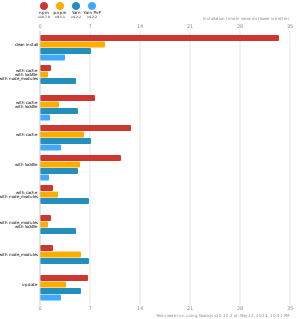
- Fast. Up to 2x faster than the alternatives (see benchmark).
- Efficient. Files inside
node_modulesare linked from a single content-addressable storage. - Great for monorepos.
- Strict. A package can access only dependencies that are specified in its
package.json. - Deterministic. Has a lockfile called
pnpm-lock.yaml. - Works as a Node.js version manager. See pnpm env use.
- Works everywhere. Supports Windows, Linux, and macOS.
- Battle-tested. Used in production by teams of all sizes since 2016.
- See the full feature comparison with npm and Yarn.
To quote the Rush team:
Microsoft uses pnpm in Rush repos with hundreds of projects and hundreds of PRs per day, and we’ve found it to be very fast and reliable.



Platinum Sponsors

|
Gold Sponsors

|

|

|

|

|

|

|

|
Silver Sponsors

|

|

|

|

|

|

|
⏱️ Time.now |
Support this project by becoming a sponsor.
Background
pnpm uses a content-addressable filesystem to store all files from all module directories on a disk. When using npm, if you have 100 projects using lodash, you will have 100 copies of lodash on disk. With pnpm, lodash will be stored in a content-addressable storage, so:
- If you depend on different versions of lodash, only the files that differ are added to the store.
If lodash has 100 files, and a new version has a change only in one of those files,
pnpm updatewill only add 1 new file to the storage. - All the files are saved in a single place on the disk. When packages are installed, their files are linked from that single place consuming no additional disk space. Linking is performed using either hard-links or reflinks (copy-on-write).
As a result, you save gigabytes of space on your disk and you have a lot faster installations!
If you'd like more details about the unique node_modules structure that pnpm creates and
why it works fine with the Node.js ecosystem, read this small article: Flat node_modules is not the only way.
💖 Like this project? Let people know with a tweet
Getting Started
Benchmark
pnpm is up to 2x faster than npm and Yarn classic. See all benchmarks here.
Benchmarks on an app with lots of dependencies: