 Zoltan Kochan
473cccecef
Zoltan Kochan
473cccecef
Fix three `pnpm prune` issues across pnpm v11 and pnpm v12:

1. Extraneous direct dependencies in `node_modules`:
   - In pnpm v11, `prune.handler` did not disable `optimisticRepeatInstall`, and `installDeps` could short-circuit via `canReportAlreadyUpToDate` before `headlessInstall` ran `prune()`. In addition, `pruneRemovedDependencies` skipped `prune()` when `currentLockfile` was absent (for example, when a project had zero dependencies). Disable `optimisticRepeatInstall` in `prune.handler`, prevent `canReportAlreadyUpToDate` when `pruneDirectDependencies` or `pruneStore` is set, and pass an empty `currentLockfile` to `prune()` when `pruneDirectDependencies` is enabled and no current lockfile exists.
   - In pnpm v12 (`pacquet`), `prune_stale_modules` only unlinked direct dependencies that were present in `current_lockfile` and removed from `wanted_lockfile`, never scanning `node_modules` on disk for extraneous entries when `prune` ran. Add `PruneTreeOptions::direct_dependencies` and `PruneExtraneousDirectDeps` to scan each selected importer's `node_modules` directory during `pnpm prune`, remove entries (and their bin shims and emptied scope directories) that are not wanted direct dependencies, excluded manifest links, or root public hoists, and force `commit_modules_state`'s virtual-store sweep during `prune`.

2. `pnpm --filter <pkg> prune` and `pnpm -r prune` in pnpm v11:
   - Separate `cliOptionsTypes` from `rcOptionsTypes` in `@pnpm/installing.commands` `prune` and add `'recursive': Boolean` so the CLI parser accepts `-r` / `--recursive` and `--filter`.
   - Do not pass `include` to `validateModules` when `pruneDirectDependencies` is set so `prune --prod` does not purge every workspace project's `node_modules` directory.
   - Do not auto-include the workspace root in `shouldInstallWorkspaceRoot` during filtered `prune`.
   - Scope `pruneDirectDependencies` to the selected `ctx.projects` and keep all dependency groups in `findOrphanDepPaths` / `getPkgsDepPathsOwnedOnlyByImporters` during a partial workspace `prune` so unselected workspace importers do not lose their devDependencies from the shared virtual store.

3. Workspace selection and `sharedWorkspaceLockfile: false` in pnpm v12:
   - Add `CliCommand::Prune(_)` to `CliCommand::recursive_by_default`.
   - Route `PrunePipeline` through `select_install_family_plan` (`PerProject`, `Shared`, `Single`) and pass `WorkspaceInstallSelection` (with `install_dirs` restricted to `selected_dirs`) into `Install::run_prune`.

Closes https://github.com/pnpm/tasks/issues/171
简体中文 | 日本語 | 한국어 | Italiano | Português Brasileiro

Fast, disk space efficient package manager:
- Fast. Up to 2x faster than the alternatives (see benchmark).
- Efficient. Files inside
node_modulesare linked from a single content-addressable storage. - Great for monorepos.
- Strict. A package can access only dependencies that are specified in its
package.json. - Deterministic. Has a lockfile called
pnpm-lock.yaml. - Works as a Node.js version manager. See pnpm runtime.
- Works everywhere. Supports Windows, Linux, and macOS.
- Battle-tested. Used in production by teams of all sizes since 2016.
- Experimental Rust port. Includes pacquet, an experimental port of the CLI written in Rust.
- See the full feature comparison with npm and Yarn.
To quote the Rush team:
Microsoft uses pnpm in Rush repos with hundreds of projects and hundreds of PRs per day, and we’ve found it to be very fast and reliable.



Platinum Sponsors

|

|

|

|
Gold Sponsors

|

|

|

|

|

|

|

|
Silver Sponsors

|

|

|

|

|

|

|

|

|
| ⏱️ Time.now |
Support this project by becoming a sponsor.
Background
pnpm uses a content-addressable filesystem to store all files from all module directories on a disk. When using npm, if you have 100 projects using lodash, you will have 100 copies of lodash on disk. With pnpm, lodash will be stored in a content-addressable storage, so:
- If you depend on different versions of lodash, only the files that differ are added to the store.
If lodash has 100 files, and a new version has a change only in one of those files,
pnpm updatewill only add 1 new file to the storage. - All the files are saved in a single place on the disk. When packages are installed, their files are linked from that single place consuming no additional disk space. Linking is performed using either hard-links or reflinks (copy-on-write).
As a result, you save gigabytes of space on your disk and you have a lot faster installations!
If you'd like more details about the unique node_modules structure that pnpm creates and
why it works fine with the Node.js ecosystem, read this small article: Flat node_modules is not the only way.
💖 Like this project? Let people know with a tweet
Getting Started
Benchmark
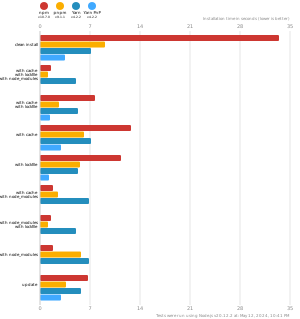
pnpm is up to 2x faster than npm and Yarn classic. See all benchmarks here.
Benchmarks on an app with lots of dependencies:
License
MIT, except the pnpr/ directory, which is source-available under the PolyForm Shield License 1.0.0.