4a36b9a110
## Summary

Rename all internal packages so their npm names follow the `@pnpm/<domain>.<leaf>` convention, matching their directory structure. Also rename directories to remove redundancy and improve clarity.

### Bulk rename (94 packages)

All `@pnpm/` packages now derive their name from their directory path using dot-separated segments. Exceptions: `packages/`, `__utils__/`, and `pnpm/artifacts/` keep leaf names only.

### Directory renames (removing redundant prefixes)

- `cli/cli-meta` → `cli/meta`, `cli/cli-utils` → `cli/utils`
- `config/config` → `config/reader`, `config/config-writer` → `config/writer`
- `fetching/fetching-types` → `fetching/types`
- `lockfile/lockfile-to-pnp` → `lockfile/to-pnp`
- `store/store-connection-manager` → `store/connection-manager`
- `store/store-controller-types` → `store/controller-types`
- `store/store-path` → `store/path`

### Targeted renames (clarity improvements)

- `deps/dependency-path` → `deps/path` (`@pnpm/deps.path`)
- `deps/calc-dep-state` → `deps/graph-hasher` (`@pnpm/deps.graph-hasher`)
- `deps/inspection/dependencies-hierarchy` → `deps/inspection/tree-builder` (`@pnpm/deps.inspection.tree-builder`)
- `bins/link-bins` → `bins/linker`, `bins/remove-bins` → `bins/remover`, `bins/package-bins` → `bins/resolver`
- `installing/get-context` → `installing/context`
- `store/package-store` → `store/controller`
- `pkg-manifest/manifest-utils` → `pkg-manifest/utils`

### Manifest reader/writer renames

- `workspace/read-project-manifest` → `workspace/project-manifest-reader` (`@pnpm/workspace.project-manifest-reader`)
- `workspace/write-project-manifest` → `workspace/project-manifest-writer` (`@pnpm/workspace.project-manifest-writer`)
- `workspace/read-manifest` → `workspace/workspace-manifest-reader` (`@pnpm/workspace.workspace-manifest-reader`)
- `workspace/manifest-writer` → `workspace/workspace-manifest-writer` (`@pnpm/workspace.workspace-manifest-writer`)

### Workspace package renames

- `workspace/find-packages` → `workspace/projects-reader`
- `workspace/find-workspace-dir` → `workspace/root-finder`
- `workspace/resolve-workspace-range` → `workspace/range-resolver`
- `workspace/filter-packages-from-dir` merged into `workspace/filter-workspace-packages` → `workspace/projects-filter`

### Domain moves

- `pkg-manifest/read-project-manifest` → `workspace/project-manifest-reader`
- `pkg-manifest/write-project-manifest` → `workspace/project-manifest-writer`
- `pkg-manifest/exportable-manifest` → `releasing/exportable-manifest`

### Scope

- 1206 files changed
- Updated: package.json names/deps, TypeScript imports, tsconfig references, changeset files, renovate.json, test fixtures, import ordering
简体中文 | 日本語 | 한국어 | Italiano | Português Brasileiro

Fast, disk space efficient package manager:
- Fast. Up to 2x faster than the alternatives (see benchmark).
- Efficient. Files inside
node_modulesare linked from a single content-addressable storage. - Great for monorepos.
- Strict. A package can access only dependencies that are specified in its
package.json. - Deterministic. Has a lockfile called
pnpm-lock.yaml. - Works as a Node.js version manager. See pnpm env use.
- Works everywhere. Supports Windows, Linux, and macOS.
- Battle-tested. Used in production by teams of all sizes since 2016.
- See the full feature comparison with npm and Yarn.
To quote the Rush team:
Microsoft uses pnpm in Rush repos with hundreds of projects and hundreds of PRs per day, and we’ve found it to be very fast and reliable.



Platinum Sponsors

|
Gold Sponsors

|

|

|

|

|

|

|

|
Silver Sponsors

|

|

|

|

|

|
| ⏱️ Time.now |
Support this project by becoming a sponsor.
Background
pnpm uses a content-addressable filesystem to store all files from all module directories on a disk. When using npm, if you have 100 projects using lodash, you will have 100 copies of lodash on disk. With pnpm, lodash will be stored in a content-addressable storage, so:
- If you depend on different versions of lodash, only the files that differ are added to the store.
If lodash has 100 files, and a new version has a change only in one of those files,
pnpm updatewill only add 1 new file to the storage. - All the files are saved in a single place on the disk. When packages are installed, their files are linked from that single place consuming no additional disk space. Linking is performed using either hard-links or reflinks (copy-on-write).
As a result, you save gigabytes of space on your disk and you have a lot faster installations!
If you'd like more details about the unique node_modules structure that pnpm creates and
why it works fine with the Node.js ecosystem, read this small article: Flat node_modules is not the only way.
💖 Like this project? Let people know with a tweet
Getting Started
Benchmark
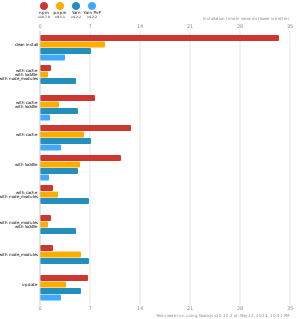
pnpm is up to 2x faster than npm and Yarn classic. See all benchmarks here.
Benchmarks on an app with lots of dependencies: