Zoltan Kochan
4b25d60f62
Zoltan Kochan
4b25d60f62
Reported against pacquet's configDependencies preview engine for `msw@2.12.14`: install fails with `ERR_PNPM_PATCH_FAILED ... error applying hunk #1` even though the patch is perfectly valid. Original report (patch file + error log): [Stanzilla/21648ae644068c3aef3d18693c7c32c9](https://gist.github.com/Stanzilla/21648ae644068c3aef3d18693c7c32c9).

**Root cause.** When two snapshots of the same patched package hardlink (or reflink, where the filesystem doesn't break-on-write) from the same store file, pacquet's `apply_patch_to_dir` did a plain `fs::write` — which truncates and writes through the shared inode, **corrupting the on-disk store copy** and leaking patched content into every other snapshot that linked the same file. The next worker then read already-patched content and `diffy::apply` failed on the missing `-` lines. The patched output already lives in the side-effects cache after apply returns, so nothing requires the store copy to carry it.

The fix is three layered changes to `apply_patch_to_dir`:

- **Atomic temp + rename for Modify** ([apply.rs](pacquet/crates/patching/src/apply.rs)). Stage the patched bytes in a sibling `.{name}.{pid}.{counter}.pacquet-tmp` opened with `create_new(true)` (no symlink-follow, no truncation of an attacker-pre-seeded path), chmod the temp to match the original *before* the rename so the final mode lands atomically, then `fs::rename` over the target. `rename` is atomic on Unix and replaces in-place on Windows, so an IO failure mid-write leaves either the original or the rewritten file — never an empty dirent. As a side effect of creating a new dirent → inode mapping, it also breaks any hardlink the path previously shared with the store. Matches the [`pacquet_lockfile::save_lockfile::write_atomic`](pacquet/crates/lockfile/src/save_lockfile.rs) pattern.
- **Idempotency via reverse-dry-run** (Modify/Create/Delete). When forward apply fails, try reverse-apply against the on-disk content; if it succeeds the file is already in the post-patch state and we no-op. Mirrors upstream [`@pnpm/patch-package`'s `applyPatch`](https://github.com/ds300/patch-package/blob/master/src/applyPatches.ts) which retries `executeEffects(reversePatch, { dryRun: true })` on failure. Defense in depth for re-runs that find the directory pre-patched (side-effects-cache hit that fell through, manual edits, partial install recovery) — the hardlink-break above prevents fresh installs from ever producing that state.
- **Idempotency for Create and Delete**. Create skips when the existing file already contains the post-patch content; Delete treats `NotFound` on the target as already-deleted.

Equivalent fix for the TS pnpm CLI side is in [`pnpm/patch-package@c97a62e`](https://github.com/pnpm/patch-package/commit/c97a62e) (`@pnpm/patch-package` is the apply implementation pnpm imports); pnpm will pick it up once that package is released and the dep gets bumped.
简体中文 | 日本語 | 한국어 | Italiano | Português Brasileiro

Fast, disk space efficient package manager:
- Fast. Up to 2x faster than the alternatives (see benchmark).
- Efficient. Files inside
node_modulesare linked from a single content-addressable storage. - Great for monorepos.
- Strict. A package can access only dependencies that are specified in its
package.json. - Deterministic. Has a lockfile called
pnpm-lock.yaml. - Works as a Node.js version manager. See pnpm runtime.
- Works everywhere. Supports Windows, Linux, and macOS.
- Battle-tested. Used in production by teams of all sizes since 2016.
- See the full feature comparison with npm and Yarn.
To quote the Rush team:
Microsoft uses pnpm in Rush repos with hundreds of projects and hundreds of PRs per day, and we’ve found it to be very fast and reliable.



Platinum Sponsors

|
Gold Sponsors

|

|

|

|

|

|

|

|
Silver Sponsors

|

|

|

|

|

|

|
⏱️ Time.now |
Support this project by becoming a sponsor.
Background
pnpm uses a content-addressable filesystem to store all files from all module directories on a disk. When using npm, if you have 100 projects using lodash, you will have 100 copies of lodash on disk. With pnpm, lodash will be stored in a content-addressable storage, so:
- If you depend on different versions of lodash, only the files that differ are added to the store.
If lodash has 100 files, and a new version has a change only in one of those files,
pnpm updatewill only add 1 new file to the storage. - All the files are saved in a single place on the disk. When packages are installed, their files are linked from that single place consuming no additional disk space. Linking is performed using either hard-links or reflinks (copy-on-write).
As a result, you save gigabytes of space on your disk and you have a lot faster installations!
If you'd like more details about the unique node_modules structure that pnpm creates and
why it works fine with the Node.js ecosystem, read this small article: Flat node_modules is not the only way.
💖 Like this project? Let people know with a tweet
Getting Started
Benchmark
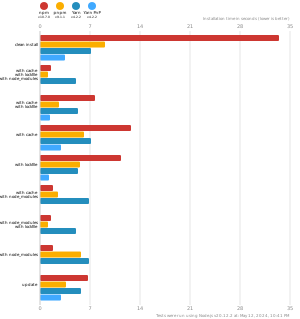
pnpm is up to 2x faster than npm and Yarn classic. See all benchmarks here.
Benchmarks on an app with lots of dependencies: