 Zoltan Kochan
55434d2463
Zoltan Kochan
55434d2463
A pylock.toml was reused only when the whole marker environment and the
ordered wheel tag list were equal to the ones that produced it, so a
kernel update invalidated a lockfile whose interpreter, wheel tags,
requirements and packages were unchanged, and a frozen install on CI
failed for it. Closes pnpm/pnpm#14843.

A lockfile is now replayed when it still applies to the target: the
requirements, index and requires-python are the ones it was resolved
for, and every pinned wheel carries tags the interpreter accepts. The
recorded environment is not compared. Whether the locked graph is still
the one the markers select is settled by re-solving it against them,
which the locked install already did; that check is exact where an
equality check on the environment refused every kernel update. A wheel
that installs here is the same wheel wherever it was chosen.

An install that may resolve again does so when the locked graph no
longer matches the markers, with a warning naming the lockfile and the
resolver's explanation, instead of failing. A frozen install keeps
failing on it, and keeps failing on a lockfile pinning a wheel the
target cannot install, with the reason attached.

The environments marker written to the lockfile names python_version
and the marker variables the solved graph reads, instead of every
variable of the resolving environment. PEP 751 requires an installer to
refuse a lockfile whose environments none of its markers satisfy, so a
marker over the whole environment made other installers refuse it after
a kernel update too. The lockfile format is unchanged; tool.pnpm still
records the resolving target, which a pnpr server's answer is checked
against.

The environments marker names python_full_version when a locked
package's Requires-Python tells patch releases of the running minor
apart, so a PEP 751 installer does not accept the lockfile on a patch
release a package excludes. A fetch failure on a lockfile resolved for
another target replaces the lockfile when the install may resolve
again: such a lockfile may pin wheels the markers no longer reach, and
was replaced without fetching anything before replay existed. A
lockfile resolved for this exact target pins only wheels the target
needs, so its fetch failures fail every install.
简体中文 | 日本語 | 한국어 | Italiano | Português Brasileiro

Fast, disk space efficient package manager:
- Fast. Up to 2x faster than the alternatives (see benchmark).
- Efficient. Files inside
node_modulesare linked from a single content-addressable storage. - Great for monorepos.
- Strict. A package can access only dependencies that are specified in its
package.json. - Deterministic. Has a lockfile called
pnpm-lock.yaml. - Works as a Node.js version manager. See pnpm runtime.
- Works everywhere. Supports Windows, Linux, and macOS.
- Battle-tested. Used in production by teams of all sizes since 2016.
- Experimental Rust port. Includes pacquet, an experimental port of the CLI written in Rust.
- See the full feature comparison with npm and Yarn.
To quote the Rush team:
Microsoft uses pnpm in Rush repos with hundreds of projects and hundreds of PRs per day, and we’ve found it to be very fast and reliable.



Platinum Sponsors

|

|

|

|
Gold Sponsors

|

|

|

|

|

|

|

|
Silver Sponsors
|

|

|

|

|

|

|

|
|
| ⏱️ Time.now |
Support this project by becoming a sponsor.
Background
pnpm uses a content-addressable filesystem to store all files from all module directories on a disk. When using npm, if you have 100 projects using lodash, you will have 100 copies of lodash on disk. With pnpm, lodash will be stored in a content-addressable storage, so:
- If you depend on different versions of lodash, only the files that differ are added to the store.
If lodash has 100 files, and a new version has a change only in one of those files,
pnpm updatewill only add 1 new file to the storage. - All the files are saved in a single place on the disk. When packages are installed, their files are linked from that single place consuming no additional disk space. Linking is performed using either hard-links or reflinks (copy-on-write).
As a result, you save gigabytes of space on your disk and you have a lot faster installations!
If you'd like more details about the unique node_modules structure that pnpm creates and
why it works fine with the Node.js ecosystem, read this small article: Flat node_modules is not the only way.
💖 Like this project? Let people know with a tweet
Getting Started
Benchmark
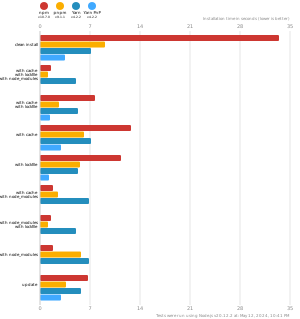
pnpm is up to 2x faster than npm and Yarn classic. See all benchmarks here.
Benchmarks on an app with lots of dependencies:
License
MIT, except the pnpr/ directory, which is source-available under the PolyForm Shield License 1.0.0.