 Zoltan Kochan
7237adea49
Zoltan Kochan
7237adea49
Extracting config was blocked by a cycle: config reached into s3 for
S3Settings and build_s3_store, s3 into storage, and storage back into config.

Neither of those items belonged in s3. S3Settings is the deserialized YAML
s3: block — config's own data, filed under the backend that consumes it. And
build_s3_store builds an AmazonS3Builder from that block; it touches
object_store but nothing in our s3 module, so it sits just as well next to
the settings it reads. Moving both leaves config with no dependency on s3 at
all and the cycle gone, with no behavior change: the store is still built
once at config-load time, which is what makes constructing the storage layer
infallible.

config is then a leaf, so it becomes pnpr-config, carrying config.yaml (the
bundled default it include_str!s) with it.

Two items the boundary caught as reaching across: RedactedHeaders and
UpstreamConfig::with_defaults, both now pub. with_defaults also gained
#[must_use], the same public-API lint consequence the last extraction saw.

The suite is unchanged at 714, of which 144 now run under pnpr-config.

Related to pnpm/pnpm#14191.
简体中文 | 日本語 | 한국어 | Italiano | Português Brasileiro

Fast, disk space efficient package manager:
- Fast. Up to 2x faster than the alternatives (see benchmark).
- Efficient. Files inside
node_modulesare linked from a single content-addressable storage. - Great for monorepos.
- Strict. A package can access only dependencies that are specified in its
package.json. - Deterministic. Has a lockfile called
pnpm-lock.yaml. - Works as a Node.js version manager. See pnpm runtime.
- Works everywhere. Supports Windows, Linux, and macOS.
- Battle-tested. Used in production by teams of all sizes since 2016.
- Experimental Rust port. Includes pacquet, an experimental port of the CLI written in Rust.
- See the full feature comparison with npm and Yarn.
To quote the Rush team:
Microsoft uses pnpm in Rush repos with hundreds of projects and hundreds of PRs per day, and we’ve found it to be very fast and reliable.



Platinum Sponsors

|

|

|
Gold Sponsors

|

|

|

|

|

|

|

|

|
Silver Sponsors

|

|

|

|

|

|

|

|
|
| ⏱️ Time.now |
Support this project by becoming a sponsor.
Background
pnpm uses a content-addressable filesystem to store all files from all module directories on a disk. When using npm, if you have 100 projects using lodash, you will have 100 copies of lodash on disk. With pnpm, lodash will be stored in a content-addressable storage, so:
- If you depend on different versions of lodash, only the files that differ are added to the store.
If lodash has 100 files, and a new version has a change only in one of those files,
pnpm updatewill only add 1 new file to the storage. - All the files are saved in a single place on the disk. When packages are installed, their files are linked from that single place consuming no additional disk space. Linking is performed using either hard-links or reflinks (copy-on-write).
As a result, you save gigabytes of space on your disk and you have a lot faster installations!
If you'd like more details about the unique node_modules structure that pnpm creates and
why it works fine with the Node.js ecosystem, read this small article: Flat node_modules is not the only way.
💖 Like this project? Let people know with a tweet
Getting Started
Benchmark
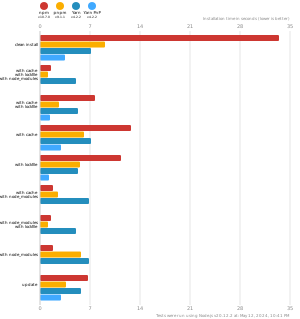
pnpm is up to 2x faster than npm and Yarn classic. See all benchmarks here.
Benchmarks on an app with lots of dependencies:
License
MIT, except the pnpr/ directory, which is source-available under the PolyForm Shield License 1.0.0.