KhảiandClaude
815e507d67
KhảiandClaude
815e507d67
* ci(benchmark): run all six integrated-benchmark scenarios

Wires `clean-install`, `full-resolution`, `peek`, and `gvs-warm` into
`pacquet-integrated-benchmark.yml` so per-PR runs cover the same scenario
set the manual `benchmark.yml` workflow already exercises via
`benchmarks/bench.sh`. Requested for #11837, where the perf delta affects
the resolution-bound scenarios (`firstInstall`, `withWarmCache`,
`withWarmModules`, `updatedDependencies`) that the prior two-scenario set
did not measure.

Each scenario gets its own step with a 10 min hyperfine timeout (same
rationale as the existing steps) and writes per-scenario report copies
that the summary step concatenates into `SUMMARY.md`.

* ci(benchmark): drop peek and gvs-warm scenarios

Keep only the two new no-lockfile scenarios (`clean-install`,
`full-resolution`) on top of the existing `frozen-lockfile` and
`frozen-lockfile-hot-cache`. #11837's perf change is in the
fresh-lockfile install path, which only runs when resolution runs — i.e.,
exactly the no-lockfile scenarios. `peek` mutates an existing lockfile
and `gvs-warm` is a frozen-lockfile variant; neither exercises the
affected path, and including them only costs per-PR CI wall time.

* fix(bench): pin packages: ['.'] in synthesized pnpm-workspace.yaml

The integrated-benchmark clones each pacquet revision's source tree into
`<bench_dir>/pacquet/`, which on the pnpm/pnpm monorepo includes upstream
test fixtures like
`workspace/project-manifest-reader/__fixtures__/invalid-package-json/package.json`
— intentionally malformed JSON used to exercise pnpm's manifest reader.

Without a `packages:` field, both pnpm's `findPackages.ts:28` and
pacquet's `crates/workspace/src/projects.rs:128` default to `[".", "**"]`,
so the fresh-resolve install path's `find_workspace_projects` walk
descends into the cloned source tree and trips on the bad fixture:

  Error: pacquet_package_manifest::serialization_error
    × installing dependencies
    ╰─▶ expected `,` or `}` at line 3 column 3

The walk only runs on the fresh-lockfile branch (`install.rs:628-630`),
which is why frozen-lockfile and frozen-lockfile-hot-cache stay green
while clean-install and full-resolution fail every time.

Pin `packages: ['.']` in the synthesized manifest so enumeration stays
at the workspace root. The benchmark's installs are single-project,
so this doesn't narrow anything the install actually needed to see.
Fixtures supplied via `--fixture-dir` that already declare `packages:`
keep their own value.

* ci(benchmark): bump no-lockfile scenarios to 20 min

Clean-install and full-resolution go through pacquet's fresh-resolve
install path, which is currently ~3-5x slower than pnpm on the
`alotta-files` fixture (pnpm/pnpm#11832). Hyperfine's default 1 warmup
+ 10 timed runs across three benchmark targets (pacquet@HEAD,
pacquet@main, system pnpm) projects to ~13 min wallclock for these
two scenarios, putting the previous 10 min cap right on the edge.
Doubling to 20 min keeps the per-step timeout meaningful as a stuck-
install detector without losing CI time when the bench is healthy.

The frozen-lockfile steps stay at 10 min — they don't traverse the
slower fresh-resolve path.

* fix(bench): drop --no-frozen-lockfile from full-resolution scenario

Pacquet doesn't expose `--no-frozen-lockfile` (only `--frozen-lockfile`,
`--prefer-frozen-lockfile`, and `--no-prefer-frozen-lockfile`). Passing
it makes clap reject the install:

  error: unexpected argument '--no-frozen-lockfile' found
    tip: a similar argument exists: '--frozen-lockfile'

The flag was redundant for this scenario anyway: full-resolution starts
every iteration with no lockfile on disk (init() skips the lockfile when
`lockfile_enabled()` is false; cleanup removes it; `lockfile=false` in
the synthesized npmrc/workspace prevents writing one). With no lockfile
present the frozen path is unreachable regardless of the flag, so both
tools take fresh resolution by definition. Fold full-resolution into
clean-install's bare `install` arm.

---------

Co-authored-by: Claude <noreply@anthropic.com>
简体中文 | 日本語 | 한국어 | Italiano | Português Brasileiro

Fast, disk space efficient package manager:
- Fast. Up to 2x faster than the alternatives (see benchmark).
- Efficient. Files inside
node_modulesare linked from a single content-addressable storage. - Great for monorepos.
- Strict. A package can access only dependencies that are specified in its
package.json. - Deterministic. Has a lockfile called
pnpm-lock.yaml. - Works as a Node.js version manager. See pnpm runtime.
- Works everywhere. Supports Windows, Linux, and macOS.
- Battle-tested. Used in production by teams of all sizes since 2016.
- See the full feature comparison with npm and Yarn.
To quote the Rush team:
Microsoft uses pnpm in Rush repos with hundreds of projects and hundreds of PRs per day, and we’ve found it to be very fast and reliable.



Platinum Sponsors

|
Gold Sponsors

|

|

|

|

|

|

|

|
Silver Sponsors

|

|

|

|

|

|

|
⏱️ Time.now |
Support this project by becoming a sponsor.
Background
pnpm uses a content-addressable filesystem to store all files from all module directories on a disk. When using npm, if you have 100 projects using lodash, you will have 100 copies of lodash on disk. With pnpm, lodash will be stored in a content-addressable storage, so:
- If you depend on different versions of lodash, only the files that differ are added to the store.
If lodash has 100 files, and a new version has a change only in one of those files,
pnpm updatewill only add 1 new file to the storage. - All the files are saved in a single place on the disk. When packages are installed, their files are linked from that single place consuming no additional disk space. Linking is performed using either hard-links or reflinks (copy-on-write).
As a result, you save gigabytes of space on your disk and you have a lot faster installations!
If you'd like more details about the unique node_modules structure that pnpm creates and
why it works fine with the Node.js ecosystem, read this small article: Flat node_modules is not the only way.
💖 Like this project? Let people know with a tweet
Getting Started
Benchmark
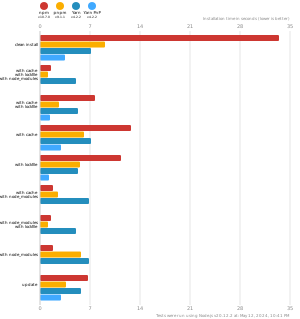
pnpm is up to 2x faster than npm and Yarn classic. See all benchmarks here.
Benchmarks on an app with lots of dependencies: