81817ec55a
Restores `--json` / `--parseable` / `--long` support on `pnpm -g ls` and tightens `--depth>0` semantics around isolated global installs. Closes #11440.

- **`--json` / `--parseable` (the regression):** aggregate global packages from all isolated install dirs into a single synthesized `PackageDependencyHierarchy` and dispatch to the existing `renderJson` / `renderParseable` / `renderTree`. Output shape matches pnpm 10 (`result[0].dependencies[name].version`), so tools like `npm-check-updates` work again.
- **`--depth>0`:** the v11 architecture installs each global package into its own isolated dir with its own lockfile, so merging transitive trees across installs would be incoherent. New behavior:
  - One global install dir total → fast-path delegate to the regular `list` flow with `params` unchanged, so `listForPackages` can match top-level *or* transitive packages.
  - Multiple installs, params narrow to one install dir (top-level alias match) → drop the params and render that install dir's full tree.
  - Multiple installs, params don't narrow → throw `ERR_PNPM_GLOBAL_LS_DEPTH_NOT_SUPPORTED` with a message asking the user to filter to a single global package or omit `--depth`.

The regression was introduced by the isolated global packages refactor (#10697), which added a custom `listGlobalPackages` shortcut that always returned plain text and ignored format flags.
简体中文 | 日本語 | 한국어 | Italiano | Português Brasileiro

Fast, disk space efficient package manager:
- Fast. Up to 2x faster than the alternatives (see benchmark).
- Efficient. Files inside
node_modulesare linked from a single content-addressable storage. - Great for monorepos.
- Strict. A package can access only dependencies that are specified in its
package.json. - Deterministic. Has a lockfile called
pnpm-lock.yaml. - Works as a Node.js version manager. See pnpm runtime.
- Works everywhere. Supports Windows, Linux, and macOS.
- Battle-tested. Used in production by teams of all sizes since 2016.
- See the full feature comparison with npm and Yarn.
To quote the Rush team:
Microsoft uses pnpm in Rush repos with hundreds of projects and hundreds of PRs per day, and we’ve found it to be very fast and reliable.



Platinum Sponsors

|
Gold Sponsors

|

|

|

|

|

|

|

|
Silver Sponsors

|

|

|

|

|

|
|
⏱️ Time.now |
Support this project by becoming a sponsor.
Background
pnpm uses a content-addressable filesystem to store all files from all module directories on a disk. When using npm, if you have 100 projects using lodash, you will have 100 copies of lodash on disk. With pnpm, lodash will be stored in a content-addressable storage, so:
- If you depend on different versions of lodash, only the files that differ are added to the store.
If lodash has 100 files, and a new version has a change only in one of those files,
pnpm updatewill only add 1 new file to the storage. - All the files are saved in a single place on the disk. When packages are installed, their files are linked from that single place consuming no additional disk space. Linking is performed using either hard-links or reflinks (copy-on-write).
As a result, you save gigabytes of space on your disk and you have a lot faster installations!
If you'd like more details about the unique node_modules structure that pnpm creates and
why it works fine with the Node.js ecosystem, read this small article: Flat node_modules is not the only way.
💖 Like this project? Let people know with a tweet
Getting Started
Benchmark
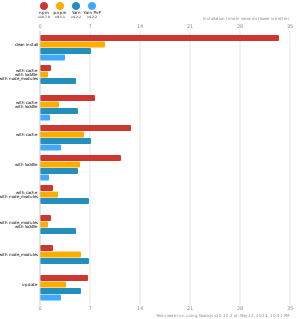
pnpm is up to 2x faster than npm and Yarn classic. See all benchmarks here.
Benchmarks on an app with lots of dependencies: