Zoltan Kochan
87136edaa3
Zoltan Kochan
87136edaa3
Closes #11975.

`pnpm-registry`'s `PUT /:pkg` endpoint accepted tarballs without verifying that their bytes matched the integrity declared in the packument. A buggy or partial-upload client could land a tarball whose hash didn't match `dist.integrity` / `dist.shasum`, and a malicious client could deliberately decouple the advertised hash from the bytes — both classes of silent-corruption bug that only surface when downstream `pnpm install` later fails with `EINTEGRITY`.

This change hashes every attachment before any I/O happens and rejects mismatches up-front so the bad bytes never reach the cache. The decode + hash + write runs in one streaming pass so the full decoded payload never lives in memory at once.

## What lands

- `stream_decode_verify_and_write` in `publish.rs` — pulls base64 chunks out of `base64::read::DecoderReader`, feeds each 64 KiB chunk to an ssri `IntegrityChecker` (SHA-512), an optional `IntegrityOpts(Sha1)` for legacy shasum, and the on-disk tmp file in lockstep. Verifies declared `length`, integrity, and shasum at the end; any failure removes the tmp file before returning.
- All failure modes surface as `400 BAD_REQUEST` with an `EINTEGRITY:` prefix in the body so pnpm / npm clients can recognize the error code.
- `extract_attachments` no longer base64-decodes eagerly; it returns `PendingAttachment { filename, data, declared_length }` and lets the streaming path consume `data` directly.
- `PackageName::parse_tarball_name` returns `(canonical, version)` so the publish handler can pull the matching `versions[v].dist` block out of the body. `canonicalize_tarball_name` becomes a thin wrapper.
- `Cache::reserve_tarball_paths` + `finalize_tarball_slot` expose a tmp/final path pair so the publish handler can do the actual write inside `tokio::task::spawn_blocking` (sync `std::fs`) and finalize via async `tokio::fs::rename` afterward.
- `publish_package` calls `stream_decode_verify_and_write` *before* any tarball lands at its final path. On any failure it removes every in-progress tmp file so a rejected publish leaves no on-disk artifact.

## Memory win

On a 100 MiB tarball publish, the old flow held the full payload in three places simultaneously (HTTP body Bytes + serde_json owned base64 String + decoded `Vec<u8>`). The streaming flow drops the decoded `Vec<u8>` entirely — only the base64 string and a 64 KiB working buffer remain. Roughly 100 MiB of peak heap saved per concurrent publish.
简体中文 | 日本語 | 한국어 | Italiano | Português Brasileiro

Fast, disk space efficient package manager:
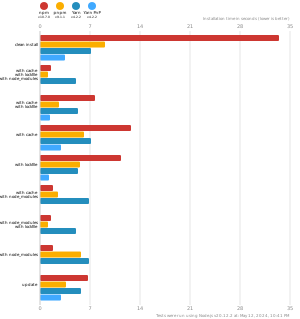
- Fast. Up to 2x faster than the alternatives (see benchmark).
- Efficient. Files inside
node_modulesare linked from a single content-addressable storage. - Great for monorepos.
- Strict. A package can access only dependencies that are specified in its
package.json. - Deterministic. Has a lockfile called
pnpm-lock.yaml. - Works as a Node.js version manager. See pnpm runtime.
- Works everywhere. Supports Windows, Linux, and macOS.
- Battle-tested. Used in production by teams of all sizes since 2016.
- See the full feature comparison with npm and Yarn.
To quote the Rush team:
Microsoft uses pnpm in Rush repos with hundreds of projects and hundreds of PRs per day, and we’ve found it to be very fast and reliable.



Platinum Sponsors

|
Gold Sponsors

|

|

|

|

|

|

|

|
Silver Sponsors

|

|

|

|

|

|
|
⏱️ Time.now |
Support this project by becoming a sponsor.
Background
pnpm uses a content-addressable filesystem to store all files from all module directories on a disk. When using npm, if you have 100 projects using lodash, you will have 100 copies of lodash on disk. With pnpm, lodash will be stored in a content-addressable storage, so:
- If you depend on different versions of lodash, only the files that differ are added to the store.
If lodash has 100 files, and a new version has a change only in one of those files,
pnpm updatewill only add 1 new file to the storage. - All the files are saved in a single place on the disk. When packages are installed, their files are linked from that single place consuming no additional disk space. Linking is performed using either hard-links or reflinks (copy-on-write).
As a result, you save gigabytes of space on your disk and you have a lot faster installations!
If you'd like more details about the unique node_modules structure that pnpm creates and
why it works fine with the Node.js ecosystem, read this small article: Flat node_modules is not the only way.
💖 Like this project? Let people know with a tweet
Getting Started
Benchmark
pnpm is up to 2x faster than npm and Yarn classic. See all benchmarks here.
Benchmarks on an app with lots of dependencies: