Zoltan Kochan
90fe4dc2d2
Zoltan Kochan
90fe4dc2d2
* fix(package-manager): record configDependencies in workspace state

build_workspace_state hardcoded config_dependencies: None, so a pacquet
install wrote .pnpm-workspace-state-v1.json without the configDependencies
map. On the next pnpm run/node/exec, pnpm's checkDepsStatus compared the
live config's configDependencies against the missing recorded value, judged
node_modules out of sync, and reinstalled every time. When devEngines.runtime
is set with onFail: download, that reinstall also re-provisions the runtime.

Parse configDependencies from pnpm-workspace.yaml into Config (workspace-only,
cleared from global config.yaml like patchedDependencies) and write it through
build_workspace_state, mirroring pnpm's createWorkspaceState.

* refactor(package-manager): drop redundant comment in build_workspace_state

The fn doc comment and the WorkspaceSettings.config_dependencies field doc
already explain the createWorkspaceState parity and reinstall consequence.

* fix(config): model both configDependencies value shapes

The string-only Option<BTreeMap<String, String>> made an object-form
configDependencies entry ({ tarball?, integrity }) — valid in pnpm — fail
deserialization, turning a supported manifest into a hard config-load error.

Introduce ConfigDependency (untagged: VersionWithIntegrity string or
{ tarball?, integrity }) in the workspace-state crate and thread it through
Config and the workspace-state writer so both shapes round-trip verbatim,
matching pnpm. Also add the trailing comma perfectionist/dylint requires on
the new multi-line assert_eq! invocations.
简体中文 | 日本語 | 한국어 | Italiano | Português Brasileiro

Fast, disk space efficient package manager:
- Fast. Up to 2x faster than the alternatives (see benchmark).
- Efficient. Files inside
node_modulesare linked from a single content-addressable storage. - Great for monorepos.
- Strict. A package can access only dependencies that are specified in its
package.json. - Deterministic. Has a lockfile called
pnpm-lock.yaml. - Works as a Node.js version manager. See pnpm runtime.
- Works everywhere. Supports Windows, Linux, and macOS.
- Battle-tested. Used in production by teams of all sizes since 2016.
- See the full feature comparison with npm and Yarn.
To quote the Rush team:
Microsoft uses pnpm in Rush repos with hundreds of projects and hundreds of PRs per day, and we’ve found it to be very fast and reliable.



Platinum Sponsors

|
Gold Sponsors

|

|

|

|

|

|

|

|
Silver Sponsors

|

|

|

|

|

|
|
⏱️ Time.now |
Support this project by becoming a sponsor.
Background
pnpm uses a content-addressable filesystem to store all files from all module directories on a disk. When using npm, if you have 100 projects using lodash, you will have 100 copies of lodash on disk. With pnpm, lodash will be stored in a content-addressable storage, so:
- If you depend on different versions of lodash, only the files that differ are added to the store.
If lodash has 100 files, and a new version has a change only in one of those files,
pnpm updatewill only add 1 new file to the storage. - All the files are saved in a single place on the disk. When packages are installed, their files are linked from that single place consuming no additional disk space. Linking is performed using either hard-links or reflinks (copy-on-write).
As a result, you save gigabytes of space on your disk and you have a lot faster installations!
If you'd like more details about the unique node_modules structure that pnpm creates and
why it works fine with the Node.js ecosystem, read this small article: Flat node_modules is not the only way.
💖 Like this project? Let people know with a tweet
Getting Started
Benchmark
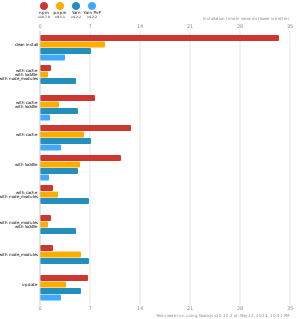
pnpm is up to 2x faster than npm and Yarn classic. See all benchmarks here.
Benchmarks on an app with lots of dependencies: