 9a3cfa40fd
With minimumReleaseAge active (the default), every range pick runs
filter_pkg_metadata_by_publish_date, and any dist-tag pointing at a
version outside the maturity cutoff repopulates by scanning all
candidate versions, reading each candidate's deprecated flag. Reading
that flag through PackageVersions::get hydrated the full manifest
fragment (including the flattened catch-all map), which a time profile
of a warm-cache fresh resolve of the babylon fixture showed as the
single largest CPU consumer (~10 thread-seconds, all on the resolve
task's critical path).

PackageVersions::is_deprecated answers the same question from the raw
fragment: a substring pre-check for the key text, then a single-field
deserialize using the same normalization as PackageVersion::deprecated.
The tag-repopulation loop now also parses candidate versions once per
filter call instead of once per tag, matching the parsedSemverCache in
pnpm's filterPkgMetadataByPublishDate, and the deprecated-pick fallback
in pick_version_by_version_range uses the probe instead of hydrating
every version.

Warm-cache fresh resolve of the babylon fixture: resolve_workspace
7.5s -> 2.6s. Resolved version sets are byte-identical before/after
across the vue and babylon fixtures.
简体中文 | 日本語 | 한국어 | Italiano | Português Brasileiro

Fast, disk space efficient package manager:
- Fast. Up to 2x faster than the alternatives (see benchmark).
- Efficient. Files inside
node_modulesare linked from a single content-addressable storage. - Great for monorepos.
- Strict. A package can access only dependencies that are specified in its
package.json. - Deterministic. Has a lockfile called
pnpm-lock.yaml. - Works as a Node.js version manager. See pnpm runtime.
- Works everywhere. Supports Windows, Linux, and macOS.
- Battle-tested. Used in production by teams of all sizes since 2016.
- See the full feature comparison with npm and Yarn.
To quote the Rush team:
Microsoft uses pnpm in Rush repos with hundreds of projects and hundreds of PRs per day, and we’ve found it to be very fast and reliable.



Platinum Sponsors

|

|
Gold Sponsors

|

|

|

|

|

|

|

|
Silver Sponsors

|

|

|

|

|

|

|
|
⏱️ Time.now |
Support this project by becoming a sponsor.
Background
pnpm uses a content-addressable filesystem to store all files from all module directories on a disk. When using npm, if you have 100 projects using lodash, you will have 100 copies of lodash on disk. With pnpm, lodash will be stored in a content-addressable storage, so:
- If you depend on different versions of lodash, only the files that differ are added to the store.
If lodash has 100 files, and a new version has a change only in one of those files,
pnpm updatewill only add 1 new file to the storage. - All the files are saved in a single place on the disk. When packages are installed, their files are linked from that single place consuming no additional disk space. Linking is performed using either hard-links or reflinks (copy-on-write).
As a result, you save gigabytes of space on your disk and you have a lot faster installations!
If you'd like more details about the unique node_modules structure that pnpm creates and
why it works fine with the Node.js ecosystem, read this small article: Flat node_modules is not the only way.
💖 Like this project? Let people know with a tweet
Getting Started
Benchmark
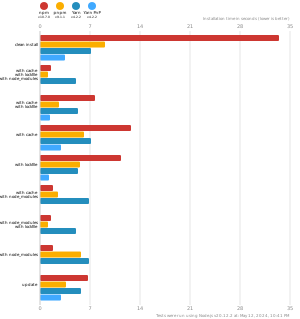
pnpm is up to 2x faster than npm and Yarn classic. See all benchmarks here.
Benchmarks on an app with lots of dependencies:
License
MIT, except the pnpr/ directory, which is source-available under the PolyForm Shield License 1.0.0.