9da8708a53
The previous design of the outdated table had a few issues with readability:

- The borders of the table cells were visually competing with the content of the cells.

- The leftmost column had no border and was flush with the edge of the terminal. This made it difficult for the eye to find the start of the line, and also made the entire table seem unbalanced since all other cells had a left border and padding before the text.

- The headers were not visually distinguished from the content.

This PR aims to address these issues by doing the following:

- The cell border is gray and a single line all around, which is enough to provide visual separation between cells but allows the cell content to be much stronger visually.

- The leftmost column has a left border and padding like all other cells. The padding and visual consistency makes the table easier to parse visually.

- The headers are now in blue, which sets them apart from the content cells.

PR #2007

pnpm
Fast, disk space efficient package manager


Features:
- Fast. As fast as npm and Yarn.
- Efficient. One version of a package is saved only ever once on a disk.
- Great for multi-package repositories (a.k.a. monorepos). See the recursive commands.
- Strict. A package can access only dependencies that are specified in its
package.json. - Deterministic. Has a lockfile called
pnpm-lock.yaml. - Works everywhere. Works on Windows, Linux and OS X.
- Aliases. Install different versions of the same package or import it using a different name.
Like this project? Let people know with a tweet.
Table of Contents
Background
pnpm uses hard links and symlinks to save one version of a module only ever once on a disk.
When using npm or Yarn for example, if you have 100 projects using the same version
of lodash, you will have 100 copies of lodash on disk. With pnpm, lodash will be saved in a
single place on the disk and a hard link will put it into the node_modules where it should
be installed.
As a result, you save gigabytes of space on your disk and you have a lot faster installations!
If you'd like more details about the unique node_modules structure that pnpm creates and
why it works fine with the Node.js ecosystem, read this small article: Flat node_modules is not the only way.
Install
Using a standalone script:
curl -L https://unpkg.com/@pnpm/self-installer | node
Via npm:
npm add -g pnpm
Once you first installed pnpm, you can upgrade it using pnpm:
pnpm add -g pnpm
Do you wanna use pnpm on CI servers? See: Continuous Integration.
Usage
pnpm CLI
Just use pnpm in place of npm. For instance, to install run:
pnpm install
For more advanced usage, read pnpm CLI on our website.
For using the programmatic API, use pnpm's engine: supi.
pnpx CLI
npm has a great package runner called npx.
pnpm offers the same tool via the pnpx command. The only difference is that pnpx uses pnpm for installing packages.
The following command installs a temporary create-react-app and calls it, without polluting global installs or requiring more than one step!
pnpx create-react-app my-cool-new-app
Benchmark
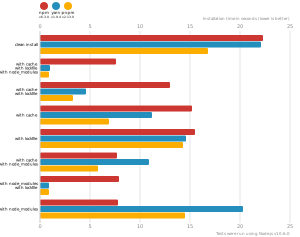
pnpm is as fast as npm and Yarn. See all benchmarks here.
Benchmarks on a React app:
Support
Contributors
This project exists thanks to all the people who contribute. [Contribute].

Backers
Thank you to all our backers! 🙏 [Become a backer]

Sponsors
Support this project by becoming a sponsor. Your logo will show up here with a link to your website. [Become a sponsor]