a14b9f2d2f
* fix(exe): create pn/pnpx/pnx binaries in linkExePlatformBinary

When pnpm auto-manages its version via the `packageManager` field,
it installs @pnpm/exe to the store with scripts disabled. The
`linkExePlatformBinary` function replicates setup.js by linking the
platform binary, but it only created the `pnpm` binary.

The published @pnpm/exe tarball has placeholder files for pn, pnpx,
and pnx (written by prepare.js). Without setup.js running, these
remain as placeholders, causing "This: not found" when invoked.

Create pn (hardlink to native binary) and pnpx/pnx (shell scripts)
in linkExePlatformBinary, matching what setup.js does.

* fix(exe): remove unnecessary placeholder writes on Windows

* test(exe): verify pn/pnpx/pnx are created by linkExePlatformBinary

* test(exe): e2e test that setup.js creates all binaries after prepare.js

Runs prepare.js (simulating publish) then setup.js (simulating install)
and verifies that pnpm and pn are hardlinks to the platform binary,
and pnpx and pnx are executable shell scripts.

Also fixes setup.js to unlink before writing shell scripts, so that
the 0o755 mode is applied even when prepare.js already created the
file with 0o644.

* fix: use node: protocol for imports

* fix(exe): use shell script aliases for pn instead of hardlinks

pn, like pnpx and pnx, is now a shell script (`exec pnpm "$@"`)
instead of a hardlink to the native binary. This avoids duplicating
the ~100MB binary.

Updated in both setup.js (registry installs) and
linkExePlatformBinary (store installs via version switching).

* fix(exe): revert pn back to hardlink, keep pnpx/pnx as shell scripts

Hardlinks have zero overhead and no disk cost (shared inode).
Shell scripts are only needed for pnpx/pnx which inject the dlx arg.

* fix(exe): only ignore ENOENT in createShellScript unlink

* fix(exe): publish pnpx/pnx with real content instead of placeholders

prepare.js now writes the actual shell scripts for pnpx and pnx
(and their .cmd/.ps1 Windows wrappers) instead of placeholder text.
This means setup.js and linkExePlatformBinary only need to handle
the native binary hardlinks (pnpm, pn) and the Windows bin rewrite.

The published tarball contains the correct pnpx/pnx scripts for all
platforms, so they work even when lifecycle scripts don't run (e.g.
store installs during auto version management).

* fix(exe): skip hardlink test when platform binary is unavailable

The platform-specific packages (@pnpm/linux-x64 etc.) are optional
dependencies only available in the @pnpm/exe package, not in CI
test environments. Split the test so prepare.js content verification
always runs, while the setup.js hardlink test skips gracefully.

* style: use single quotes in test
简体中文 | 日本語 | 한국어 | Italiano | Português Brasileiro

Fast, disk space efficient package manager:
- Fast. Up to 2x faster than the alternatives (see benchmark).
- Efficient. Files inside
node_modulesare linked from a single content-addressable storage. - Great for monorepos.
- Strict. A package can access only dependencies that are specified in its
package.json. - Deterministic. Has a lockfile called
pnpm-lock.yaml. - Works as a Node.js version manager. See pnpm env use.
- Works everywhere. Supports Windows, Linux, and macOS.
- Battle-tested. Used in production by teams of all sizes since 2016.
- See the full feature comparison with npm and Yarn.
To quote the Rush team:
Microsoft uses pnpm in Rush repos with hundreds of projects and hundreds of PRs per day, and we’ve found it to be very fast and reliable.



Platinum Sponsors

|
Gold Sponsors

|

|

|

|

|

|

|

|
Silver Sponsors

|

|

|

|

|

|
|
⏱️ Time.now |
Support this project by becoming a sponsor.
Background
pnpm uses a content-addressable filesystem to store all files from all module directories on a disk. When using npm, if you have 100 projects using lodash, you will have 100 copies of lodash on disk. With pnpm, lodash will be stored in a content-addressable storage, so:
- If you depend on different versions of lodash, only the files that differ are added to the store.
If lodash has 100 files, and a new version has a change only in one of those files,
pnpm updatewill only add 1 new file to the storage. - All the files are saved in a single place on the disk. When packages are installed, their files are linked from that single place consuming no additional disk space. Linking is performed using either hard-links or reflinks (copy-on-write).
As a result, you save gigabytes of space on your disk and you have a lot faster installations!
If you'd like more details about the unique node_modules structure that pnpm creates and
why it works fine with the Node.js ecosystem, read this small article: Flat node_modules is not the only way.
💖 Like this project? Let people know with a tweet
Getting Started
Benchmark
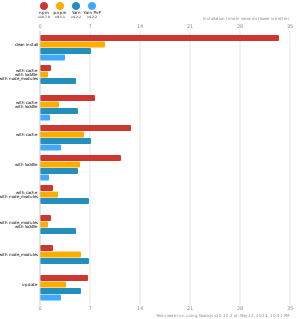
pnpm is up to 2x faster than npm and Yarn classic. See all benchmarks here.
Benchmarks on an app with lots of dependencies: