a4f3c6d3b7
Two related workflow changes:

### `pacquet-release-to-npm.yml`: switch to `workflow_dispatch`

The trigger was "push to main touching `pacquet/npm/pacquet/package.json`" — the version came from a committed bump and the workflow auto-fired on every such commit. Switch to `workflow_dispatch` only, with a `version` input (validated as semver). The workflow patches `pacquet/npm/pacquet/package.json` before `generate-packages.mjs` runs, so the version is single-sourced from the manual trigger rather than needing a separate commit to bump the manifest first.

The committed manifest now omits the `version` field entirely — it only exists at release time inside the runner.

Dropped along the way:

- The `check` job (EndBug/version-check against unpkg) — no longer needed when the operator types the version.
- The `Create GitHub Release` step — no draft release, no `v*.*.*` git tag. The pacquet `v0.x.x` tag scheme collided with pnpm's `v11.x.x`; npm is the authoritative artifact store and provenance attestations stay attached via `--provenance` on `pnpm publish`.
- `contents: write` on the publish job (no longer needs to create a tag).

### `release.yml`: add `workflow_dispatch` as a lib-only republish path

Add a `workflow_dispatch:` trigger alongside the existing tag-push trigger. Tag-push behaves exactly as before. Manual dispatch becomes a fast **lib-only republish** path — useful after a version bump to one or more lib packages that doesn't warrant a full CLI release.

On `workflow_dispatch` from any ref, the following are skipped (guarded with `if: startsWith(github.ref, 'refs/tags/')`):

- `Publish @pnpm/exe` step — also contains the multi-minute `build-artifacts` call.
- `Publish pnpm CLI` step.
- `Copy Artifacts`, `Attest build provenance` (the `dist/*` attestation), `Generate release description`, `Release` (`softprops/action-gh-release`) — these are the GitHub-Release-side ceremony. Without an explicit `tag_name`, `softprops/action-gh-release@v2.5.0` defaults to `github.ref_name`, which on a manual dispatch from main would create a junk release tagged literally `main`.

What still runs on `workflow_dispatch`:

- `actions/checkout`, garnet scan, `pnpm/setup`
- `Publish internal workspace packages (static token)` — i.e. `pn publish --filter=!pnpm --filter=!@pnpm/exe --access=public --provenance`

Compilation is handled by each lib package's own `prepublishOnly: tsgo --build` hook (which `pnpm publish` runs automatically), same as the existing tag-push flow.

The npm registry rejects any version already on it, so re-running on an already-released tree is a no-op — that's the safety net for accidental clicks.

## How to use

**pacquet release**: Actions → Release Pacquet → Run workflow → fill in `version` (e.g. `0.2.3` or `0.2.3-rc.1`) → Run. No tag, no GitHub release.

**pnpm full release**: still triggered by a `v*.*.*` tag push. Publishes @pnpm/exe + libs + CLI, attests, copies artifacts, creates a draft GitHub release.

**pnpm lib-only republish**: Actions → Release → Run workflow → choose `main` → Run. Publishes just the internal workspace packages from whatever versions are currently in each `package.json`. Skips CLI, @pnpm/exe, build-artifacts, GitHub release.
简体中文 | 日本語 | 한국어 | Italiano | Português Brasileiro

Fast, disk space efficient package manager:
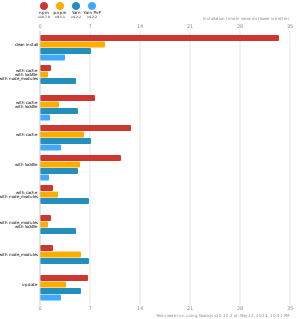
- Fast. Up to 2x faster than the alternatives (see benchmark).
- Efficient. Files inside
node_modulesare linked from a single content-addressable storage. - Great for monorepos.
- Strict. A package can access only dependencies that are specified in its
package.json. - Deterministic. Has a lockfile called
pnpm-lock.yaml. - Works as a Node.js version manager. See pnpm runtime.
- Works everywhere. Supports Windows, Linux, and macOS.
- Battle-tested. Used in production by teams of all sizes since 2016.
- See the full feature comparison with npm and Yarn.
To quote the Rush team:
Microsoft uses pnpm in Rush repos with hundreds of projects and hundreds of PRs per day, and we’ve found it to be very fast and reliable.



Platinum Sponsors

|
Gold Sponsors

|

|

|

|

|

|

|

|
Silver Sponsors
|

|

|

|

|

|
|
⏱️ Time.now |
Support this project by becoming a sponsor.
Background
pnpm uses a content-addressable filesystem to store all files from all module directories on a disk. When using npm, if you have 100 projects using lodash, you will have 100 copies of lodash on disk. With pnpm, lodash will be stored in a content-addressable storage, so:
- If you depend on different versions of lodash, only the files that differ are added to the store.
If lodash has 100 files, and a new version has a change only in one of those files,
pnpm updatewill only add 1 new file to the storage. - All the files are saved in a single place on the disk. When packages are installed, their files are linked from that single place consuming no additional disk space. Linking is performed using either hard-links or reflinks (copy-on-write).
As a result, you save gigabytes of space on your disk and you have a lot faster installations!
If you'd like more details about the unique node_modules structure that pnpm creates and
why it works fine with the Node.js ecosystem, read this small article: Flat node_modules is not the only way.
💖 Like this project? Let people know with a tweet
Getting Started
Benchmark
pnpm is up to 2x faster than npm and Yarn classic. See all benchmarks here.
Benchmarks on an app with lots of dependencies: