d203a71c98
- **`pnpm why` now shows a reverse dependency tree.** The searched package appears at the root with its dependants as branches, walking back to workspace roots. This replaces the previous forward-tree output which was noisy and hard to read for deeply nested dependencies.
- **Replaced `archy` with a new `@pnpm/text.tree-renderer` package** that renders trees using box-drawing characters (├──, └──, │) and supports grouped sections, dim connectors, and deduplication markers.
- **Show peer dependency hash suffixes** in `pnpm list` and `pnpm why` output to distinguish between different peer-dep variants of the same package.
- **Improved `pnpm list` visual output:** bold importer nodes, dimmed workspace paths, dependency grouping, package count summary, and deterministic sort order.
- **Added `--long` support to `pnpm why`** and the ability to read package manifests from the CAS store.
- **Deduplicated shared code** between `list` and `why` commands into a common module, and reused `getPkgInfo` in the why tree builder.
简体中文 | 日本語 | 한국어 | Italiano | Português Brasileiro

Fast, disk space efficient package manager:
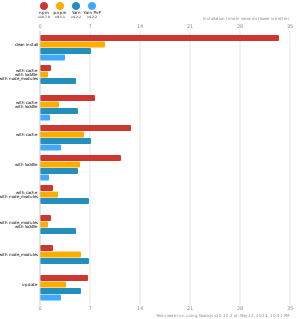
- Fast. Up to 2x faster than the alternatives (see benchmark).
- Efficient. Files inside
node_modulesare linked from a single content-addressable storage. - Great for monorepos.
- Strict. A package can access only dependencies that are specified in its
package.json. - Deterministic. Has a lockfile called
pnpm-lock.yaml. - Works as a Node.js version manager. See pnpm env use.
- Works everywhere. Supports Windows, Linux, and macOS.
- Battle-tested. Used in production by teams of all sizes since 2016.
- See the full feature comparison with npm and Yarn.
To quote the Rush team:
Microsoft uses pnpm in Rush repos with hundreds of projects and hundreds of PRs per day, and we’ve found it to be very fast and reliable.



Platinum Sponsors

|
Gold Sponsors

|

|

|

|

|

|

|

|
Silver Sponsors

|

|

|

|

|

|
Support this project by becoming a sponsor.
Background
pnpm uses a content-addressable filesystem to store all files from all module directories on a disk. When using npm, if you have 100 projects using lodash, you will have 100 copies of lodash on disk. With pnpm, lodash will be stored in a content-addressable storage, so:
- If you depend on different versions of lodash, only the files that differ are added to the store.
If lodash has 100 files, and a new version has a change only in one of those files,
pnpm updatewill only add 1 new file to the storage. - All the files are saved in a single place on the disk. When packages are installed, their files are linked from that single place consuming no additional disk space. Linking is performed using either hard-links or reflinks (copy-on-write).
As a result, you save gigabytes of space on your disk and you have a lot faster installations!
If you'd like more details about the unique node_modules structure that pnpm creates and
why it works fine with the Node.js ecosystem, read this small article: Flat node_modules is not the only way.
💖 Like this project? Let people know with a tweet
Getting Started
Benchmark
pnpm is up to 2x faster than npm and Yarn classic. See all benchmarks here.
Benchmarks on an app with lots of dependencies: