mirror of
https://github.com/pnpm/pnpm.git
synced 2026-03-25 18:41:48 -04:00

424 lines
16 KiB
Markdown
424 lines
16 KiB
Markdown
# pnpm
|
|
|
|
[](https://www.npmjs.com/package/pnpm)
|
|
[](https://travis-ci.org/pnpm/pnpm "See test builds")
|
|
[](https://ci.appveyor.com/project/zkochan/pnpm-17nv8/branch/master)
|
|
[](https://gitter.im/pnpm/pnpm?utm_source=badge&utm_medium=badge&utm_campaign=pr-badge&utm_content=badge)
|
|
[](https://twitter.com/pnpmjs)
|
|
|
|
> Fast, disk space efficient package manager
|
|
|
|
Features:
|
|
|
|
* **Fast.** Faster than npm and Yarn.
|
|
* **Efficient.** One version of a package is saved only ever once on a disk.
|
|
* **Deterministic.** Has a lockfile called `shrinkwrap.yaml`.
|
|
* **Strict.** A package can access only dependencies that are specified in its `package.json`.
|
|
* **Works everywhere.** Works on Windows, Linux and OS X.
|
|
* **Hooks.** `node_modules` is not a black box anymore.
|
|
* **Aliases.** Install different versions of the same package or import it using a different name.
|
|
|
|
Like this project? Let people know with a [tweet](https://bit.ly/tweet-pnpm).
|
|
|
|
## Table of Contents
|
|
|
|
* [Background](#background)
|
|
* [Install](#install)
|
|
* [Usage](#usage)
|
|
* [pnpm CLI](#pnpm-cli)
|
|
* [pnpx CLI](#pnpx-cli)
|
|
* [Configuring](#configuring)
|
|
* [Hooks](#hooks)
|
|
* [Aliases](#aliases)
|
|
* [Benchmark](#benchmark)
|
|
* [Limitations](#limitations)
|
|
* [Frequently Asked Questions](#frequently-asked-questions)
|
|
* [Support](#support)
|
|
* [Awesome list](https://github.com/pnpm/awesome-pnpm)
|
|
* Recipes
|
|
* [Continuous Integration](docs/recipes/continuous-integration.md)
|
|
* Advanced
|
|
* [About the package store](docs/about-the-package-store.md)
|
|
* [Symlinked `node_modules` structure](docs/symlinked-node-modules-structure.md)
|
|
* [How peers are resolved](docs/how-peers-are-resolved.md)
|
|
* [Contributing](CONTRIBUTING.md)
|
|
|
|
## Background
|
|
|
|
pnpm uses hard links and symlinks to save one version of a module only ever once on a disk.
|
|
When using npm or Yarn for example, if you have 100 projects using the same version
|
|
of lodash, you will have 100 copies of lodash on disk. With pnpm, lodash will be saved in a
|
|
single place on the disk and a hard link will put it into the `node_modules` where it should
|
|
be installed.
|
|
|
|
As a result, you save gigabytes of space on your disk and you have a lot faster installations!
|
|
If you'd like more details about the unique `node_modules` structure that pnpm creates and
|
|
why it works fine with the Node.js ecosystem, read this small article: [Why should we use pnpm?](https://www.kochan.io/nodejs/why-should-we-use-pnpm.html)
|
|
|
|
## Install
|
|
|
|
Using a [standalone script](https://github.com/pnpm/self-installer#readme):
|
|
|
|
```
|
|
curl -L https://unpkg.com/@pnpm/self-installer | node
|
|
```
|
|
|
|
Via npm:
|
|
|
|
```
|
|
npm install -g pnpm
|
|
```
|
|
|
|
Once you first installed pnpm, you can upgrade it using pnpm:
|
|
|
|
```
|
|
pnpm install -g pnpm
|
|
```
|
|
|
|
> Do you wanna use pnpm on CI servers? See: [Continuous Integration](docs/recipes/continuous-integration.md).
|
|
|
|
## Usage
|
|
|
|
### pnpm CLI
|
|
|
|
Just use pnpm in place of npm:
|
|
|
|
```
|
|
pnpm install lodash
|
|
```
|
|
|
|
npm commands that are re-implemented in pnpm:
|
|
|
|
* `install`
|
|
* `update`
|
|
* `uninstall`
|
|
* `link`
|
|
* `prune`
|
|
* `list`
|
|
* `install-test`
|
|
* `outdated`
|
|
* `rebuild`
|
|
* `root`
|
|
* `help`
|
|
|
|
Also, pnpm has some custom commands:
|
|
|
|
* `dislink`
|
|
|
|
Unlinks a package. Like `yarn unlink` but pnpm re-installs the dependency
|
|
after removing the external link.
|
|
* `store status`
|
|
|
|
Returns a 0 exit code if packages in the store are not modified, i.e. the
|
|
content of the package is the same as it was at the time of unpacking.
|
|
* `store prune`
|
|
|
|
Removes unreferenced (extraneous, orphan) packages from the store.
|
|
|
|
The rest of the commands pass through to npm.
|
|
|
|
For using the programmatic API, use pnpm's engine: [supi](https://github.com/pnpm/supi).
|
|
|
|
### pnpx CLI
|
|
|
|
npm has a great package runner called [npx](https://medium.com/@maybekatz/introducing-npx-an-npm-package-runner-55f7d4bd282b).
|
|
pnpm offers the same tool via the `pnpx` command. The only difference is that `pnpx` uses pnpm for installing packages.
|
|
|
|
The following command installs a temporary create-react-app and calls it,
|
|
without polluting global installs or requiring more than one step!
|
|
|
|
```
|
|
pnpx create-react-app my-cool-new-app
|
|
```
|
|
|
|
### Configuring
|
|
|
|
pnpm uses npm's programmatic API to read configs. Hence, you should set configs for pnpm the same way you would for npm.
|
|
|
|
Furthermore, pnpm uses the same configs that npm uses for doing installations. If you have a private registry and npm is configured
|
|
to work with it, pnpm should be able to authorize requests as well, with no additional configuration.
|
|
|
|
However, pnpm has some unique configs as well:
|
|
|
|
#### store
|
|
|
|
* Default: **~/.pnpm-store**
|
|
* Type: **path**
|
|
|
|
The location where all the packages are saved on the disk.
|
|
|
|
The store should be always on the same disk on which installation is happening. So there will be one store per disk.
|
|
If there is a home directory on the current disk, then the store is created in `<home dir>/.pnpm-store`. If there is no
|
|
homedir on the disk, then the store is created in the root. For example, if installation is happening on disk `D`
|
|
then the store will be created in `D:\.pnpm-store`.
|
|
|
|
It is possible to set a store from a different disk but in that case pnpm will copy, not link, packages from the store.
|
|
Hard links are possible only inside a filesystem.
|
|
|
|
#### offline
|
|
|
|
* Default: **false**
|
|
* Type: **Boolean**
|
|
|
|
If true, pnpm will use only packages already available in the store.
|
|
If a package won't be found locally, the installation will fail.
|
|
|
|
#### prefer-offline
|
|
|
|
* Default: **false**
|
|
* Type: **Boolean**
|
|
|
|
If true, staleness checks for cached data will be bypassed, but missing data will be requested from the server.
|
|
To force full offline mode, use `--offline`.
|
|
|
|
#### network-concurrency
|
|
|
|
* Default: **16**
|
|
* Type: **Number**
|
|
|
|
Controls the maximum number of HTTP requests that can be done simultaneously.
|
|
|
|
#### child-concurrency
|
|
|
|
* Default: **5**
|
|
* Type: **Number**
|
|
|
|
Controls the number of child processes run parallelly to build node modules.
|
|
|
|
#### lock
|
|
|
|
* Default: **true**
|
|
* Type: **Boolean**
|
|
|
|
Dangerous! If false, the store is not locked. It means that several installations using the same
|
|
store can run simultaneously.
|
|
|
|
Can be passed in via a CLI option. `--no-lock` to set it to false. E.g.: `pnpm install --no-lock`.
|
|
|
|
> If you experience issues similar to the ones described in [#594](https://github.com/pnpm/pnpm/issues/594), use this option to disable locking.
|
|
> In the meanwhile, we'll try to find a solution that will make locking work for everyone.
|
|
|
|
#### ignore-pnpmfile
|
|
|
|
* Default: **false**
|
|
* Type: **Boolean**
|
|
|
|
`pnpmfile.js` will be ignored. Useful together with `--ignore-scripts` when you want to make sure that
|
|
no script gets executed during install.
|
|
|
|
#### independent-leaves
|
|
|
|
* Default: **false**
|
|
* Type: **Boolean**
|
|
|
|
If true, symlinks leaf dependencies directly from the global store. Leaf dependencies are
|
|
packages that have no dependencies of their own. Setting this config to `true` might break some packages
|
|
that rely on location but gives an average of **8% installation speed improvement**.
|
|
|
|
#### verify-store-integrity
|
|
|
|
* Default: **true**
|
|
* Type: **Boolean**
|
|
|
|
If false, doesn't check whether packages in the store were mutated.
|
|
|
|
#### package-import-method
|
|
|
|
* Default: **auto**
|
|
* Type: **auto**, **hardlink**, **copy**, **reflink**
|
|
|
|
Controls the way packages are imported from the store.
|
|
|
|
* **auto** - try to hardlink packages from the store. If it fails, fallback to copy
|
|
* **hardlink** - hardlink packages from the store
|
|
* **copy** - copy packages from the store
|
|
* **reflink** - reflink (aka copy-on-write) packages from the store
|
|
|
|
#### shrinkwrap
|
|
|
|
* Default: **true**
|
|
* Type: **Boolean**
|
|
|
|
When set to `false`, pnpm won't read or generate a `shrinkwrap.yaml` file.
|
|
|
|
#### shrinkwrap-only
|
|
|
|
* Default: **false**
|
|
* Type: **Boolean**
|
|
|
|
When used, only updates `shrinkwrap.yaml` and `package.json` instead of checking `node_modules` and downloading dependencies.
|
|
|
|
#### reporter
|
|
|
|
* Default:
|
|
* For TTY stdout: **default**
|
|
* For non-TTY stdout: **append-only**
|
|
* Type: **default**, **append-only**, **ndjson**, **silent**
|
|
|
|
Allows to choose the reporter that will print info about
|
|
the installation progress.
|
|
|
|
* **silent** - no output is logged to the console, except fatal errors
|
|
* **default** - the default reporter when the stdout is TTY
|
|
* **append-only** - the output is always appended to the end. No cursor manipulations are performed
|
|
* **ndjson** - the most verbose reporter. Prints all logs in [ndjson](http://ndjson.org/) format
|
|
|
|
### Hooks
|
|
|
|
pnpm allows to step directly into the installation process via special functions called *hooks*.
|
|
Hooks can be declared in a file called `pnpmfile.js`. `pnpmfile.js` should live in the root of the project.
|
|
|
|
An example of a `pnpmfile.js` that changes the dependencies field of a dependency:
|
|
|
|
```js
|
|
module.exports = {
|
|
hooks: {
|
|
readPackage
|
|
}
|
|
}
|
|
|
|
// This hook will override the manifest of foo@1 after downloading it from the registry
|
|
// foo@1 will always be installed with the second version of bar
|
|
function readPackage (pkg) {
|
|
if (pkg.name === 'foo' && pkg.version.startsWith('1.')) {
|
|
pkg.dependencies = {
|
|
bar: '^2.0.0'
|
|
}
|
|
}
|
|
return pkg
|
|
}
|
|
```
|
|
|
|
### Aliases
|
|
|
|
Aliases let you install packages with custom names.
|
|
|
|
Lets' assume you use `lodash` all over your project. There is a bug in `lodash` that breaks your project.
|
|
You have a fix but `lodash` won't merge it. Normally you would either install `lodash` from your fork
|
|
directly (as a git-hosted dependency) or publish it with a different name. If you use the second solution
|
|
you have to replace all the requires in your project with the new dependency name (`require('lodash')` => `require('awesome-lodash')`)`.
|
|
With aliases, you have a third option.
|
|
|
|
Publish a new package called `awesome-lodash` and install it using `lodash` as its alias:
|
|
|
|
```
|
|
pnpm install lodash@npm:awesome-lodash
|
|
```
|
|
|
|
No changes in code are needed. All the requires of `lodash` will import `awesome-lodash`.
|
|
|
|
Sometimes you'll want to use two different versions of a package in your project. Easy:
|
|
|
|
```
|
|
pnpm install lodash1@npm:lodash@1
|
|
pnpm install lodash2@npm:lodash@2
|
|
```
|
|
|
|
Now you can require the first version of lodash via `require('lodash1')` and the second via `require('lodash2')`.
|
|
|
|
This gets even more powerful when combined with hooks. Maybe you want to replace `lodash` with `awesome-lodash`
|
|
in all the packages in `node_modules`. You can easily achieve that with the following `pnpmfile.js`:
|
|
|
|
```js
|
|
module.exports = {
|
|
hooks: {
|
|
readPackage
|
|
}
|
|
}
|
|
|
|
function readPackage (pkg) {
|
|
if (pkg.dependencies && pkg.dependencies.lodash) {
|
|
pkg.dependencies.lodash = 'npm:awesome-lodash@^1.0.0'
|
|
}
|
|
return pkg
|
|
}
|
|
```
|
|
|
|
## Benchmark
|
|
|
|
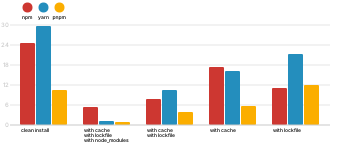
pnpm is faster than npm and Yarn. See [this](https://github.com/zkochan/node-package-manager-benchmark)
|
|
benchmark which compares the three package managers on different types of applications.
|
|
|
|
Here are the benchmarks on a React app:
|
|
|
|
|
|
|
|
## Limitations
|
|
|
|
1. `npm-shrinkwrap.json` and `package-lock.json` are ignored. Unlike pnpm, npm can install the
|
|
same `name@version` multiple times and with different sets of dependencies.
|
|
npm's shrinkwrap file is designed to reflect the `node_modules` layout created
|
|
by npm. pnpm cannot create a similar layout, so it cannot respect
|
|
npm's lockfile format.
|
|
2. You can't publish npm modules with `bundleDependencies` managed by pnpm.
|
|
3. Binstubs (files in `node_modules/.bin`) are always shell files not
|
|
symlinks to JS files. The shell files are created to help pluggable CLI apps
|
|
in finding their plugins in the unusual `node_modules` structure. This is very
|
|
rarely an issue and if you expect the file to be a js file, just reference the
|
|
original file instead, as described in [#736](https://github.com/pnpm/pnpm/issues/736).
|
|
4. Node.js doesn't work with the [--preserve-symlinks](https://nodejs.org/api/cli.html#cli_preserve_symlinks) flag when executed in a project that uses pnpm.
|
|
|
|
Got an idea for workarounds for these issues? [Share them.](https://github.com/pnpm/pnpm/issues/new)
|
|
|
|
## Other Node.js package managers
|
|
|
|
* `npm`. The oldest and most widely used. See [pnpm vs npm](docs/pnpm-vs-npm.md).
|
|
* `ied`. Built on a very similar premise as pnpm. pnpm takes huge inspiration from it.
|
|
* `Yarn`. The first Node.js package manager that invented lockfiles and offline installations.
|
|
|
|
## Frequently Asked Questions
|
|
|
|
### Why does my `node_modules` folder use disk space if packages are stored in a global store?
|
|
|
|
pnpm creates [hard links](https://en.wikipedia.org/wiki/Hard_link) from the global store to project's `node_modules` folders.
|
|
Hard links point to the same place on the disk where the original files are.
|
|
So, for example, if you have `foo` in your project as a dependency and it occupies 1MB of space,
|
|
then it will look like it occupies 1MB of space in the project's `node_modules` folder and
|
|
the same amount of space in the global store. However, that 1MB is *the same space* on the disk
|
|
addressed from two different locations. So in total `foo` occupies 1MB,
|
|
not 2MB.
|
|
|
|
For more on this subject:
|
|
|
|
* [Why do hard links seem to take the same space as the originals?](https://unix.stackexchange.com/questions/88423/why-do-hard-links-seem-to-take-the-same-space-as-the-originals)
|
|
* [A thread from the pnpm chat room](https://gist.github.com/zkochan/106cfef49f8476b753a9cbbf9c65aff1)
|
|
* [An issue in the pnpm repo](https://github.com/pnpm/pnpm/issues/794)
|
|
|
|
### Does it work on Windows? It is harder to create symlinks on Windows
|
|
|
|
Using symlinks on Windows is problematic indeed. That is why pnpm uses junctions instead of symlinks on Windows OS.
|
|
|
|
### Does it work on Windows? Nested `node_modules` approach is basically incompatible with Windows
|
|
|
|
Early versions of npm had issues because of nesting all `node_modules` (see [Node's nested node_modules approach is basically incompatible with Windows](https://github.com/nodejs/node-v0.x-archive/issues/6960)). However, pnpm does not create deep folders, it stores all packages flatly and uses symlinks to create the dependency tree structure.
|
|
|
|
### What about circular symlinks?
|
|
|
|
Although pnpm uses symlinks to put dependencies into `node_modules` folders, circular symlinks are avoided because parent packages are placed into the same `node_modules` folder in which their dependencies are. So `foo`'s dependencies are not in `foo/node_modules` but `foo` is in `node_modules/foo`, together with its own dependencies.
|
|
|
|
### Why have hard links at all? Why not symlink directly to the global store?
|
|
|
|
One package can have different sets of dependencies on one machine.
|
|
|
|
In project **A** `foo@1.0.0` can have dependency resolved to `bar@1.0.0` but in project **B** the same dependency of `foo` might
|
|
resolve to `bar@1.1.0`. So pnpm hard links `foo@1.0.0` to every project where it is used, in order to create different sets
|
|
of dependencies for it.
|
|
|
|
Direct symlinking to the global store would work with Node's `--preserve-symlinks` flag. But `--preserve-symlinks` comes
|
|
with a bunch of different issues, so we decided to stick with hard links.
|
|
For more details about why this decision was made, see: https://github.com/nodejs/node-eps/issues/46.
|
|
|
|
### What does `pnpm` stand for?
|
|
|
|
`pnpm` stands for `performant npm`. [Rico Sta. Cruz](https://github.com/rstacruz/) came up with the name.
|
|
|
|
## Support
|
|
|
|
- [Stack Overflow](https://stackoverflow.com/questions/tagged/pnpm)
|
|
- [Gitter chat](https://gitter.im/pnpm/pnpm)
|
|
- [Twitter](https://twitter.com/pnpmjs)
|
|
|
|
## License
|
|
|
|
[MIT](https://github.com/pnpm/pnpm/blob/master/LICENSE)
|