ec6473e95e
Once the lockfile pins integrity for git-hosted tarballs, every
post-fetch reader (pkg-finder, store status, FUSE mounter,
skipIfHasSideEffectsCache in building/after-install) looks the package
up under storeIndexKey(integrity, pkgId). Three issues were exposed:

1. pkg-finder ran parse(packageId) and rebuilt name@version, but
   packageIdFromSnapshot returns the URL alone for git-hosted (the
   `:` in `https://` makes tryGetPackageId strip the `name@`
   prefix). parse(URL) returns {} and the lookup key became
   `…\tundefined@undefined`. Use packageId directly — that's the
   form the writer in package-requester uses.

2. The FUSE handler and the after-install side-effects-cache lookup
   used `${name}@${version}`, which doesn't match the resolver's
   pkg.id for git-hosted (URL). Use
   `nonSemverVersion ?? ${name}@${version}` so the readers compute
   the same key the writer uses.

3. On the first install, integrity isn't known when
   getFilesIndexFilePath runs, so the writer parks the index under
   gitHostedStoreIndexKey. Once the worker computes integrity, the
   git-hosted fetcher now also registers the entry under
   storeIndexKey(integrity, pkgId), so subsequent integrity-based
   lookups (the same install or any later one) resolve to the same
   data without a refetch.

The license test that walks the lockfile right after install now
passes locally; that's the case that was failing in CI.

---
Written by an agent (Claude Code, claude-opus-4-7).
简体中文 | 日本語 | 한국어 | Italiano | Português Brasileiro

Fast, disk space efficient package manager:
- Fast. Up to 2x faster than the alternatives (see benchmark).
- Efficient. Files inside
node_modulesare linked from a single content-addressable storage. - Great for monorepos.
- Strict. A package can access only dependencies that are specified in its
package.json. - Deterministic. Has a lockfile called
pnpm-lock.yaml. - Works as a Node.js version manager. See pnpm runtime.
- Works everywhere. Supports Windows, Linux, and macOS.
- Battle-tested. Used in production by teams of all sizes since 2016.
- See the full feature comparison with npm and Yarn.
To quote the Rush team:
Microsoft uses pnpm in Rush repos with hundreds of projects and hundreds of PRs per day, and we’ve found it to be very fast and reliable.



Platinum Sponsors

|
Gold Sponsors

|

|

|

|

|

|

|

|
Silver Sponsors

|

|

|

|

|

|
|
⏱️ Time.now |
Support this project by becoming a sponsor.
Background
pnpm uses a content-addressable filesystem to store all files from all module directories on a disk. When using npm, if you have 100 projects using lodash, you will have 100 copies of lodash on disk. With pnpm, lodash will be stored in a content-addressable storage, so:
- If you depend on different versions of lodash, only the files that differ are added to the store.
If lodash has 100 files, and a new version has a change only in one of those files,
pnpm updatewill only add 1 new file to the storage. - All the files are saved in a single place on the disk. When packages are installed, their files are linked from that single place consuming no additional disk space. Linking is performed using either hard-links or reflinks (copy-on-write).
As a result, you save gigabytes of space on your disk and you have a lot faster installations!
If you'd like more details about the unique node_modules structure that pnpm creates and
why it works fine with the Node.js ecosystem, read this small article: Flat node_modules is not the only way.
💖 Like this project? Let people know with a tweet
Getting Started
Benchmark
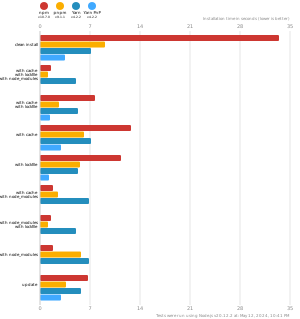
pnpm is up to 2x faster than npm and Yarn classic. See all benchmarks here.
Benchmarks on an app with lots of dependencies: