 Sina Atalay
5cc5fbdf9e
Sina Atalay
5cc5fbdf9e
* Rename `data` folder with schema

* Start refactoring data models

* Work on entry models

* Keep working on entries

* Keep working on data models

* Push old data files

* Keep working on data models

* First draft of schema.cv

* Keep working on schema

* Keep working on schema

* Improve schema.models

* Keep working on rendercv.schema

* Work on schema.design

* Keep working on rendercv.schema

* Complete variant_class_generator

* Keep working rendercv.schema

* Keep working on rendercv.schema

* Final touches to rendercv.schema

* Improve json schema descriptions in rendercv.schema

* Start working on rendercv.schema tests

* Keep implementing rendercv.schema tests

* Add more tests for rendercv.schema

* Improve rendercv.schema

* Improve docstrings and comments in rendercv.schema

* Implement better pydantic error handling in `rendercv.schema`

* Improve variant class system

* Fix rendercv.schema tests

* Start working on rendercv.templater

* Update template names

* Switching to new rendercv typst template soon

* Work on new templater

* Rename renderer with renderer_old

* Don't use utils in rendercv.schema

* Complete connections

* Update renderer folder structure

* Work on new renderer

* Work on new renderer

* Date processing on new renderer

* Improve date processing, support multiple emails, phones, and websites

* Improve markdown to Typst

* Complete entry template processing

* Time span computation in new renderer

* Better entry templates

* Setup new templates

* Improve rendercv.schema

* Start adding tests for rendercv.renderer

* New markdown parser!

* Improve markdown to typst conversion

* Finalize markdown parser

* Add new test files for rendercv.renderer

* Fix cv and connections

* Add connections test

* Improve connection tests

* Improve entry templates

* Add model processor tests

* Improve templater

* Rename old folders

* Improve schema

* Add file generation logic to renderer

* Fix naming issues

* Fix schema tests

* Add path type tests

* Add font family and typst dimension type tests

* Rename old tests

* Fix design tests

* Start integration testing of renderer

* Improve entry tempates

* Handle nested highlights properly

* Finalize Typst preamble template

* Start working on new CLI

* Remove old test files

* Implement override dictionary in new schema

* Start working on new CLI

* Better prints on render command

* New structure

* New render printer

* Add all the commands to new CLI

* Work on new command in new cli

* Improve new command

* Add error handler to new cli

* Work on create theme command

* Complete create theme command

* Remove old source files

* Improve exceptions

* Create new docs

* Add writing tests guide

* Fix cli printer and write tests

* Test copy templates

* Add app tests

* Bring back accidentally removed files

* Imporve cli and tests

* Fix path issues

* Improve

* Improve

* Add reference file comparison tests

* Fix path resolver

* Start working on test_pdf_png

* Implement comparison of multiple files (png)

* Start testing typst

* Fix templating issues

* Fix header and entry templates issues

* Implement short second rows

* Fix date issues

* Fix nested bullets and add summary

* Update testdata

* Implement footer

* Update testdata

* Reimagined design and locale schema, first iteration

* Reimagined design and locale second iteration

* Update design and locale schemas

* Adapt templater to the new design and locale

* Fix tests

* Update lib.typ and testdata for the new locale and design

* Implement proper tests with all combinations of entries

* Remove some docstrings

* fix connections logic

* Improve

* Start working on examples

* Update testdata

* Fix long second row issue

* fix templating issues

* Fix lib.typ issues

* Update testdata

* Fix clean_trailing_parts

* Update test cv

* update test cv

* Update theme defaults

* update schema and fix moderncv

* Fix moderncv issues

* Update testdata

* Update testdata and examples

* Fix issues about photo

* Fix typst photo path issues

* improve entry templates from yaml

* add new locale

* Rename writing tests doc

* Update writing tests

* Improve tests

* Add more cli tests

* Increase test coverage

* Rename variant pydantic model generator

* Improve tests

* Update testdata and improve tests

* Format, fix pre-commit errors

* Fix scripts and update entry figures

* Improve tests

* Write docstrings of schema

* Write schema docstrings

* Setup api reference

* Start working on new docs

* Work on docs

* Improve progress panel of render command

* Finalize new docs index

* Complete CLI docs

* Work on YAML input structure page

* Finalize user guide

* Start working on developer guide

* Improve api reference

* Improve developer guide

* Improve developer guide

* Improve developer gide

* Improve developer guide

* Improve developer guide

* Update developer guide

* Improve developer guide

* Improve developer guide

* Improve developer guide

* Developer guide first draft

* update developer guide

* Update examples

* Update testdata

* Handle wrong installation (rendercv instead of rendercv[full])

* Remove unnecessary files

* Write set up vs code page

* Update README.md

* Change docs description

* Compress design options gif

* minor updates

* Polish all the json schema descriptions

* Update testdata and examples

* Remove some emdashed from docs

* Add whatsapp support

* Add TestEscapeTypstCharacters to tests

* Implement custom connections

* Add page break before sections feature

* Revert page break before sections feature

* Rebase to main

* Fix social network tests, update schema
RenderCV
CV/resume generator for academics and engineers


)
)
)
Write your CV or resume as YAML, then run RenderCV,
rendercv render John_Doe_CV.yaml
and get a PDF with perfect typography. No template wrestling. No broken layouts. Consistent spacing, every time.
With RenderCV, you can:
- Version-control your CV — it's just text.
- Focus on content — don't wory about the formatting.
- Get perfect typography — kerning, spacing, hierarchy, all handled. No design skills required.
A YAML file like this:
cv:
  name: John Doe
  location: San Francisco, CA
  email: john.doe@email.com
  website: https://rendercv.com/
  social_networks:
    - network: LinkedIn
      username: rendercv
    - network: GitHub
      username: rendercv
  sections:
    Welcome to RenderCV:
      - RenderCV reads a CV written in a YAML file, and generates a PDF with professional typography.
      - See the [documentation](https://docs.rendercv.com) for more details.
    education:
      - institution: Princeton University
        area: Computer Science
        degree: PhD
        date:
        start_date: 2018-09
        end_date: 2023-05
        location: Princeton, NJ
        summary:
        highlights:
          - "Thesis: Efficient Neural Architecture Search for Resource-Constrained Deployment"
          - "Advisor: Prof. Sanjeev Arora"
          - NSF Graduate Research Fellowship, Siebel Scholar (Class of 2022)
    ...
becomes one of these PDFs. Click on the images to preview.
 |
 |
 |
|---|---|---|
 |
 |
 |
JSON Schema
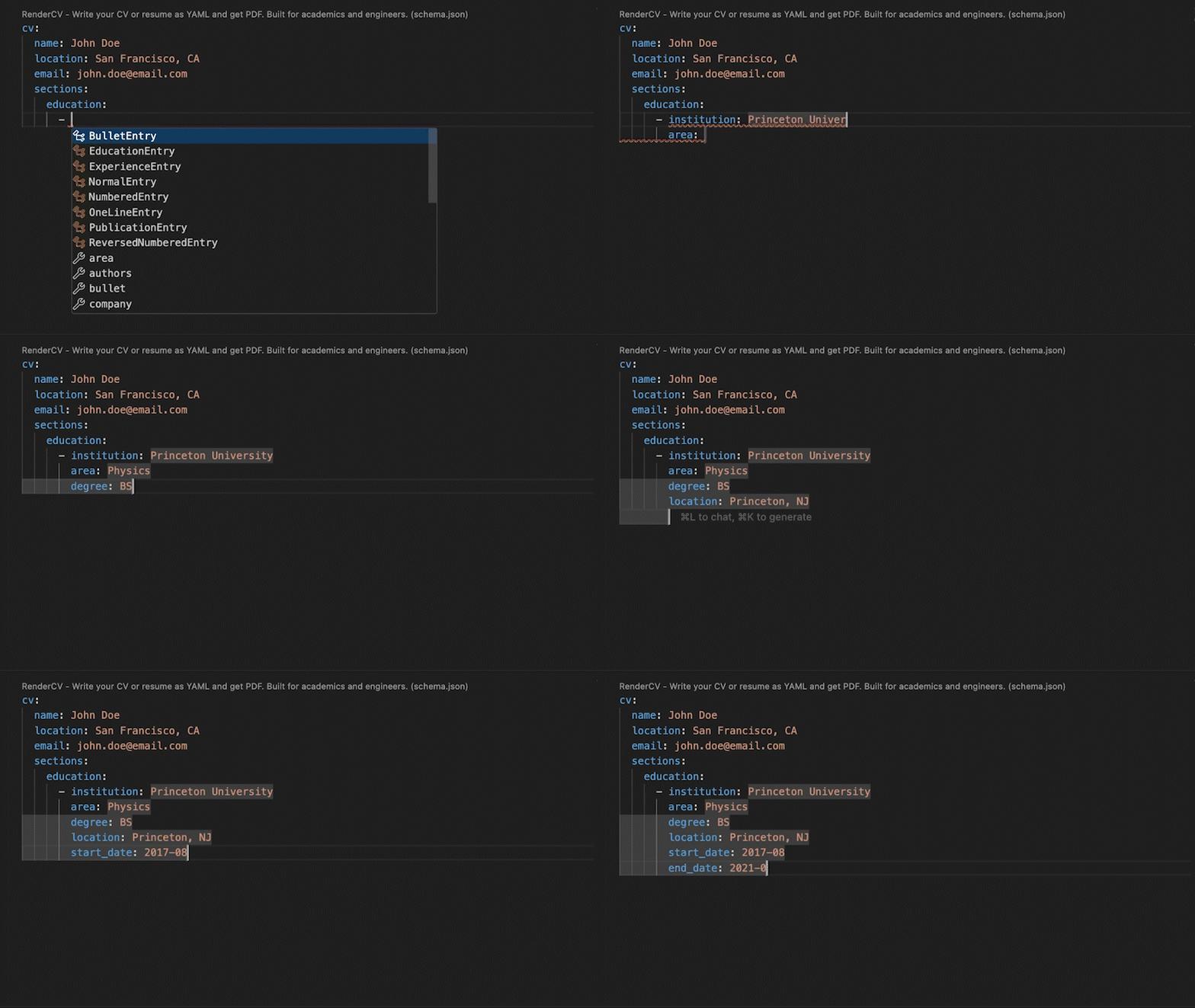
RenderCV's JSON Schema lets you fill out the YAML interactively, with autocompletion and inline documentation.
Extensive Design Options
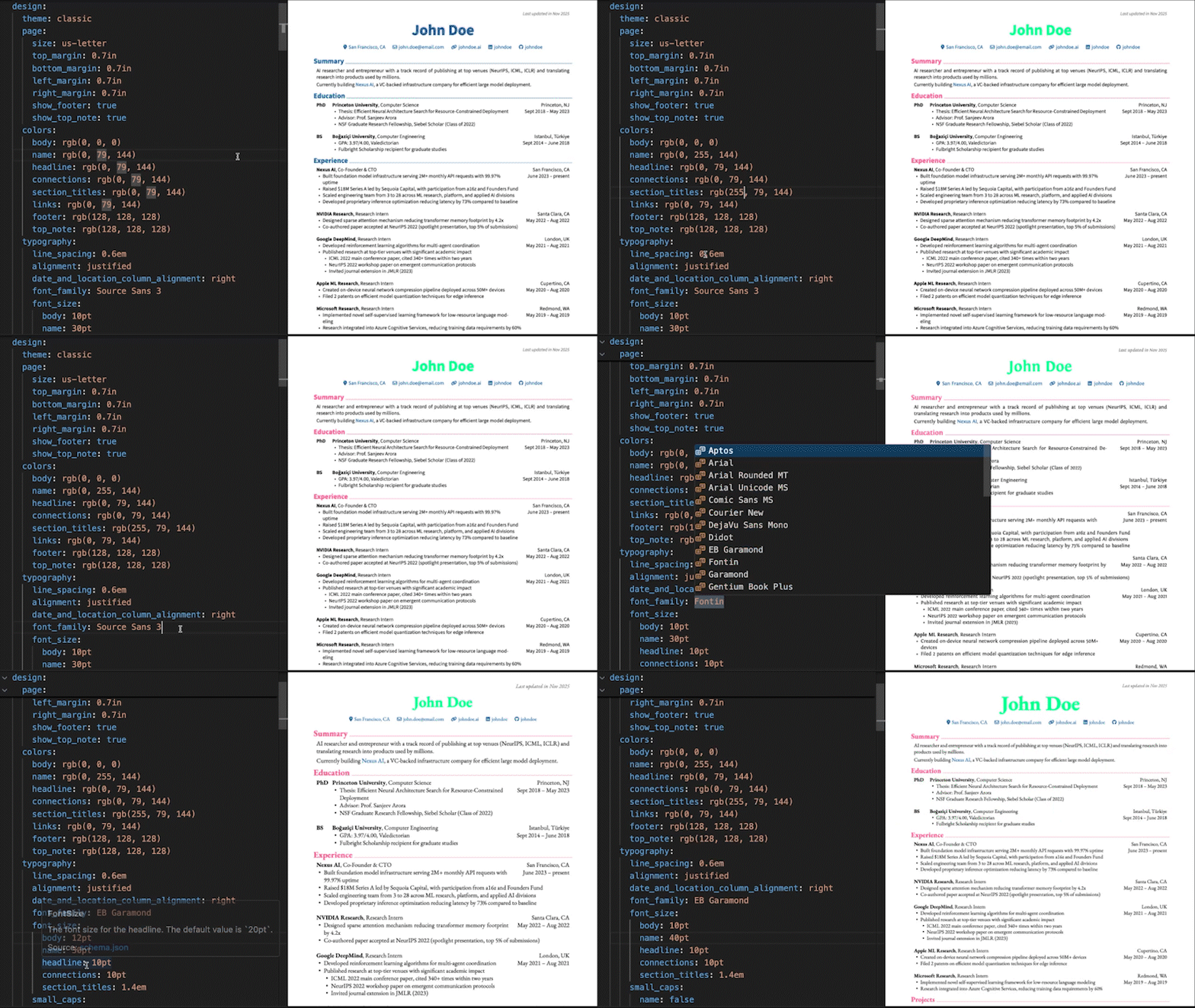
You have full control over every detail.
design:
  theme: classic
  page:
    size: us-letter
    top_margin: 0.7in
    bottom_margin: 0.7in
    left_margin: 0.7in
    right_margin: 0.7in
    show_footer: true
    show_top_note: true
  colors:
    body: rgb(0, 0, 0)
    name: rgb(0, 79, 144)
    headline: rgb(0, 79, 144)
    connections: rgb(0, 79, 144)
    section_titles: rgb(0, 79, 144)
    links: rgb(0, 79, 144)
    footer: rgb(128, 128, 128)
    top_note: rgb(128, 128, 128)
  typography:
    line_spacing: 0.6em
    alignment: justified
    date_and_location_column_alignment: right
    font_family: Source Sans 3
  # ...and more
Tip
Want to set up a live preview environment like the one shown above? See how to set up VS Code for RenderCV.
Strict Validation
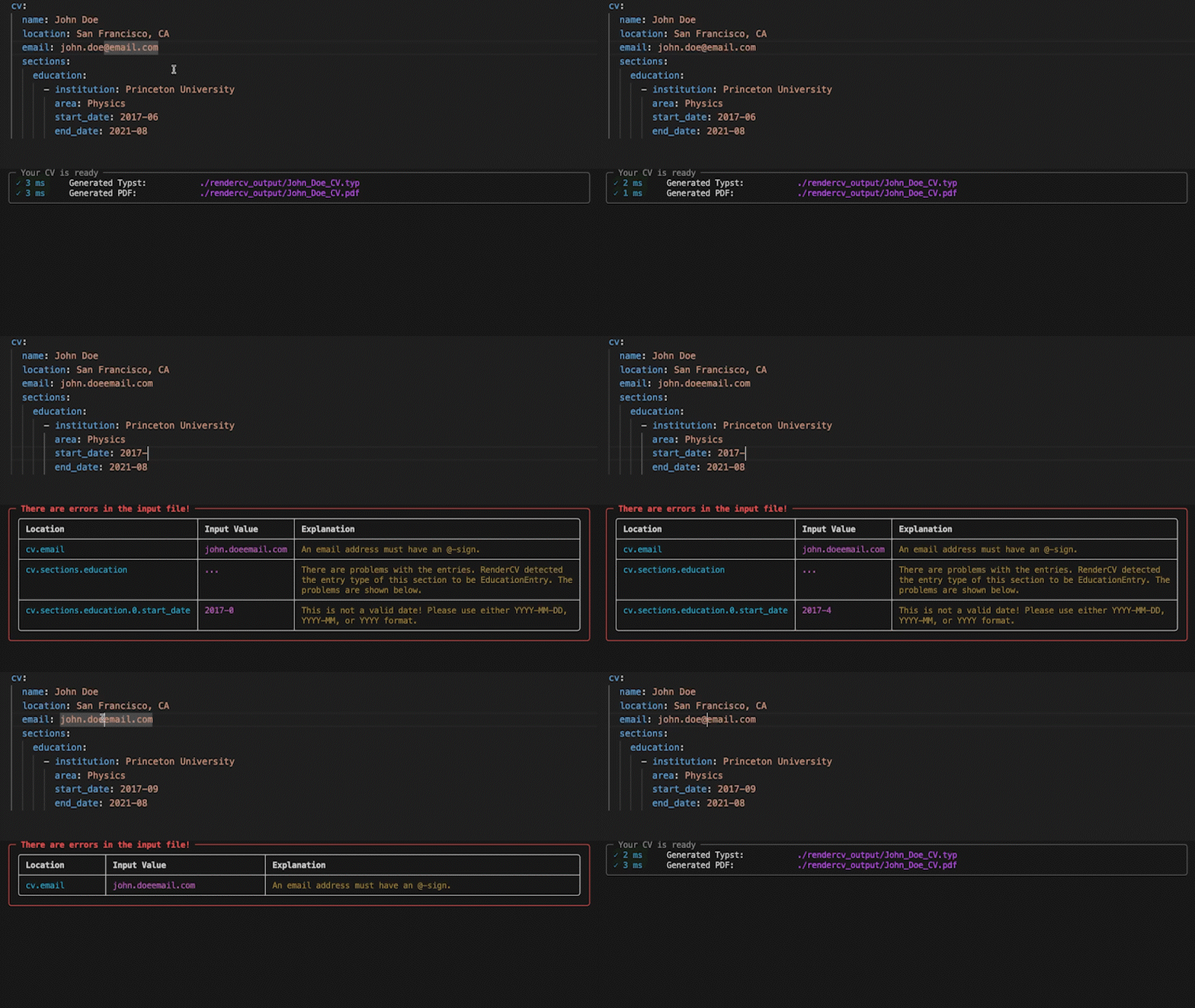
No surprises. If something's wrong, you'll know exactly what and where. If it's valid, you get a perfect PDF.
Any Language
Fill out the locale field for your language.
locale:
  language: english
  last_updated: Last updated in
  month: month
  months: months
  year: year
  years: years
  present: present
  month_abbreviations:
    - Jan
    - Feb
    - Mar
  ...
Get Started
Install RenderCV (Requires Python 3.12+):
pip install "rendercv[full]"
Create a new CV yaml file:
rendercv new "John Doe"
Edit the YAML, then render:
rendercv render "John_Doe_CV.yaml"
For more details, see the user guide.