mirror of
https://github.com/vernu/textbee.git
synced 2026-07-30 17:07:46 -04:00

260 lines
8.6 KiB
Markdown
260 lines
8.6 KiB
Markdown

|
|

|
|

|
|
[](https://discord.gg/d7vyfBpWbQ)
|
|
|
|
# textbee.dev - android sms gateway
|
|
|
|
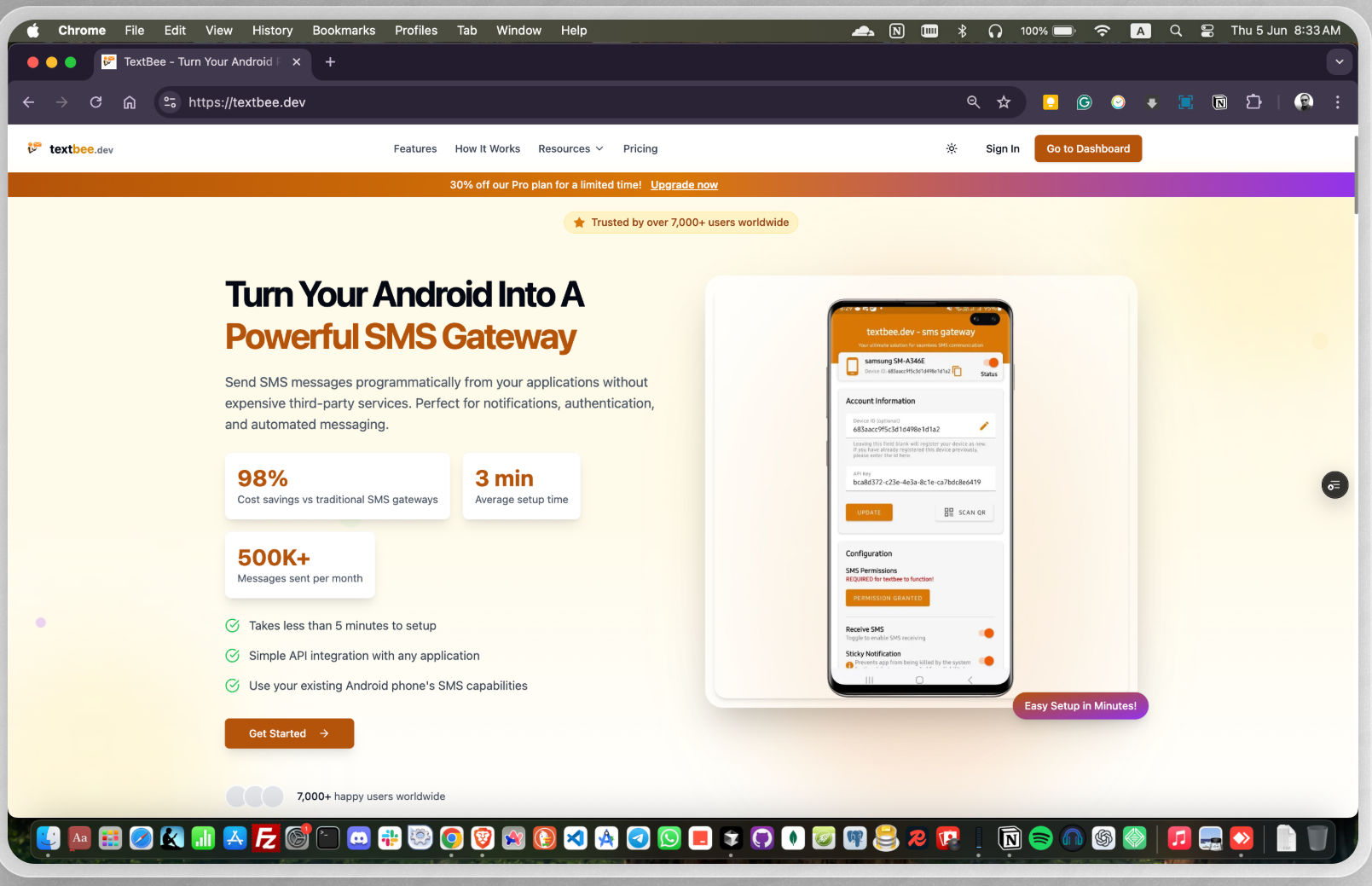
Send and receive SMS messages using your own Android phone - no Twilio, no per-message fees. Free, open-source, and self-hostable.
|
|
|
|
Manage SMS messages through a web dashboard or a REST API. textbee is ideal for businesses, developers, and hobbyists looking for a reliable and cost-effective solution to automate SMS messaging.
|
|
|
|
**Website:** [https://textbee.dev](https://textbee.dev?ref=gh-readme)
|
|
|
|
|
|
|
|
|
|
|
|
## Why textbee?
|
|
|
|
| | textbee | Twilio & similar APIs |
|
|
|---|---|---|
|
|
| Cost per SMS | Your carrier plan (often free/unlimited) | ~$0.008+ per message |
|
|
| Phone number | Your own SIM | Rented number |
|
|
| Self-hostable | ✅ Full control over your data | ❌ |
|
|
| Open source | ✅ | ❌ |
|
|
| Setup time | ~2 minutes | Account approval, compliance forms |
|
|
|
|
## Features
|
|
|
|
- Send & receive SMS messages via API & dashboard
|
|
- Use your own Android phone as an SMS gateway
|
|
- REST API for easy integration with apps & services
|
|
- Send bulk SMS with CSV file
|
|
- Multi-device support for higher SMS throughput
|
|
- Secure API authentication with API keys
|
|
- Webhook support for incoming messages
|
|
- Self-hosting support for full control over your data
|
|
|
|
|
|
## Getting Started
|
|
|
|
1. Go to [textbee.dev](https://textbee.dev) and register or login with your account
|
|
2. Install the app on your Android phone from [textbee.dev/download](https://textbee.dev/download)
|
|
3. Open the app and grant the permissions for SMS
|
|
4. Go to [textbee.dev/dashboard](https://textbee.dev/dashboard) and click register device / generate API key
|
|
5. Scan the QR code with the app or enter the API key manually
|
|
6. You're ready to send SMS from the dashboard or from your application via the REST API
|
|
|
|
|
|
|
|
### Sending an SMS
|
|
|
|
```javascript
|
|
const API_KEY = 'YOUR_API_KEY';
|
|
const DEVICE_ID = 'YOUR_DEVICE_ID';
|
|
|
|
await axios.post(`https://api.textbee.dev/api/v1/gateway/devices/${DEVICE_ID}/send-sms`, {
|
|
recipients: [ '+251912345678' ],
|
|
message: 'Hello World!',
|
|
}, {
|
|
headers: { 'x-api-key': API_KEY },
|
|
});
|
|
```
|
|
|
|
<details>
|
|
<summary><b>Python</b></summary>
|
|
```python
|
|
import requests
|
|
|
|
API_KEY = 'YOUR_API_KEY'
|
|
DEVICE_ID = 'YOUR_DEVICE_ID'
|
|
|
|
requests.post(
|
|
f'https://api.textbee.dev/api/v1/gateway/devices/{DEVICE_ID}/send-sms',
|
|
json={
|
|
'recipients': ['+251912345678'],
|
|
'message': 'Hello World!',
|
|
},
|
|
headers={'x-api-key': API_KEY},
|
|
)
|
|
```
|
|
|
|
</details>
|
|
<details>
|
|
<summary><b>curl</b></summary>
|
|
```bash
|
|
curl -X POST "https://api.textbee.dev/api/v1/gateway/devices/YOUR_DEVICE_ID/send-sms" \
|
|
-H 'x-api-key: YOUR_API_KEY' \
|
|
-H 'Content-Type: application/json' \
|
|
-d '{
|
|
"recipients": [ "+251912345678" ],
|
|
"message": "Hello World!"
|
|
}'
|
|
```
|
|
|
|
</details>
|
|
### Receiving SMS
|
|
|
|
Enable SMS receiving in the mobile app, then access incoming messages via the REST API, the dashboard, or webhook notifications delivered to your preferred URL.
|
|
|
|
```javascript
|
|
const API_KEY = 'YOUR_API_KEY';
|
|
const DEVICE_ID = 'YOUR_DEVICE_ID';
|
|
|
|
await axios.get(`https://api.textbee.dev/api/v1/gateway/devices/${DEVICE_ID}/get-received-sms`, {
|
|
headers: { 'x-api-key': API_KEY },
|
|
});
|
|
```
|
|
|
|
<details>
|
|
<summary><b>curl</b></summary>
|
|
```bash
|
|
curl -X GET "https://api.textbee.dev/api/v1/gateway/devices/YOUR_DEVICE_ID/get-received-sms" \
|
|
-H "x-api-key: YOUR_API_KEY"
|
|
```
|
|
|
|
</details>
|
|
## Use Cases
|
|
|
|
- OTP / 2FA delivery for your app
|
|
- Order and appointment notifications
|
|
- Alerts from servers, cron jobs, and home automation
|
|
- Form-to-SMS and lead follow-ups
|
|
- Bulk announcements to a contact list (CSV upload)
|
|
## FAQ
|
|
|
|
<details>
|
|
<summary><b>Will my carrier block my number for sending too many messages?</b></summary>
|
|
Carriers apply their own rate limits and anti-spam policies, which vary by country and plan. For personal and low-volume use this is rarely an issue. For higher throughput, use multiple devices/SIMs and keep sending rates reasonable. You are responsible for staying within your carrier's terms.
|
|
|
|
</details>
|
|
<details>
|
|
<summary><b>Is it legal to send marketing SMS this way?</b></summary>
|
|
SMS marketing is regulated in most countries (e.g., TCPA in the US, GDPR/ePrivacy in the EU). textbee is a tool — you are responsible for obtaining consent and complying with the laws that apply to you and your recipients.
|
|
|
|
</details>
|
|
<details>
|
|
<summary><b>Does my phone need to stay on?</b></summary>
|
|
Yes — messages are sent through your phone, so it needs to be powered on with the app running and connected to the internet. A spare Android phone plugged into a charger works great as a dedicated gateway.
|
|
|
|
</details>
|
|
<details>
|
|
<summary><b>Is there a limit on the cloud-hosted version?</b></summary>
|
|
See [textbee.dev](https://textbee.dev) for current plans and limits. You can always self-host for full control.
|
|
|
|
</details>
|
|
|
|
|
|
## Self-Hosting
|
|
|
|
**Technology stack**: React, Next.js, Node.js, NestJS, MongoDB, Android, Kotlin, Jetpack Compose, Java (legacy)
|
|
|
|
### Setting Up Database
|
|
|
|
1. **Install MongoDB on Your Server**: Follow the official MongoDB installation guide for your operating system.
|
|
2. **Using MongoDB Atlas**: Alternatively, you can create a free database on MongoDB Atlas. Sign up at [MongoDB Atlas](https://www.mongodb.com/cloud/atlas) and follow the instructions to set up your database.
|
|
|
|
|
|
### Firebase Setup
|
|
|
|
1. Create a Firebase project.
|
|
2. Enable Firebase Cloud Messaging (FCM) in your Firebase project.
|
|
3. Obtain the Firebase credentials for backend use and the Android app.
|
|
|
|
### Building the Android App
|
|
|
|
1. Clone the repository and navigate to the Android project directory.
|
|
2. Update the `google-services.json` file with your Firebase project configuration.
|
|
3. Update every occurrence of `textbee.dev` with your own domain in the project.
|
|
4. Build the app using Android Studio or the command line:
|
|
```bash
|
|
./gradlew assembleRelease
|
|
```
|
|
|
|
### Building the Web
|
|
|
|
1. Navigate to the `web` directory.
|
|
2. Copy the `.env.example` file to `.env`:
|
|
```bash
|
|
cp .env.example .env
|
|
```
|
|
3. Update the `.env` file with your own credentials.
|
|
4. Install dependencies:
|
|
```bash
|
|
pnpm install
|
|
```
|
|
5. Build the web application:
|
|
```bash
|
|
pnpm build
|
|
```
|
|
|
|
### Building the API
|
|
|
|
1. Navigate to the `api` directory.
|
|
2. Copy the `.env.example` file to `.env`:
|
|
```bash
|
|
cp .env.example .env
|
|
```
|
|
3. Update the `.env` file with your own credentials.
|
|
4. Install dependencies:
|
|
```bash
|
|
pnpm install
|
|
```
|
|
5. Build the API:
|
|
```bash
|
|
pnpm build
|
|
```
|
|
|
|
### Hosting on a VPS
|
|
|
|
1. Install `pnpm`, `pm2`, and `Caddy` on your VPS.
|
|
2. Use `pm2` to manage your Node.js processes:
|
|
```bash
|
|
pm2 start dist/main.js --name textbee-api
|
|
```
|
|
3. Configure `Caddy` to serve your web application and API. Example Caddyfile:
|
|
```
|
|
textbee.dev {
|
|
reverse_proxy /api/* localhost:3000
|
|
reverse_proxy /* localhost:3001
|
|
}
|
|
```
|
|
4. Ensure your domain points to your VPS and Caddy is configured properly.
|
|
|
|
### Dockerized env
|
|
#### Requirements:
|
|
- Docker installed
|
|
1. After setting up Firebase, update your `.env` in `web` && `api` folder.
|
|
```bash
|
|
cd web && cp .env.example .env \
|
|
&& cd ../api && cp .env.example .env
|
|
```
|
|
2. Navigate to root folder and execute docker-compose.yml file.
|
|
This will spin up `web` container, `api` container alongside with `MongoDB` and `MongoExpress`. `TextBee` database will be automatically created.
|
|
```bash
|
|
docker compose up -d
|
|
```
|
|
To stop the containers simply type
|
|
```bash
|
|
docker compose down
|
|
```
|
|
|
|
## Contributing
|
|
|
|
Contributions are welcome!
|
|
|
|
1. [Fork](https://github.com/vernu/textbee/fork) the project.
|
|
2. Create a feature or bugfix branch from `main` branch.
|
|
3. Make sure your commit messages and PR comment summaries are descriptive.
|
|
4. Create a pull request to the `main` branch.
|
|
|
|
## Bug Reporting and Feature Requests
|
|
|
|
Please feel free to [create an issue](https://github.com/vernu/textbee/issues/new) in the repository for any bug reports or feature requests. Make sure to provide a detailed description of the issue or feature you are requesting and properly label whether it is a bug or a feature request.
|
|
|
|
Please note that if you discover any vulnerability or security issue, we kindly request that you refrain from creating a public issue. Instead, send an email detailing the vulnerability to contact@textbee.dev.
|
|
|
|
## For support, feedback, and questions
|
|
Feel free to reach out to us at contact@textbee.dev or [Join our Discord server](https://discord.gg/d7vyfBpWbQ)
|