mirror of
https://github.com/meshtastic/web.git
synced 2026-02-05 21:32:04 -05:00

167 lines
5.5 KiB
Markdown
167 lines
5.5 KiB
Markdown
# Meshtastic Web
|
||
|
||
<!--Project specific badges here-->
|
||
|
||
[](https://github.com/meshtastic/web/actions/workflows/ci.yml)
|
||
[](https://cla-assistant.io/meshtastic/web)
|
||
[](https://opencollective.com/meshtastic/)
|
||
[](https://vercel.com?utm_source=meshtastic&utm_campaign=oss)
|
||
|
||
## Overview
|
||
|
||
Official [Meshtastic](https://meshtastic.org) web interface, that can be hosted
|
||
or served from a node
|
||
|
||
**[Hosted version](https://client.meshtastic.org)**
|
||
|
||
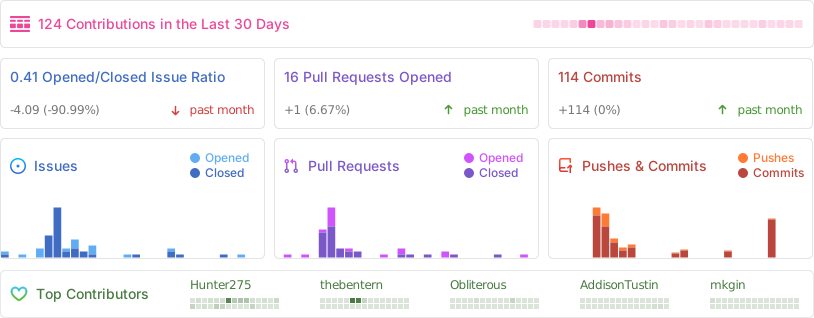
## Stats
|
||
|
||
|
||
|
||
## Progress Web App Support (PWA)
|
||
|
||
Meshtastic Web Client now includes Progressive Web App (PWA) functionality,
|
||
allowing users to:
|
||
|
||
- Install the app on desktop and mobile devices
|
||
- Access the interface offline
|
||
- Receive updates automatically
|
||
- Experience faster load times with caching
|
||
|
||
To install as a PWA:
|
||
|
||
- On desktop: Look for the install icon in your browser's address bar
|
||
- On mobile: Use "Add to Home Screen" option in your browser menu
|
||
|
||
PWA functionality works with both the hosted version and self-hosted instances.
|
||
|
||
## Self-host
|
||
|
||
The client can be self hosted using the precompiled container images with an OCI
|
||
compatible runtime such as [Docker](https://www.docker.com/) or
|
||
[Podman](https://podman.io/). The base image used is
|
||
[Nginx 1.27](https://hub.docker.com/_/nginx)
|
||
|
||
```bash
|
||
# With Docker
|
||
docker run -d -p 8080:8080 --restart always --name Meshtastic-Web ghcr.io/meshtastic/web
|
||
|
||
#With Podman
|
||
podman run -d -p 8080:8080 --restart always --name Meshtastic-Web ghcr.io/meshtastic/web
|
||
```
|
||
|
||
## Nightly releases
|
||
|
||
Our nightly releases provide the latest development builds with cutting-edge
|
||
features and fixes. These builds are automatically generated from the latest
|
||
main branch every night and are available for testing and early adoption.
|
||
|
||
```bash
|
||
# With Docker
|
||
docker run -d -p 8080:8080 --restart always --name Meshtastic-Web ghcr.io/meshtastic/web:nightly
|
||
#With Podman
|
||
podman run -d -p 8080:8080 --restart always --name Meshtastic-Web ghcr.io/meshtastic/web:nightly
|
||
```
|
||
|
||
> [!WARNING]
|
||
>
|
||
> - Nightly builds represent the latest development state and may contain
|
||
> breaking changes
|
||
> - These builds undergo automated testing but may be less stable than tagged
|
||
> release versions
|
||
> - Not recommended for production environments unless you are actively testing
|
||
> new features
|
||
> - No guarantee of backward compatibility between nightly builds
|
||
|
||
### Version Information
|
||
|
||
Each nightly build is tagged with:
|
||
|
||
- The nightly tag for the latest build
|
||
- A specific SHA for build reproducibility
|
||
|
||
### Feedback
|
||
|
||
If you encounter any issues with nightly builds, please report them in our
|
||
[issues tracker](https://github.com/meshtastic/web/issues). Your feedback helps
|
||
improve the stability of future releases
|
||
|
||
## Development & Building
|
||
|
||
You'll need to download the package manager used with this repo. You can install
|
||
it by visiting [deno.com](https://deno.com/) and following the installation
|
||
instructions listed on the home page.
|
||
|
||
### Development
|
||
|
||
Install the dependencies.
|
||
|
||
```bash
|
||
deno i
|
||
```
|
||
|
||
Start the development server:
|
||
|
||
```bash
|
||
deno task dev
|
||
```
|
||
|
||
### Building and Packaging
|
||
|
||
Build the project:
|
||
|
||
```bash
|
||
deno task build
|
||
```
|
||
|
||
GZip the output:
|
||
|
||
```bash
|
||
deno task package
|
||
```
|
||
|
||
### Why Deno?
|
||
|
||
Meshtastic Web uses Deno as its development platform for several compelling
|
||
reasons:
|
||
|
||
- **Built-in Security**: Deno's security-first approach requires explicit
|
||
permissions for file, network, and environment access, reducing vulnerability
|
||
risks.
|
||
- **TypeScript Support**: Native TypeScript support without additional
|
||
configuration, enhancing code quality and developer experience.
|
||
- **Modern JavaScript**: First-class support for ESM imports, top-level await,
|
||
and other modern JavaScript features.
|
||
- **Simplified Tooling**: Built-in formatter, linter, test runner, and bundler
|
||
eliminate the need for multiple third-party tools.
|
||
- **Reproducible Builds**: Lockfile ensures consistent builds across all
|
||
environments.
|
||
- **Web Standard APIs**: Uses browser-compatible APIs, making code more portable
|
||
between server and client environments.
|
||
|
||
### Contributing
|
||
|
||
We welcome contributions! Here’s how the deployment flow works for pull
|
||
requests:
|
||
|
||
- **Preview Deployments:**\
|
||
Every pull request automatically generates a preview deployment on Vercel.
|
||
This allows you and reviewers to easily preview changes before merging.
|
||
|
||
- **Staging Environment (`client-test`):**\
|
||
Once your PR is merged, your changes will be available on our staging site:
|
||
[client-test.meshtastic.org](https://client-test.meshtastic.org/).\
|
||
This environment supports rapid feature iteration and testing without
|
||
impacting the production site.
|
||
|
||
- **Production Releases:**\
|
||
At regular intervals, stable and fully tested releases are promoted to our
|
||
production site: [client.meshtastic.org](https://client.meshtastic.org/).\
|
||
This is the primary interface used by the public to connect with their
|
||
Meshtastic nodes.
|
||
|
||
Please review our
|
||
[Contribution Guidelines](https://github.com/meshtastic/web/blob/master/CONTRIBUTING.md)
|
||
before submitting a pull request. We appreciate your help in making the project
|
||
better!
|