mirror of
https://github.com/mudler/LocalAI.git
synced 2026-05-24 08:38:02 -04:00
Compare commits
16 Commits
docs/impro
...
copilot/fi
| Author | SHA1 | Date | |
|---|---|---|---|

|
eae90cafac | ||
|
|
d2ed2b48a8 | ||
|
|
22d8b48fd1 | ||
|
|
f2ba636290 | ||
|
|
95b6c9bb5a | ||
|
|
2cc4809b0d | ||
|
|
77bbeed57e | ||
|
|
3152611184 | ||
|
|
30f992f241 | ||
|
|
2709220b84 | ||
|
|
4278506876 | ||
|
|
1dd1d12da1 | ||
|
|
3a5b3bb0a6 | ||
|
|
94d9fc923f | ||
|
|
6fcf2c50b6 | ||
|
|
7cbd4a2f18 |
3
.gitmodules
vendored
3
.gitmodules
vendored
@@ -1,6 +1,3 @@
|
||||
[submodule "docs/themes/hugo-theme-relearn"]
|
||||
path = docs/themes/hugo-theme-relearn
|
||||
url = https://github.com/McShelby/hugo-theme-relearn.git
|
||||
[submodule "docs/themes/lotusdocs"]
|
||||
path = docs/themes/lotusdocs
|
||||
url = https://github.com/colinwilson/lotusdocs
|
||||
|
||||
@@ -1,5 +1,5 @@
|
||||
|
||||
LLAMA_VERSION?=80deff3648b93727422461c41c7279ef1dac7452
|
||||
LLAMA_VERSION?=10e9780154365b191fb43ca4830659ef12def80f
|
||||
LLAMA_REPO?=https://github.com/ggerganov/llama.cpp
|
||||
|
||||
CMAKE_ARGS?=
|
||||
|
||||
@@ -14,6 +14,8 @@ cp -r grpc-server.cpp llama.cpp/tools/grpc-server/
|
||||
cp -rfv llama.cpp/vendor/nlohmann/json.hpp llama.cpp/tools/grpc-server/
|
||||
cp -rfv llama.cpp/tools/server/utils.hpp llama.cpp/tools/grpc-server/
|
||||
cp -rfv llama.cpp/vendor/cpp-httplib/httplib.h llama.cpp/tools/grpc-server/
|
||||
cp -rfv llama.cpp/tools/server/server-http.cpp llama.cpp/tools/grpc-server/
|
||||
cp -rfv llama.cpp/tools/server/server-http.h llama.cpp/tools/grpc-server/
|
||||
|
||||
set +e
|
||||
if grep -q "grpc-server" llama.cpp/tools/CMakeLists.txt; then
|
||||
|
||||
@@ -8,7 +8,7 @@ JOBS?=$(shell nproc --ignore=1)
|
||||
|
||||
# whisper.cpp version
|
||||
WHISPER_REPO?=https://github.com/ggml-org/whisper.cpp
|
||||
WHISPER_CPP_VERSION?=d9b7613b34a343848af572cc14467fc5e82fc788
|
||||
WHISPER_CPP_VERSION?=b12abefa9be2abae39a73fa903322af135024a36
|
||||
SO_TARGET?=libgowhisper.so
|
||||
|
||||
CMAKE_ARGS+=-DBUILD_SHARED_LIBS=OFF
|
||||
|
||||
@@ -1,6 +1,7 @@
|
||||
package config
|
||||
|
||||
import (
|
||||
"fmt"
|
||||
"os"
|
||||
"regexp"
|
||||
"slices"
|
||||
@@ -475,7 +476,7 @@ func (cfg *ModelConfig) SetDefaults(opts ...ConfigLoaderOption) {
|
||||
cfg.syncKnownUsecasesFromString()
|
||||
}
|
||||
|
||||
func (c *ModelConfig) Validate() bool {
|
||||
func (c *ModelConfig) Validate() (bool, error) {
|
||||
downloadedFileNames := []string{}
|
||||
for _, f := range c.DownloadFiles {
|
||||
downloadedFileNames = append(downloadedFileNames, f.Filename)
|
||||
@@ -489,17 +490,20 @@ func (c *ModelConfig) Validate() bool {
|
||||
}
|
||||
if strings.HasPrefix(n, string(os.PathSeparator)) ||
|
||||
strings.Contains(n, "..") {
|
||||
return false
|
||||
return false, fmt.Errorf("invalid file path: %s", n)
|
||||
}
|
||||
}
|
||||
|
||||
if c.Backend != "" {
|
||||
// a regex that checks that is a string name with no special characters, except '-' and '_'
|
||||
re := regexp.MustCompile(`^[a-zA-Z0-9-_]+$`)
|
||||
return re.MatchString(c.Backend)
|
||||
if !re.MatchString(c.Backend) {
|
||||
return false, fmt.Errorf("invalid backend name: %s", c.Backend)
|
||||
}
|
||||
return true, nil
|
||||
}
|
||||
|
||||
return true
|
||||
return true, nil
|
||||
}
|
||||
|
||||
func (c *ModelConfig) HasTemplate() bool {
|
||||
@@ -534,7 +538,8 @@ const (
|
||||
|
||||
func GetAllModelConfigUsecases() map[string]ModelConfigUsecases {
|
||||
return map[string]ModelConfigUsecases{
|
||||
"FLAG_ANY": FLAG_ANY,
|
||||
// Note: FLAG_ANY is intentionally excluded from this map
|
||||
// because it's 0 and would always match in HasUsecases checks
|
||||
"FLAG_CHAT": FLAG_CHAT,
|
||||
"FLAG_COMPLETION": FLAG_COMPLETION,
|
||||
"FLAG_EDIT": FLAG_EDIT,
|
||||
@@ -636,7 +641,7 @@ func (c *ModelConfig) GuessUsecases(u ModelConfigUsecases) bool {
|
||||
}
|
||||
}
|
||||
if (u & FLAG_TTS) == FLAG_TTS {
|
||||
ttsBackends := []string{"bark-cpp", "piper", "transformers-musicgen"}
|
||||
ttsBackends := []string{"bark-cpp", "piper", "transformers-musicgen", "kokoro"}
|
||||
if !slices.Contains(ttsBackends, c.Backend) {
|
||||
return false
|
||||
}
|
||||
|
||||
@@ -169,7 +169,7 @@ func (bcl *ModelConfigLoader) LoadMultipleModelConfigsSingleFile(file string, op
|
||||
}
|
||||
|
||||
for _, cc := range c {
|
||||
if cc.Validate() {
|
||||
if valid, _ := cc.Validate(); valid {
|
||||
bcl.configs[cc.Name] = *cc
|
||||
}
|
||||
}
|
||||
@@ -184,7 +184,7 @@ func (bcl *ModelConfigLoader) ReadModelConfig(file string, opts ...ConfigLoaderO
|
||||
return fmt.Errorf("ReadModelConfig cannot read config file %q: %w", file, err)
|
||||
}
|
||||
|
||||
if c.Validate() {
|
||||
if valid, _ := c.Validate(); valid {
|
||||
bcl.configs[c.Name] = *c
|
||||
} else {
|
||||
return fmt.Errorf("config is not valid")
|
||||
@@ -362,7 +362,7 @@ func (bcl *ModelConfigLoader) LoadModelConfigsFromPath(path string, opts ...Conf
|
||||
log.Error().Err(err).Str("File Name", file.Name()).Msgf("LoadModelConfigsFromPath cannot read config file")
|
||||
continue
|
||||
}
|
||||
if c.Validate() {
|
||||
if valid, _ := c.Validate(); valid {
|
||||
bcl.configs[c.Name] = *c
|
||||
} else {
|
||||
log.Error().Err(err).Str("Name", c.Name).Msgf("config is not valid")
|
||||
|
||||
@@ -28,7 +28,9 @@ known_usecases:
|
||||
config, err := readModelConfigFromFile(tmp.Name())
|
||||
Expect(err).To(BeNil())
|
||||
Expect(config).ToNot(BeNil())
|
||||
Expect(config.Validate()).To(BeFalse())
|
||||
valid, err := config.Validate()
|
||||
Expect(err).To(HaveOccurred())
|
||||
Expect(valid).To(BeFalse())
|
||||
Expect(config.KnownUsecases).ToNot(BeNil())
|
||||
})
|
||||
It("Test Validate", func() {
|
||||
@@ -46,7 +48,9 @@ parameters:
|
||||
Expect(config).ToNot(BeNil())
|
||||
// two configs in config.yaml
|
||||
Expect(config.Name).To(Equal("bar-baz"))
|
||||
Expect(config.Validate()).To(BeTrue())
|
||||
valid, err := config.Validate()
|
||||
Expect(err).To(BeNil())
|
||||
Expect(valid).To(BeTrue())
|
||||
|
||||
// download https://raw.githubusercontent.com/mudler/LocalAI/v2.25.0/embedded/models/hermes-2-pro-mistral.yaml
|
||||
httpClient := http.Client{}
|
||||
@@ -63,7 +67,9 @@ parameters:
|
||||
Expect(config).ToNot(BeNil())
|
||||
// two configs in config.yaml
|
||||
Expect(config.Name).To(Equal("hermes-2-pro-mistral"))
|
||||
Expect(config.Validate()).To(BeTrue())
|
||||
valid, err = config.Validate()
|
||||
Expect(err).To(BeNil())
|
||||
Expect(valid).To(BeTrue())
|
||||
})
|
||||
})
|
||||
It("Properly handles backend usecase matching", func() {
|
||||
@@ -160,4 +166,76 @@ parameters:
|
||||
Expect(i.HasUsecases(FLAG_COMPLETION)).To(BeTrue())
|
||||
Expect(i.HasUsecases(FLAG_CHAT)).To(BeTrue())
|
||||
})
|
||||
|
||||
It("Handles multiple configs with same model file but different names", func() {
|
||||
// Create a temporary directory for test configs
|
||||
tmpDir, err := os.MkdirTemp("", "config_test_*")
|
||||
Expect(err).To(BeNil())
|
||||
defer os.RemoveAll(tmpDir)
|
||||
|
||||
// Write first config without MCP
|
||||
config1Path := tmpDir + "/model-without-mcp.yaml"
|
||||
err = os.WriteFile(config1Path, []byte(`name: model-without-mcp
|
||||
backend: llama-cpp
|
||||
parameters:
|
||||
model: shared-model.gguf
|
||||
`), 0644)
|
||||
Expect(err).To(BeNil())
|
||||
|
||||
// Write second config with MCP
|
||||
config2Path := tmpDir + "/model-with-mcp.yaml"
|
||||
err = os.WriteFile(config2Path, []byte(`name: model-with-mcp
|
||||
backend: llama-cpp
|
||||
parameters:
|
||||
model: shared-model.gguf
|
||||
mcp:
|
||||
stdio: |
|
||||
mcpServers:
|
||||
test:
|
||||
command: echo
|
||||
args: ["hello"]
|
||||
`), 0644)
|
||||
Expect(err).To(BeNil())
|
||||
|
||||
// Load all configs
|
||||
loader := NewModelConfigLoader(tmpDir)
|
||||
err = loader.LoadModelConfigsFromPath(tmpDir)
|
||||
Expect(err).To(BeNil())
|
||||
|
||||
// Verify both configs are loaded
|
||||
cfg1, exists1 := loader.GetModelConfig("model-without-mcp")
|
||||
Expect(exists1).To(BeTrue())
|
||||
Expect(cfg1.Name).To(Equal("model-without-mcp"))
|
||||
Expect(cfg1.Model).To(Equal("shared-model.gguf"))
|
||||
Expect(cfg1.MCP.Stdio).To(Equal(""))
|
||||
Expect(cfg1.MCP.Servers).To(Equal(""))
|
||||
|
||||
cfg2, exists2 := loader.GetModelConfig("model-with-mcp")
|
||||
Expect(exists2).To(BeTrue())
|
||||
Expect(cfg2.Name).To(Equal("model-with-mcp"))
|
||||
Expect(cfg2.Model).To(Equal("shared-model.gguf"))
|
||||
Expect(cfg2.MCP.Stdio).ToNot(Equal(""))
|
||||
|
||||
// Verify both configs are in the list
|
||||
allConfigs := loader.GetAllModelsConfigs()
|
||||
Expect(len(allConfigs)).To(Equal(2))
|
||||
|
||||
// Find each config in the list
|
||||
foundWithoutMCP := false
|
||||
foundWithMCP := false
|
||||
for _, cfg := range allConfigs {
|
||||
if cfg.Name == "model-without-mcp" {
|
||||
foundWithoutMCP = true
|
||||
Expect(cfg.Model).To(Equal("shared-model.gguf"))
|
||||
Expect(cfg.MCP.Stdio).To(Equal(""))
|
||||
}
|
||||
if cfg.Name == "model-with-mcp" {
|
||||
foundWithMCP = true
|
||||
Expect(cfg.Model).To(Equal("shared-model.gguf"))
|
||||
Expect(cfg.MCP.Stdio).ToNot(Equal(""))
|
||||
}
|
||||
}
|
||||
Expect(foundWithoutMCP).To(BeTrue())
|
||||
Expect(foundWithMCP).To(BeTrue())
|
||||
})
|
||||
})
|
||||
|
||||
@@ -164,7 +164,7 @@ func InstallBackend(ctx context.Context, systemState *system.SystemState, modelL
|
||||
return fmt.Errorf("failed copying: %w", err)
|
||||
}
|
||||
} else {
|
||||
uri := downloader.URI(config.URI)
|
||||
log.Debug().Str("uri", config.URI).Str("backendPath", backendPath).Msg("Downloading backend")
|
||||
if err := uri.DownloadFileWithContext(ctx, backendPath, "", 1, 1, downloadStatus); err != nil {
|
||||
success := false
|
||||
// Try to download from mirrors
|
||||
@@ -177,16 +177,27 @@ func InstallBackend(ctx context.Context, systemState *system.SystemState, modelL
|
||||
}
|
||||
if err := downloader.URI(mirror).DownloadFileWithContext(ctx, backendPath, "", 1, 1, downloadStatus); err == nil {
|
||||
success = true
|
||||
log.Debug().Str("uri", config.URI).Str("backendPath", backendPath).Msg("Downloaded backend")
|
||||
break
|
||||
}
|
||||
}
|
||||
|
||||
if !success {
|
||||
log.Error().Str("uri", config.URI).Str("backendPath", backendPath).Err(err).Msg("Failed to download backend")
|
||||
return fmt.Errorf("failed to download backend %q: %v", config.URI, err)
|
||||
}
|
||||
} else {
|
||||
log.Debug().Str("uri", config.URI).Str("backendPath", backendPath).Msg("Downloaded backend")
|
||||
}
|
||||
}
|
||||
|
||||
// sanity check - check if runfile is present
|
||||
runFile := filepath.Join(backendPath, runFile)
|
||||
if _, err := os.Stat(runFile); os.IsNotExist(err) {
|
||||
log.Error().Str("runFile", runFile).Msg("Run file not found")
|
||||
return fmt.Errorf("not a valid backend: run file not found %q", runFile)
|
||||
}
|
||||
|
||||
// Create metadata for the backend
|
||||
metadata := &BackendMetadata{
|
||||
Name: name,
|
||||
|
||||
@@ -563,8 +563,8 @@ var _ = Describe("Gallery Backends", func() {
|
||||
)
|
||||
Expect(err).NotTo(HaveOccurred())
|
||||
err = InstallBackend(context.TODO(), systemState, ml, &backend, nil)
|
||||
Expect(err).To(HaveOccurred()) // Will fail due to invalid URI, but path should be created
|
||||
Expect(newPath).To(BeADirectory())
|
||||
Expect(err).To(HaveOccurred()) // Will fail due to invalid URI, but path should be created
|
||||
})
|
||||
|
||||
It("should overwrite existing backend", func() {
|
||||
|
||||
@@ -6,11 +6,13 @@ import (
|
||||
"os"
|
||||
"path/filepath"
|
||||
"strings"
|
||||
"time"
|
||||
|
||||
"github.com/lithammer/fuzzysearch/fuzzy"
|
||||
"github.com/mudler/LocalAI/core/config"
|
||||
"github.com/mudler/LocalAI/pkg/downloader"
|
||||
"github.com/mudler/LocalAI/pkg/system"
|
||||
"github.com/mudler/LocalAI/pkg/xsync"
|
||||
"github.com/rs/zerolog/log"
|
||||
|
||||
"gopkg.in/yaml.v2"
|
||||
@@ -19,7 +21,7 @@ import (
|
||||
func GetGalleryConfigFromURL[T any](url string, basePath string) (T, error) {
|
||||
var config T
|
||||
uri := downloader.URI(url)
|
||||
err := uri.DownloadWithCallback(basePath, func(url string, d []byte) error {
|
||||
err := uri.ReadWithCallback(basePath, func(url string, d []byte) error {
|
||||
return yaml.Unmarshal(d, &config)
|
||||
})
|
||||
if err != nil {
|
||||
@@ -32,7 +34,7 @@ func GetGalleryConfigFromURL[T any](url string, basePath string) (T, error) {
|
||||
func GetGalleryConfigFromURLWithContext[T any](ctx context.Context, url string, basePath string) (T, error) {
|
||||
var config T
|
||||
uri := downloader.URI(url)
|
||||
err := uri.DownloadWithAuthorizationAndCallback(ctx, basePath, "", func(url string, d []byte) error {
|
||||
err := uri.ReadWithAuthorizationAndCallback(ctx, basePath, "", func(url string, d []byte) error {
|
||||
return yaml.Unmarshal(d, &config)
|
||||
})
|
||||
if err != nil {
|
||||
@@ -141,7 +143,7 @@ func AvailableGalleryModels(galleries []config.Gallery, systemState *system.Syst
|
||||
|
||||
// Get models from galleries
|
||||
for _, gallery := range galleries {
|
||||
galleryModels, err := getGalleryElements[*GalleryModel](gallery, systemState.Model.ModelsPath, func(model *GalleryModel) bool {
|
||||
galleryModels, err := getGalleryElements(gallery, systemState.Model.ModelsPath, func(model *GalleryModel) bool {
|
||||
if _, err := os.Stat(filepath.Join(systemState.Model.ModelsPath, fmt.Sprintf("%s.yaml", model.GetName()))); err == nil {
|
||||
return true
|
||||
}
|
||||
@@ -182,7 +184,7 @@ func AvailableBackends(galleries []config.Gallery, systemState *system.SystemSta
|
||||
func findGalleryURLFromReferenceURL(url string, basePath string) (string, error) {
|
||||
var refFile string
|
||||
uri := downloader.URI(url)
|
||||
err := uri.DownloadWithCallback(basePath, func(url string, d []byte) error {
|
||||
err := uri.ReadWithCallback(basePath, func(url string, d []byte) error {
|
||||
refFile = string(d)
|
||||
if len(refFile) == 0 {
|
||||
return fmt.Errorf("invalid reference file at url %s: %s", url, d)
|
||||
@@ -194,6 +196,17 @@ func findGalleryURLFromReferenceURL(url string, basePath string) (string, error)
|
||||
return refFile, err
|
||||
}
|
||||
|
||||
type galleryCacheEntry struct {
|
||||
yamlEntry []byte
|
||||
lastUpdated time.Time
|
||||
}
|
||||
|
||||
func (entry galleryCacheEntry) hasExpired() bool {
|
||||
return entry.lastUpdated.Before(time.Now().Add(-1 * time.Hour))
|
||||
}
|
||||
|
||||
var galleryCache = xsync.NewSyncedMap[string, galleryCacheEntry]()
|
||||
|
||||
func getGalleryElements[T GalleryElement](gallery config.Gallery, basePath string, isInstalledCallback func(T) bool) ([]T, error) {
|
||||
var models []T = []T{}
|
||||
|
||||
@@ -204,16 +217,37 @@ func getGalleryElements[T GalleryElement](gallery config.Gallery, basePath strin
|
||||
return models, err
|
||||
}
|
||||
}
|
||||
|
||||
cacheKey := fmt.Sprintf("%s-%s", gallery.Name, gallery.URL)
|
||||
if galleryCache.Exists(cacheKey) {
|
||||
entry := galleryCache.Get(cacheKey)
|
||||
// refresh if last updated is more than 1 hour ago
|
||||
if !entry.hasExpired() {
|
||||
err := yaml.Unmarshal(entry.yamlEntry, &models)
|
||||
if err != nil {
|
||||
return models, err
|
||||
}
|
||||
} else {
|
||||
galleryCache.Delete(cacheKey)
|
||||
}
|
||||
}
|
||||
|
||||
uri := downloader.URI(gallery.URL)
|
||||
|
||||
err := uri.DownloadWithCallback(basePath, func(url string, d []byte) error {
|
||||
return yaml.Unmarshal(d, &models)
|
||||
})
|
||||
if err != nil {
|
||||
if yamlErr, ok := err.(*yaml.TypeError); ok {
|
||||
log.Debug().Msgf("YAML errors: %s\n\nwreckage of models: %+v", strings.Join(yamlErr.Errors, "\n"), models)
|
||||
if len(models) == 0 {
|
||||
err := uri.ReadWithCallback(basePath, func(url string, d []byte) error {
|
||||
galleryCache.Set(cacheKey, galleryCacheEntry{
|
||||
yamlEntry: d,
|
||||
lastUpdated: time.Now(),
|
||||
})
|
||||
return yaml.Unmarshal(d, &models)
|
||||
})
|
||||
if err != nil {
|
||||
if yamlErr, ok := err.(*yaml.TypeError); ok {
|
||||
log.Debug().Msgf("YAML errors: %s\n\nwreckage of models: %+v", strings.Join(yamlErr.Errors, "\n"), models)
|
||||
}
|
||||
return models, fmt.Errorf("failed to read gallery elements: %w", err)
|
||||
}
|
||||
return models, err
|
||||
}
|
||||
|
||||
// Add gallery to models
|
||||
|
||||
@@ -2,11 +2,16 @@ package importers
|
||||
|
||||
import (
|
||||
"encoding/json"
|
||||
"fmt"
|
||||
"os"
|
||||
"strings"
|
||||
|
||||
"github.com/rs/zerolog/log"
|
||||
"gopkg.in/yaml.v3"
|
||||
|
||||
"github.com/mudler/LocalAI/core/config"
|
||||
"github.com/mudler/LocalAI/core/gallery"
|
||||
"github.com/mudler/LocalAI/pkg/downloader"
|
||||
hfapi "github.com/mudler/LocalAI/pkg/huggingface-api"
|
||||
)
|
||||
|
||||
@@ -28,6 +33,10 @@ type Importer interface {
|
||||
Import(details Details) (gallery.ModelConfig, error)
|
||||
}
|
||||
|
||||
func hasYAMLExtension(uri string) bool {
|
||||
return strings.HasSuffix(uri, ".yaml") || strings.HasSuffix(uri, ".yml")
|
||||
}
|
||||
|
||||
func DiscoverModelConfig(uri string, preferences json.RawMessage) (gallery.ModelConfig, error) {
|
||||
var err error
|
||||
var modelConfig gallery.ModelConfig
|
||||
@@ -42,20 +51,61 @@ func DiscoverModelConfig(uri string, preferences json.RawMessage) (gallery.Model
|
||||
if err != nil {
|
||||
// maybe not a HF repository
|
||||
// TODO: maybe we can check if the URI is a valid HF repository
|
||||
log.Debug().Str("uri", uri).Msg("Failed to get model details, maybe not a HF repository")
|
||||
log.Debug().Str("uri", uri).Str("hfrepoID", hfrepoID).Msg("Failed to get model details, maybe not a HF repository")
|
||||
} else {
|
||||
log.Debug().Str("uri", uri).Msg("Got model details")
|
||||
log.Debug().Any("details", hfDetails).Msg("Model details")
|
||||
}
|
||||
|
||||
// handle local config files ("/my-model.yaml" or "file://my-model.yaml")
|
||||
localURI := uri
|
||||
if strings.HasPrefix(uri, downloader.LocalPrefix) {
|
||||
localURI = strings.TrimPrefix(uri, downloader.LocalPrefix)
|
||||
}
|
||||
|
||||
// if a file exists or it's an url that ends with .yaml or .yml, read the config file directly
|
||||
if _, e := os.Stat(localURI); hasYAMLExtension(localURI) && (e == nil || downloader.URI(localURI).LooksLikeURL()) {
|
||||
var modelYAML []byte
|
||||
if downloader.URI(localURI).LooksLikeURL() {
|
||||
err := downloader.URI(localURI).ReadWithCallback(localURI, func(url string, i []byte) error {
|
||||
modelYAML = i
|
||||
return nil
|
||||
})
|
||||
if err != nil {
|
||||
log.Error().Err(err).Str("filepath", localURI).Msg("error reading model definition")
|
||||
return gallery.ModelConfig{}, err
|
||||
}
|
||||
} else {
|
||||
modelYAML, err = os.ReadFile(localURI)
|
||||
if err != nil {
|
||||
log.Error().Err(err).Str("filepath", localURI).Msg("error reading model definition")
|
||||
return gallery.ModelConfig{}, err
|
||||
}
|
||||
}
|
||||
|
||||
var modelConfig config.ModelConfig
|
||||
if e := yaml.Unmarshal(modelYAML, &modelConfig); e != nil {
|
||||
return gallery.ModelConfig{}, e
|
||||
}
|
||||
|
||||
configFile, err := yaml.Marshal(modelConfig)
|
||||
return gallery.ModelConfig{
|
||||
Description: modelConfig.Description,
|
||||
Name: modelConfig.Name,
|
||||
ConfigFile: string(configFile),
|
||||
}, err
|
||||
}
|
||||
|
||||
details := Details{
|
||||
HuggingFace: hfDetails,
|
||||
URI: uri,
|
||||
Preferences: preferences,
|
||||
}
|
||||
|
||||
importerMatched := false
|
||||
for _, importer := range defaultImporters {
|
||||
if importer.Match(details) {
|
||||
importerMatched = true
|
||||
modelConfig, err = importer.Import(details)
|
||||
if err != nil {
|
||||
continue
|
||||
@@ -63,5 +113,8 @@ func DiscoverModelConfig(uri string, preferences json.RawMessage) (gallery.Model
|
||||
break
|
||||
}
|
||||
}
|
||||
return modelConfig, err
|
||||
if !importerMatched {
|
||||
return gallery.ModelConfig{}, fmt.Errorf("no importer matched for %s", uri)
|
||||
}
|
||||
return modelConfig, nil
|
||||
}
|
||||
|
||||
@@ -3,6 +3,8 @@ package importers_test
|
||||
import (
|
||||
"encoding/json"
|
||||
"fmt"
|
||||
"os"
|
||||
"path/filepath"
|
||||
|
||||
"github.com/mudler/LocalAI/core/gallery/importers"
|
||||
. "github.com/onsi/ginkgo/v2"
|
||||
@@ -212,4 +214,139 @@ var _ = Describe("DiscoverModelConfig", func() {
|
||||
Expect(modelConfig.Name).To(BeEmpty())
|
||||
})
|
||||
})
|
||||
|
||||
Context("with local YAML config files", func() {
|
||||
var tempDir string
|
||||
|
||||
BeforeEach(func() {
|
||||
var err error
|
||||
tempDir, err = os.MkdirTemp("", "importers-test-*")
|
||||
Expect(err).ToNot(HaveOccurred())
|
||||
})
|
||||
|
||||
AfterEach(func() {
|
||||
os.RemoveAll(tempDir)
|
||||
})
|
||||
|
||||
It("should read local YAML file with file:// prefix", func() {
|
||||
yamlContent := `name: test-model
|
||||
backend: llama-cpp
|
||||
description: Test model from local YAML
|
||||
parameters:
|
||||
model: /path/to/model.gguf
|
||||
temperature: 0.7
|
||||
`
|
||||
yamlFile := filepath.Join(tempDir, "test-model.yaml")
|
||||
err := os.WriteFile(yamlFile, []byte(yamlContent), 0644)
|
||||
Expect(err).ToNot(HaveOccurred())
|
||||
|
||||
uri := "file://" + yamlFile
|
||||
preferences := json.RawMessage(`{}`)
|
||||
|
||||
modelConfig, err := importers.DiscoverModelConfig(uri, preferences)
|
||||
|
||||
Expect(err).ToNot(HaveOccurred())
|
||||
Expect(modelConfig.Name).To(Equal("test-model"))
|
||||
Expect(modelConfig.Description).To(Equal("Test model from local YAML"))
|
||||
Expect(modelConfig.ConfigFile).To(ContainSubstring("backend: llama-cpp"))
|
||||
Expect(modelConfig.ConfigFile).To(ContainSubstring("name: test-model"))
|
||||
})
|
||||
|
||||
It("should read local YAML file without file:// prefix (direct path)", func() {
|
||||
yamlContent := `name: direct-path-model
|
||||
backend: mlx
|
||||
description: Test model from direct path
|
||||
parameters:
|
||||
model: /path/to/model.safetensors
|
||||
`
|
||||
yamlFile := filepath.Join(tempDir, "direct-model.yaml")
|
||||
err := os.WriteFile(yamlFile, []byte(yamlContent), 0644)
|
||||
Expect(err).ToNot(HaveOccurred())
|
||||
|
||||
uri := yamlFile
|
||||
preferences := json.RawMessage(`{}`)
|
||||
|
||||
modelConfig, err := importers.DiscoverModelConfig(uri, preferences)
|
||||
|
||||
Expect(err).ToNot(HaveOccurred())
|
||||
Expect(modelConfig.Name).To(Equal("direct-path-model"))
|
||||
Expect(modelConfig.Description).To(Equal("Test model from direct path"))
|
||||
Expect(modelConfig.ConfigFile).To(ContainSubstring("backend: mlx"))
|
||||
})
|
||||
|
||||
It("should read local YAML file with .yml extension", func() {
|
||||
yamlContent := `name: yml-extension-model
|
||||
backend: transformers
|
||||
description: Test model with .yml extension
|
||||
parameters:
|
||||
model: /path/to/model
|
||||
`
|
||||
yamlFile := filepath.Join(tempDir, "test-model.yml")
|
||||
err := os.WriteFile(yamlFile, []byte(yamlContent), 0644)
|
||||
Expect(err).ToNot(HaveOccurred())
|
||||
|
||||
uri := "file://" + yamlFile
|
||||
preferences := json.RawMessage(`{}`)
|
||||
|
||||
modelConfig, err := importers.DiscoverModelConfig(uri, preferences)
|
||||
|
||||
Expect(err).ToNot(HaveOccurred())
|
||||
Expect(modelConfig.Name).To(Equal("yml-extension-model"))
|
||||
Expect(modelConfig.Description).To(Equal("Test model with .yml extension"))
|
||||
Expect(modelConfig.ConfigFile).To(ContainSubstring("backend: transformers"))
|
||||
})
|
||||
|
||||
It("should ignore preferences when reading YAML files directly", func() {
|
||||
yamlContent := `name: yaml-model
|
||||
backend: llama-cpp
|
||||
description: Original description
|
||||
parameters:
|
||||
model: /path/to/model.gguf
|
||||
`
|
||||
yamlFile := filepath.Join(tempDir, "prefs-test.yaml")
|
||||
err := os.WriteFile(yamlFile, []byte(yamlContent), 0644)
|
||||
Expect(err).ToNot(HaveOccurred())
|
||||
|
||||
uri := "file://" + yamlFile
|
||||
// Preferences should be ignored when reading YAML directly
|
||||
preferences := json.RawMessage(`{"name": "custom-name", "description": "Custom description", "backend": "mlx"}`)
|
||||
|
||||
modelConfig, err := importers.DiscoverModelConfig(uri, preferences)
|
||||
|
||||
Expect(err).ToNot(HaveOccurred())
|
||||
// Should use values from YAML file, not preferences
|
||||
Expect(modelConfig.Name).To(Equal("yaml-model"))
|
||||
Expect(modelConfig.Description).To(Equal("Original description"))
|
||||
Expect(modelConfig.ConfigFile).To(ContainSubstring("backend: llama-cpp"))
|
||||
})
|
||||
|
||||
It("should return error when local YAML file doesn't exist", func() {
|
||||
nonExistentFile := filepath.Join(tempDir, "nonexistent.yaml")
|
||||
uri := "file://" + nonExistentFile
|
||||
preferences := json.RawMessage(`{}`)
|
||||
|
||||
modelConfig, err := importers.DiscoverModelConfig(uri, preferences)
|
||||
|
||||
Expect(err).To(HaveOccurred())
|
||||
Expect(modelConfig.Name).To(BeEmpty())
|
||||
})
|
||||
|
||||
It("should return error when YAML file is invalid/malformed", func() {
|
||||
invalidYaml := `name: invalid-model
|
||||
backend: llama-cpp
|
||||
invalid: yaml: content: [unclosed bracket
|
||||
`
|
||||
yamlFile := filepath.Join(tempDir, "invalid.yaml")
|
||||
err := os.WriteFile(yamlFile, []byte(invalidYaml), 0644)
|
||||
Expect(err).ToNot(HaveOccurred())
|
||||
|
||||
uri := "file://" + yamlFile
|
||||
preferences := json.RawMessage(`{}`)
|
||||
|
||||
modelConfig, err := importers.DiscoverModelConfig(uri, preferences)
|
||||
|
||||
Expect(err).To(HaveOccurred())
|
||||
Expect(modelConfig.Name).To(BeEmpty())
|
||||
})
|
||||
})
|
||||
})
|
||||
|
||||
@@ -9,7 +9,9 @@ import (
|
||||
"github.com/mudler/LocalAI/core/config"
|
||||
"github.com/mudler/LocalAI/core/gallery"
|
||||
"github.com/mudler/LocalAI/core/schema"
|
||||
"github.com/mudler/LocalAI/pkg/downloader"
|
||||
"github.com/mudler/LocalAI/pkg/functions"
|
||||
"github.com/rs/zerolog/log"
|
||||
"go.yaml.in/yaml/v2"
|
||||
)
|
||||
|
||||
@@ -20,14 +22,22 @@ type LlamaCPPImporter struct{}
|
||||
func (i *LlamaCPPImporter) Match(details Details) bool {
|
||||
preferences, err := details.Preferences.MarshalJSON()
|
||||
if err != nil {
|
||||
log.Error().Err(err).Msg("failed to marshal preferences")
|
||||
return false
|
||||
}
|
||||
|
||||
preferencesMap := make(map[string]any)
|
||||
err = json.Unmarshal(preferences, &preferencesMap)
|
||||
if err != nil {
|
||||
return false
|
||||
|
||||
if len(preferences) > 0 {
|
||||
err = json.Unmarshal(preferences, &preferencesMap)
|
||||
if err != nil {
|
||||
log.Error().Err(err).Msg("failed to unmarshal preferences")
|
||||
return false
|
||||
}
|
||||
}
|
||||
|
||||
uri := downloader.URI(details.URI)
|
||||
|
||||
if preferencesMap["backend"] == "llama-cpp" {
|
||||
return true
|
||||
}
|
||||
@@ -36,6 +46,10 @@ func (i *LlamaCPPImporter) Match(details Details) bool {
|
||||
return true
|
||||
}
|
||||
|
||||
if uri.LooksLikeOCI() {
|
||||
return true
|
||||
}
|
||||
|
||||
if details.HuggingFace != nil {
|
||||
for _, file := range details.HuggingFace.Files {
|
||||
if strings.HasSuffix(file.Path, ".gguf") {
|
||||
@@ -48,14 +62,19 @@ func (i *LlamaCPPImporter) Match(details Details) bool {
|
||||
}
|
||||
|
||||
func (i *LlamaCPPImporter) Import(details Details) (gallery.ModelConfig, error) {
|
||||
|
||||
log.Debug().Str("uri", details.URI).Msg("llama.cpp importer matched")
|
||||
|
||||
preferences, err := details.Preferences.MarshalJSON()
|
||||
if err != nil {
|
||||
return gallery.ModelConfig{}, err
|
||||
}
|
||||
preferencesMap := make(map[string]any)
|
||||
err = json.Unmarshal(preferences, &preferencesMap)
|
||||
if err != nil {
|
||||
return gallery.ModelConfig{}, err
|
||||
if len(preferences) > 0 {
|
||||
err = json.Unmarshal(preferences, &preferencesMap)
|
||||
if err != nil {
|
||||
return gallery.ModelConfig{}, err
|
||||
}
|
||||
}
|
||||
|
||||
name, ok := preferencesMap["name"].(string)
|
||||
@@ -108,7 +127,40 @@ func (i *LlamaCPPImporter) Import(details Details) (gallery.ModelConfig, error)
|
||||
Description: description,
|
||||
}
|
||||
|
||||
if strings.HasSuffix(details.URI, ".gguf") {
|
||||
uri := downloader.URI(details.URI)
|
||||
|
||||
switch {
|
||||
case uri.LooksLikeOCI():
|
||||
ociName := strings.TrimPrefix(string(uri), downloader.OCIPrefix)
|
||||
ociName = strings.TrimPrefix(ociName, downloader.OllamaPrefix)
|
||||
ociName = strings.ReplaceAll(ociName, "/", "__")
|
||||
ociName = strings.ReplaceAll(ociName, ":", "__")
|
||||
cfg.Files = append(cfg.Files, gallery.File{
|
||||
URI: details.URI,
|
||||
Filename: ociName,
|
||||
})
|
||||
modelConfig.PredictionOptions = schema.PredictionOptions{
|
||||
BasicModelRequest: schema.BasicModelRequest{
|
||||
Model: ociName,
|
||||
},
|
||||
}
|
||||
case uri.LooksLikeURL() && strings.HasSuffix(details.URI, ".gguf"):
|
||||
// Extract filename from URL
|
||||
fileName, e := uri.FilenameFromUrl()
|
||||
if e != nil {
|
||||
return gallery.ModelConfig{}, e
|
||||
}
|
||||
|
||||
cfg.Files = append(cfg.Files, gallery.File{
|
||||
URI: details.URI,
|
||||
Filename: fileName,
|
||||
})
|
||||
modelConfig.PredictionOptions = schema.PredictionOptions{
|
||||
BasicModelRequest: schema.BasicModelRequest{
|
||||
Model: fileName,
|
||||
},
|
||||
}
|
||||
case strings.HasSuffix(details.URI, ".gguf"):
|
||||
cfg.Files = append(cfg.Files, gallery.File{
|
||||
URI: details.URI,
|
||||
Filename: filepath.Base(details.URI),
|
||||
@@ -118,7 +170,7 @@ func (i *LlamaCPPImporter) Import(details Details) (gallery.ModelConfig, error)
|
||||
Model: filepath.Base(details.URI),
|
||||
},
|
||||
}
|
||||
} else if details.HuggingFace != nil {
|
||||
case details.HuggingFace != nil:
|
||||
// We want to:
|
||||
// Get first the chosen quants that match filenames
|
||||
// OR the first mmproj/gguf file found
|
||||
@@ -195,7 +247,6 @@ func (i *LlamaCPPImporter) Import(details Details) (gallery.ModelConfig, error)
|
||||
}
|
||||
break
|
||||
}
|
||||
|
||||
}
|
||||
|
||||
data, err := yaml.Marshal(modelConfig)
|
||||
|
||||
@@ -9,7 +9,6 @@ import (
|
||||
"strings"
|
||||
|
||||
"dario.cat/mergo"
|
||||
"github.com/mudler/LocalAI/core/config"
|
||||
lconfig "github.com/mudler/LocalAI/core/config"
|
||||
"github.com/mudler/LocalAI/pkg/downloader"
|
||||
"github.com/mudler/LocalAI/pkg/model"
|
||||
@@ -17,7 +16,7 @@ import (
|
||||
"github.com/mudler/LocalAI/pkg/utils"
|
||||
|
||||
"github.com/rs/zerolog/log"
|
||||
"gopkg.in/yaml.v2"
|
||||
"gopkg.in/yaml.v3"
|
||||
)
|
||||
|
||||
/*
|
||||
@@ -74,7 +73,7 @@ type PromptTemplate struct {
|
||||
// Installs a model from the gallery
|
||||
func InstallModelFromGallery(
|
||||
ctx context.Context,
|
||||
modelGalleries, backendGalleries []config.Gallery,
|
||||
modelGalleries, backendGalleries []lconfig.Gallery,
|
||||
systemState *system.SystemState,
|
||||
modelLoader *model.ModelLoader,
|
||||
name string, req GalleryModel, downloadStatus func(string, string, string, float64), enforceScan, automaticallyInstallBackend bool) error {
|
||||
@@ -260,8 +259,8 @@ func InstallModel(ctx context.Context, systemState *system.SystemState, nameOver
|
||||
return nil, fmt.Errorf("failed to unmarshal updated config YAML: %v", err)
|
||||
}
|
||||
|
||||
if !modelConfig.Validate() {
|
||||
return nil, fmt.Errorf("failed to validate updated config YAML")
|
||||
if valid, err := modelConfig.Validate(); !valid {
|
||||
return nil, fmt.Errorf("failed to validate updated config YAML: %v", err)
|
||||
}
|
||||
|
||||
err = os.WriteFile(configFilePath, updatedConfigYAML, 0600)
|
||||
@@ -304,7 +303,7 @@ func DeleteModelFromSystem(systemState *system.SystemState, name string) error {
|
||||
// Galleryname is the name of the model in this case
|
||||
dat, err := os.ReadFile(configFile)
|
||||
if err == nil {
|
||||
modelConfig := &config.ModelConfig{}
|
||||
modelConfig := &lconfig.ModelConfig{}
|
||||
|
||||
err = yaml.Unmarshal(dat, &modelConfig)
|
||||
if err != nil {
|
||||
@@ -369,7 +368,7 @@ func DeleteModelFromSystem(systemState *system.SystemState, name string) error {
|
||||
|
||||
// This is ***NEVER*** going to be perfect or finished.
|
||||
// This is a BEST EFFORT function to surface known-vulnerable models to users.
|
||||
func SafetyScanGalleryModels(galleries []config.Gallery, systemState *system.SystemState) error {
|
||||
func SafetyScanGalleryModels(galleries []lconfig.Gallery, systemState *system.SystemState) error {
|
||||
galleryModels, err := AvailableGalleryModels(galleries, systemState)
|
||||
if err != nil {
|
||||
return err
|
||||
|
||||
@@ -87,7 +87,7 @@ func getModels(url string) ([]gallery.GalleryModel, error) {
|
||||
response := []gallery.GalleryModel{}
|
||||
uri := downloader.URI(url)
|
||||
// TODO: No tests currently seem to exercise file:// urls. Fix?
|
||||
err := uri.DownloadWithAuthorizationAndCallback(context.TODO(), "", bearerKey, func(url string, i []byte) error {
|
||||
err := uri.ReadWithAuthorizationAndCallback(context.TODO(), "", bearerKey, func(url string, i []byte) error {
|
||||
// Unmarshal YAML data into a struct
|
||||
return json.Unmarshal(i, &response)
|
||||
})
|
||||
@@ -513,6 +513,124 @@ var _ = Describe("API test", func() {
|
||||
})
|
||||
|
||||
})
|
||||
|
||||
Context("Importing models from URI", func() {
|
||||
var testYamlFile string
|
||||
|
||||
BeforeEach(func() {
|
||||
// Create a test YAML config file
|
||||
yamlContent := `name: test-import-model
|
||||
backend: llama-cpp
|
||||
description: Test model imported from file URI
|
||||
parameters:
|
||||
model: path/to/model.gguf
|
||||
temperature: 0.7
|
||||
`
|
||||
testYamlFile = filepath.Join(tmpdir, "test-import.yaml")
|
||||
err := os.WriteFile(testYamlFile, []byte(yamlContent), 0644)
|
||||
Expect(err).ToNot(HaveOccurred())
|
||||
})
|
||||
|
||||
AfterEach(func() {
|
||||
err := os.Remove(testYamlFile)
|
||||
Expect(err).ToNot(HaveOccurred())
|
||||
})
|
||||
|
||||
It("should import model from file:// URI pointing to local YAML config", func() {
|
||||
importReq := schema.ImportModelRequest{
|
||||
URI: "file://" + testYamlFile,
|
||||
Preferences: json.RawMessage(`{}`),
|
||||
}
|
||||
|
||||
var response schema.GalleryResponse
|
||||
err := postRequestResponseJSON("http://127.0.0.1:9090/models/import-uri", &importReq, &response)
|
||||
Expect(err).ToNot(HaveOccurred())
|
||||
Expect(response.ID).ToNot(BeEmpty())
|
||||
|
||||
uuid := response.ID
|
||||
resp := map[string]interface{}{}
|
||||
Eventually(func() bool {
|
||||
response := getModelStatus("http://127.0.0.1:9090/models/jobs/" + uuid)
|
||||
resp = response
|
||||
return response["processed"].(bool)
|
||||
}, "360s", "10s").Should(Equal(true))
|
||||
|
||||
// Check that the model was imported successfully
|
||||
Expect(resp["message"]).ToNot(ContainSubstring("error"))
|
||||
Expect(resp["error"]).To(BeNil())
|
||||
|
||||
// Verify the model config file was created
|
||||
dat, err := os.ReadFile(filepath.Join(modelDir, "test-import-model.yaml"))
|
||||
Expect(err).ToNot(HaveOccurred())
|
||||
|
||||
content := map[string]interface{}{}
|
||||
err = yaml.Unmarshal(dat, &content)
|
||||
Expect(err).ToNot(HaveOccurred())
|
||||
Expect(content["name"]).To(Equal("test-import-model"))
|
||||
Expect(content["backend"]).To(Equal("llama-cpp"))
|
||||
})
|
||||
|
||||
It("should return error when file:// URI points to non-existent file", func() {
|
||||
nonExistentFile := filepath.Join(tmpdir, "nonexistent.yaml")
|
||||
importReq := schema.ImportModelRequest{
|
||||
URI: "file://" + nonExistentFile,
|
||||
Preferences: json.RawMessage(`{}`),
|
||||
}
|
||||
|
||||
var response schema.GalleryResponse
|
||||
err := postRequestResponseJSON("http://127.0.0.1:9090/models/import-uri", &importReq, &response)
|
||||
// The endpoint should return an error immediately
|
||||
Expect(err).To(HaveOccurred())
|
||||
Expect(err.Error()).To(ContainSubstring("failed to discover model config"))
|
||||
})
|
||||
})
|
||||
|
||||
Context("Importing models from URI can't point to absolute paths", func() {
|
||||
var testYamlFile string
|
||||
|
||||
BeforeEach(func() {
|
||||
// Create a test YAML config file
|
||||
yamlContent := `name: test-import-model
|
||||
backend: llama-cpp
|
||||
description: Test model imported from file URI
|
||||
parameters:
|
||||
model: /path/to/model.gguf
|
||||
temperature: 0.7
|
||||
`
|
||||
testYamlFile = filepath.Join(tmpdir, "test-import.yaml")
|
||||
err := os.WriteFile(testYamlFile, []byte(yamlContent), 0644)
|
||||
Expect(err).ToNot(HaveOccurred())
|
||||
})
|
||||
|
||||
AfterEach(func() {
|
||||
err := os.Remove(testYamlFile)
|
||||
Expect(err).ToNot(HaveOccurred())
|
||||
})
|
||||
|
||||
It("should fail to import model from file:// URI pointing to local YAML config", func() {
|
||||
importReq := schema.ImportModelRequest{
|
||||
URI: "file://" + testYamlFile,
|
||||
Preferences: json.RawMessage(`{}`),
|
||||
}
|
||||
|
||||
var response schema.GalleryResponse
|
||||
err := postRequestResponseJSON("http://127.0.0.1:9090/models/import-uri", &importReq, &response)
|
||||
Expect(err).ToNot(HaveOccurred())
|
||||
Expect(response.ID).ToNot(BeEmpty())
|
||||
|
||||
uuid := response.ID
|
||||
resp := map[string]interface{}{}
|
||||
Eventually(func() bool {
|
||||
response := getModelStatus("http://127.0.0.1:9090/models/jobs/" + uuid)
|
||||
resp = response
|
||||
return response["processed"].(bool)
|
||||
}, "360s", "10s").Should(Equal(true))
|
||||
|
||||
// Check that the model was imported successfully
|
||||
Expect(resp["message"]).To(ContainSubstring("error"))
|
||||
Expect(resp["error"]).ToNot(BeNil())
|
||||
})
|
||||
})
|
||||
})
|
||||
|
||||
Context("Model gallery", func() {
|
||||
|
||||
@@ -135,7 +135,7 @@ func EditModelEndpoint(cl *config.ModelConfigLoader, appConfig *config.Applicati
|
||||
}
|
||||
|
||||
// Validate the configuration
|
||||
if !req.Validate() {
|
||||
if valid, _ := req.Validate(); !valid {
|
||||
response := ModelResponse{
|
||||
Success: false,
|
||||
Error: "Validation failed",
|
||||
@@ -196,7 +196,7 @@ func EditModelEndpoint(cl *config.ModelConfigLoader, appConfig *config.Applicati
|
||||
func ReloadModelsEndpoint(cl *config.ModelConfigLoader, appConfig *config.ApplicationConfig) echo.HandlerFunc {
|
||||
return func(c echo.Context) error {
|
||||
// Reload configurations
|
||||
if err := cl.LoadModelConfigsFromPath(appConfig.SystemState.Model.ModelsPath); err != nil {
|
||||
if err := cl.LoadModelConfigsFromPath(appConfig.SystemState.Model.ModelsPath, appConfig.ToConfigLoaderOptions()...); err != nil {
|
||||
response := ModelResponse{
|
||||
Success: false,
|
||||
Error: "Failed to reload configurations: " + err.Error(),
|
||||
|
||||
@@ -148,7 +148,7 @@ func ImportModelEndpoint(cl *config.ModelConfigLoader, appConfig *config.Applica
|
||||
modelConfig.SetDefaults()
|
||||
|
||||
// Validate the configuration
|
||||
if !modelConfig.Validate() {
|
||||
if valid, _ := modelConfig.Validate(); !valid {
|
||||
response := ModelResponse{
|
||||
Success: false,
|
||||
Error: "Invalid configuration",
|
||||
@@ -185,7 +185,7 @@ func ImportModelEndpoint(cl *config.ModelConfigLoader, appConfig *config.Applica
|
||||
return c.JSON(http.StatusInternalServerError, response)
|
||||
}
|
||||
// Reload configurations
|
||||
if err := cl.LoadModelConfigsFromPath(appConfig.SystemState.Model.ModelsPath); err != nil {
|
||||
if err := cl.LoadModelConfigsFromPath(appConfig.SystemState.Model.ModelsPath, appConfig.ToConfigLoaderOptions()...); err != nil {
|
||||
response := ModelResponse{
|
||||
Success: false,
|
||||
Error: "Failed to reload configurations: " + err.Error(),
|
||||
|
||||
@@ -112,7 +112,7 @@ func newTranscriptionOnlyModel(pipeline *config.Pipeline, cl *config.ModelConfig
|
||||
return nil, nil, fmt.Errorf("failed to load backend config: %w", err)
|
||||
}
|
||||
|
||||
if !cfgVAD.Validate() {
|
||||
if valid, _ := cfgVAD.Validate(); !valid {
|
||||
return nil, nil, fmt.Errorf("failed to validate config: %w", err)
|
||||
}
|
||||
|
||||
@@ -128,7 +128,7 @@ func newTranscriptionOnlyModel(pipeline *config.Pipeline, cl *config.ModelConfig
|
||||
return nil, nil, fmt.Errorf("failed to load backend config: %w", err)
|
||||
}
|
||||
|
||||
if !cfgSST.Validate() {
|
||||
if valid, _ := cfgSST.Validate(); !valid {
|
||||
return nil, nil, fmt.Errorf("failed to validate config: %w", err)
|
||||
}
|
||||
|
||||
@@ -155,7 +155,7 @@ func newModel(pipeline *config.Pipeline, cl *config.ModelConfigLoader, ml *model
|
||||
return nil, fmt.Errorf("failed to load backend config: %w", err)
|
||||
}
|
||||
|
||||
if !cfgVAD.Validate() {
|
||||
if valid, _ := cfgVAD.Validate(); !valid {
|
||||
return nil, fmt.Errorf("failed to validate config: %w", err)
|
||||
}
|
||||
|
||||
@@ -172,7 +172,7 @@ func newModel(pipeline *config.Pipeline, cl *config.ModelConfigLoader, ml *model
|
||||
return nil, fmt.Errorf("failed to load backend config: %w", err)
|
||||
}
|
||||
|
||||
if !cfgSST.Validate() {
|
||||
if valid, _ := cfgSST.Validate(); !valid {
|
||||
return nil, fmt.Errorf("failed to validate config: %w", err)
|
||||
}
|
||||
|
||||
@@ -191,7 +191,7 @@ func newModel(pipeline *config.Pipeline, cl *config.ModelConfigLoader, ml *model
|
||||
return nil, fmt.Errorf("failed to load backend config: %w", err)
|
||||
}
|
||||
|
||||
if !cfgAnyToAny.Validate() {
|
||||
if valid, _ := cfgAnyToAny.Validate(); !valid {
|
||||
return nil, fmt.Errorf("failed to validate config: %w", err)
|
||||
}
|
||||
|
||||
@@ -218,7 +218,7 @@ func newModel(pipeline *config.Pipeline, cl *config.ModelConfigLoader, ml *model
|
||||
return nil, fmt.Errorf("failed to load backend config: %w", err)
|
||||
}
|
||||
|
||||
if !cfgLLM.Validate() {
|
||||
if valid, _ := cfgLLM.Validate(); !valid {
|
||||
return nil, fmt.Errorf("failed to validate config: %w", err)
|
||||
}
|
||||
|
||||
@@ -228,7 +228,7 @@ func newModel(pipeline *config.Pipeline, cl *config.ModelConfigLoader, ml *model
|
||||
return nil, fmt.Errorf("failed to load backend config: %w", err)
|
||||
}
|
||||
|
||||
if !cfgTTS.Validate() {
|
||||
if valid, _ := cfgTTS.Validate(); !valid {
|
||||
return nil, fmt.Errorf("failed to validate config: %w", err)
|
||||
}
|
||||
|
||||
|
||||
@@ -475,7 +475,7 @@ func mergeOpenAIRequestAndModelConfig(config *config.ModelConfig, input *schema.
|
||||
}
|
||||
}
|
||||
|
||||
if config.Validate() {
|
||||
if valid, _ := config.Validate(); valid {
|
||||
return nil
|
||||
}
|
||||
return fmt.Errorf("unable to validate configuration after merging")
|
||||
|
||||
@@ -1213,9 +1213,6 @@ async function promptGPT(systemPrompt, input) {
|
||||
document.getElementById("system_prompt").addEventListener("submit", submitSystemPrompt);
|
||||
document.getElementById("prompt").addEventListener("submit", submitPrompt);
|
||||
document.getElementById("input").focus();
|
||||
document.getElementById("input_image").addEventListener("change", readInputImage);
|
||||
document.getElementById("input_audio").addEventListener("change", readInputAudio);
|
||||
document.getElementById("input_file").addEventListener("change", readInputFile);
|
||||
|
||||
storesystemPrompt = localStorage.getItem("system_prompt");
|
||||
if (storesystemPrompt) {
|
||||
|
||||
@@ -629,11 +629,33 @@ function backendsGallery() {
|
||||
this.fetchBackends();
|
||||
}
|
||||
|
||||
if (jobData.error) {
|
||||
if (jobData.error || (jobData.message && jobData.message.startsWith('error:'))) {
|
||||
backend.processing = false;
|
||||
delete this.jobProgress[backend.jobID];
|
||||
const action = backend.isDeletion ? 'deleting' : 'installing';
|
||||
this.addNotification(`Error ${action} backend "${backend.name}": ${jobData.error}`, 'error');
|
||||
// Extract error message - handle both string and object errors
|
||||
let errorMessage = 'Unknown error';
|
||||
if (typeof jobData.error === 'string') {
|
||||
errorMessage = jobData.error;
|
||||
} else if (jobData.error && typeof jobData.error === 'object') {
|
||||
// Check if error object has any properties
|
||||
const errorKeys = Object.keys(jobData.error);
|
||||
if (errorKeys.length > 0) {
|
||||
// Try common error object properties
|
||||
errorMessage = jobData.error.message || jobData.error.error || jobData.error.Error || JSON.stringify(jobData.error);
|
||||
} else {
|
||||
// Empty object {}, fall back to message field
|
||||
errorMessage = jobData.message || 'Unknown error';
|
||||
}
|
||||
} else if (jobData.message) {
|
||||
// Use message field if error is not present or is empty
|
||||
errorMessage = jobData.message;
|
||||
}
|
||||
// Remove "error: " prefix if present
|
||||
if (errorMessage.startsWith('error: ')) {
|
||||
errorMessage = errorMessage.substring(7);
|
||||
}
|
||||
this.addNotification(`Error ${action} backend "${backend.name}": ${errorMessage}`, 'error');
|
||||
}
|
||||
} catch (error) {
|
||||
console.error('Error polling job:', error);
|
||||
|
||||
@@ -419,8 +419,7 @@ SOFTWARE.
|
||||
</template>
|
||||
|
||||
{{ if $model }}
|
||||
{{ $galleryConfig:= index $allGalleryConfigs $model}}
|
||||
{{ if $galleryConfig }}
|
||||
<!-- Check for MCP configuration independently of gallery config -->
|
||||
{{ $modelConfig := "" }}
|
||||
{{ range .ModelsConfig }}
|
||||
{{ if eq .Name $model }}
|
||||
@@ -449,7 +448,6 @@ SOFTWARE.
|
||||
</div>
|
||||
{{ end }}
|
||||
{{ end }}
|
||||
{{ end }}
|
||||
|
||||
<button
|
||||
@click="showPromptForm = !showPromptForm"
|
||||
|
||||
@@ -127,6 +127,7 @@
|
||||
imageFiles: [],
|
||||
audioFiles: [],
|
||||
textFiles: [],
|
||||
attachedFiles: [],
|
||||
currentPlaceholder: 'Send a message...',
|
||||
placeholderIndex: 0,
|
||||
charIndex: 0,
|
||||
@@ -241,6 +242,30 @@
|
||||
} else {
|
||||
this.resumeTyping();
|
||||
}
|
||||
},
|
||||
handleFileSelection(files, fileType) {
|
||||
Array.from(files).forEach(file => {
|
||||
// Check if file already exists
|
||||
const exists = this.attachedFiles.some(f => f.name === file.name && f.type === fileType);
|
||||
if (!exists) {
|
||||
this.attachedFiles.push({ name: file.name, type: fileType });
|
||||
}
|
||||
});
|
||||
},
|
||||
removeAttachedFile(fileType, fileName) {
|
||||
// Remove from attachedFiles array
|
||||
const index = this.attachedFiles.findIndex(f => f.name === fileName && f.type === fileType);
|
||||
if (index !== -1) {
|
||||
this.attachedFiles.splice(index, 1);
|
||||
}
|
||||
// Remove from corresponding file array
|
||||
if (fileType === 'image') {
|
||||
this.imageFiles = this.imageFiles.filter(f => f.name !== fileName);
|
||||
} else if (fileType === 'audio') {
|
||||
this.audioFiles = this.audioFiles.filter(f => f.name !== fileName);
|
||||
} else if (fileType === 'file') {
|
||||
this.textFiles = this.textFiles.filter(f => f.name !== fileName);
|
||||
}
|
||||
}
|
||||
}">
|
||||
<!-- Model Selector -->
|
||||
@@ -265,6 +290,24 @@
|
||||
|
||||
<!-- Input Bar -->
|
||||
<form @submit.prevent="startChat($event)" class="relative w-full">
|
||||
<!-- Attachment Tags - Show above input when files are attached -->
|
||||
<div x-show="attachedFiles.length > 0" class="mb-3 flex flex-wrap gap-2 items-center">
|
||||
<template x-for="(file, index) in attachedFiles" :key="index">
|
||||
<div class="inline-flex items-center gap-2 px-3 py-1.5 rounded-lg text-sm bg-[#38BDF8]/20 border border-[#38BDF8]/40 text-[#E5E7EB]">
|
||||
<i :class="file.type === 'image' ? 'fa-solid fa-image' : file.type === 'audio' ? 'fa-solid fa-microphone' : 'fa-solid fa-file'" class="text-[#38BDF8]"></i>
|
||||
<span x-text="file.name" class="max-w-[200px] truncate"></span>
|
||||
<button
|
||||
type="button"
|
||||
@click="attachedFiles.splice(index, 1); removeAttachedFile(file.type, file.name)"
|
||||
class="ml-1 text-[#94A3B8] hover:text-[#E5E7EB] transition-colors"
|
||||
title="Remove attachment"
|
||||
>
|
||||
<i class="fa-solid fa-times text-xs"></i>
|
||||
</button>
|
||||
</div>
|
||||
</template>
|
||||
</div>
|
||||
|
||||
<div class="relative w-full bg-[#1E293B] border border-[#38BDF8]/20 rounded-xl focus-within:ring-2 focus-within:ring-[#38BDF8]/50 focus-within:border-[#38BDF8] transition-all duration-200">
|
||||
<textarea
|
||||
x-model="inputValue"
|
||||
@@ -279,7 +322,6 @@
|
||||
@input="handleInput()"
|
||||
rows="2"
|
||||
></textarea>
|
||||
<span x-show="fileName" x-text="fileName" class="absolute right-16 top-3 text-[#94A3B8] text-xs mr-2"></span>
|
||||
|
||||
<!-- Attachment Buttons -->
|
||||
<button
|
||||
@@ -321,7 +363,7 @@
|
||||
multiple
|
||||
accept="image/*"
|
||||
style="display: none;"
|
||||
@change="imageFiles = Array.from($event.target.files); fileName = imageFiles.length > 0 ? imageFiles.length + ' image(s) selected' : ''"
|
||||
@change="imageFiles = Array.from($event.target.files); handleFileSelection($event.target.files, 'image')"
|
||||
/>
|
||||
<input
|
||||
id="index_input_audio"
|
||||
@@ -329,7 +371,7 @@
|
||||
multiple
|
||||
accept="audio/*"
|
||||
style="display: none;"
|
||||
@change="audioFiles = Array.from($event.target.files); fileName = audioFiles.length > 0 ? audioFiles.length + ' audio file(s) selected' : ''"
|
||||
@change="audioFiles = Array.from($event.target.files); handleFileSelection($event.target.files, 'audio')"
|
||||
/>
|
||||
<input
|
||||
id="index_input_file"
|
||||
@@ -337,7 +379,7 @@
|
||||
multiple
|
||||
accept=".txt,.md,.pdf"
|
||||
style="display: none;"
|
||||
@change="textFiles = Array.from($event.target.files); fileName = textFiles.length > 0 ? textFiles.length + ' file(s) selected' : ''"
|
||||
@change="textFiles = Array.from($event.target.files); handleFileSelection($event.target.files, 'file')"
|
||||
/>
|
||||
</div>
|
||||
|
||||
|
||||
@@ -279,10 +279,22 @@
|
||||
<!-- Backends Section -->
|
||||
<div class="mt-8">
|
||||
<div class="mb-6">
|
||||
<h2 class="text-2xl font-semibold text-[#E5E7EB] mb-1 flex items-center">
|
||||
<i class="fas fa-cogs mr-2 text-[#8B5CF6] text-sm"></i>
|
||||
Installed Backends
|
||||
</h2>
|
||||
<div class="flex items-center justify-between mb-1">
|
||||
<h2 class="text-2xl font-semibold text-[#E5E7EB] flex items-center">
|
||||
<i class="fas fa-cogs mr-2 text-[#8B5CF6] text-sm"></i>
|
||||
Installed Backends
|
||||
</h2>
|
||||
{{ if gt (len .InstalledBackends) 0 }}
|
||||
<button
|
||||
@click="reinstallAllBackends()"
|
||||
:disabled="reinstallingAll"
|
||||
class="inline-flex items-center bg-[#38BDF8] hover:bg-[#38BDF8]/80 disabled:opacity-50 disabled:cursor-not-allowed text-white py-1.5 px-3 rounded text-xs font-medium transition-colors"
|
||||
title="Reinstall all backends">
|
||||
<i class="fas fa-arrow-rotate-right mr-1.5 text-[10px]" :class="reinstallingAll ? 'fa-spin' : ''"></i>
|
||||
<span x-text="reinstallingAll ? 'Reinstalling...' : 'Reinstall All'"></span>
|
||||
</button>
|
||||
{{ end }}
|
||||
</div>
|
||||
<p class="text-sm text-[#94A3B8] mb-4">
|
||||
<span class="text-[#8B5CF6] font-medium">{{len .InstalledBackends}}</span> backend{{if gt (len .InstalledBackends) 1}}s{{end}} ready to use
|
||||
</p>
|
||||
@@ -324,7 +336,7 @@
|
||||
</thead>
|
||||
<tbody>
|
||||
{{ range .InstalledBackends }}
|
||||
<tr class="hover:bg-[#1E293B]/50 border-b border-[#1E293B] transition-colors">
|
||||
<tr class="hover:bg-[#1E293B]/50 border-b border-[#1E293B] transition-colors" data-backend-name="{{.Name}}" data-is-system="{{.IsSystem}}">
|
||||
<!-- Name Column -->
|
||||
<td class="p-2">
|
||||
<div class="flex items-center gap-2">
|
||||
@@ -378,6 +390,13 @@
|
||||
<td class="p-2">
|
||||
<div class="flex items-center justify-end gap-1">
|
||||
{{ if not .IsSystem }}
|
||||
<button
|
||||
@click="reinstallBackend('{{.Name}}')"
|
||||
:disabled="reinstallingBackends['{{.Name}}']"
|
||||
class="text-[#38BDF8]/60 hover:text-[#38BDF8] hover:bg-[#38BDF8]/10 disabled:opacity-50 disabled:cursor-not-allowed rounded p-1 transition-colors"
|
||||
title="Reinstall {{.Name}}">
|
||||
<i class="fas fa-arrow-rotate-right text-xs" :class="reinstallingBackends['{{.Name}}'] ? 'fa-spin' : ''"></i>
|
||||
</button>
|
||||
<button
|
||||
@click="deleteBackend('{{.Name}}')"
|
||||
class="text-red-400/60 hover:text-red-400 hover:bg-red-500/10 rounded p-1 transition-colors"
|
||||
@@ -406,9 +425,13 @@
|
||||
function indexDashboard() {
|
||||
return {
|
||||
notifications: [],
|
||||
reinstallingBackends: {},
|
||||
reinstallingAll: false,
|
||||
backendJobs: {},
|
||||
|
||||
init() {
|
||||
// Initialize component
|
||||
// Poll for job progress every 600ms
|
||||
setInterval(() => this.pollJobs(), 600);
|
||||
},
|
||||
|
||||
addNotification(message, type = 'success') {
|
||||
@@ -422,6 +445,137 @@ function indexDashboard() {
|
||||
this.notifications = this.notifications.filter(n => n.id !== id);
|
||||
},
|
||||
|
||||
async reinstallBackend(backendName) {
|
||||
if (this.reinstallingBackends[backendName]) {
|
||||
return; // Already reinstalling
|
||||
}
|
||||
|
||||
try {
|
||||
this.reinstallingBackends[backendName] = true;
|
||||
const response = await fetch(`/api/backends/install/${encodeURIComponent(backendName)}`, {
|
||||
method: 'POST'
|
||||
});
|
||||
|
||||
const data = await response.json();
|
||||
|
||||
if (response.ok && data.jobID) {
|
||||
this.backendJobs[backendName] = data.jobID;
|
||||
this.addNotification(`Reinstalling backend "${backendName}"...`, 'success');
|
||||
} else {
|
||||
this.reinstallingBackends[backendName] = false;
|
||||
this.addNotification(`Failed to start reinstall: ${data.error || 'Unknown error'}`, 'error');
|
||||
}
|
||||
} catch (error) {
|
||||
console.error('Error reinstalling backend:', error);
|
||||
this.reinstallingBackends[backendName] = false;
|
||||
this.addNotification(`Failed to reinstall backend: ${error.message}`, 'error');
|
||||
}
|
||||
},
|
||||
|
||||
async reinstallAllBackends() {
|
||||
if (this.reinstallingAll) {
|
||||
return; // Already reinstalling
|
||||
}
|
||||
|
||||
if (!confirm('Are you sure you want to reinstall all backends? This may take some time.')) {
|
||||
return;
|
||||
}
|
||||
|
||||
this.reinstallingAll = true;
|
||||
|
||||
// Get all non-system backends from the page using data attributes
|
||||
const backendRows = document.querySelectorAll('tr[data-backend-name]');
|
||||
const backendsToReinstall = [];
|
||||
|
||||
backendRows.forEach(row => {
|
||||
const backendName = row.getAttribute('data-backend-name');
|
||||
const isSystem = row.getAttribute('data-is-system') === 'true';
|
||||
if (backendName && !isSystem && !this.reinstallingBackends[backendName]) {
|
||||
backendsToReinstall.push(backendName);
|
||||
}
|
||||
});
|
||||
|
||||
if (backendsToReinstall.length === 0) {
|
||||
this.reinstallingAll = false;
|
||||
this.addNotification('No backends available to reinstall', 'error');
|
||||
return;
|
||||
}
|
||||
|
||||
this.addNotification(`Starting reinstall of ${backendsToReinstall.length} backend(s)...`, 'success');
|
||||
|
||||
// Reinstall all backends sequentially to avoid overwhelming the system
|
||||
for (const backendName of backendsToReinstall) {
|
||||
await this.reinstallBackend(backendName);
|
||||
// Small delay between installations
|
||||
await new Promise(resolve => setTimeout(resolve, 500));
|
||||
}
|
||||
|
||||
// Don't set reinstallingAll to false here - let pollJobs handle it when all jobs complete
|
||||
// This allows the UI to show the batch operation is in progress
|
||||
},
|
||||
|
||||
async pollJobs() {
|
||||
for (const [backendName, jobID] of Object.entries(this.backendJobs)) {
|
||||
try {
|
||||
const response = await fetch(`/api/backends/job/${jobID}`);
|
||||
const jobData = await response.json();
|
||||
|
||||
if (jobData.completed) {
|
||||
delete this.backendJobs[backendName];
|
||||
this.reinstallingBackends[backendName] = false;
|
||||
this.addNotification(`Backend "${backendName}" reinstalled successfully!`, 'success');
|
||||
|
||||
// Only reload if not in batch mode and no other jobs are running
|
||||
if (!this.reinstallingAll && Object.keys(this.backendJobs).length === 0) {
|
||||
setTimeout(() => {
|
||||
window.location.reload();
|
||||
}, 1500);
|
||||
}
|
||||
}
|
||||
|
||||
if (jobData.error || (jobData.message && jobData.message.startsWith('error:'))) {
|
||||
delete this.backendJobs[backendName];
|
||||
this.reinstallingBackends[backendName] = false;
|
||||
let errorMessage = 'Unknown error';
|
||||
if (typeof jobData.error === 'string') {
|
||||
errorMessage = jobData.error;
|
||||
} else if (jobData.error && typeof jobData.error === 'object') {
|
||||
const errorKeys = Object.keys(jobData.error);
|
||||
if (errorKeys.length > 0) {
|
||||
errorMessage = jobData.error.message || jobData.error.error || jobData.error.Error || JSON.stringify(jobData.error);
|
||||
} else {
|
||||
errorMessage = jobData.message || 'Unknown error';
|
||||
}
|
||||
} else if (jobData.message) {
|
||||
errorMessage = jobData.message;
|
||||
}
|
||||
if (errorMessage.startsWith('error: ')) {
|
||||
errorMessage = errorMessage.substring(7);
|
||||
}
|
||||
this.addNotification(`Error reinstalling backend "${backendName}": ${errorMessage}`, 'error');
|
||||
|
||||
// If batch mode and all jobs are done (completed or errored), reload
|
||||
if (this.reinstallingAll && Object.keys(this.backendJobs).length === 0) {
|
||||
this.reinstallingAll = false;
|
||||
setTimeout(() => {
|
||||
window.location.reload();
|
||||
}, 2000);
|
||||
}
|
||||
}
|
||||
} catch (error) {
|
||||
console.error('Error polling job:', error);
|
||||
}
|
||||
}
|
||||
|
||||
// If batch mode completed and no jobs left, reload
|
||||
if (this.reinstallingAll && Object.keys(this.backendJobs).length === 0) {
|
||||
this.reinstallingAll = false;
|
||||
setTimeout(() => {
|
||||
window.location.reload();
|
||||
}, 2000);
|
||||
}
|
||||
},
|
||||
|
||||
async deleteBackend(backendName) {
|
||||
if (!confirm(`Are you sure you want to delete the backend "${backendName}"?`)) {
|
||||
return;
|
||||
|
||||
@@ -77,18 +77,197 @@
|
||||
|
||||
<!-- URI Input -->
|
||||
<div>
|
||||
<label class="block text-sm font-medium text-[#94A3B8] mb-2">
|
||||
<i class="fas fa-link mr-2"></i>Model URI
|
||||
</label>
|
||||
<div class="flex items-center justify-between mb-2">
|
||||
<label class="block text-sm font-medium text-[#94A3B8]">
|
||||
<i class="fas fa-link mr-2"></i>Model URI
|
||||
</label>
|
||||
<div class="flex gap-2">
|
||||
<a href="https://huggingface.co/models?search=gguf&sort=trending"
|
||||
target="_blank"
|
||||
class="text-xs px-3 py-1.5 rounded-lg bg-purple-600/20 hover:bg-purple-600/30 text-purple-300 border border-purple-500/30 transition-all flex items-center gap-1.5">
|
||||
<i class="fab fa-huggingface"></i>
|
||||
<span>Search GGUF Models on Hugging Face</span>
|
||||
<i class="fas fa-external-link-alt text-xs"></i>
|
||||
</a>
|
||||
<a href="https://huggingface.co/models?sort=trending"
|
||||
target="_blank"
|
||||
class="text-xs px-3 py-1.5 rounded-lg bg-purple-600/20 hover:bg-purple-600/30 text-purple-300 border border-purple-500/30 transition-all flex items-center gap-1.5">
|
||||
<i class="fab fa-huggingface"></i>
|
||||
<span>Browse All Models on Hugging Face</span>
|
||||
<i class="fas fa-external-link-alt text-xs"></i>
|
||||
</a>
|
||||
</div>
|
||||
</div>
|
||||
<input
|
||||
x-model="importUri"
|
||||
type="text"
|
||||
placeholder="https://example.com/model.gguf or file:///path/to/model.gguf"
|
||||
placeholder="huggingface://TheBloke/Llama-2-7B-Chat-GGUF or https://example.com/model.gguf"
|
||||
class="w-full px-4 py-3 bg-[#101827] border border-[#1E293B] rounded-lg text-[#E5E7EB] focus:border-green-500 focus:ring-2 focus:ring-green-500/50 focus:outline-none transition-colors"
|
||||
:disabled="isSubmitting">
|
||||
<p class="mt-2 text-xs text-[#94A3B8]">
|
||||
Enter the URI or path to the model file you want to import
|
||||
</p>
|
||||
|
||||
<!-- URI Format Guide -->
|
||||
<div class="mt-4" x-data="{ showGuide: false }">
|
||||
<button @click="showGuide = !showGuide"
|
||||
class="flex items-center gap-2 text-sm text-[#94A3B8] hover:text-[#E5E7EB] transition-colors">
|
||||
<i class="fas" :class="showGuide ? 'fa-chevron-down' : 'fa-chevron-right'"></i>
|
||||
<i class="fas fa-info-circle"></i>
|
||||
<span>Supported URI Formats</span>
|
||||
</button>
|
||||
|
||||
<div x-show="showGuide"
|
||||
x-transition:enter="transition ease-out duration-200"
|
||||
x-transition:enter-start="opacity-0 transform -translate-y-2"
|
||||
x-transition:enter-end="opacity-100 transform translate-y-0"
|
||||
class="mt-3 p-4 bg-[#101827] border border-[#1E293B] rounded-lg space-y-4">
|
||||
|
||||
<!-- HuggingFace -->
|
||||
<div>
|
||||
<h4 class="text-sm font-semibold text-[#E5E7EB] mb-2 flex items-center gap-2">
|
||||
<i class="fab fa-huggingface text-purple-400"></i>
|
||||
HuggingFace
|
||||
</h4>
|
||||
<div class="space-y-1.5 text-xs text-[#94A3B8] font-mono pl-6">
|
||||
<div class="flex items-start gap-2">
|
||||
<span class="text-green-400">•</span>
|
||||
<div>
|
||||
<code class="text-[#10B981]">huggingface://</code><span class="text-[#94A3B8]">TheBloke/Llama-2-7B-Chat-GGUF</span>
|
||||
<p class="text-[#6B7280] mt-0.5">Standard HuggingFace format</p>
|
||||
</div>
|
||||
</div>
|
||||
<div class="flex items-start gap-2">
|
||||
<span class="text-green-400">•</span>
|
||||
<div>
|
||||
<code class="text-[#10B981]">hf://</code><span class="text-[#94A3B8]">TheBloke/Llama-2-7B-Chat-GGUF</span>
|
||||
<p class="text-[#6B7280] mt-0.5">Short HuggingFace format</p>
|
||||
</div>
|
||||
</div>
|
||||
<div class="flex items-start gap-2">
|
||||
<span class="text-green-400">•</span>
|
||||
<div>
|
||||
<code class="text-[#10B981]">https://huggingface.co/</code><span class="text-[#94A3B8]">TheBloke/Llama-2-7B-Chat-GGUF</span>
|
||||
<p class="text-[#6B7280] mt-0.5">Full HuggingFace URL</p>
|
||||
</div>
|
||||
</div>
|
||||
</div>
|
||||
</div>
|
||||
|
||||
<!-- HTTP/HTTPS -->
|
||||
<div>
|
||||
<h4 class="text-sm font-semibold text-[#E5E7EB] mb-2 flex items-center gap-2">
|
||||
<i class="fas fa-globe text-blue-400"></i>
|
||||
HTTP/HTTPS URLs
|
||||
</h4>
|
||||
<div class="space-y-1.5 text-xs text-[#94A3B8] font-mono pl-6">
|
||||
<div class="flex items-start gap-2">
|
||||
<span class="text-green-400">•</span>
|
||||
<div>
|
||||
<code class="text-[#10B981]">https://</code><span class="text-[#94A3B8]">example.com/model.gguf</span>
|
||||
<p class="text-[#6B7280] mt-0.5">Direct download from any HTTPS URL</p>
|
||||
</div>
|
||||
</div>
|
||||
</div>
|
||||
</div>
|
||||
|
||||
<!-- Local Files -->
|
||||
<div>
|
||||
<h4 class="text-sm font-semibold text-[#E5E7EB] mb-2 flex items-center gap-2">
|
||||
<i class="fas fa-file text-yellow-400"></i>
|
||||
Local Files
|
||||
</h4>
|
||||
<div class="space-y-1.5 text-xs text-[#94A3B8] font-mono pl-6">
|
||||
<div class="flex items-start gap-2">
|
||||
<span class="text-green-400">•</span>
|
||||
<div>
|
||||
<code class="text-[#10B981]">file://</code><span class="text-[#94A3B8]">/path/to/model.gguf</span>
|
||||
<p class="text-[#6B7280] mt-0.5">Local file path (absolute)</p>
|
||||
</div>
|
||||
</div>
|
||||
<div class="flex items-start gap-2">
|
||||
<span class="text-green-400">•</span>
|
||||
<div>
|
||||
<code class="text-[#94A3B8]">/path/to/model.yaml</code>
|
||||
<p class="text-[#6B7280] mt-0.5">Direct local YAML config file</p>
|
||||
</div>
|
||||
</div>
|
||||
</div>
|
||||
</div>
|
||||
|
||||
<!-- OCI -->
|
||||
<div>
|
||||
<h4 class="text-sm font-semibold text-[#E5E7EB] mb-2 flex items-center gap-2">
|
||||
<i class="fas fa-box text-cyan-400"></i>
|
||||
OCI Registry
|
||||
</h4>
|
||||
<div class="space-y-1.5 text-xs text-[#94A3B8] font-mono pl-6">
|
||||
<div class="flex items-start gap-2">
|
||||
<span class="text-green-400">•</span>
|
||||
<div>
|
||||
<code class="text-[#10B981]">oci://</code><span class="text-[#94A3B8]">registry.example.com/model:tag</span>
|
||||
<p class="text-[#6B7280] mt-0.5">OCI container registry</p>
|
||||
</div>
|
||||
</div>
|
||||
<div class="flex items-start gap-2">
|
||||
<span class="text-green-400">•</span>
|
||||
<div>
|
||||
<code class="text-[#10B981]">ocifile://</code><span class="text-[#94A3B8]">/path/to/image.tar</span>
|
||||
<p class="text-[#6B7280] mt-0.5">Local OCI tarball file</p>
|
||||
</div>
|
||||
</div>
|
||||
</div>
|
||||
</div>
|
||||
|
||||
<!-- Ollama -->
|
||||
<div>
|
||||
<h4 class="text-sm font-semibold text-[#E5E7EB] mb-2 flex items-center gap-2">
|
||||
<i class="fas fa-cube text-indigo-400"></i>
|
||||
Ollama
|
||||
</h4>
|
||||
<div class="space-y-1.5 text-xs text-[#94A3B8] font-mono pl-6">
|
||||
<div class="flex items-start gap-2">
|
||||
<span class="text-green-400">•</span>
|
||||
<div>
|
||||
<code class="text-[#10B981]">ollama://</code><span class="text-[#94A3B8]">llama2:7b</span>
|
||||
<p class="text-[#6B7280] mt-0.5">Ollama model format</p>
|
||||
</div>
|
||||
</div>
|
||||
</div>
|
||||
</div>
|
||||
|
||||
<!-- YAML Config Files -->
|
||||
<div>
|
||||
<h4 class="text-sm font-semibold text-[#E5E7EB] mb-2 flex items-center gap-2">
|
||||
<i class="fas fa-code text-pink-400"></i>
|
||||
YAML Configuration Files
|
||||
</h4>
|
||||
<div class="space-y-1.5 text-xs text-[#94A3B8] font-mono pl-6">
|
||||
<div class="flex items-start gap-2">
|
||||
<span class="text-green-400">•</span>
|
||||
<div>
|
||||
<code class="text-[#94A3B8]">https://example.com/model.yaml</code>
|
||||
<p class="text-[#6B7280] mt-0.5">Remote YAML config file</p>
|
||||
</div>
|
||||
</div>
|
||||
<div class="flex items-start gap-2">
|
||||
<span class="text-green-400">•</span>
|
||||
<div>
|
||||
<code class="text-[#94A3B8]">file:///path/to/config.yaml</code>
|
||||
<p class="text-[#6B7280] mt-0.5">Local YAML config file</p>
|
||||
</div>
|
||||
</div>
|
||||
</div>
|
||||
</div>
|
||||
|
||||
<div class="pt-2 mt-3 border-t border-[#1E293B]">
|
||||
<p class="text-xs text-[#6B7280] italic">
|
||||
<i class="fas fa-lightbulb mr-1.5 text-yellow-400"></i>
|
||||
Tip: For HuggingFace models, you can use any of the three formats. The system will automatically detect and download the appropriate model files.
|
||||
</p>
|
||||
</div>
|
||||
</div>
|
||||
</div>
|
||||
</div>
|
||||
|
||||
<!-- Preferences Section -->
|
||||
@@ -629,11 +808,33 @@ function importModel() {
|
||||
setTimeout(() => {
|
||||
window.location.reload();
|
||||
}, 2000);
|
||||
} else if (jobData.error) {
|
||||
} else if (jobData.error || (jobData.message && jobData.message.startsWith('error:'))) {
|
||||
clearInterval(this.jobPollInterval);
|
||||
this.isSubmitting = false;
|
||||
this.currentJobId = null;
|
||||
this.showAlert('error', 'Import failed: ' + jobData.error);
|
||||
// Extract error message - handle both string and object errors
|
||||
let errorMessage = 'Unknown error';
|
||||
if (typeof jobData.error === 'string') {
|
||||
errorMessage = jobData.error;
|
||||
} else if (jobData.error && typeof jobData.error === 'object') {
|
||||
// Check if error object has any properties
|
||||
const errorKeys = Object.keys(jobData.error);
|
||||
if (errorKeys.length > 0) {
|
||||
// Try common error object properties
|
||||
errorMessage = jobData.error.message || jobData.error.error || jobData.error.Error || JSON.stringify(jobData.error);
|
||||
} else {
|
||||
// Empty object {}, fall back to message field
|
||||
errorMessage = jobData.message || 'Unknown error';
|
||||
}
|
||||
} else if (jobData.message) {
|
||||
// Use message field if error is not present or is empty
|
||||
errorMessage = jobData.message;
|
||||
}
|
||||
// Remove "error: " prefix if present
|
||||
if (errorMessage.startsWith('error: ')) {
|
||||
errorMessage = errorMessage.substring(7);
|
||||
}
|
||||
this.showAlert('error', 'Import failed: ' + errorMessage);
|
||||
}
|
||||
} catch (error) {
|
||||
console.error('Error polling job status:', error);
|
||||
|
||||
@@ -714,11 +714,33 @@ function modelsGallery() {
|
||||
this.fetchModels();
|
||||
}
|
||||
|
||||
if (jobData.error) {
|
||||
if (jobData.error || (jobData.message && jobData.message.startsWith('error:'))) {
|
||||
model.processing = false;
|
||||
delete this.jobProgress[model.jobID];
|
||||
const action = model.isDeletion ? 'deleting' : 'installing';
|
||||
this.addNotification(`Error ${action} model "${model.name}": ${jobData.error}`, 'error');
|
||||
// Extract error message - handle both string and object errors
|
||||
let errorMessage = 'Unknown error';
|
||||
if (typeof jobData.error === 'string') {
|
||||
errorMessage = jobData.error;
|
||||
} else if (jobData.error && typeof jobData.error === 'object') {
|
||||
// Check if error object has any properties
|
||||
const errorKeys = Object.keys(jobData.error);
|
||||
if (errorKeys.length > 0) {
|
||||
// Try common error object properties
|
||||
errorMessage = jobData.error.message || jobData.error.error || jobData.error.Error || JSON.stringify(jobData.error);
|
||||
} else {
|
||||
// Empty object {}, fall back to message field
|
||||
errorMessage = jobData.message || 'Unknown error';
|
||||
}
|
||||
} else if (jobData.message) {
|
||||
// Use message field if error is not present or is empty
|
||||
errorMessage = jobData.message;
|
||||
}
|
||||
// Remove "error: " prefix if present
|
||||
if (errorMessage.startsWith('error: ')) {
|
||||
errorMessage = errorMessage.substring(7);
|
||||
}
|
||||
this.addNotification(`Error ${action} model "${model.name}": ${errorMessage}`, 'error');
|
||||
}
|
||||
} catch (error) {
|
||||
console.error('Error polling job:', error);
|
||||
|
||||
@@ -34,15 +34,14 @@
|
||||
<div class="border-b border-[#1E293B] p-5">
|
||||
<div class="flex flex-col sm:flex-row items-center justify-between gap-4">
|
||||
<!-- Model Selection -->
|
||||
<div class="flex items-center">
|
||||
<div class="flex items-center" x-data="{ link : '{{ if .Model }}tts/{{.Model}}{{ end }}' }">
|
||||
<label for="model-select" class="mr-3 text-[#94A3B8] font-medium">
|
||||
<i class="fas fa-microphone-lines text-[#8B5CF6] mr-2"></i>Model:
|
||||
</label>
|
||||
<select
|
||||
<select
|
||||
id="model-select"
|
||||
x-data="{ link : '' }"
|
||||
x-model="link"
|
||||
x-init="$watch('link', value => window.location = link)"
|
||||
x-model="link"
|
||||
@change="window.location = link"
|
||||
class="bg-[#101827] text-[#E5E7EB] border border-[#1E293B] focus:border-[#8B5CF6] focus:ring-2 focus:ring-[#8B5CF6]/50 rounded-lg shadow-sm p-2.5 appearance-none"
|
||||
>
|
||||
<option value="" disabled class="text-[#94A3B8]">Select a model</option>
|
||||
|
||||
@@ -85,7 +85,7 @@ func (g *GalleryService) modelHandler(op *GalleryOp[gallery.GalleryModel, galler
|
||||
}
|
||||
|
||||
// Reload models
|
||||
err = cl.LoadModelConfigsFromPath(systemState.Model.ModelsPath)
|
||||
err = cl.LoadModelConfigsFromPath(systemState.Model.ModelsPath, g.appConfig.ToConfigLoaderOptions()...)
|
||||
if err != nil {
|
||||
return err
|
||||
}
|
||||
|
||||
@@ -5,10 +5,6 @@ import (
|
||||
"encoding/json"
|
||||
"errors"
|
||||
"fmt"
|
||||
"os"
|
||||
"path"
|
||||
"path/filepath"
|
||||
"strings"
|
||||
"time"
|
||||
|
||||
"github.com/google/uuid"
|
||||
@@ -16,12 +12,10 @@ import (
|
||||
"github.com/mudler/LocalAI/core/gallery"
|
||||
"github.com/mudler/LocalAI/core/gallery/importers"
|
||||
"github.com/mudler/LocalAI/core/services"
|
||||
"github.com/mudler/LocalAI/pkg/downloader"
|
||||
"github.com/mudler/LocalAI/pkg/model"
|
||||
"github.com/mudler/LocalAI/pkg/system"
|
||||
"github.com/mudler/LocalAI/pkg/utils"
|
||||
"github.com/rs/zerolog/log"
|
||||
"gopkg.in/yaml.v2"
|
||||
)
|
||||
|
||||
const (
|
||||
@@ -34,178 +28,59 @@ const (
|
||||
func InstallModels(ctx context.Context, galleryService *services.GalleryService, galleries, backendGalleries []config.Gallery, systemState *system.SystemState, modelLoader *model.ModelLoader, enforceScan, autoloadBackendGalleries bool, downloadStatus func(string, string, string, float64), models ...string) error {
|
||||
// create an error that groups all errors
|
||||
var err error
|
||||
|
||||
installBackend := func(modelPath string) error {
|
||||
// Then load the model file, and read the backend
|
||||
modelYAML, e := os.ReadFile(modelPath)
|
||||
if e != nil {
|
||||
log.Error().Err(e).Str("filepath", modelPath).Msg("error reading model definition")
|
||||
return e
|
||||
}
|
||||
|
||||
var model config.ModelConfig
|
||||
if e := yaml.Unmarshal(modelYAML, &model); e != nil {
|
||||
log.Error().Err(e).Str("filepath", modelPath).Msg("error unmarshalling model definition")
|
||||
return e
|
||||
}
|
||||
|
||||
if model.Backend == "" {
|
||||
log.Debug().Str("filepath", modelPath).Msg("no backend found in model definition")
|
||||
return nil
|
||||
}
|
||||
|
||||
if err := gallery.InstallBackendFromGallery(ctx, backendGalleries, systemState, modelLoader, model.Backend, downloadStatus, false); err != nil {
|
||||
log.Error().Err(err).Str("backend", model.Backend).Msg("error installing backend")
|
||||
return err
|
||||
}
|
||||
|
||||
return nil
|
||||
}
|
||||
|
||||
for _, url := range models {
|
||||
// As a best effort, try to resolve the model from the remote library
|
||||
// if it's not resolved we try with the other method below
|
||||
// Check if it's a model gallery, or print a warning
|
||||
e, found := installModel(ctx, galleries, backendGalleries, url, systemState, modelLoader, downloadStatus, enforceScan, autoloadBackendGalleries)
|
||||
if e != nil && found {
|
||||
log.Error().Err(err).Msgf("[startup] failed installing model '%s'", url)
|
||||
err = errors.Join(err, e)
|
||||
} else if !found {
|
||||
log.Debug().Msgf("[startup] model not found in the gallery '%s'", url)
|
||||
|
||||
uri := downloader.URI(url)
|
||||
|
||||
switch {
|
||||
case uri.LooksLikeOCI():
|
||||
log.Debug().Msgf("[startup] resolved OCI model to download: %s", url)
|
||||
|
||||
// convert OCI image name to a file name.
|
||||
ociName := strings.TrimPrefix(url, downloader.OCIPrefix)
|
||||
ociName = strings.TrimPrefix(ociName, downloader.OllamaPrefix)
|
||||
ociName = strings.ReplaceAll(ociName, "/", "__")
|
||||
ociName = strings.ReplaceAll(ociName, ":", "__")
|
||||
|
||||
// check if file exists
|
||||
if _, e := os.Stat(filepath.Join(systemState.Model.ModelsPath, ociName)); errors.Is(e, os.ErrNotExist) {
|
||||
modelDefinitionFilePath := filepath.Join(systemState.Model.ModelsPath, ociName)
|
||||
e := uri.DownloadFile(modelDefinitionFilePath, "", 0, 0, func(fileName, current, total string, percent float64) {
|
||||
utils.DisplayDownloadFunction(fileName, current, total, percent)
|
||||
})
|
||||
if e != nil {
|
||||
log.Error().Err(e).Str("url", url).Str("filepath", modelDefinitionFilePath).Msg("error downloading model")
|
||||
err = errors.Join(err, e)
|
||||
}
|
||||
if galleryService == nil {
|
||||
return fmt.Errorf("cannot start autoimporter, not sure how to handle this uri")
|
||||
}
|
||||
|
||||
log.Info().Msgf("[startup] installed model from OCI repository: %s", ociName)
|
||||
case uri.LooksLikeURL():
|
||||
log.Debug().Msgf("[startup] downloading %s", url)
|
||||
|
||||
// Extract filename from URL
|
||||
fileName, e := uri.FilenameFromUrl()
|
||||
if e != nil {
|
||||
log.Warn().Err(e).Str("url", url).Msg("error extracting filename from URL")
|
||||
err = errors.Join(err, e)
|
||||
// TODO: we should just use the discoverModelConfig here and default to this.
|
||||
modelConfig, discoverErr := importers.DiscoverModelConfig(url, json.RawMessage{})
|
||||
if discoverErr != nil {
|
||||
log.Error().Err(discoverErr).Msgf("[startup] failed to discover model config '%s'", url)
|
||||
err = errors.Join(discoverErr, fmt.Errorf("failed to discover model config: %w", err))
|
||||
continue
|
||||
}
|
||||
|
||||
modelPath := filepath.Join(systemState.Model.ModelsPath, fileName)
|
||||
|
||||
if e := utils.VerifyPath(fileName, modelPath); e != nil {
|
||||
log.Error().Err(e).Str("filepath", modelPath).Msg("error verifying path")
|
||||
err = errors.Join(err, e)
|
||||
uuid, uuidErr := uuid.NewUUID()
|
||||
if uuidErr != nil {
|
||||
err = errors.Join(uuidErr, fmt.Errorf("failed to generate UUID: %w", uuidErr))
|
||||
continue
|
||||
}
|
||||
|
||||
// check if file exists
|
||||
if _, e := os.Stat(modelPath); errors.Is(e, os.ErrNotExist) {
|
||||
e := uri.DownloadFile(modelPath, "", 0, 0, func(fileName, current, total string, percent float64) {
|
||||
utils.DisplayDownloadFunction(fileName, current, total, percent)
|
||||
})
|
||||
if e != nil {
|
||||
log.Error().Err(e).Str("url", url).Str("filepath", modelPath).Msg("error downloading model")
|
||||
err = errors.Join(err, e)
|
||||
}
|
||||
galleryService.ModelGalleryChannel <- services.GalleryOp[gallery.GalleryModel, gallery.ModelConfig]{
|
||||
Req: gallery.GalleryModel{
|
||||
Overrides: map[string]interface{}{},
|
||||
},
|
||||
ID: uuid.String(),
|
||||
GalleryElementName: modelConfig.Name,
|
||||
GalleryElement: &modelConfig,
|
||||
BackendGalleries: backendGalleries,
|
||||
}
|
||||
|
||||
// Check if we have the backend installed
|
||||
if autoloadBackendGalleries && path.Ext(modelPath) == YAML_EXTENSION {
|
||||
if err := installBackend(modelPath); err != nil {
|
||||
log.Error().Err(err).Str("filepath", modelPath).Msg("error installing backend")
|
||||
var status *services.GalleryOpStatus
|
||||
// wait for op to finish
|
||||
for {
|
||||
status = galleryService.GetStatus(uuid.String())
|
||||
if status != nil && status.Processed {
|
||||
break
|
||||
}
|
||||
time.Sleep(1 * time.Second)
|
||||
}
|
||||
default:
|
||||
if _, e := os.Stat(url); e == nil {
|
||||
log.Debug().Msgf("[startup] resolved local model: %s", url)
|
||||
// copy to modelPath
|
||||
md5Name := utils.MD5(url)
|
||||
|
||||
modelYAML, e := os.ReadFile(url)
|
||||
if e != nil {
|
||||
log.Error().Err(e).Str("filepath", url).Msg("error reading model definition")
|
||||
err = errors.Join(err, e)
|
||||
continue
|
||||
}
|
||||
|
||||
modelDefinitionFilePath := filepath.Join(systemState.Model.ModelsPath, md5Name) + YAML_EXTENSION
|
||||
if e := os.WriteFile(modelDefinitionFilePath, modelYAML, 0600); e != nil {
|
||||
log.Error().Err(err).Str("filepath", modelDefinitionFilePath).Msg("error loading model: %s")
|
||||
err = errors.Join(err, e)
|
||||
}
|
||||
|
||||
// Check if we have the backend installed
|
||||
if autoloadBackendGalleries && path.Ext(modelDefinitionFilePath) == YAML_EXTENSION {
|
||||
if err := installBackend(modelDefinitionFilePath); err != nil {
|
||||
log.Error().Err(err).Str("filepath", modelDefinitionFilePath).Msg("error installing backend")
|
||||
}
|
||||
}
|
||||
} else {
|
||||
// Check if it's a model gallery, or print a warning
|
||||
e, found := installModel(ctx, galleries, backendGalleries, url, systemState, modelLoader, downloadStatus, enforceScan, autoloadBackendGalleries)
|
||||
if e != nil && found {
|
||||
log.Error().Err(err).Msgf("[startup] failed installing model '%s'", url)
|
||||
err = errors.Join(err, e)
|
||||
} else if !found {
|
||||
log.Warn().Msgf("[startup] failed resolving model '%s'", url)
|
||||
|
||||
if galleryService == nil {
|
||||
err = errors.Join(err, fmt.Errorf("cannot start autoimporter, not sure how to handle this uri"))
|
||||
continue
|
||||
}
|
||||
|
||||
// TODO: we should just use the discoverModelConfig here and default to this.
|
||||
modelConfig, discoverErr := importers.DiscoverModelConfig(url, json.RawMessage{})
|
||||
if discoverErr != nil {
|
||||
err = errors.Join(discoverErr, fmt.Errorf("failed to discover model config: %w", err))
|
||||
continue
|
||||
}
|
||||
|
||||
uuid, uuidErr := uuid.NewUUID()
|
||||
if uuidErr != nil {
|
||||
err = errors.Join(uuidErr, fmt.Errorf("failed to generate UUID: %w", uuidErr))
|
||||
continue
|
||||
}
|
||||
|
||||
galleryService.ModelGalleryChannel <- services.GalleryOp[gallery.GalleryModel, gallery.ModelConfig]{
|
||||
Req: gallery.GalleryModel{
|
||||
Overrides: map[string]interface{}{},
|
||||
},
|
||||
ID: uuid.String(),
|
||||
GalleryElementName: modelConfig.Name,
|
||||
GalleryElement: &modelConfig,
|
||||
BackendGalleries: backendGalleries,
|
||||
}
|
||||
|
||||
var status *services.GalleryOpStatus
|
||||
// wait for op to finish
|
||||
for {
|
||||
status = galleryService.GetStatus(uuid.String())
|
||||
if status != nil && status.Processed {
|
||||
break
|
||||
}
|
||||
time.Sleep(1 * time.Second)
|
||||
}
|
||||
|
||||
if status.Error != nil {
|
||||
return status.Error
|
||||
}
|
||||
|
||||
log.Info().Msgf("[startup] imported model '%s' from '%s'", modelConfig.Name, url)
|
||||
}
|
||||
if status.Error != nil {
|
||||
log.Error().Err(status.Error).Msgf("[startup] failed to import model '%s' from '%s'", modelConfig.Name, url)
|
||||
return status.Error
|
||||
}
|
||||
|
||||
log.Info().Msgf("[startup] imported model '%s' from '%s'", modelConfig.Name, url)
|
||||
}
|
||||
}
|
||||
return err
|
||||
|
||||
@@ -7,6 +7,7 @@ import (
|
||||
"path/filepath"
|
||||
|
||||
"github.com/mudler/LocalAI/core/config"
|
||||
"github.com/mudler/LocalAI/core/services"
|
||||
. "github.com/mudler/LocalAI/core/startup"
|
||||
"github.com/mudler/LocalAI/pkg/model"
|
||||
"github.com/mudler/LocalAI/pkg/system"
|
||||
@@ -19,8 +20,11 @@ var _ = Describe("Preload test", func() {
|
||||
var tmpdir string
|
||||
var systemState *system.SystemState
|
||||
var ml *model.ModelLoader
|
||||
var ctx context.Context
|
||||
var cancel context.CancelFunc
|
||||
|
||||
BeforeEach(func() {
|
||||
ctx, cancel = context.WithCancel(context.Background())
|
||||
var err error
|
||||
tmpdir, err = os.MkdirTemp("", "")
|
||||
Expect(err).ToNot(HaveOccurred())
|
||||
@@ -29,13 +33,24 @@ var _ = Describe("Preload test", func() {
|
||||
ml = model.NewModelLoader(systemState, true)
|
||||
})
|
||||
|
||||
AfterEach(func() {
|
||||
cancel()
|
||||
})
|
||||
|
||||
Context("Preloading from strings", func() {
|
||||
It("loads from embedded full-urls", func() {
|
||||
url := "https://raw.githubusercontent.com/mudler/LocalAI-examples/main/configurations/phi-2.yaml"
|
||||
fileName := fmt.Sprintf("%s.yaml", "phi-2")
|
||||
|
||||
InstallModels(context.TODO(), nil, []config.Gallery{}, []config.Gallery{}, systemState, ml, true, true, nil, url)
|
||||
galleryService := services.NewGalleryService(&config.ApplicationConfig{
|
||||
SystemState: systemState,
|
||||
}, ml)
|
||||
galleryService.Start(ctx, config.NewModelConfigLoader(tmpdir), systemState)
|
||||
|
||||
err := InstallModels(ctx, galleryService, []config.Gallery{}, []config.Gallery{}, systemState, ml, true, true, func(s1, s2, s3 string, f float64) {
|
||||
fmt.Println(s1, s2, s3, f)
|
||||
}, url)
|
||||
Expect(err).ToNot(HaveOccurred())
|
||||
resultFile := filepath.Join(tmpdir, fileName)
|
||||
|
||||
content, err := os.ReadFile(resultFile)
|
||||
@@ -47,13 +62,22 @@ var _ = Describe("Preload test", func() {
|
||||
url := "huggingface://TheBloke/TinyLlama-1.1B-Chat-v0.3-GGUF/tinyllama-1.1b-chat-v0.3.Q2_K.gguf"
|
||||
fileName := fmt.Sprintf("%s.gguf", "tinyllama-1.1b-chat-v0.3.Q2_K")
|
||||
|
||||
err := InstallModels(context.TODO(), nil, []config.Gallery{}, []config.Gallery{}, systemState, ml, true, true, nil, url)
|
||||
galleryService := services.NewGalleryService(&config.ApplicationConfig{
|
||||
SystemState: systemState,
|
||||
}, ml)
|
||||
galleryService.Start(ctx, config.NewModelConfigLoader(tmpdir), systemState)
|
||||
|
||||
err := InstallModels(ctx, galleryService, []config.Gallery{}, []config.Gallery{}, systemState, ml, true, true, func(s1, s2, s3 string, f float64) {
|
||||
fmt.Println(s1, s2, s3, f)
|
||||
}, url)
|
||||
Expect(err).ToNot(HaveOccurred())
|
||||
|
||||
resultFile := filepath.Join(tmpdir, fileName)
|
||||
dirs, err := os.ReadDir(tmpdir)
|
||||
Expect(err).ToNot(HaveOccurred())
|
||||
|
||||
_, err = os.Stat(resultFile)
|
||||
Expect(err).ToNot(HaveOccurred())
|
||||
Expect(err).ToNot(HaveOccurred(), fmt.Sprintf("%+v", dirs))
|
||||
})
|
||||
})
|
||||
})
|
||||
|
||||
208
docs/config.toml
208
docs/config.toml
@@ -1,208 +0,0 @@
|
||||
baseURL = "https://localai.io/"
|
||||
languageCode = "en-GB"
|
||||
contentDir = "content"
|
||||
enableEmoji = true
|
||||
enableGitInfo = true # N.B. .GitInfo does not currently function with git submodule content directories
|
||||
|
||||
defaultContentLanguage = 'en'
|
||||
|
||||
|
||||
[markup]
|
||||
defaultMarkdownHandler = "goldmark"
|
||||
[markup.tableOfContents]
|
||||
endLevel = 3
|
||||
startLevel = 1
|
||||
[markup.goldmark]
|
||||
[markup.goldmark.renderer]
|
||||
unsafe = true # https://jdhao.github.io/2019/12/29/hugo_html_not_shown/
|
||||
# [markup.highlight]
|
||||
# codeFences = false # disables Hugo's default syntax highlighting
|
||||
# [markup.goldmark.parser]
|
||||
# [markup.goldmark.parser.attribute]
|
||||
# block = true
|
||||
# title = true
|
||||
|
||||
|
||||
|
||||
[params]
|
||||
|
||||
google_fonts = [
|
||||
["Inter", "300, 400, 600, 700"],
|
||||
["Fira Code", "500, 700"]
|
||||
]
|
||||
|
||||
sans_serif_font = "Inter" # Default is System font
|
||||
secondary_font = "Inter" # Default is System font
|
||||
mono_font = "Fira Code" # Default is System font
|
||||
|
||||
[params.footer]
|
||||
copyright = "© 2023-2025 <a href='https://mudler.pm' target=_blank>Ettore Di Giacinto</a>"
|
||||
version = true # includes git commit info
|
||||
|
||||
[params.social]
|
||||
github = "mudler/LocalAI" # YOUR_GITHUB_ID or YOUR_GITHUB_URL
|
||||
twitter = "LocalAI_API" # YOUR_TWITTER_ID
|
||||
dicord = "uJAeKSAGDy"
|
||||
# instagram = "colinwilson" # YOUR_INSTAGRAM_ID
|
||||
rss = true # show rss icon with link
|
||||
|
||||
[params.docs] # Parameters for the /docs 'template'
|
||||
|
||||
logo = "https://raw.githubusercontent.com/mudler/LocalAI/refs/heads/master/core/http/static/logo.png"
|
||||
logo_text = ""
|
||||
title = "LocalAI" # default html title for documentation pages/sections
|
||||
|
||||
pathName = "docs" # path name for documentation site | default "docs"
|
||||
|
||||
# themeColor = "cyan" # (optional) - Set theme accent colour. Options include: blue (default), green, red, yellow, emerald, cardinal, magenta, cyan
|
||||
|
||||
darkMode = true # enable dark mode option? default false
|
||||
|
||||
prism = true # enable syntax highlighting via Prism
|
||||
|
||||
prismTheme = "solarized-light" # (optional) - Set theme for PrismJS. Options include: lotusdocs (default), solarized-light, twilight, lucario
|
||||
|
||||
# gitinfo
|
||||
repoURL = "https://github.com/mudler/LocalAI" # Git repository URL for your site [support for GitHub, GitLab, and BitBucket]
|
||||
repoBranch = "master"
|
||||
editPage = true # enable 'Edit this page' feature - default false
|
||||
lastMod = true # enable 'Last modified' date on pages - default false
|
||||
lastModRelative = true # format 'Last modified' time as relative - default true
|
||||
|
||||
sidebarIcons = true # enable sidebar icons? default false
|
||||
breadcrumbs = true # default is true
|
||||
backToTop = true # enable back-to-top button? default true
|
||||
|
||||
# ToC
|
||||
toc = true # enable table of contents? default is true
|
||||
tocMobile = true # enable table of contents in mobile view? default is true
|
||||
scrollSpy = true # enable scrollspy on ToC? default is true
|
||||
|
||||
# front matter
|
||||
descriptions = true # enable front matter descriptions under content title?
|
||||
titleIcon = true # enable front matter icon title prefix? default is false
|
||||
|
||||
# content navigation
|
||||
navDesc = true # include front matter descriptions in Prev/Next navigation cards
|
||||
navDescTrunc = 30 # Number of characters by which to truncate the Prev/Next descriptions
|
||||
|
||||
listDescTrunc = 100 # Number of characters by which to truncate the list card description
|
||||
|
||||
# Link behaviour
|
||||
intLinkTooltip = true # Enable a tooltip for internal links that displays info about the destination? default false
|
||||
# extLinkNewTab = false # Open external links in a new Tab? default true
|
||||
# logoLinkURL = "" # Set a custom URL destination for the top header logo link.
|
||||
|
||||
[params.flexsearch] # Parameters for FlexSearch
|
||||
enabled = true
|
||||
# tokenize = "full"
|
||||
# optimize = true
|
||||
# cache = 100
|
||||
# minQueryChar = 3 # default is 0 (disabled)
|
||||
# maxResult = 5 # default is 5
|
||||
# searchSectionsIndex = []
|
||||
|
||||
[params.docsearch] # Parameters for DocSearch
|
||||
# appID = "" # Algolia Application ID
|
||||
# apiKey = "" # Algolia Search-Only API (Public) Key
|
||||
# indexName = "" # Index Name to perform search on (or set env variable HUGO_PARAM_DOCSEARCH_indexName)
|
||||
|
||||
[params.analytics] # Parameters for Analytics (Google, Plausible)
|
||||
# google = "G-XXXXXXXXXX" # Replace with your Google Analytics ID
|
||||
# plausibleURL = "/docs/s" # (or set via env variable HUGO_PARAM_ANALYTICS_plausibleURL)
|
||||
# plausibleAPI = "/docs/s" # optional - (or set via env variable HUGO_PARAM_ANALYTICS_plausibleAPI)
|
||||
# plausibleDomain = "" # (or set via env variable HUGO_PARAM_ANALYTICS_plausibleDomain)
|
||||
|
||||
# [params.feedback]
|
||||
# enabled = true
|
||||
# emoticonTpl = true
|
||||
# eventDest = ["plausible","google"]
|
||||
# emoticonEventName = "Feedback"
|
||||
# positiveEventName = "Positive Feedback"
|
||||
# negativeEventName = "Negative Feedback"
|
||||
# positiveFormTitle = "What did you like?"
|
||||
# negativeFormTitle = "What went wrong?"
|
||||
# successMsg = "Thank you for helping to improve Lotus Docs' documentation!"
|
||||
# errorMsg = "Sorry! There was an error while attempting to submit your feedback!"
|
||||
# positiveForm = [
|
||||
# ["Accurate", "Accurately describes the feature or option."],
|
||||
# ["Solved my problem", "Helped me resolve an issue."],
|
||||
# ["Easy to understand", "Easy to follow and comprehend."],
|
||||
# ["Something else"]
|
||||
# ]
|
||||
# negativeForm = [
|
||||
# ["Inaccurate", "Doesn't accurately describe the feature or option."],
|
||||
# ["Couldn't find what I was looking for", "Missing important information."],
|
||||
# ["Hard to understand", "Too complicated or unclear."],
|
||||
# ["Code sample errors", "One or more code samples are incorrect."],
|
||||
# ["Something else"]
|
||||
# ]
|
||||
|
||||
[menu]
|
||||
[[menu.primary]]
|
||||
name = "Docs"
|
||||
url = "docs/"
|
||||
identifier = "docs"
|
||||
weight = 10
|
||||
[[menu.primary]]
|
||||
name = "Discord"
|
||||
url = "https://discord.gg/uJAeKSAGDy"
|
||||
identifier = "discord"
|
||||
weight = 20
|
||||
|
||||
[languages]
|
||||
[languages.en]
|
||||
title = "LocalAI"
|
||||
languageName = "English"
|
||||
weight = 10
|
||||
# [languages.fr]
|
||||
# title = "LocalAI documentation"
|
||||
# languageName = "Français"
|
||||
# contentDir = "content/fr"
|
||||
# weight = 20
|
||||
# [languages.de]
|
||||
# title = "LocalAI documentation"
|
||||
# languageName = "Deutsch"
|
||||
# contentDir = "content/de"
|
||||
# weight = 30
|
||||
|
||||
|
||||
|
||||
|
||||
|
||||
# mounts are only needed in this showcase to access the publicly available screenshots;
|
||||
# remove this section if you don't need further mounts
|
||||
[module]
|
||||
replacements = "github.com/colinwilson/lotusdocs -> lotusdocs"
|
||||
[[module.mounts]]
|
||||
source = 'archetypes'
|
||||
target = 'archetypes'
|
||||
[[module.mounts]]
|
||||
source = 'assets'
|
||||
target = 'assets'
|
||||
[[module.mounts]]
|
||||
source = 'content'
|
||||
target = 'content'
|
||||
[[module.mounts]]
|
||||
source = 'data'
|
||||
target = 'data'
|
||||
[[module.mounts]]
|
||||
source = 'i18n'
|
||||
target = 'i18n'
|
||||
[[module.mounts]]
|
||||
source = '../images'
|
||||
target = 'static/images'
|
||||
[[module.mounts]]
|
||||
source = 'layouts'
|
||||
target = 'layouts'
|
||||
[[module.mounts]]
|
||||
source = 'static'
|
||||
target = 'static'
|
||||
# uncomment line below for temporary local development of module
|
||||
# or when using a 'theme' as a git submodule
|
||||
[[module.imports]]
|
||||
path = "github.com/colinwilson/lotusdocs"
|
||||
disable = false
|
||||
[[module.imports]]
|
||||
path = "github.com/gohugoio/hugo-mod-bootstrap-scss/v5"
|
||||
disable = false
|
||||
61
docs/content/_index.md
Normal file
61
docs/content/_index.md
Normal file
@@ -0,0 +1,61 @@
|
||||
+++
|
||||
title = "LocalAI"
|
||||
description = "The free, OpenAI, Anthropic alternative. Your All-in-One Complete AI Stack"
|
||||
type = "home"
|
||||
+++
|
||||
|
||||
**The free, OpenAI, Anthropic alternative. Your All-in-One Complete AI Stack** - Run powerful language models, autonomous agents, and document intelligence **locally** on your hardware.
|
||||
|
||||
**No cloud, no limits, no compromise.**
|
||||
|
||||
{{% notice tip %}}
|
||||
**[⭐ Star us on GitHub](https://github.com/mudler/LocalAI)** - 33.3k+ stars and growing!
|
||||
|
||||
**Drop-in replacement for OpenAI API** - modular suite of tools that work seamlessly together or independently.
|
||||
|
||||
Start with **[LocalAI](https://localai.io)**'s OpenAI-compatible API, extend with **[LocalAGI](https://github.com/mudler/LocalAGI)**'s autonomous agents, and enhance with **[LocalRecall](https://github.com/mudler/LocalRecall)**'s semantic search - all running locally on your hardware.
|
||||
|
||||
**Open Source** MIT Licensed.
|
||||
{{% /notice %}}
|
||||
|
||||
## Why Choose LocalAI?
|
||||
|
||||
**OpenAI API Compatible** - Run AI models locally with our modular ecosystem. From language models to autonomous agents and semantic search, build your complete AI stack without the cloud.
|
||||
|
||||
### Key Features
|
||||
|
||||
- **LLM Inferencing**: LocalAI is a free, **Open Source** OpenAI alternative. Run **LLMs**, generate **images**, **audio** and more **locally** with consumer grade hardware.
|
||||
- **Agentic-first**: Extend LocalAI with LocalAGI, an autonomous AI agent platform that runs locally, no coding required. Build and deploy autonomous agents with ease.
|
||||
- **Memory and Knowledge base**: Extend LocalAI with LocalRecall, A local rest api for semantic search and memory management. Perfect for AI applications.
|
||||
- **OpenAI Compatible**: Drop-in replacement for OpenAI API. Compatible with existing applications and libraries.
|
||||
- **No GPU Required**: Run on consumer grade hardware. No need for expensive GPUs or cloud services.
|
||||
- **Multiple Models**: Support for various model families including LLMs, image generation, and audio models. Supports multiple backends for inferencing.
|
||||
- **Privacy Focused**: Keep your data local. No data leaves your machine, ensuring complete privacy.
|
||||
- **Easy Setup**: Simple installation and configuration. Get started in minutes with Binaries installation, Docker, Podman, Kubernetes or local installation.
|
||||
- **Community Driven**: Active community support and regular updates. Contribute and help shape the future of LocalAI.
|
||||
|
||||
## Quick Start
|
||||
|
||||
**Docker is the recommended installation method** for most users:
|
||||
|
||||
```bash
|
||||
docker run -p 8080:8080 --name local-ai -ti localai/localai:latest
|
||||
```
|
||||
|
||||
For complete installation instructions, see the [Installation guide](/installation/).
|
||||
|
||||
## Get Started
|
||||
|
||||
1. **[Install LocalAI](/installation/)** - Choose your installation method (Docker recommended)
|
||||
2. **[Quickstart Guide](/getting-started/quickstart/)** - Get started quickly after installation
|
||||
3. **[Install and Run Models](/getting-started/models/)** - Learn how to work with AI models
|
||||
4. **[Try It Out](/getting-started/try-it-out/)** - Explore examples and use cases
|
||||
|
||||
## Learn More
|
||||
|
||||
- [Explore available models](https://models.localai.io)
|
||||
- [Model compatibility](/model-compatibility/)
|
||||
- [Try out examples](https://github.com/mudler/LocalAI-examples)
|
||||
- [Join the community](https://discord.gg/uJAeKSAGDy)
|
||||
- [Check the LocalAI Github repository](https://github.com/mudler/LocalAI)
|
||||
- [Check the LocalAGI Github repository](https://github.com/mudler/LocalAGI)
|
||||
@@ -2,6 +2,7 @@
|
||||
weight: 20
|
||||
title: "Advanced"
|
||||
description: "Advanced usage"
|
||||
type: chapter
|
||||
icon: settings
|
||||
lead: ""
|
||||
date: 2020-10-06T08:49:15+00:00
|
||||
@@ -27,7 +27,7 @@ template:
|
||||
chat: chat
|
||||
```
|
||||
|
||||
For a complete reference of all available configuration options, see the [Model Configuration]({{%relref "docs/advanced/model-configuration" %}}) page.
|
||||
For a complete reference of all available configuration options, see the [Model Configuration]({{%relref "advanced/model-configuration" %}}) page.
|
||||
|
||||
**Configuration File Locations:**
|
||||
|
||||
@@ -108,7 +108,6 @@ Similarly it can be specified a path to a YAML configuration file containing a l
|
||||
```yaml
|
||||
- url: https://raw.githubusercontent.com/go-skynet/model-gallery/main/gpt4all-j.yaml
|
||||
name: gpt4all-j
|
||||
# ...
|
||||
```
|
||||
|
||||
### Automatic prompt caching
|
||||
@@ -119,7 +118,6 @@ To enable prompt caching, you can control the settings in the model config YAML
|
||||
|
||||
```yaml
|
||||
|
||||
# Enable prompt caching
|
||||
prompt_cache_path: "cache"
|
||||
prompt_cache_all: true
|
||||
|
||||
@@ -131,20 +129,18 @@ prompt_cache_all: true
|
||||
|
||||
By default LocalAI will try to autoload the model by trying all the backends. This might work for most of models, but some of the backends are NOT configured to autoload.
|
||||
|
||||
The available backends are listed in the [model compatibility table]({{%relref "docs/reference/compatibility-table" %}}).
|
||||
The available backends are listed in the [model compatibility table]({{%relref "reference/compatibility-table" %}}).
|
||||
|
||||
In order to specify a backend for your models, create a model config file in your `models` directory specifying the backend:
|
||||
|
||||
```yaml
|
||||
name: gpt-3.5-turbo
|
||||
|
||||
# Default model parameters
|
||||
parameters:
|
||||
# Relative to the models path
|
||||
model: ...
|
||||
|
||||
backend: llama-stable
|
||||
# ...
|
||||
```
|
||||
|
||||
### Connect external backends
|
||||
@@ -183,7 +179,6 @@ make -C backend/python/vllm
|
||||
When LocalAI runs in a container,
|
||||
there are additional environment variables available that modify the behavior of LocalAI on startup:
|
||||
|
||||
{{< table "table-responsive" >}}
|
||||
| Environment variable | Default | Description |
|
||||
|----------------------------|---------|------------------------------------------------------------------------------------------------------------|
|
||||
| `REBUILD` | `false` | Rebuild LocalAI on startup |
|
||||
@@ -193,20 +188,17 @@ there are additional environment variables available that modify the behavior of
|
||||
| `EXTRA_BACKENDS` | | A space separated list of backends to prepare. For example `EXTRA_BACKENDS="backend/python/diffusers backend/python/transformers"` prepares the python environment on start |
|
||||
| `DISABLE_AUTODETECT` | `false` | Disable autodetect of CPU flagset on start |
|
||||
| `LLAMACPP_GRPC_SERVERS` | | A list of llama.cpp workers to distribute the workload. For example `LLAMACPP_GRPC_SERVERS="address1:port,address2:port"` |
|
||||
{{< /table >}}
|
||||
|
||||
Here is how to configure these variables:
|
||||
|
||||
```bash
|
||||
# Option 1: command line
|
||||
docker run --env REBUILD=true localai
|
||||
# Option 2: set within an env file
|
||||
docker run --env-file .env localai
|
||||
```
|
||||
|
||||
### CLI Parameters
|
||||
|
||||
For a complete reference of all CLI parameters, environment variables, and command-line options, see the [CLI Reference]({{%relref "docs/reference/cli-reference" %}}) page.
|
||||
For a complete reference of all CLI parameters, environment variables, and command-line options, see the [CLI Reference]({{%relref "reference/cli-reference" %}}) page.
|
||||
|
||||
You can control LocalAI with command line arguments to specify a binding address, number of threads, model paths, and many other options. Any command line parameter can be specified via an environment variable.
|
||||
|
||||
@@ -282,20 +274,17 @@ A list of the environment variable that tweaks parallelism is the following:
|
||||
### Python backends GRPC max workers
|
||||
### Default number of workers for GRPC Python backends.
|
||||
### This actually controls wether a backend can process multiple requests or not.
|
||||
# PYTHON_GRPC_MAX_WORKERS=1
|
||||
|
||||
### Define the number of parallel LLAMA.cpp workers (Defaults to 1)
|
||||
# LLAMACPP_PARALLEL=1
|
||||
|
||||
### Enable to run parallel requests
|
||||
# LOCALAI_PARALLEL_REQUESTS=true
|
||||
```
|
||||
|
||||
Note that, for llama.cpp you need to set accordingly `LLAMACPP_PARALLEL` to the number of parallel processes your GPU/CPU can handle. For python-based backends (like vLLM) you can set `PYTHON_GRPC_MAX_WORKERS` to the number of parallel requests.
|
||||
|
||||
### VRAM and Memory Management
|
||||
|
||||
For detailed information on managing VRAM when running multiple models, see the dedicated [VRAM and Memory Management]({{%relref "docs/advanced/vram-management" %}}) page.
|
||||
For detailed information on managing VRAM when running multiple models, see the dedicated [VRAM and Memory Management]({{%relref "advanced/vram-management" %}}) page.
|
||||
|
||||
### Disable CPU flagset auto detection in llama.cpp
|
||||
|
||||
@@ -5,9 +5,9 @@ title = "Fine-tuning LLMs for text generation"
|
||||
weight = 22
|
||||
+++
|
||||
|
||||
{{% alert note %}}
|
||||
{{% notice note %}}
|
||||
Section under construction
|
||||
{{% /alert %}}
|
||||
{{% /notice %}}
|
||||
|
||||
This section covers how to fine-tune a language model for text generation and consume it in LocalAI.
|
||||
|
||||
@@ -74,12 +74,10 @@ Prepare a dataset, and upload it to your Google Drive in case you are using the
|
||||
### Install dependencies
|
||||
|
||||
```bash
|
||||
# Install axolotl and dependencies
|
||||
git clone https://github.com/OpenAccess-AI-Collective/axolotl && pushd axolotl && git checkout 797f3dd1de8fd8c0eafbd1c9fdb172abd9ff840a && popd #0.3.0
|
||||
pip install packaging
|
||||
pushd axolotl && pip install -e '.[flash-attn,deepspeed]' && popd
|
||||
|
||||
# https://github.com/oobabooga/text-generation-webui/issues/4238
|
||||
pip install https://github.com/Dao-AILab/flash-attention/releases/download/v2.3.0/flash_attn-2.3.0+cu117torch2.0cxx11abiFALSE-cp310-cp310-linux_x86_64.whl
|
||||
```
|
||||
|
||||
@@ -96,19 +94,16 @@ We will need to configure axolotl. In this example is provided a file to use `ax
|
||||
If you have a big dataset, you can pre-tokenize it to speedup the fine-tuning process:
|
||||
|
||||
```bash
|
||||
# Optional pre-tokenize (run only if big dataset)
|
||||
python -m axolotl.cli.preprocess axolotl.yaml
|
||||
```
|
||||
|
||||
Now we are ready to start the fine-tuning process:
|
||||
```bash
|
||||
# Fine-tune
|
||||
accelerate launch -m axolotl.cli.train axolotl.yaml
|
||||
```
|
||||
|
||||
After we have finished the fine-tuning, we merge the Lora base with the model:
|
||||
```bash
|
||||
# Merge lora
|
||||
python3 -m axolotl.cli.merge_lora axolotl.yaml --lora_model_dir="./qlora-out" --load_in_8bit=False --load_in_4bit=False
|
||||
```
|
||||
|
||||
@@ -116,17 +111,11 @@ And we convert it to the gguf format that LocalAI can consume:
|
||||
|
||||
```bash
|
||||
|
||||
# Convert to gguf
|
||||
git clone https://github.com/ggerganov/llama.cpp.git
|
||||
pushd llama.cpp && cmake -B build -DGGML_CUDA=ON && cmake --build build --config Release && popd
|
||||
|
||||
# We need to convert the pytorch model into ggml for quantization
|
||||
# It crates 'ggml-model-f16.bin' in the 'merged' directory.
|
||||
pushd llama.cpp && python3 convert_hf_to_gguf.py ../qlora-out/merged && popd
|
||||
|
||||
# Start off by making a basic q4_0 4-bit quantization.
|
||||
# It's important to have 'ggml' in the name of the quant for some
|
||||
# software to recognize it's file format.
|
||||
pushd llama.cpp/build/bin && ./llama-quantize ../../../qlora-out/merged/Merged-33B-F16.gguf \
|
||||
../../../custom-model-q4_0.gguf q4_0
|
||||
|
||||
@@ -498,7 +498,7 @@ feature_flags:
|
||||
|
||||
## Related Documentation
|
||||
|
||||
- See [Advanced Usage]({{%relref "docs/advanced/advanced-usage" %}}) for other configuration options
|
||||
- See [Prompt Templates]({{%relref "docs/advanced/advanced-usage#prompt-templates" %}}) for template examples
|
||||
- See [CLI Reference]({{%relref "docs/reference/cli-reference" %}}) for command-line options
|
||||
- See [Advanced Usage]({{%relref "advanced/advanced-usage" %}}) for other configuration options
|
||||
- See [Prompt Templates]({{%relref "advanced/advanced-usage#prompt-templates" %}}) for template examples
|
||||
- See [CLI Reference]({{%relref "reference/cli-reference" %}}) for command-line options
|
||||
|
||||
@@ -23,10 +23,8 @@ The simplest approach is to ensure only one model is loaded at a time. When a ne
|
||||
### Configuration
|
||||
|
||||
```bash
|
||||
# Via command line
|
||||
./local-ai --single-active-backend
|
||||
|
||||
# Via environment variable
|
||||
LOCALAI_SINGLE_ACTIVE_BACKEND=true ./local-ai
|
||||
```
|
||||
|
||||
@@ -39,13 +37,10 @@ LOCALAI_SINGLE_ACTIVE_BACKEND=true ./local-ai
|
||||
### Example
|
||||
|
||||
```bash
|
||||
# Start LocalAI with single active backend
|
||||
LOCALAI_SINGLE_ACTIVE_BACKEND=true ./local-ai
|
||||
|
||||
# First request loads model A
|
||||
curl http://localhost:8080/v1/chat/completions -d '{"model": "model-a", ...}'
|
||||
|
||||
# Second request automatically unloads model A and loads model B
|
||||
curl http://localhost:8080/v1/chat/completions -d '{"model": "model-b", ...}'
|
||||
```
|
||||
|
||||
@@ -60,13 +55,10 @@ The idle watchdog monitors models that haven't been used for a specified period
|
||||
#### Configuration
|
||||
|
||||
```bash
|
||||
# Enable idle watchdog with default timeout (15 minutes)
|
||||
LOCALAI_WATCHDOG_IDLE=true ./local-ai
|
||||
|
||||
# Customize the idle timeout (e.g., 10 minutes)
|
||||
LOCALAI_WATCHDOG_IDLE=true LOCALAI_WATCHDOG_IDLE_TIMEOUT=10m ./local-ai
|
||||
|
||||
# Via command line
|
||||
./local-ai --enable-watchdog-idle --watchdog-idle-timeout=10m
|
||||
```
|
||||
|
||||
@@ -77,13 +69,10 @@ The busy watchdog monitors models that have been processing requests for an unus
|
||||
#### Configuration
|
||||
|
||||
```bash
|
||||
# Enable busy watchdog with default timeout (5 minutes)
|
||||
LOCALAI_WATCHDOG_BUSY=true ./local-ai
|
||||
|
||||
# Customize the busy timeout (e.g., 10 minutes)
|
||||
LOCALAI_WATCHDOG_BUSY=true LOCALAI_WATCHDOG_BUSY_TIMEOUT=10m ./local-ai
|
||||
|
||||
# Via command line
|
||||
./local-ai --enable-watchdog-busy --watchdog-busy-timeout=10m
|
||||
```
|
||||
|
||||
@@ -117,19 +106,15 @@ Or using command line flags:
|
||||
### Example
|
||||
|
||||
```bash
|
||||
# Start LocalAI with both watchdogs enabled
|
||||
LOCALAI_WATCHDOG_IDLE=true \
|
||||
LOCALAI_WATCHDOG_IDLE_TIMEOUT=10m \
|
||||
LOCALAI_WATCHDOG_BUSY=true \
|
||||
LOCALAI_WATCHDOG_BUSY_TIMEOUT=5m \
|
||||
./local-ai
|
||||
|
||||
# Load multiple models
|
||||
curl http://localhost:8080/v1/chat/completions -d '{"model": "model-a", ...}'
|
||||
curl http://localhost:8080/v1/chat/completions -d '{"model": "model-b", ...}'
|
||||
|
||||
# After 10 minutes of inactivity, model-a will be automatically unloaded
|
||||
# If a model gets stuck processing for more than 5 minutes, it will be terminated
|
||||
```
|
||||
|
||||
### Timeout Format
|
||||
@@ -154,7 +139,6 @@ LocalAI cannot reliably estimate VRAM usage of new models to load across differe
|
||||
If automatic management doesn't meet your needs, you can manually stop models using the LocalAI management API:
|
||||
|
||||
```bash
|
||||
# Stop a specific model
|
||||
curl -X POST http://localhost:8080/backend/shutdown \
|
||||
-H "Content-Type: application/json" \
|
||||
-d '{"model": "model-name"}'
|
||||
@@ -172,7 +156,7 @@ To stop all models, you'll need to call the endpoint for each loaded model indiv
|
||||
|
||||
## Related Documentation
|
||||
|
||||
- See [Advanced Usage]({{%relref "docs/advanced/advanced-usage" %}}) for other configuration options
|
||||
- See [GPU Acceleration]({{%relref "docs/features/GPU-acceleration" %}}) for GPU setup and configuration
|
||||
- See [Backend Flags]({{%relref "docs/advanced/advanced-usage#backend-flags" %}}) for all available backend configuration options
|
||||
- See [Advanced Usage]({{%relref "advanced/advanced-usage" %}}) for other configuration options
|
||||
- See [GPU Acceleration]({{%relref "features/GPU-acceleration" %}}) for GPU setup and configuration
|
||||
- See [Backend Flags]({{%relref "advanced/advanced-usage#backend-flags" %}}) for all available backend configuration options
|
||||
|
||||
@@ -1,52 +0,0 @@
|
||||
|
||||
+++
|
||||
disableToc = false
|
||||
title = "Installer options"
|
||||
weight = 24
|
||||
+++
|
||||
|
||||
An installation script is available for quick and hassle-free installations, streamlining the setup process for new users.
|
||||
|
||||
Can be used with the following command:
|
||||
```bash
|
||||
curl https://localai.io/install.sh | sh
|
||||
```
|
||||
|
||||
Installation can be configured with Environment variables, for example:
|
||||
|
||||
```bash
|
||||
curl https://localai.io/install.sh | VAR=value sh
|
||||
```
|
||||
|
||||
List of the Environment Variables:
|
||||
| Environment Variable | Description |
|
||||
|----------------------|--------------------------------------------------------------|
|
||||
| **DOCKER_INSTALL** | Set to "true" to enable the installation of Docker images. |
|
||||
| **USE_AIO** | Set to "true" to use the all-in-one LocalAI Docker image. |
|
||||
| **USE_VULKAN** | Set to "true" to use Vulkan GPU support. |
|
||||
| **API_KEY** | Specify an API key for accessing LocalAI, if required. |
|
||||
| **PORT** | Specifies the port on which LocalAI will run (default is 8080). |
|
||||
| **THREADS** | Number of processor threads the application should use. Defaults to the number of logical cores minus one. |
|
||||
| **VERSION** | Specifies the version of LocalAI to install. Defaults to the latest available version. |
|
||||
| **MODELS_PATH** | Directory path where LocalAI models are stored (default is /usr/share/local-ai/models). |
|
||||
| **P2P_TOKEN** | Token to use for the federation or for starting workers see [documentation]({{%relref "docs/features/distributed_inferencing" %}}) |
|
||||
| **WORKER** | Set to "true" to make the instance a worker (p2p token is required see [documentation]({{%relref "docs/features/distributed_inferencing" %}})) |
|
||||
| **FEDERATED** | Set to "true" to share the instance with the federation (p2p token is required see [documentation]({{%relref "docs/features/distributed_inferencing" %}})) |
|
||||
| **FEDERATED_SERVER** | Set to "true" to run the instance as a federation server which forwards requests to the federation (p2p token is required see [documentation]({{%relref "docs/features/distributed_inferencing" %}})) |
|
||||
|
||||
## Image Selection
|
||||
|
||||
The installer will automatically detect your GPU and select the appropriate image. By default, it uses the standard images without extra Python dependencies. You can customize the image selection using the following environment variables:
|
||||
|
||||
- `USE_AIO=true`: Use all-in-one images that include all dependencies
|
||||
- `USE_VULKAN=true`: Use Vulkan GPU support instead of vendor-specific GPU support
|
||||
|
||||
## Uninstallation
|
||||
|
||||
To uninstall, run:
|
||||
|
||||
```
|
||||
curl https://localai.io/install.sh | sh -s -- --uninstall
|
||||
```
|
||||
|
||||
We are looking into improving the installer, and as this is a first iteration any feedback is welcome! Open up an [issue](https://github.com/mudler/LocalAI/issues/new/choose) if something doesn't work for you!
|
||||
@@ -1,8 +0,0 @@
|
||||
|
||||
+++
|
||||
disableToc = false
|
||||
title = "Features"
|
||||
weight = 8
|
||||
icon = "feature_search"
|
||||
url = "/features/"
|
||||
+++
|
||||
@@ -1,34 +0,0 @@
|
||||
+++
|
||||
disableToc = false
|
||||
title = "✍️ Constrained Grammars"
|
||||
weight = 15
|
||||
url = "/features/constrained_grammars/"
|
||||
+++
|
||||
|
||||
## Overview
|
||||
|
||||
The `chat` endpoint supports the `grammar` parameter, which allows users to specify a grammar in Backus-Naur Form (BNF). This feature enables the Large Language Model (LLM) to generate outputs adhering to a user-defined schema, such as `JSON`, `YAML`, or any other format that can be defined using BNF. For more details about BNF, see [Backus-Naur Form on Wikipedia](https://en.wikipedia.org/wiki/Backus%E2%80%93Naur_form).
|
||||
|
||||
{{% alert note %}}
|
||||
**Compatibility Notice:** This feature is only supported by models that use the [llama.cpp](https://github.com/ggerganov/llama.cpp) backend. For a complete list of compatible models, refer to the [Model Compatibility](docs/reference/compatibility-table) page. For technical details, see the related pull requests: [PR #1773](https://github.com/ggerganov/llama.cpp/pull/1773) and [PR #1887](https://github.com/ggerganov/llama.cpp/pull/1887).
|
||||
{{% /alert %}}
|
||||
|
||||
## Setup
|
||||
|
||||
To use this feature, follow the installation and setup instructions on the [LocalAI Functions](docs/features/openai-functions) page. Ensure that your local setup meets all the prerequisites specified for the llama.cpp backend.
|
||||
|
||||
## 💡 Usage Example
|
||||
|
||||
The following example demonstrates how to use the `grammar` parameter to constrain the model's output to either "yes" or "no". This can be particularly useful in scenarios where the response format needs to be strictly controlled.
|
||||
|
||||
### Example: Binary Response Constraint
|
||||
|
||||
```bash
|
||||
curl http://localhost:8080/v1/chat/completions -H "Content-Type: application/json" -d '{
|
||||
"model": "gpt-4",
|
||||
"messages": [{"role": "user", "content": "Do you like apples?"}],
|
||||
"grammar": "root ::= (\"yes\" | \"no\")"
|
||||
}'
|
||||
```
|
||||
|
||||
In this example, the `grammar` parameter is set to a simple choice between "yes" and "no", ensuring that the model's response adheres strictly to one of these options regardless of the context.
|
||||
@@ -1,7 +0,0 @@
|
||||
|
||||
+++
|
||||
disableToc = false
|
||||
title = "Getting started"
|
||||
weight = 2
|
||||
icon = "rocket_launch"
|
||||
+++
|
||||
@@ -1,238 +0,0 @@
|
||||
+++
|
||||
disableToc = false
|
||||
title = "Quickstart"
|
||||
weight = 3
|
||||
url = '/basics/getting_started/'
|
||||
icon = "rocket_launch"
|
||||
+++
|
||||
|
||||
**LocalAI** is a free, open-source alternative to OpenAI (Anthropic, etc.), functioning as a drop-in replacement REST API for local inferencing. It allows you to run [LLMs]({{% relref "docs/features/text-generation" %}}), generate images, and produce audio, all locally or on-premises with consumer-grade hardware, supporting multiple model families and architectures.
|
||||
|
||||
{{% alert icon="💡" %}}
|
||||
|
||||
**Security considerations**
|
||||
|
||||
If you are exposing LocalAI remotely, make sure you protect the API endpoints adequately with a mechanism which allows to protect from the incoming traffic or alternatively, run LocalAI with `API_KEY` to gate the access with an API key. The API key guarantees a total access to the features (there is no role separation), and it is to be considered as likely as an admin role.
|
||||
|
||||
{{% /alert %}}
|
||||
|
||||
## Quickstart
|
||||
|
||||
### Using the Bash Installer
|
||||
|
||||
```bash
|
||||
# Basic installation
|
||||
curl https://localai.io/install.sh | sh
|
||||
```
|
||||
|
||||
The bash installer, if docker is not detected, will install automatically as a systemd service.
|
||||
|
||||
See [Installer]({{% relref "docs/advanced/installer" %}}) for all the supported options
|
||||
|
||||
### macOS Download
|
||||
|
||||
For MacOS a DMG is available:
|
||||
|
||||
<a href="https://github.com/mudler/LocalAI/releases/latest/download/LocalAI.dmg">
|
||||
<img src="https://img.shields.io/badge/Download-macOS-blue?style=for-the-badge&logo=apple&logoColor=white" alt="Download LocalAI for macOS"/>
|
||||
</a>
|
||||
|
||||
> Note: the DMGs are not signed by Apple and shows quarantined after install. See https://github.com/mudler/LocalAI/issues/6268 for a workaround, fix is tracked here: https://github.com/mudler/LocalAI/issues/6244
|
||||
|
||||
### Run with docker
|
||||
|
||||
{{% alert icon="💡" %}}
|
||||
**Docker Run vs Docker Start**
|
||||
|
||||
- `docker run` creates and starts a new container. If a container with the same name already exists, this command will fail.
|
||||
- `docker start` starts an existing container that was previously created with `docker run`.
|
||||
|
||||
If you've already run LocalAI before and want to start it again, use: `docker start -i local-ai`
|
||||
{{% /alert %}}
|
||||
|
||||
The following commands will automatically start with a web interface and a Rest API on port `8080`.
|
||||
|
||||
#### CPU only image:
|
||||
|
||||
```bash
|
||||
docker run -ti --name local-ai -p 8080:8080 localai/localai:latest
|
||||
```
|
||||
|
||||
#### NVIDIA GPU Images:
|
||||
|
||||
```bash
|
||||
# CUDA 12.0
|
||||
docker run -ti --name local-ai -p 8080:8080 --gpus all localai/localai:latest-gpu-nvidia-cuda-12
|
||||
|
||||
# CUDA 11.7
|
||||
docker run -ti --name local-ai -p 8080:8080 --gpus all localai/localai:latest-gpu-nvidia-cuda-11
|
||||
|
||||
# NVIDIA Jetson (L4T) ARM64
|
||||
# First, you need to have installed the nvidia container toolkit: https://docs.nvidia.com/datacenter/cloud-native/container-toolkit/latest/install-guide.html#installing-with-ap
|
||||
docker run -ti --name local-ai -p 8080:8080 --runtime nvidia --gpus all localai/localai:latest-nvidia-l4t-arm64
|
||||
```
|
||||
|
||||
#### AMD GPU Images (ROCm):
|
||||
|
||||
```bash
|
||||
docker run -ti --name local-ai -p 8080:8080 --device=/dev/kfd --device=/dev/dri --group-add=video localai/localai:latest-gpu-hipblas
|
||||
```
|
||||
|
||||
#### Intel GPU Images (oneAPI):
|
||||
|
||||
```bash
|
||||
docker run -ti --name local-ai -p 8080:8080 localai/localai:latest-gpu-intel
|
||||
```
|
||||
|
||||
#### Vulkan GPU Images:
|
||||
|
||||
```bash
|
||||
docker run -ti --name local-ai -p 8080:8080 localai/localai:latest-gpu-vulkan
|
||||
```
|
||||
|
||||
#### AIO Images (pre-downloaded models):
|
||||
|
||||
```bash
|
||||
# CPU version
|
||||
docker run -ti --name local-ai -p 8080:8080 localai/localai:latest-aio-cpu
|
||||
|
||||
# NVIDIA CUDA 12 version
|
||||
docker run -ti --name local-ai -p 8080:8080 --gpus all localai/localai:latest-aio-gpu-nvidia-cuda-12
|
||||
|
||||
# NVIDIA CUDA 11 version
|
||||
docker run -ti --name local-ai -p 8080:8080 --gpus all localai/localai:latest-aio-gpu-nvidia-cuda-11
|
||||
|
||||
# Intel GPU version
|
||||
docker run -ti --name local-ai -p 8080:8080 localai/localai:latest-aio-gpu-intel
|
||||
|
||||
# AMD GPU version
|
||||
docker run -ti --name local-ai -p 8080:8080 --device=/dev/kfd --device=/dev/dri --group-add=video localai/localai:latest-aio-gpu-hipblas
|
||||
```
|
||||
|
||||
### Downloading models on start
|
||||
|
||||
When starting LocalAI (either via Docker or via CLI) you can specify as argument a list of models to install automatically before starting the API, for example:
|
||||
|
||||
```bash
|
||||
# From the model gallery (see available models with `local-ai models list`, in the WebUI from the model tab, or visiting https://models.localai.io)
|
||||
local-ai run llama-3.2-1b-instruct:q4_k_m
|
||||
# Start LocalAI with the phi-2 model directly from huggingface
|
||||
local-ai run huggingface://TheBloke/phi-2-GGUF/phi-2.Q8_0.gguf
|
||||
# Install and run a model from the Ollama OCI registry
|
||||
local-ai run ollama://gemma:2b
|
||||
# Run a model from a configuration file
|
||||
local-ai run https://gist.githubusercontent.com/.../phi-2.yaml
|
||||
# Install and run a model from a standard OCI registry (e.g., Docker Hub)
|
||||
local-ai run oci://localai/phi-2:latest
|
||||
```
|
||||
|
||||
{{% alert icon="⚡" %}}
|
||||
**Automatic Backend Detection**: When you install models from the gallery or YAML files, LocalAI automatically detects your system's GPU capabilities (NVIDIA, AMD, Intel) and downloads the appropriate backend. For advanced configuration options, see [GPU Acceleration]({{% relref "docs/features/gpu-acceleration#automatic-backend-detection" %}}).
|
||||
{{% /alert %}}
|
||||
|
||||
For a full list of options, you can run LocalAI with `--help` or refer to the [Installer Options]({{% relref "docs/advanced/installer" %}}) documentation.
|
||||
|
||||
Binaries can also be [manually downloaded]({{% relref "docs/reference/binaries" %}}).
|
||||
|
||||
## Using Homebrew on MacOS
|
||||
|
||||
{{% alert icon="⚠️" %}}
|
||||
The Homebrew formula currently doesn't have the same options than the bash script
|
||||
{{% /alert %}}
|
||||
|
||||
You can install Homebrew's [LocalAI](https://formulae.brew.sh/formula/localai) with the following command:
|
||||
|
||||
```
|
||||
brew install localai
|
||||
```
|
||||
|
||||
|
||||
## Using Container Images or Kubernetes
|
||||
|
||||
LocalAI is available as a container image compatible with various container engines such as Docker, Podman, and Kubernetes. Container images are published on [quay.io](https://quay.io/repository/go-skynet/local-ai?tab=tags&tag=latest) and [Docker Hub](https://hub.docker.com/r/localai/localai).
|
||||
|
||||
For detailed instructions, see [Using container images]({{% relref "docs/getting-started/container-images" %}}). For Kubernetes deployment, see [Run with Kubernetes]({{% relref "docs/getting-started/kubernetes" %}}).
|
||||
|
||||
## Running LocalAI with All-in-One (AIO) Images
|
||||
|
||||
> _Already have a model file? Skip to [Run models manually]({{% relref "docs/getting-started/models" %}})_.
|
||||
|
||||
LocalAI's All-in-One (AIO) images are pre-configured with a set of models and backends to fully leverage almost all the features of LocalAI. If pre-configured models are not required, you can use the standard [images]({{% relref "docs/getting-started/container-images" %}}).
|
||||
|
||||
These images are available for both CPU and GPU environments. AIO images are designed for ease of use and require no additional configuration.
|
||||
|
||||
It is recommended to use AIO images if you prefer not to configure the models manually or via the web interface. For running specific models, refer to the [manual method]({{% relref "docs/getting-started/models" %}}).
|
||||
|
||||
The AIO images come pre-configured with the following features:
|
||||
- Text to Speech (TTS)
|
||||
- Speech to Text
|
||||
- Function calling
|
||||
- Large Language Models (LLM) for text generation
|
||||
- Image generation
|
||||
- Embedding server
|
||||
|
||||
For instructions on using AIO images, see [Using container images]({{% relref "docs/getting-started/container-images#all-in-one-images" %}}).
|
||||
|
||||
## Using LocalAI and the full stack with LocalAGI
|
||||
|
||||
LocalAI is part of the Local family stack, along with LocalAGI and LocalRecall.
|
||||
|
||||
[LocalAGI](https://github.com/mudler/LocalAGI) is a powerful, self-hostable AI Agent platform designed for maximum privacy and flexibility which encompassess and uses all the software stack. It provides a complete drop-in replacement for OpenAI's Responses APIs with advanced agentic capabilities, working entirely locally on consumer-grade hardware (CPU and GPU).
|
||||
|
||||
### Quick Start
|
||||
|
||||
```bash
|
||||
# Clone the repository
|
||||
git clone https://github.com/mudler/LocalAGI
|
||||
cd LocalAGI
|
||||
|
||||
# CPU setup (default)
|
||||
docker compose up
|
||||
|
||||
# NVIDIA GPU setup
|
||||
docker compose -f docker-compose.nvidia.yaml up
|
||||
|
||||
# Intel GPU setup (for Intel Arc and integrated GPUs)
|
||||
docker compose -f docker-compose.intel.yaml up
|
||||
|
||||
# Start with a specific model (see available models in models.localai.io, or localai.io to use any model in huggingface)
|
||||
MODEL_NAME=gemma-3-12b-it docker compose up
|
||||
|
||||
# NVIDIA GPU setup with custom multimodal and image models
|
||||
MODEL_NAME=gemma-3-12b-it \
|
||||
MULTIMODAL_MODEL=minicpm-v-4_5 \
|
||||
IMAGE_MODEL=flux.1-dev-ggml \
|
||||
docker compose -f docker-compose.nvidia.yaml up
|
||||
```
|
||||
|
||||
### Key Features
|
||||
|
||||
- **Privacy-Focused**: All processing happens locally, ensuring your data never leaves your machine
|
||||
- **Flexible Deployment**: Supports CPU, NVIDIA GPU, and Intel GPU configurations
|
||||
- **Multiple Model Support**: Compatible with various models from Hugging Face and other sources
|
||||
- **Web Interface**: User-friendly chat interface for interacting with AI agents
|
||||
- **Advanced Capabilities**: Supports multimodal models, image generation, and more
|
||||
- **Docker Integration**: Easy deployment using Docker Compose
|
||||
|
||||
### Environment Variables
|
||||
|
||||
You can customize your LocalAGI setup using the following environment variables:
|
||||
|
||||
- `MODEL_NAME`: Specify the model to use (e.g., `gemma-3-12b-it`)
|
||||
- `MULTIMODAL_MODEL`: Set a custom multimodal model
|
||||
- `IMAGE_MODEL`: Configure an image generation model
|
||||
|
||||
For more advanced configuration and API documentation, visit the [LocalAGI GitHub repository](https://github.com/mudler/LocalAGI).
|
||||
|
||||
## What's Next?
|
||||
|
||||
There is much more to explore with LocalAI! You can run any model from Hugging Face, perform video generation, and also voice cloning. For a comprehensive overview, check out the [features]({{% relref "docs/features" %}}) section.
|
||||
|
||||
Explore additional resources and community contributions:
|
||||
|
||||
- [Installer Options]({{% relref "docs/advanced/installer" %}})
|
||||
- [Run from Container images]({{% relref "docs/getting-started/container-images" %}})
|
||||
- [Examples to try from the CLI]({{% relref "docs/getting-started/try-it-out" %}})
|
||||
- [Build LocalAI and the container image]({{% relref "docs/getting-started/build" %}})
|
||||
- [Run models manually]({{% relref "docs/getting-started/models" %}})
|
||||
- [Examples](https://github.com/mudler/LocalAI/tree/master/examples#examples)
|
||||
@@ -46,7 +46,7 @@ Model sizes vary significantly depending on the model and quantization level:
|
||||
|
||||
### Benchmarking LocalAI and llama.cpp shows different results!
|
||||
|
||||
LocalAI applies a set of defaults when loading models with the llama.cpp backend, one of these is mirostat sampling - while it achieves better results, it slows down the inference. You can disable this by setting `mirostat: 0` in the model config file. See also the advanced section ({{%relref "docs/advanced/advanced-usage" %}}) for more information and [this issue](https://github.com/mudler/LocalAI/issues/2780).
|
||||
LocalAI applies a set of defaults when loading models with the llama.cpp backend, one of these is mirostat sampling - while it achieves better results, it slows down the inference. You can disable this by setting `mirostat: 0` in the model config file. See also the advanced section ({{%relref "advanced/advanced-usage" %}}) for more information and [this issue](https://github.com/mudler/LocalAI/issues/2780).
|
||||
|
||||
### What's the difference with Serge, or XXX?
|
||||
|
||||
@@ -66,7 +66,7 @@ Yes! If the client uses OpenAI and supports setting a different base URL to send
|
||||
|
||||
### Can this leverage GPUs?
|
||||
|
||||
There is GPU support, see {{%relref "docs/features/GPU-acceleration" %}}.
|
||||
There is GPU support, see {{%relref "features/GPU-acceleration" %}}.
|
||||
|
||||
### Where is the webUI?
|
||||
|
||||
@@ -5,15 +5,15 @@ weight = 9
|
||||
url = "/features/gpu-acceleration/"
|
||||
+++
|
||||
|
||||
{{% alert context="warning" %}}
|
||||
{{% notice context="warning" %}}
|
||||
Section under construction
|
||||
{{% /alert %}}
|
||||
{{% /notice %}}
|
||||
|
||||
This section contains instruction on how to use LocalAI with GPU acceleration.
|
||||
|
||||
{{% alert icon="⚡" context="warning" %}}
|
||||
For acceleration for AMD or Metal HW is still in development, for additional details see the [build]({{%relref "docs/getting-started/build#Acceleration" %}})
|
||||
{{% /alert %}}
|
||||
{{% notice icon="⚡" context="warning" %}}
|
||||
For acceleration for AMD or Metal HW is still in development, for additional details see the [build]({{%relref "installation/build#Acceleration" %}})
|
||||
{{% /notice %}}
|
||||
|
||||
## Automatic Backend Detection
|
||||
|
||||
@@ -32,7 +32,6 @@ Depending on the model architecture and backend used, there might be different w
|
||||
|
||||
```yaml
|
||||
name: my-model-name
|
||||
# Default model parameters
|
||||
parameters:
|
||||
# Relative to the models path
|
||||
model: llama.cpp-model.ggmlv3.q5_K_M.bin
|
||||
@@ -124,7 +123,7 @@ llama_init_from_file: kv self size = 512.00 MB
|
||||
|
||||
There are a limited number of tested configurations for ROCm systems however most newer deditated GPU consumer grade devices seem to be supported under the current ROCm6 implementation.
|
||||
|
||||
Due to the nature of ROCm it is best to run all implementations in containers as this limits the number of packages required for installation on host system, compatibility and package versions for dependencies across all variations of OS must be tested independently if desired, please refer to the [build]({{%relref "docs/getting-started/build#Acceleration" %}}) documentation.
|
||||
Due to the nature of ROCm it is best to run all implementations in containers as this limits the number of packages required for installation on host system, compatibility and package versions for dependencies across all variations of OS must be tested independently if desired, please refer to the [build]({{%relref "installation/build#Acceleration" %}}) documentation.
|
||||
|
||||
### Requirements
|
||||
|
||||
@@ -181,7 +180,6 @@ The devices in the following list have been tested with `hipblas` images running
|
||||
The following are examples of the ROCm specific configuration elements required.
|
||||
|
||||
```yaml
|
||||
# docker-compose.yaml
|
||||
# For full functionality select a non-'core' image, version locking the image is recommended for debug purposes.
|
||||
image: quay.io/go-skynet/local-ai:master-aio-gpu-hipblas
|
||||
environment:
|
||||
38
docs/content/features/_index.en.md
Normal file
38
docs/content/features/_index.en.md
Normal file
@@ -0,0 +1,38 @@
|
||||
+++
|
||||
disableToc = false
|
||||
title = "Features"
|
||||
weight = 8
|
||||
icon = "lightbulb"
|
||||
type = "chapter"
|
||||
url = "/features/"
|
||||
+++
|
||||
|
||||
LocalAI provides a comprehensive set of features for running AI models locally. This section covers all the capabilities and functionalities available in LocalAI.
|
||||
|
||||
## Core Features
|
||||
|
||||
- **[Text Generation](text-generation/)** - Generate text with GPT-compatible models using various backends
|
||||
- **[Image Generation](image-generation/)** - Create images with Stable Diffusion and other diffusion models
|
||||
- **[Audio Processing](audio-to-text/)** - Transcribe audio to text and generate speech from text
|
||||
- **[Embeddings](embeddings/)** - Generate vector embeddings for semantic search and RAG applications
|
||||
- **[GPT Vision](gpt-vision/)** - Analyze and understand images with vision-language models
|
||||
|
||||
## Advanced Features
|
||||
|
||||
- **[OpenAI Functions](openai-functions/)** - Use function calling and tools API with local models
|
||||
- **[Constrained Grammars](constrained_grammars/)** - Control model output format with BNF grammars
|
||||
- **[GPU Acceleration](GPU-acceleration/)** - Optimize performance with GPU support
|
||||
- **[Distributed Inference](distributed_inferencing/)** - Scale inference across multiple nodes
|
||||
- **[Model Context Protocol (MCP)](mcp/)** - Enable agentic capabilities with MCP integration
|
||||
|
||||
## Specialized Features
|
||||
|
||||
- **[Object Detection](object-detection/)** - Detect and locate objects in images
|
||||
- **[Reranker](reranker/)** - Improve retrieval accuracy with cross-encoder models
|
||||
- **[Stores](stores/)** - Vector similarity search for embeddings
|
||||
- **[Model Gallery](model-gallery/)** - Browse and install pre-configured models
|
||||
- **[Backends](backends/)** - Learn about available backends and how to manage them
|
||||
|
||||
## Getting Started
|
||||
|
||||
To start using these features, make sure you have [LocalAI installed](/installation/) and have [downloaded some models](/getting-started/models/). Then explore the feature pages above to learn how to use each capability.
|
||||
@@ -41,4 +41,4 @@ curl http://localhost:8080/v1/audio/transcriptions -H "Content-Type: multipart/f
|
||||
|
||||
## Result
|
||||
{"text":"My fellow Americans, this day has brought terrible news and great sadness to our country.At nine o'clock this morning, Mission Control in Houston lost contact with our Space ShuttleColumbia.A short time later, debris was seen falling from the skies above Texas.The Columbia's lost.There are no survivors.One board was a crew of seven.Colonel Rick Husband, Lieutenant Colonel Michael Anderson, Commander Laurel Clark, Captain DavidBrown, Commander William McCool, Dr. Kultna Shavla, and Elon Ramon, a colonel in the IsraeliAir Force.These men and women assumed great risk in the service to all humanity.In an age when spaceflight has come to seem almost routine, it is easy to overlook thedangers of travel by rocket and the difficulties of navigating the fierce outer atmosphere ofthe Earth.These astronauts knew the dangers, and they faced them willingly, knowing they had a highand noble purpose in life.Because of their courage and daring and idealism, we will miss them all the more.All Americans today are thinking as well of the families of these men and women who havebeen given this sudden shock and grief.You're not alone.Our entire nation agrees with you, and those you loved will always have the respect andgratitude of this country.The cause in which they died will continue.Mankind has led into the darkness beyond our world by the inspiration of discovery andthe longing to understand.Our journey into space will go on.In the skies today, we saw destruction and tragedy.As farther than we can see, there is comfort and hope.In the words of the prophet Isaiah, \"Lift your eyes and look to the heavens who createdall these, he who brings out the starry hosts one by one and calls them each by name.\"Because of his great power and mighty strength, not one of them is missing.The same creator who names the stars also knows the names of the seven souls we mourntoday.The crew of the shuttle Columbia did not return safely to Earth yet we can pray that all aresafely home.May God bless the grieving families and may God continue to bless America.[BLANK_AUDIO]"}
|
||||
```
|
||||
```
|
||||
@@ -1,11 +1,10 @@
|
||||
---
|
||||
title: "Backends"
|
||||
title: "⚙️ Backends"
|
||||
description: "Learn how to use, manage, and develop backends in LocalAI"
|
||||
weight: 4
|
||||
url: "/backends/"
|
||||
---
|
||||
|
||||
# Backends
|
||||
|
||||
LocalAI supports a variety of backends that can be used to run different types of AI models. There are core Backends which are included, and there are containerized applications that provide the runtime environment for specific model types, such as LLMs, diffusion models, or text-to-speech models.
|
||||
|
||||
@@ -53,7 +52,6 @@ Where URI is the path to an OCI container image.
|
||||
A backend gallery is a collection of YAML files, each defining a backend. Here's an example structure:
|
||||
|
||||
```yaml
|
||||
# backends/llm-backend.yaml
|
||||
name: "llm-backend"
|
||||
description: "A backend for running LLM models"
|
||||
uri: "quay.io/username/llm-backend:latest"
|
||||
72
docs/content/features/constrained_grammars.md
Normal file
72
docs/content/features/constrained_grammars.md
Normal file
@@ -0,0 +1,72 @@
|
||||
+++
|
||||
disableToc = false
|
||||
title = "✍️ Constrained Grammars"
|
||||
weight = 15
|
||||
url = "/features/constrained_grammars/"
|
||||
+++
|
||||
|
||||
## Overview
|
||||
|
||||
The `chat` endpoint supports the `grammar` parameter, which allows users to specify a grammar in Backus-Naur Form (BNF). This feature enables the Large Language Model (LLM) to generate outputs adhering to a user-defined schema, such as `JSON`, `YAML`, or any other format that can be defined using BNF. For more details about BNF, see [Backus-Naur Form on Wikipedia](https://en.wikipedia.org/wiki/Backus%E2%80%93Naur_form).
|
||||
|
||||
{{% notice note %}}
|
||||
**Compatibility Notice:** This feature is only supported by models that use the [llama.cpp](https://github.com/ggerganov/llama.cpp) backend. For a complete list of compatible models, refer to the [Model Compatibility]({{%relref "reference/compatibility-table" %}}) page. For technical details, see the related pull requests: [PR #1773](https://github.com/ggerganov/llama.cpp/pull/1773) and [PR #1887](https://github.com/ggerganov/llama.cpp/pull/1887).
|
||||
{{% /notice %}}
|
||||
|
||||
## Setup
|
||||
|
||||
To use this feature, follow the installation and setup instructions on the [LocalAI Functions]({{%relref "features/openai-functions" %}}) page. Ensure that your local setup meets all the prerequisites specified for the llama.cpp backend.
|
||||
|
||||
## 💡 Usage Example
|
||||
|
||||
The following example demonstrates how to use the `grammar` parameter to constrain the model's output to either "yes" or "no". This can be particularly useful in scenarios where the response format needs to be strictly controlled.
|
||||
|
||||
### Example: Binary Response Constraint
|
||||
|
||||
```bash
|
||||
curl http://localhost:8080/v1/chat/completions -H "Content-Type: application/json" -d '{
|
||||
"model": "gpt-4",
|
||||
"messages": [{"role": "user", "content": "Do you like apples?"}],
|
||||
"grammar": "root ::= (\"yes\" | \"no\")"
|
||||
}'
|
||||
```
|
||||
|
||||
In this example, the `grammar` parameter is set to a simple choice between "yes" and "no", ensuring that the model's response adheres strictly to one of these options regardless of the context.
|
||||
|
||||
### Example: JSON Output Constraint
|
||||
|
||||
You can also use grammars to enforce JSON output format:
|
||||
|
||||
```bash
|
||||
curl http://localhost:8080/v1/chat/completions -H "Content-Type: application/json" -d '{
|
||||
"model": "gpt-4",
|
||||
"messages": [{"role": "user", "content": "Generate a person object with name and age"}],
|
||||
"grammar": "root ::= \"{\" \"\\\"name\\\":\" string \",\\\"age\\\":\" number \"}\"\nstring ::= \"\\\"\" [a-z]+ \"\\\"\"\nnumber ::= [0-9]+"
|
||||
}'
|
||||
```
|
||||
|
||||
### Example: YAML Output Constraint
|
||||
|
||||
Similarly, you can enforce YAML format:
|
||||
|
||||
```bash
|
||||
curl http://localhost:8080/v1/chat/completions -H "Content-Type: application/json" -d '{
|
||||
"model": "gpt-4",
|
||||
"messages": [{"role": "user", "content": "Generate a YAML list of fruits"}],
|
||||
"grammar": "root ::= \"fruits:\" newline (\" - \" string newline)+\nstring ::= [a-z]+\nnewline ::= \"\\n\""
|
||||
}'
|
||||
```
|
||||
|
||||
## Advanced Usage
|
||||
|
||||
For more complex grammars, you can define multi-line BNF rules. The grammar parser supports:
|
||||
- Alternation (`|`)
|
||||
- Repetition (`*`, `+`)
|
||||
- Optional elements (`?`)
|
||||
- Character classes (`[a-z]`)
|
||||
- String literals (`"text"`)
|
||||
|
||||
## Related Features
|
||||
|
||||
- [OpenAI Functions]({{%relref "features/openai-functions" %}}) - Function calling with structured outputs
|
||||
- [Text Generation]({{%relref "features/text-generation" %}}) - General text generation capabilities
|
||||
@@ -49,11 +49,11 @@ The instructions are displayed in the "Swarm" section of the WebUI, guiding you
|
||||
|
||||
### Workers mode
|
||||
|
||||
{{% alert note %}}
|
||||
{{% notice note %}}
|
||||
This feature is available exclusively with llama-cpp compatible models.
|
||||
|
||||
This feature was introduced in [LocalAI pull request #2324](https://github.com/mudler/LocalAI/pull/2324) and is based on the upstream work in [llama.cpp pull request #6829](https://github.com/ggerganov/llama.cpp/pull/6829).
|
||||
{{% /alert %}}
|
||||
{{% /notice %}}
|
||||
|
||||
To connect multiple workers to a single LocalAI instance, start first a server in p2p mode:
|
||||
|
||||
@@ -90,7 +90,6 @@ Use the WebUI to guide you in the process of starting new workers. This example
|
||||
|
||||
```bash
|
||||
./local-ai run --p2p
|
||||
# Get the token in the Swarm section of the WebUI
|
||||
```
|
||||
|
||||
Copy the token from the WebUI or via API call (e.g., `curl http://localhost:8000/p2p/token`) and save it for later use.
|
||||
@@ -101,19 +100,6 @@ To reuse the same token later, restart the server with `--p2ptoken` or `P2P_TOKE
|
||||
|
||||
```bash
|
||||
TOKEN=XXX ./local-ai worker p2p-llama-cpp-rpc --llama-cpp-args="-m <memory>"
|
||||
# 1:06AM INF loading environment variables from file envFile=.env
|
||||
# 1:06AM INF Setting logging to info
|
||||
# {"level":"INFO","time":"2024-05-19T01:06:01.794+0200","caller":"config/config.go:288","message":"connmanager disabled\n"}
|
||||
# {"level":"INFO","time":"2024-05-19T01:06:01.794+0200","caller":"config/config.go:295","message":" go-libp2p resource manager protection enabled"}
|
||||
# {"level":"INFO","time":"2024-05-19T01:06:01.794+0200","caller":"config/config.go:409","message":"max connections: 100\n"}
|
||||
# 1:06AM INF Starting llama-cpp-rpc-server on '127.0.0.1:34371'
|
||||
# {"level":"INFO","time":"2024-05-19T01:06:01.794+0200","caller":"node/node.go:118","message":" Starting EdgeVPN network"}
|
||||
# create_backend: using CPU backend
|
||||
# Starting RPC server on 127.0.0.1:34371, backend memory: 31913 MB
|
||||
# 2024/05/19 01:06:01 failed to sufficiently increase receive buffer size (was: 208 kiB, wanted: 2048 kiB, got: 416 kiB). # See https://github.com/quic-go/quic-go/wiki/UDP-Buffer-Sizes for details.
|
||||
# {"level":"INFO","time":"2024-05-19T01:06:01.805+0200","caller":"node/node.go:172","message":" Node ID: 12D3KooWJ7WQAbCWKfJgjw2oMMGGss9diw3Sov5hVWi8t4DMgx92"}
|
||||
# {"level":"INFO","time":"2024-05-19T01:06:01.806+0200","caller":"node/node.go:173","message":" Node Addresses: [/ip4/127.0.0.1/tcp/44931 /ip4/127.0.0.1/udp/33251/quic-v1/webtransport/certhash/uEiAWAhZ-W9yx2ZHnKQm3BE_ft5jjoc468z5-Rgr9XdfjeQ/certhash/uEiB8Uwn0M2TQBELaV2m4lqypIAY2S-2ZMf7lt_N5LS6ojw /ip4/127.0.0.1/udp/35660/quic-v1 /ip4/192.168.68.110/tcp/44931 /ip4/192.168.68.110/udp/33251/quic-v1/webtransport/certhash/uEiAWAhZ-W9yx2ZHnKQm3BE_ft5jjoc468z5-Rgr9XdfjeQ/certhash/uEiB8Uwn0M2TQBELaV2m4lqypIAY2S-2ZMf7lt_N5LS6ojw /ip4/192.168.68.110/udp/35660/quic-v1 /ip6/::1/tcp/41289 /ip6/::1/udp/33160/quic-v1/webtransport/certhash/uEiAWAhZ-W9yx2ZHnKQm3BE_ft5jjoc468z5-Rgr9XdfjeQ/certhash/uEiB8Uwn0M2TQBELaV2m4lqypIAY2S-2ZMf7lt_N5LS6ojw /ip6/::1/udp/35701/quic-v1]"}
|
||||
# {"level":"INFO","time":"2024-05-19T01:06:01.806+0200","caller":"discovery/dht.go:104","message":" Bootstrapping DHT"}
|
||||
```
|
||||
|
||||
(Note: You can also supply the token via command-line arguments)
|
||||
@@ -129,7 +115,6 @@ The server logs should indicate that new workers are being discovered.
|
||||
|
||||
There are options that can be tweaked or parameters that can be set using environment variables
|
||||
|
||||
{{< table "table-responsive" >}}
|
||||
| Environment Variable | Description |
|
||||
|----------------------|-------------|
|
||||
| **LOCALAI_P2P** | Set to "true" to enable p2p |
|
||||
@@ -143,7 +128,6 @@ There are options that can be tweaked or parameters that can be set using enviro
|
||||
| **LOCALAI_P2P_TOKEN** | Set the token for the p2p network |
|
||||
| **LOCALAI_P2P_LOGLEVEL** | Set the loglevel for the LocalAI p2p stack (default: info) |
|
||||
| **LOCALAI_P2P_LIB_LOGLEVEL** | Set the loglevel for the underlying libp2p stack (default: fatal) |
|
||||
{{< /table >}}
|
||||
|
||||
|
||||
## Architecture
|
||||
@@ -167,6 +151,4 @@ LOCALAI_P2P_LOGLEVEL=debug LOCALAI_P2P_LIB_LOGLEVEL=debug LOCALAI_P2P_ENABLE_LIM
|
||||
- If running in p2p mode with container images, make sure you start the container with `--net host` or `network_mode: host` in the docker-compose file.
|
||||
- Only a single model is supported currently.
|
||||
- Ensure the server detects new workers before starting inference. Currently, additional workers cannot be added once inference has begun.
|
||||
- For more details on the implementation, refer to [LocalAI pull request #2343](https://github.com/mudler/LocalAI/pull/2343)
|
||||
|
||||
|
||||
- For more details on the implementation, refer to [LocalAI pull request #2343](https://github.com/mudler/LocalAI/pull/2343)
|
||||
@@ -24,7 +24,6 @@ parameters:
|
||||
model: <model_file>
|
||||
backend: "<backend>"
|
||||
embeddings: true
|
||||
# .. other parameters
|
||||
```
|
||||
|
||||
## Huggingface embeddings
|
||||
@@ -41,7 +40,7 @@ parameters:
|
||||
|
||||
The `sentencetransformers` backend uses Python [sentence-transformers](https://github.com/UKPLab/sentence-transformers). For a list of all pre-trained models available see here: https://github.com/UKPLab/sentence-transformers#pre-trained-models
|
||||
|
||||
{{% alert note %}}
|
||||
{{% notice note %}}
|
||||
|
||||
- The `sentencetransformers` backend is an optional backend of LocalAI and uses Python. If you are running `LocalAI` from the containers you are good to go and should be already configured for use.
|
||||
- For local execution, you also have to specify the extra backend in the `EXTERNAL_GRPC_BACKENDS` environment variable.
|
||||
@@ -49,7 +48,7 @@ The `sentencetransformers` backend uses Python [sentence-transformers](https://g
|
||||
- The `sentencetransformers` backend does support only embeddings of text, and not of tokens. If you need to embed tokens you can use the `bert` backend or `llama.cpp`.
|
||||
- No models are required to be downloaded before using the `sentencetransformers` backend. The models will be downloaded automatically the first time the API is used.
|
||||
|
||||
{{% /alert %}}
|
||||
{{% /notice %}}
|
||||
|
||||
## Llama.cpp embeddings
|
||||
|
||||
@@ -61,7 +60,6 @@ backend: llama-cpp
|
||||
embeddings: true
|
||||
parameters:
|
||||
model: ggml-file.bin
|
||||
# ...
|
||||
```
|
||||
|
||||
Then you can use the API to generate embeddings:
|
||||
@@ -75,4 +73,4 @@ curl http://localhost:8080/embeddings -X POST -H "Content-Type: application/json
|
||||
|
||||
## 💡 Examples
|
||||
|
||||
- Example that uses LLamaIndex and LocalAI as embedding: [here](https://github.com/mudler/LocalAI-examples/tree/main/query_data).
|
||||
- Example that uses LLamaIndex and LocalAI as embedding: [here](https://github.com/mudler/LocalAI-examples/tree/main/query_data).
|
||||
@@ -34,5 +34,4 @@ Grammars and function tools can be used as well in conjunction with vision APIs:
|
||||
|
||||
All-in-One images have already shipped the llava model as `gpt-4-vision-preview`, so no setup is needed in this case.
|
||||
|
||||
To setup the LLaVa models, follow the full example in the [configuration examples](https://github.com/mudler/LocalAI-examples/blob/main/configurations/llava/llava.yaml).
|
||||
|
||||
To setup the LLaVa models, follow the full example in the [configuration examples](https://github.com/mudler/LocalAI-examples/blob/main/configurations/llava/llava.yaml).
|
||||
@@ -18,7 +18,6 @@ OpenAI docs: https://platform.openai.com/docs/api-reference/images/create
|
||||
To generate an image you can send a POST request to the `/v1/images/generations` endpoint with the instruction as the request body:
|
||||
|
||||
```bash
|
||||
# 512x512 is supported too
|
||||
curl http://localhost:8080/v1/images/generations -H "Content-Type: application/json" -d '{
|
||||
"prompt": "A cute baby sea otter",
|
||||
"size": "256x256"
|
||||
@@ -92,7 +91,6 @@ parameters:
|
||||
model: Linaqruf/animagine-xl
|
||||
backend: diffusers
|
||||
|
||||
# Force CPU usage - set to true for GPU
|
||||
f16: false
|
||||
diffusers:
|
||||
cuda: false # Enable for GPU usage (CUDA)
|
||||
@@ -101,7 +99,7 @@ diffusers:
|
||||
|
||||
#### Dependencies
|
||||
|
||||
This is an extra backend - in the container is already available and there is nothing to do for the setup. Do not use *core* images (ending with `-core`). If you are building manually, see the [build instructions]({{%relref "docs/getting-started/build" %}}).
|
||||
This is an extra backend - in the container is already available and there is nothing to do for the setup. Do not use *core* images (ending with `-core`). If you are building manually, see the [build instructions]({{%relref "installation/build" %}}).
|
||||
|
||||
#### Model setup
|
||||
|
||||
@@ -205,7 +203,6 @@ Additional arbitrarly parameters can be specified in the option field in key/val
|
||||
|
||||
```yaml
|
||||
name: animagine-xl
|
||||
# ...
|
||||
options:
|
||||
- "cfg_scale:6"
|
||||
```
|
||||
@@ -293,7 +290,6 @@ parameters:
|
||||
model: stabilityai/stable-diffusion-2-depth
|
||||
backend: diffusers
|
||||
step: 50
|
||||
# Force CPU usage
|
||||
f16: true
|
||||
cuda: true
|
||||
diffusers:
|
||||
@@ -317,7 +313,6 @@ parameters:
|
||||
model: stabilityai/stable-video-diffusion-img2vid
|
||||
backend: diffusers
|
||||
step: 25
|
||||
# Force CPU usage
|
||||
f16: true
|
||||
cuda: true
|
||||
diffusers:
|
||||
@@ -337,7 +332,6 @@ parameters:
|
||||
model: damo-vilab/text-to-video-ms-1.7b
|
||||
backend: diffusers
|
||||
step: 25
|
||||
# Force CPU usage
|
||||
f16: true
|
||||
cuda: true
|
||||
diffusers:
|
||||
@@ -348,4 +342,4 @@ diffusers:
|
||||
```bash
|
||||
(echo -n '{"prompt": "spiderman surfing","size": "512x512","model":"txt2vid"}') |
|
||||
curl -H "Content-Type: application/json" -X POST -d @- http://localhost:8080/v1/images/generations
|
||||
```
|
||||
```
|
||||
@@ -1,5 +1,5 @@
|
||||
+++
|
||||
title = "Model Context Protocol (MCP)"
|
||||
title = "🔗 Model Context Protocol (MCP)"
|
||||
weight = 20
|
||||
toc = true
|
||||
description = "Agentic capabilities with Model Context Protocol integration"
|
||||
@@ -7,7 +7,6 @@ tags = ["MCP", "Agents", "Tools", "Advanced"]
|
||||
categories = ["Features"]
|
||||
+++
|
||||
|
||||
# Model Context Protocol (MCP) Support
|
||||
|
||||
LocalAI now supports the **Model Context Protocol (MCP)**, enabling powerful agentic capabilities by connecting AI models to external tools and services. This feature allows your LocalAI models to interact with various MCP servers, providing access to real-time data, APIs, and specialized tools.
|
||||
|
||||
@@ -43,7 +42,6 @@ backend: llama-cpp
|
||||
parameters:
|
||||
model: qwen3-4b.gguf
|
||||
|
||||
# MCP Configuration
|
||||
mcp:
|
||||
remote: |
|
||||
{
|
||||
@@ -79,7 +77,6 @@ mcp:
|
||||
}
|
||||
}
|
||||
|
||||
# Agent Configuration
|
||||
agent:
|
||||
max_attempts: 3 # Maximum number of tool execution attempts
|
||||
max_iterations: 3 # Maximum number of reasoning iterations
|
||||
@@ -2,7 +2,6 @@
|
||||
+++
|
||||
disableToc = false
|
||||
title = "🖼️ Model gallery"
|
||||
|
||||
weight = 18
|
||||
url = '/models'
|
||||
+++
|
||||
@@ -14,13 +13,13 @@ A list of the models available can also be browsed at [the Public LocalAI Galler
|
||||
LocalAI to ease out installations of models provide a way to preload models on start and downloading and installing them in runtime. You can install models manually by copying them over the `models` directory, or use the API or the Web interface to configure, download and verify the model assets for you.
|
||||
|
||||
|
||||
{{% alert note %}}
|
||||
{{% notice note %}}
|
||||
The models in this gallery are not directly maintained by LocalAI. If you find a model that is not working, please open an issue on the model gallery repository.
|
||||
{{% /alert %}}
|
||||
{{% /notice %}}
|
||||
|
||||
{{% alert note %}}
|
||||
{{% notice note %}}
|
||||
GPT and text generation models might have a license which is not permissive for commercial use or might be questionable or without any license at all. Please check the model license before using it. The official gallery contains only open licensed models.
|
||||
{{% /alert %}}
|
||||
{{% /notice %}}
|
||||
|
||||

|
||||
|
||||
@@ -68,10 +67,10 @@ where `github:mudler/localai/gallery/index.yaml` will be expanded automatically
|
||||
|
||||
Note: the url are expanded automatically for `github` and `huggingface`, however `https://` and `http://` prefix works as well.
|
||||
|
||||
{{% alert note %}}
|
||||
{{% notice note %}}
|
||||
|
||||
If you want to build your own gallery, there is no documentation yet. However you can find the source of the default gallery in the [LocalAI repository](https://github.com/mudler/LocalAI/tree/master/gallery).
|
||||
{{% /alert %}}
|
||||
{{% /notice %}}
|
||||
|
||||
|
||||
### List Models
|
||||
@@ -85,13 +84,10 @@ curl http://localhost:8080/models/available
|
||||
To search for a model, you can use `jq`:
|
||||
|
||||
```bash
|
||||
# Get all information about models with a name that contains "replit"
|
||||
curl http://localhost:8080/models/available | jq '.[] | select(.name | contains("replit"))'
|
||||
|
||||
# Get the binary name of all local models (not hosted on Hugging Face)
|
||||
curl http://localhost:8080/models/available | jq '.[] | .name | select(contains("localmodels"))'
|
||||
|
||||
# Get all of the model URLs that contains "orca"
|
||||
curl http://localhost:8080/models/available | jq '.[] | .urls | select(. != null) | add | select(contains("orca"))'
|
||||
```
|
||||
|
||||
@@ -124,11 +120,9 @@ LOCALAI=http://localhost:8080
|
||||
curl $LOCALAI/models/apply -H "Content-Type: application/json" -d '{
|
||||
"config_url": "<MODEL_CONFIG_FILE_URL>"
|
||||
}'
|
||||
# or if from a repository
|
||||
curl $LOCALAI/models/apply -H "Content-Type: application/json" -d '{
|
||||
"id": "<GALLERY>@<MODEL_NAME>"
|
||||
}'
|
||||
# or from a gallery config
|
||||
curl $LOCALAI/models/apply -H "Content-Type: application/json" -d '{
|
||||
"url": "<MODEL_CONFIG_FILE_URL>"
|
||||
}'
|
||||
@@ -199,7 +193,7 @@ YAML:
|
||||
|
||||
</details>
|
||||
|
||||
{{% alert note %}}
|
||||
{{% notice note %}}
|
||||
|
||||
You can find already some open licensed models in the [LocalAI gallery](https://github.com/mudler/LocalAI/tree/master/gallery).
|
||||
|
||||
@@ -223,7 +217,7 @@ curl $LOCALAI/models/apply -H "Content-Type: application/json" -d '{
|
||||
|
||||
</details>
|
||||
|
||||
{{% /alert %}}
|
||||
{{% /notice %}}
|
||||
|
||||
### Override a model name
|
||||
|
||||
@@ -117,7 +117,7 @@ The RF-DETR backend is implemented as a Python-based gRPC service that integrate
|
||||
|
||||
#### Available Models
|
||||
|
||||
Currently, the following model is available in the [Model Gallery]({{%relref "docs/features/model-gallery" %}}):
|
||||
Currently, the following model is available in the [Model Gallery]({{%relref "features/model-gallery" %}}):
|
||||
|
||||
- **rfdetr-base**: Base model with balanced performance and accuracy
|
||||
|
||||
@@ -128,7 +128,6 @@ You can browse and install this model through the LocalAI web interface or using
|
||||
### Basic Object Detection
|
||||
|
||||
```bash
|
||||
# Detect objects in an image from URL
|
||||
curl -X POST http://localhost:8080/v1/detection \
|
||||
-H "Content-Type: application/json" \
|
||||
-d '{
|
||||
@@ -140,7 +139,6 @@ curl -X POST http://localhost:8080/v1/detection \
|
||||
### Base64 Image Detection
|
||||
|
||||
```bash
|
||||
# Convert image to base64 and send
|
||||
base64_image=$(base64 -w 0 image.jpg)
|
||||
curl -X POST http://localhost:8080/v1/detection \
|
||||
-H "Content-Type: application/json" \
|
||||
@@ -187,7 +185,7 @@ Additional object detection models and backends will be added to this category i
|
||||
|
||||
## Related Features
|
||||
|
||||
- [🎨 Image generation]({{%relref "docs/features/image-generation" %}}): Generate images with AI
|
||||
- [📖 Text generation]({{%relref "docs/features/text-generation" %}}): Generate text with language models
|
||||
- [🔍 GPT Vision]({{%relref "docs/features/gpt-vision" %}}): Analyze images with language models
|
||||
- [🚀 GPU acceleration]({{%relref "docs/features/GPU-acceleration" %}}): Optimize performance with GPU acceleration
|
||||
- [🎨 Image generation]({{%relref "features/image-generation" %}}): Generate images with AI
|
||||
- [📖 Text generation]({{%relref "features/text-generation" %}}): Generate text with language models
|
||||
- [🔍 GPT Vision]({{%relref "features/gpt-vision" %}}): Analyze images with language models
|
||||
- [🚀 GPU acceleration]({{%relref "features/GPU-acceleration" %}}): Optimize performance with GPU acceleration
|
||||
@@ -42,8 +42,6 @@ To use the functions with the OpenAI client in python:
|
||||
```python
|
||||
from openai import OpenAI
|
||||
|
||||
# ...
|
||||
# Send the conversation and available functions to GPT
|
||||
messages = [{"role": "user", "content": "What is the weather like in Beijing now?"}]
|
||||
tools = [
|
||||
{
|
||||
@@ -263,4 +261,4 @@ Grammars and function tools can be used as well in conjunction with vision APIs:
|
||||
|
||||
## 💡 Examples
|
||||
|
||||
A full e2e example with `docker-compose` is available [here](https://github.com/mudler/LocalAI-examples/tree/main/functions).
|
||||
A full e2e example with `docker-compose` is available [here](https://github.com/mudler/LocalAI-examples/tree/main/functions).
|
||||
@@ -25,10 +25,6 @@ backend: rerankers
|
||||
parameters:
|
||||
model: cross-encoder
|
||||
|
||||
# optionally:
|
||||
# type: flashrank
|
||||
# diffusers:
|
||||
# pipeline_type: en # to specify the english language
|
||||
```
|
||||
|
||||
and test it with:
|
||||
@@ -54,4 +50,4 @@ and test it with:
|
||||
],
|
||||
"top_n": 3
|
||||
}'
|
||||
```
|
||||
```
|
||||
@@ -2,7 +2,6 @@
|
||||
+++
|
||||
disableToc = false
|
||||
title = "💾 Stores"
|
||||
|
||||
weight = 18
|
||||
url = '/stores'
|
||||
+++
|
||||
@@ -6,7 +6,7 @@ weight = 10
|
||||
url = "/features/text-generation/"
|
||||
+++
|
||||
|
||||
LocalAI supports generating text with GPT with `llama.cpp` and other backends (such as `rwkv.cpp` as ) see also the [Model compatibility]({{%relref "docs/reference/compatibility-table" %}}) for an up-to-date list of the supported model families.
|
||||
LocalAI supports generating text with GPT with `llama.cpp` and other backends (such as `rwkv.cpp` as ) see also the [Model compatibility]({{%relref "reference/compatibility-table" %}}) for an up-to-date list of the supported model families.
|
||||
|
||||
Note:
|
||||
|
||||
@@ -82,19 +82,19 @@ RWKV support is available through llama.cpp (see below)
|
||||
|
||||
[llama.cpp](https://github.com/ggerganov/llama.cpp) is a popular port of Facebook's LLaMA model in C/C++.
|
||||
|
||||
{{% alert note %}}
|
||||
{{% notice note %}}
|
||||
|
||||
The `ggml` file format has been deprecated. If you are using `ggml` models and you are configuring your model with a YAML file, specify, use a LocalAI version older than v2.25.0. For `gguf` models, use the `llama` backend. The go backend is deprecated as well but still available as `go-llama`.
|
||||
|
||||
{{% /alert %}}
|
||||
{{% /notice %}}
|
||||
|
||||
#### Features
|
||||
|
||||
The `llama.cpp` model supports the following features:
|
||||
- [📖 Text generation (GPT)]({{%relref "docs/features/text-generation" %}})
|
||||
- [🧠 Embeddings]({{%relref "docs/features/embeddings" %}})
|
||||
- [🔥 OpenAI functions]({{%relref "docs/features/openai-functions" %}})
|
||||
- [✍️ Constrained grammars]({{%relref "docs/features/constrained_grammars" %}})
|
||||
- [📖 Text generation (GPT)]({{%relref "features/text-generation" %}})
|
||||
- [🧠 Embeddings]({{%relref "features/embeddings" %}})
|
||||
- [🔥 OpenAI functions]({{%relref "features/openai-functions" %}})
|
||||
- [✍️ Constrained grammars]({{%relref "features/constrained_grammars" %}})
|
||||
|
||||
#### Setup
|
||||
|
||||
@@ -104,7 +104,7 @@ LocalAI supports `llama.cpp` models out of the box. You can use the `llama.cpp`
|
||||
|
||||
It is sufficient to copy the `ggml` or `gguf` model files in the `models` folder. You can refer to the model in the `model` parameter in the API calls.
|
||||
|
||||
[You can optionally create an associated YAML]({{%relref "docs/advanced" %}}) model config file to tune the model's parameters or apply a template to the prompt.
|
||||
[You can optionally create an associated YAML]({{%relref "advanced" %}}) model config file to tune the model's parameters or apply a template to the prompt.
|
||||
|
||||
Prompt templates are useful for models that are fine-tuned towards a specific prompt.
|
||||
|
||||
@@ -124,7 +124,7 @@ curl http://localhost:8080/v1/chat/completions -H "Content-Type: application/jso
|
||||
|
||||
LocalAI will automatically download and configure the model in the `model` directory.
|
||||
|
||||
Models can be also preloaded or downloaded on demand. To learn about model galleries, check out the [model gallery documentation]({{%relref "docs/features/model-gallery" %}}).
|
||||
Models can be also preloaded or downloaded on demand. To learn about model galleries, check out the [model gallery documentation]({{%relref "features/model-gallery" %}}).
|
||||
|
||||
#### YAML configuration
|
||||
|
||||
@@ -189,8 +189,6 @@ name: exllama
|
||||
parameters:
|
||||
model: WizardLM-7B-uncensored-GPTQ
|
||||
backend: exllama
|
||||
# Note: you can also specify "exllama2" if it's an exllama2 model here
|
||||
# ...
|
||||
```
|
||||
|
||||
Test with:
|
||||
@@ -220,22 +218,6 @@ backend: vllm
|
||||
parameters:
|
||||
model: "facebook/opt-125m"
|
||||
|
||||
# Uncomment to specify a quantization method (optional)
|
||||
# quantization: "awq"
|
||||
# Uncomment to limit the GPU memory utilization (vLLM default is 0.9 for 90%)
|
||||
# gpu_memory_utilization: 0.5
|
||||
# Uncomment to trust remote code from huggingface
|
||||
# trust_remote_code: true
|
||||
# Uncomment to enable eager execution
|
||||
# enforce_eager: true
|
||||
# Uncomment to specify the size of the CPU swap space per GPU (in GiB)
|
||||
# swap_space: 2
|
||||
# Uncomment to specify the maximum length of a sequence (including prompt and output)
|
||||
# max_model_len: 32768
|
||||
# Uncomment and specify the number of Tensor divisions.
|
||||
# Allows you to partition and run large models. Performance gains are limited.
|
||||
# https://github.com/vllm-project/vllm/issues/1435
|
||||
# tensor_parallel_size: 2
|
||||
```
|
||||
|
||||
The backend will automatically download the required files in order to run the model.
|
||||
@@ -401,4 +383,4 @@ template:
|
||||
|
||||
completion: |
|
||||
{{.Input}}
|
||||
```
|
||||
```
|
||||
@@ -213,4 +213,4 @@ curl http://localhost:8080/tts -H "Content-Type: application/json" -d '{
|
||||
}'
|
||||
```
|
||||
|
||||
If a `response_format` is added in the query (other than `wav`) and ffmpeg is not available, the call will fail.
|
||||
If a `response_format` is added in the query (other than `wav`) and ffmpeg is not available, the call will fail.
|
||||
24
docs/content/getting-started/_index.en.md
Normal file
24
docs/content/getting-started/_index.en.md
Normal file
@@ -0,0 +1,24 @@
|
||||
|
||||
+++
|
||||
disableToc = false
|
||||
title = "Getting started"
|
||||
weight = 3
|
||||
icon = "rocket_launch"
|
||||
type = "chapter"
|
||||
+++
|
||||
|
||||
Welcome to LocalAI! This section covers everything you need to know **after installation** to start using LocalAI effectively.
|
||||
|
||||
{{% notice tip %}}
|
||||
**Haven't installed LocalAI yet?**
|
||||
|
||||
See the [Installation guide](/installation/) to install LocalAI first. **Docker is the recommended installation method** for most users.
|
||||
{{% /notice %}}
|
||||
|
||||
## What's in This Section
|
||||
|
||||
- **[Quickstart Guide](quickstart/)** - Get started quickly with your first API calls and model downloads
|
||||
- **[Install and Run Models](models/)** - Learn how to install, configure, and run AI models
|
||||
- **[Customize Models](customize-model/)** - Customize model configurations and prompt templates
|
||||
- **[Container Images Reference](container-images/)** - Complete reference for available Docker images
|
||||
- **[Try It Out](try-it-out/)** - Explore examples and use cases
|
||||
12
docs/content/getting-started/build.md
Normal file
12
docs/content/getting-started/build.md
Normal file
@@ -0,0 +1,12 @@
|
||||
|
||||
+++
|
||||
disableToc = false
|
||||
title = "Build LocalAI from source"
|
||||
weight = 6
|
||||
url = '/basics/build/'
|
||||
ico = "rocket_launch"
|
||||
+++
|
||||
|
||||
Building LocalAI from source is an installation method that allows you to compile LocalAI yourself, which is useful for custom configurations, development, or when you need specific build options.
|
||||
|
||||
For complete build instructions, see the [Build from Source](/installation/build/) documentation in the Installation section.
|
||||
@@ -10,16 +10,16 @@ LocalAI provides a variety of images to support different environments. These im
|
||||
|
||||
All-in-One images comes with a pre-configured set of models and backends, standard images instead do not have any model pre-configured and installed.
|
||||
|
||||
For GPU Acceleration support for Nvidia video graphic cards, use the Nvidia/CUDA images, if you don't have a GPU, use the CPU images. If you have AMD or Mac Silicon, see the [build section]({{%relref "docs/getting-started/build" %}}).
|
||||
For GPU Acceleration support for Nvidia video graphic cards, use the Nvidia/CUDA images, if you don't have a GPU, use the CPU images. If you have AMD or Mac Silicon, see the [build section]({{%relref "installation/build" %}}).
|
||||
|
||||
{{% alert icon="💡" %}}
|
||||
{{% notice tip %}}
|
||||
|
||||
**Available Images Types**:
|
||||
|
||||
- Images ending with `-core` are smaller images without predownload python dependencies. Use these images if you plan to use `llama.cpp`, `stablediffusion-ncn` or `rwkv` backends - if you are not sure which one to use, do **not** use these images.
|
||||
- Images containing the `aio` tag are all-in-one images with all the features enabled, and come with an opinionated set of configuration.
|
||||
|
||||
{{% /alert %}}
|
||||
{{% /notice %}}
|
||||
|
||||
#### Prerequisites
|
||||
|
||||
@@ -29,11 +29,88 @@ Before you begin, ensure you have a container engine installed if you are not us
|
||||
- [Install Podman (Linux)](https://podman.io/getting-started/installation)
|
||||
- [Install Docker engine (Servers)](https://docs.docker.com/engine/install/#get-started)
|
||||
|
||||
{{% alert icon="💡" %}}
|
||||
{{% notice tip %}}
|
||||
|
||||
**Hardware Requirements:** The hardware requirements for LocalAI vary based on the model size and quantization method used. For performance benchmarks with different backends, such as `llama.cpp`, visit [this link](https://github.com/ggerganov/llama.cpp#memorydisk-requirements). The `rwkv` backend is noted for its lower resource consumption.
|
||||
|
||||
{{% /alert %}}
|
||||
{{% /notice %}}
|
||||
|
||||
## Standard container images
|
||||
|
||||
Standard container images do not have pre-installed models. Use these if you want to configure models manually.
|
||||
|
||||
{{< tabs >}}
|
||||
{{% tab title="Vanilla / CPU Images" %}}
|
||||
|
||||
| Description | Quay | Docker Hub |
|
||||
| --- | --- |-----------------------------------------------|
|
||||
| Latest images from the branch (development) | `quay.io/go-skynet/local-ai:master` | `localai/localai:master` |
|
||||
| Latest tag | `quay.io/go-skynet/local-ai:latest` | `localai/localai:latest` |
|
||||
| Versioned image | `quay.io/go-skynet/local-ai:{{< version >}}` | `localai/localai:{{< version >}}` |
|
||||
|
||||
{{% /tab %}}
|
||||
|
||||
{{% tab title="GPU Images CUDA 11" %}}
|
||||
|
||||
| Description | Quay | Docker Hub |
|
||||
| --- | --- |-------------------------------------------------------------|
|
||||
| Latest images from the branch (development) | `quay.io/go-skynet/local-ai:master-gpu-nvidia-cuda-11` | `localai/localai:master-gpu-nvidia-cuda-11` |
|
||||
| Latest tag | `quay.io/go-skynet/local-ai:latest-gpu-nvidia-cuda-11` | `localai/localai:latest-gpu-nvidia-cuda-11` |
|
||||
| Versioned image | `quay.io/go-skynet/local-ai:{{< version >}}-gpu-nvidia-cuda-11` | `localai/localai:{{< version >}}-gpu-nvidia-cuda-11` |
|
||||
|
||||
{{% /tab %}}
|
||||
|
||||
{{% tab title="GPU Images CUDA 12" %}}
|
||||
|
||||
| Description | Quay | Docker Hub |
|
||||
| --- | --- |-------------------------------------------------------------|
|
||||
| Latest images from the branch (development) | `quay.io/go-skynet/local-ai:master-gpu-nvidia-cuda-12` | `localai/localai:master-gpu-nvidia-cuda-12` |
|
||||
| Latest tag | `quay.io/go-skynet/local-ai:latest-gpu-nvidia-cuda-12` | `localai/localai:latest-gpu-nvidia-cuda-12` |
|
||||
| Versioned image | `quay.io/go-skynet/local-ai:{{< version >}}-gpu-nvidia-cuda-12` | `localai/localai:{{< version >}}-gpu-nvidia-cuda-12` |
|
||||
|
||||
{{% /tab %}}
|
||||
|
||||
{{% tab title="Intel GPU" %}}
|
||||
|
||||
| Description | Quay | Docker Hub |
|
||||
| --- | --- |-------------------------------------------------------------|
|
||||
| Latest images from the branch (development) | `quay.io/go-skynet/local-ai:master-gpu-intel` | `localai/localai:master-gpu-intel` |
|
||||
| Latest tag | `quay.io/go-skynet/local-ai:latest-gpu-intel` | `localai/localai:latest-gpu-intel` |
|
||||
| Versioned image | `quay.io/go-skynet/local-ai:{{< version >}}-gpu-intel` | `localai/localai:{{< version >}}-gpu-intel` |
|
||||
|
||||
{{% /tab %}}
|
||||
|
||||
{{% tab title="AMD GPU" %}}
|
||||
|
||||
| Description | Quay | Docker Hub |
|
||||
| --- | --- |-------------------------------------------------------------|
|
||||
| Latest images from the branch (development) | `quay.io/go-skynet/local-ai:master-gpu-hipblas` | `localai/localai:master-gpu-hipblas` |
|
||||
| Latest tag | `quay.io/go-skynet/local-ai:latest-gpu-hipblas` | `localai/localai:latest-gpu-hipblas` |
|
||||
| Versioned image | `quay.io/go-skynet/local-ai:{{< version >}}-gpu-hipblas` | `localai/localai:{{< version >}}-gpu-hipblas` |
|
||||
|
||||
{{% /tab %}}
|
||||
|
||||
{{% tab title="Vulkan Images" %}}
|
||||
| Description | Quay | Docker Hub |
|
||||
| --- | --- |-------------------------------------------------------------|
|
||||
| Latest images from the branch (development) | `quay.io/go-skynet/local-ai:master-vulkan` | `localai/localai:master-vulkan` |
|
||||
| Latest tag | `quay.io/go-skynet/local-ai:latest-gpu-vulkan` | `localai/localai:latest-gpu-vulkan` |
|
||||
| Versioned image | `quay.io/go-skynet/local-ai:{{< version >}}-vulkan` | `localai/localai:{{< version >}}-vulkan` |
|
||||
{{% /tab %}}
|
||||
|
||||
{{% tab title="Nvidia Linux for tegra" %}}
|
||||
|
||||
These images are compatible with Nvidia ARM64 devices, such as the Jetson Nano, Jetson Xavier NX, and Jetson AGX Xavier. For more information, see the [Nvidia L4T guide]({{%relref "reference/nvidia-l4t" %}}).
|
||||
|
||||
| Description | Quay | Docker Hub |
|
||||
| --- | --- |-------------------------------------------------------------|
|
||||
| Latest images from the branch (development) | `quay.io/go-skynet/local-ai:master-nvidia-l4t-arm64` | `localai/localai:master-nvidia-l4t-arm64` |
|
||||
| Latest tag | `quay.io/go-skynet/local-ai:latest-nvidia-l4t-arm64` | `localai/localai:latest-nvidia-l4t-arm64` |
|
||||
| Versioned image | `quay.io/go-skynet/local-ai:{{< version >}}-nvidia-l4t-arm64` | `localai/localai:{{< version >}}-nvidia-l4t-arm64` |
|
||||
|
||||
{{% /tab %}}
|
||||
|
||||
{{< /tabs >}}
|
||||
|
||||
## All-in-one images
|
||||
|
||||
@@ -41,7 +118,6 @@ All-In-One images are images that come pre-configured with a set of models and b
|
||||
|
||||
In the AIO images there are models configured with the names of OpenAI models, however, they are really backed by Open Source models. You can find the table below
|
||||
|
||||
{{< table "table-responsive" >}}
|
||||
| Category | Model name | Real model (CPU) | Real model (GPU) |
|
||||
| ---- | ---- | ---- | ---- |
|
||||
| Text Generation | `gpt-4` | `phi-2` | `hermes-2-pro-mistral` |
|
||||
@@ -50,18 +126,13 @@ In the AIO images there are models configured with the names of OpenAI models, h
|
||||
| Speech to Text | `whisper-1` | `whisper` with `whisper-base` model | <= same |
|
||||
| Text to Speech | `tts-1` | `en-us-amy-low.onnx` from `rhasspy/piper` | <= same |
|
||||
| Embeddings | `text-embedding-ada-002` | `all-MiniLM-L6-v2` in Q4 | `all-MiniLM-L6-v2` |
|
||||
{{< /table >}}
|
||||
|
||||
### Usage
|
||||
|
||||
Select the image (CPU or GPU) and start the container with Docker:
|
||||
|
||||
```bash
|
||||
# CPU example
|
||||
docker run -p 8080:8080 --name local-ai -ti localai/localai:latest-aio-cpu
|
||||
# For Nvidia GPUs:
|
||||
# docker run -p 8080:8080 --gpus all --name local-ai -ti localai/localai:latest-aio-gpu-nvidia-cuda-11
|
||||
# docker run -p 8080:8080 --gpus all --name local-ai -ti localai/localai:latest-aio-gpu-nvidia-cuda-12
|
||||
```
|
||||
|
||||
LocalAI will automatically download all the required models, and the API will be available at [localhost:8080](http://localhost:8080/v1/models).
|
||||
@@ -103,7 +174,7 @@ services:
|
||||
# capabilities: [gpu]
|
||||
```
|
||||
|
||||
{{% alert icon="💡" %}}
|
||||
{{% notice tip %}}
|
||||
|
||||
**Models caching**: The **AIO** image will download the needed models on the first run if not already present and store those in `/models` inside the container. The AIO models will be automatically updated with new versions of AIO images.
|
||||
|
||||
@@ -122,7 +193,7 @@ docker volume create localai-models
|
||||
docker run -p 8080:8080 --name local-ai -ti -v localai-models:/models localai/localai:latest-aio-cpu
|
||||
```
|
||||
|
||||
{{% /alert %}}
|
||||
{{% /notice %}}
|
||||
|
||||
### Available AIO images
|
||||
|
||||
@@ -142,86 +213,8 @@ The AIO Images are inheriting the same environment variables as the base images
|
||||
| Variable | Default | Description |
|
||||
| ---------------------| ------- | ----------- |
|
||||
| `PROFILE` | Auto-detected | The size of the model to use. Available: `cpu`, `gpu-8g` |
|
||||
| `MODELS` | Auto-detected | A list of models YAML Configuration file URI/URL (see also [running models]({{%relref "docs/getting-started/models" %}})) |
|
||||
|
||||
|
||||
## Standard container images
|
||||
|
||||
Standard container images do not have pre-installed models.
|
||||
|
||||
{{< tabs tabTotal="8" >}}
|
||||
{{% tab tabName="Vanilla / CPU Images" %}}
|
||||
|
||||
| Description | Quay | Docker Hub |
|
||||
| --- | --- |-----------------------------------------------|
|
||||
| Latest images from the branch (development) | `quay.io/go-skynet/local-ai:master` | `localai/localai:master` |
|
||||
| Latest tag | `quay.io/go-skynet/local-ai:latest` | `localai/localai:latest` |
|
||||
| Versioned image | `quay.io/go-skynet/local-ai:{{< version >}}` | `localai/localai:{{< version >}}` |
|
||||
|
||||
{{% /tab %}}
|
||||
|
||||
{{% tab tabName="GPU Images CUDA 11" %}}
|
||||
|
||||
| Description | Quay | Docker Hub |
|
||||
| --- | --- |-------------------------------------------------------------|
|
||||
| Latest images from the branch (development) | `quay.io/go-skynet/local-ai:master-gpu-nvidia-cuda-11` | `localai/localai:master-gpu-nvidia-cuda-11` |
|
||||
| Latest tag | `quay.io/go-skynet/local-ai:latest-gpu-nvidia-cuda-11` | `localai/localai:latest-gpu-nvidia-cuda-11` |
|
||||
| Versioned image | `quay.io/go-skynet/local-ai:{{< version >}}-gpu-nvidia-cuda-11` | `localai/localai:{{< version >}}-gpu-nvidia-cuda-11` |
|
||||
|
||||
{{% /tab %}}
|
||||
|
||||
{{% tab tabName="GPU Images CUDA 12" %}}
|
||||
|
||||
| Description | Quay | Docker Hub |
|
||||
| --- | --- |-------------------------------------------------------------|
|
||||
| Latest images from the branch (development) | `quay.io/go-skynet/local-ai:master-gpu-nvidia-cuda-12` | `localai/localai:master-gpu-nvidia-cuda-12` |
|
||||
| Latest tag | `quay.io/go-skynet/local-ai:latest-gpu-nvidia-cuda-12` | `localai/localai:latest-gpu-nvidia-cuda-12` |
|
||||
| Versioned image | `quay.io/go-skynet/local-ai:{{< version >}}-gpu-nvidia-cuda-12` | `localai/localai:{{< version >}}-gpu-nvidia-cuda-12` |
|
||||
|
||||
{{% /tab %}}
|
||||
|
||||
{{% tab tabName="Intel GPU" %}}
|
||||
|
||||
| Description | Quay | Docker Hub |
|
||||
| --- | --- |-------------------------------------------------------------|
|
||||
| Latest images from the branch (development) | `quay.io/go-skynet/local-ai:master-gpu-intel` | `localai/localai:master-gpu-intel` |
|
||||
| Latest tag | `quay.io/go-skynet/local-ai:latest-gpu-intel` | `localai/localai:latest-gpu-intel` |
|
||||
| Versioned image | `quay.io/go-skynet/local-ai:{{< version >}}-gpu-intel` | `localai/localai:{{< version >}}-gpu-intel` |
|
||||
|
||||
{{% /tab %}}
|
||||
|
||||
{{% tab tabName="AMD GPU" %}}
|
||||
|
||||
| Description | Quay | Docker Hub |
|
||||
| --- | --- |-------------------------------------------------------------|
|
||||
| Latest images from the branch (development) | `quay.io/go-skynet/local-ai:master-gpu-hipblas` | `localai/localai:master-gpu-hipblas` |
|
||||
| Latest tag | `quay.io/go-skynet/local-ai:latest-gpu-hipblas` | `localai/localai:latest-gpu-hipblas` |
|
||||
| Versioned image | `quay.io/go-skynet/local-ai:{{< version >}}-gpu-hipblas` | `localai/localai:{{< version >}}-gpu-hipblas` |
|
||||
|
||||
{{% /tab %}}
|
||||
|
||||
{{% tab tabName="Vulkan Images" %}}
|
||||
| Description | Quay | Docker Hub |
|
||||
| --- | --- |-------------------------------------------------------------|
|
||||
| Latest images from the branch (development) | `quay.io/go-skynet/local-ai:master-vulkan` | `localai/localai:master-vulkan` |
|
||||
| Latest tag | `quay.io/go-skynet/local-ai:latest-gpu-vulkan` | `localai/localai:latest-gpu-vulkan` |
|
||||
| Versioned image | `quay.io/go-skynet/local-ai:{{< version >}}-vulkan` | `localai/localai:{{< version >}}-vulkan` |
|
||||
{{% /tab %}}
|
||||
|
||||
{{% tab tabName="Nvidia Linux for tegra" %}}
|
||||
|
||||
These images are compatible with Nvidia ARM64 devices, such as the Jetson Nano, Jetson Xavier NX, and Jetson AGX Xavier. For more information, see the [Nvidia L4T guide]({{%relref "docs/reference/nvidia-l4t" %}}).
|
||||
|
||||
| Description | Quay | Docker Hub |
|
||||
| --- | --- |-------------------------------------------------------------|
|
||||
| Latest images from the branch (development) | `quay.io/go-skynet/local-ai:master-nvidia-l4t-arm64` | `localai/localai:master-nvidia-l4t-arm64` |
|
||||
| Latest tag | `quay.io/go-skynet/local-ai:latest-nvidia-l4t-arm64` | `localai/localai:latest-nvidia-l4t-arm64` |
|
||||
| Versioned image | `quay.io/go-skynet/local-ai:{{< version >}}-nvidia-l4t-arm64` | `localai/localai:{{< version >}}-nvidia-l4t-arm64` |
|
||||
|
||||
{{% /tab %}}
|
||||
|
||||
{{< /tabs >}}
|
||||
| `MODELS` | Auto-detected | A list of models YAML Configuration file URI/URL (see also [running models]({{%relref "getting-started/models" %}})) |
|
||||
|
||||
## See Also
|
||||
|
||||
- [GPU acceleration]({{%relref "docs/features/gpu-acceleration" %}})
|
||||
- [GPU acceleration]({{%relref "features/gpu-acceleration" %}})
|
||||
@@ -2,21 +2,20 @@
|
||||
disableToc = false
|
||||
title = "Customizing the Model"
|
||||
weight = 5
|
||||
url = "/docs/getting-started/customize-model"
|
||||
icon = "rocket_launch"
|
||||
|
||||
+++
|
||||
|
||||
To customize the prompt template or the default settings of the model, a configuration file is utilized. This file must adhere to the LocalAI YAML configuration standards. For comprehensive syntax details, refer to the [advanced documentation]({{%relref "docs/advanced" %}}). The configuration file can be located either remotely (such as in a Github Gist) or within the local filesystem or a remote URL.
|
||||
To customize the prompt template or the default settings of the model, a configuration file is utilized. This file must adhere to the LocalAI YAML configuration standards. For comprehensive syntax details, refer to the [advanced documentation]({{%relref "advanced" %}}). The configuration file can be located either remotely (such as in a Github Gist) or within the local filesystem or a remote URL.
|
||||
|
||||
LocalAI can be initiated using either its container image or binary, with a command that includes URLs of model config files or utilizes a shorthand format (like `huggingface://` or `github://`), which is then expanded into complete URLs.
|
||||
|
||||
The configuration can also be set via an environment variable. For instance:
|
||||
|
||||
```
|
||||
# Command-Line Arguments
|
||||
local-ai github://owner/repo/file.yaml@branch
|
||||
|
||||
# Environment Variable
|
||||
MODELS="github://owner/repo/file.yaml@branch,github://owner/repo/file.yaml@branch" local-ai
|
||||
```
|
||||
|
||||
@@ -28,11 +27,11 @@ docker run -p 8080:8080 localai/localai:{{< version >}} https://gist.githubuserc
|
||||
|
||||
You can also check all the embedded models configurations [here](https://github.com/mudler/LocalAI/tree/master/embedded/models).
|
||||
|
||||
{{% alert icon="" %}}
|
||||
{{% notice tip %}}
|
||||
The model configurations used in the quickstart are accessible here: [https://github.com/mudler/LocalAI/tree/master/embedded/models](https://github.com/mudler/LocalAI/tree/master/embedded/models). Contributions are welcome; please feel free to submit a Pull Request.
|
||||
|
||||
The `phi-2` model configuration from the quickstart is expanded from [https://github.com/mudler/LocalAI/blob/master/examples/configurations/phi-2.yaml](https://github.com/mudler/LocalAI/blob/master/examples/configurations/phi-2.yaml).
|
||||
{{% /alert %}}
|
||||
{{% /notice %}}
|
||||
|
||||
## Example: Customizing the Prompt Template
|
||||
|
||||
@@ -69,5 +68,5 @@ docker run -p 8080:8080 localai/localai:{{< version >}} https://gist.githubuserc
|
||||
|
||||
## Next Steps
|
||||
|
||||
- Visit the [advanced section]({{%relref "docs/advanced" %}}) for more insights on prompt templates and configuration files.
|
||||
- To learn about fine-tuning an LLM model, check out the [fine-tuning section]({{%relref "docs/advanced/fine-tuning" %}}).
|
||||
- Visit the [advanced section]({{%relref "advanced" %}}) for more insights on prompt templates and configuration files.
|
||||
- To learn about fine-tuning an LLM model, check out the [fine-tuning section]({{%relref "advanced/fine-tuning" %}}).
|
||||
@@ -22,16 +22,10 @@ kubectl apply -f https://raw.githubusercontent.com/mudler/LocalAI-examples/refs/
|
||||
Alternatively, the [helm chart](https://github.com/go-skynet/helm-charts) can be used as well:
|
||||
|
||||
```bash
|
||||
# Install the helm repository
|
||||
helm repo add go-skynet https://go-skynet.github.io/helm-charts/
|
||||
# Update the repositories
|
||||
helm repo update
|
||||
# Get the values
|
||||
helm show values go-skynet/local-ai > values.yaml
|
||||
|
||||
# Edit the values if needed
|
||||
# vim values.yaml ...
|
||||
|
||||
# Install the helm chart
|
||||
helm install local-ai go-skynet/local-ai -f values.yaml
|
||||
```
|
||||
@@ -7,7 +7,7 @@ icon = "rocket_launch"
|
||||
|
||||
To install models with LocalAI, you can:
|
||||
|
||||
- Browse the Model Gallery from the Web Interface and install models with a couple of clicks. For more details, refer to the [Gallery Documentation]({{% relref "docs/features/model-gallery" %}}).
|
||||
- Browse the Model Gallery from the Web Interface and install models with a couple of clicks. For more details, refer to the [Gallery Documentation]({{% relref "features/model-gallery" %}}).
|
||||
- Specify a model from the LocalAI gallery during startup, e.g., `local-ai run <model_gallery_name>`.
|
||||
- Use a URI to specify a model file (e.g., `huggingface://...`, `oci://`, or `ollama://`) when starting LocalAI, e.g., `local-ai run huggingface://TheBloke/phi-2-GGUF/phi-2.Q8_0.gguf`.
|
||||
- Specify a URL to a model configuration file when starting LocalAI, e.g., `local-ai run https://gist.githubusercontent.com/.../phi-2.yaml`.
|
||||
@@ -29,7 +29,7 @@ To install only the model, use:
|
||||
local-ai models install hermes-2-theta-llama-3-8b
|
||||
```
|
||||
|
||||
Note: The galleries available in LocalAI can be customized to point to a different URL or a local directory. For more information on how to setup your own gallery, see the [Gallery Documentation]({{% relref "docs/features/model-gallery" %}}).
|
||||
Note: The galleries available in LocalAI can be customized to point to a different URL or a local directory. For more information on how to setup your own gallery, see the [Gallery Documentation]({{% relref "features/model-gallery" %}}).
|
||||
|
||||
## Run Models via URI
|
||||
|
||||
@@ -40,18 +40,14 @@ To run models via URI, specify a URI to a model file or a configuration file whe
|
||||
- From OCIs: `oci://container_image:tag`, `ollama://model_id:tag`
|
||||
- From configuration files: `https://gist.githubusercontent.com/.../phi-2.yaml`
|
||||
|
||||
Configuration files can be used to customize the model defaults and settings. For advanced configurations, refer to the [Customize Models section]({{% relref "docs/getting-started/customize-model" %}}).
|
||||
Configuration files can be used to customize the model defaults and settings. For advanced configurations, refer to the [Customize Models section]({{% relref "getting-started/customize-model" %}}).
|
||||
|
||||
### Examples
|
||||
|
||||
```bash
|
||||
# Start LocalAI with the phi-2 model
|
||||
local-ai run huggingface://TheBloke/phi-2-GGUF/phi-2.Q8_0.gguf
|
||||
# Install and run a model from the Ollama OCI registry
|
||||
local-ai run ollama://gemma:2b
|
||||
# Run a model from a configuration file
|
||||
local-ai run https://gist.githubusercontent.com/.../phi-2.yaml
|
||||
# Install and run a model from a standard OCI registry (e.g., Docker Hub)
|
||||
local-ai run oci://localai/phi-2:latest
|
||||
```
|
||||
|
||||
@@ -60,38 +56,25 @@ local-ai run oci://localai/phi-2:latest
|
||||
Follow these steps to manually run models using LocalAI:
|
||||
|
||||
1. **Prepare Your Model and Configuration Files**:
|
||||
Ensure you have a model file and, if necessary, a configuration YAML file. Customize model defaults and settings with a configuration file. For advanced configurations, refer to the [Advanced Documentation]({{% relref "docs/advanced" %}}).
|
||||
Ensure you have a model file and, if necessary, a configuration YAML file. Customize model defaults and settings with a configuration file. For advanced configurations, refer to the [Advanced Documentation]({{% relref "advanced" %}}).
|
||||
|
||||
2. **GPU Acceleration**:
|
||||
For instructions on GPU acceleration, visit the [GPU Acceleration]({{% relref "docs/features/gpu-acceleration" %}}) page.
|
||||
For instructions on GPU acceleration, visit the [GPU Acceleration]({{% relref "features/gpu-acceleration" %}}) page.
|
||||
|
||||
3. **Run LocalAI**:
|
||||
Choose one of the following methods to run LocalAI:
|
||||
|
||||
{{< tabs tabTotal="5" >}}
|
||||
{{% tab tabName="Docker" %}}
|
||||
{{< tabs >}}
|
||||
{{% tab title="Docker" %}}
|
||||
|
||||
```bash
|
||||
# Prepare the models into the `models` directory
|
||||
mkdir models
|
||||
|
||||
# Copy your models to the directory
|
||||
cp your-model.gguf models/
|
||||
|
||||
# Run the LocalAI container
|
||||
docker run -p 8080:8080 -v $PWD/models:/models -ti --rm quay.io/go-skynet/local-ai:latest --models-path /models --context-size 700 --threads 4
|
||||
|
||||
# Expected output:
|
||||
# ┌───────────────────────────────────────────────────┐
|
||||
# │ Fiber v2.42.0 │
|
||||
# │ http://127.0.0.1:8080 │
|
||||
# │ (bound on host 0.0.0.0 and port 8080) │
|
||||
# │ │
|
||||
# │ Handlers ............. 1 Processes ........... 1 │
|
||||
# │ Prefork ....... Disabled PID ................. 1 │
|
||||
# └───────────────────────────────────────────────────┘
|
||||
|
||||
# Test the endpoint with curl
|
||||
curl http://localhost:8080/v1/completions -H "Content-Type: application/json" -d '{
|
||||
"model": "your-model.gguf",
|
||||
"prompt": "A long time ago in a galaxy far, far away",
|
||||
@@ -99,68 +82,52 @@ curl http://localhost:8080/v1/completions -H "Content-Type: application/json" -d
|
||||
}'
|
||||
```
|
||||
|
||||
{{% alert icon="💡" %}}
|
||||
{{% notice tip %}}
|
||||
**Other Docker Images**:
|
||||
|
||||
For other Docker images, please refer to the table in [the container images section]({{% relref "docs/getting-started/container-images" %}}).
|
||||
{{% /alert %}}
|
||||
For other Docker images, please refer to the table in [the container images section]({{% relref "getting-started/container-images" %}}).
|
||||
{{% /notice %}}
|
||||
|
||||
### Example:
|
||||
|
||||
```bash
|
||||
mkdir models
|
||||
|
||||
# Download luna-ai-llama2 to models/
|
||||
wget https://huggingface.co/TheBloke/Luna-AI-Llama2-Uncensored-GGUF/resolve/main/luna-ai-llama2-uncensored.Q4_0.gguf -O models/luna-ai-llama2
|
||||
|
||||
# Use a template from the examples, if needed
|
||||
cp -rf prompt-templates/getting_started.tmpl models/luna-ai-llama2.tmpl
|
||||
|
||||
docker run -p 8080:8080 -v $PWD/models:/models -ti --rm quay.io/go-skynet/local-ai:latest --models-path /models --context-size 700 --threads 4
|
||||
|
||||
# Now the API is accessible at localhost:8080
|
||||
curl http://localhost:8080/v1/models
|
||||
# {"object":"list","data":[{"id":"luna-ai-llama2","object":"model"}]}
|
||||
|
||||
curl http://localhost:8080/v1/chat/completions -H "Content-Type: application/json" -d '{
|
||||
"model": "luna-ai-llama2",
|
||||
"messages": [{"role": "user", "content": "How are you?"}],
|
||||
"temperature": 0.9
|
||||
}'
|
||||
# {"model":"luna-ai-llama2","choices":[{"message":{"role":"assistant","content":"I'm doing well, thanks. How about you?"}}]}
|
||||
```
|
||||
|
||||
{{% alert note %}}
|
||||
- If running on Apple Silicon (ARM), it is **not** recommended to run on Docker due to emulation. Follow the [build instructions]({{% relref "docs/getting-started/build" %}}) to use Metal acceleration for full GPU support.
|
||||
{{% notice note %}}
|
||||
- If running on Apple Silicon (ARM), it is **not** recommended to run on Docker due to emulation. Follow the [build instructions]({{% relref "installation/build" %}}) to use Metal acceleration for full GPU support.
|
||||
- If you are running on Apple x86_64, you can use Docker without additional gain from building it from source.
|
||||
{{% /alert %}}
|
||||
{{% /notice %}}
|
||||
|
||||
{{% /tab %}}
|
||||
{{% tab tabName="Docker Compose" %}}
|
||||
{{% tab title="Docker Compose" %}}
|
||||
|
||||
```bash
|
||||
# Clone LocalAI
|
||||
git clone https://github.com/go-skynet/LocalAI
|
||||
|
||||
cd LocalAI
|
||||
|
||||
# (Optional) Checkout a specific LocalAI tag
|
||||
# git checkout -b build <TAG>
|
||||
|
||||
# Copy your models to the models directory
|
||||
cp your-model.gguf models/
|
||||
|
||||
# (Optional) Edit the .env file to set parameters like context size and threads
|
||||
# vim .env
|
||||
|
||||
# Start with Docker Compose
|
||||
docker compose up -d --pull always
|
||||
# Or build the images with:
|
||||
# docker compose up -d --build
|
||||
|
||||
# Now the API is accessible at localhost:8080
|
||||
curl http://localhost:8080/v1/models
|
||||
# {"object":"list","data":[{"id":"your-model.gguf","object":"model"}]}
|
||||
|
||||
curl http://localhost:8080/v1/completions -H "Content-Type: application/json" -d '{
|
||||
"model": "your-model.gguf",
|
||||
@@ -169,25 +136,25 @@ curl http://localhost:8080/v1/completions -H "Content-Type: application/json" -d
|
||||
}'
|
||||
```
|
||||
|
||||
{{% alert icon="💡" %}}
|
||||
{{% notice tip %}}
|
||||
**Other Docker Images**:
|
||||
|
||||
For other Docker images, please refer to the table in [Getting Started](https://localai.io/basics/getting_started/#container-images).
|
||||
{{% /alert %}}
|
||||
{{% /notice %}}
|
||||
|
||||
Note: If you are on Windows, ensure the project is on the Linux filesystem to avoid slow model loading. For more information, see the [Microsoft Docs](https://learn.microsoft.com/en-us/windows/wsl/filesystems).
|
||||
|
||||
{{% /tab %}}
|
||||
{{% tab tabName="Kubernetes" %}}
|
||||
{{% tab title="Kubernetes" %}}
|
||||
|
||||
For Kubernetes deployment, see the [Kubernetes section]({{% relref "docs/getting-started/kubernetes" %}}).
|
||||
For Kubernetes deployment, see the [Kubernetes installation guide]({{% relref "installation/kubernetes" %}}).
|
||||
|
||||
{{% /tab %}}
|
||||
{{% tab tabName="From Binary" %}}
|
||||
{{% tab title="From Binary" %}}
|
||||
|
||||
LocalAI binary releases are available on [GitHub](https://github.com/go-skynet/LocalAI/releases).
|
||||
|
||||
{{% alert icon="⚠️" %}}
|
||||
{{% notice tip %}}
|
||||
If installing on macOS, you might encounter a message saying:
|
||||
|
||||
> "local-ai-git-Darwin-arm64" (or the name you gave the binary) can't be opened because Apple cannot check it for malicious software.
|
||||
@@ -197,12 +164,12 @@ Hit OK, then go to Settings > Privacy & Security > Security and look for the mes
|
||||
> "local-ai-git-Darwin-arm64" was blocked from use because it is not from an identified developer.
|
||||
|
||||
Press "Allow Anyway."
|
||||
{{% /alert %}}
|
||||
{{% /notice %}}
|
||||
|
||||
{{% /tab %}}
|
||||
{{% tab tabName="From Source" %}}
|
||||
{{% tab title="From Source" %}}
|
||||
|
||||
For instructions on building LocalAI from source, see the [Build Section]({{% relref "docs/getting-started/build" %}}).
|
||||
For instructions on building LocalAI from source, see the [Build from Source guide]({{% relref "installation/build" %}}).
|
||||
|
||||
{{% /tab %}}
|
||||
{{< /tabs >}}
|
||||
107
docs/content/getting-started/quickstart.md
Normal file
107
docs/content/getting-started/quickstart.md
Normal file
@@ -0,0 +1,107 @@
|
||||
+++
|
||||
disableToc = false
|
||||
title = "Quickstart"
|
||||
weight = 3
|
||||
url = '/basics/getting_started/'
|
||||
icon = "rocket_launch"
|
||||
+++
|
||||
|
||||
**LocalAI** is a free, open-source alternative to OpenAI (Anthropic, etc.), functioning as a drop-in replacement REST API for local inferencing. It allows you to run [LLMs]({{% relref "features/text-generation" %}}), generate images, and produce audio, all locally or on-premises with consumer-grade hardware, supporting multiple model families and architectures.
|
||||
|
||||
{{% notice tip %}}
|
||||
|
||||
**Security considerations**
|
||||
|
||||
If you are exposing LocalAI remotely, make sure you protect the API endpoints adequately with a mechanism which allows to protect from the incoming traffic or alternatively, run LocalAI with `API_KEY` to gate the access with an API key. The API key guarantees a total access to the features (there is no role separation), and it is to be considered as likely as an admin role.
|
||||
|
||||
{{% /notice %}}
|
||||
|
||||
## Quickstart
|
||||
|
||||
This guide assumes you have already [installed LocalAI](/installation/). If you haven't installed it yet, see the [Installation guide](/installation/) first.
|
||||
|
||||
### Starting LocalAI
|
||||
|
||||
Once installed, start LocalAI. For Docker installations:
|
||||
|
||||
```bash
|
||||
docker run -p 8080:8080 --name local-ai -ti localai/localai:latest
|
||||
```
|
||||
|
||||
The API will be available at `http://localhost:8080`.
|
||||
|
||||
### Downloading models on start
|
||||
|
||||
When starting LocalAI (either via Docker or via CLI) you can specify as argument a list of models to install automatically before starting the API, for example:
|
||||
|
||||
```bash
|
||||
local-ai run llama-3.2-1b-instruct:q4_k_m
|
||||
local-ai run huggingface://TheBloke/phi-2-GGUF/phi-2.Q8_0.gguf
|
||||
local-ai run ollama://gemma:2b
|
||||
local-ai run https://gist.githubusercontent.com/.../phi-2.yaml
|
||||
local-ai run oci://localai/phi-2:latest
|
||||
```
|
||||
|
||||
{{% notice tip %}}
|
||||
**Automatic Backend Detection**: When you install models from the gallery or YAML files, LocalAI automatically detects your system's GPU capabilities (NVIDIA, AMD, Intel) and downloads the appropriate backend. For advanced configuration options, see [GPU Acceleration]({{% relref "features/gpu-acceleration#automatic-backend-detection" %}}).
|
||||
{{% /notice %}}
|
||||
|
||||
For a full list of options, you can run LocalAI with `--help` or refer to the [Linux Installation guide]({{% relref "installation/linux" %}}) for installer configuration options.
|
||||
|
||||
## Using LocalAI and the full stack with LocalAGI
|
||||
|
||||
LocalAI is part of the Local family stack, along with LocalAGI and LocalRecall.
|
||||
|
||||
[LocalAGI](https://github.com/mudler/LocalAGI) is a powerful, self-hostable AI Agent platform designed for maximum privacy and flexibility which encompassess and uses all the software stack. It provides a complete drop-in replacement for OpenAI's Responses APIs with advanced agentic capabilities, working entirely locally on consumer-grade hardware (CPU and GPU).
|
||||
|
||||
### Quick Start
|
||||
|
||||
```bash
|
||||
git clone https://github.com/mudler/LocalAGI
|
||||
cd LocalAGI
|
||||
|
||||
docker compose up
|
||||
|
||||
docker compose -f docker-compose.nvidia.yaml up
|
||||
|
||||
docker compose -f docker-compose.intel.yaml up
|
||||
|
||||
MODEL_NAME=gemma-3-12b-it docker compose up
|
||||
|
||||
MODEL_NAME=gemma-3-12b-it \
|
||||
MULTIMODAL_MODEL=minicpm-v-4_5 \
|
||||
IMAGE_MODEL=flux.1-dev-ggml \
|
||||
docker compose -f docker-compose.nvidia.yaml up
|
||||
```
|
||||
|
||||
### Key Features
|
||||
|
||||
- **Privacy-Focused**: All processing happens locally, ensuring your data never leaves your machine
|
||||
- **Flexible Deployment**: Supports CPU, NVIDIA GPU, and Intel GPU configurations
|
||||
- **Multiple Model Support**: Compatible with various models from Hugging Face and other sources
|
||||
- **Web Interface**: User-friendly chat interface for interacting with AI agents
|
||||
- **Advanced Capabilities**: Supports multimodal models, image generation, and more
|
||||
- **Docker Integration**: Easy deployment using Docker Compose
|
||||
|
||||
### Environment Variables
|
||||
|
||||
You can customize your LocalAGI setup using the following environment variables:
|
||||
|
||||
- `MODEL_NAME`: Specify the model to use (e.g., `gemma-3-12b-it`)
|
||||
- `MULTIMODAL_MODEL`: Set a custom multimodal model
|
||||
- `IMAGE_MODEL`: Configure an image generation model
|
||||
|
||||
For more advanced configuration and API documentation, visit the [LocalAGI GitHub repository](https://github.com/mudler/LocalAGI).
|
||||
|
||||
## What's Next?
|
||||
|
||||
There is much more to explore with LocalAI! You can run any model from Hugging Face, perform video generation, and also voice cloning. For a comprehensive overview, check out the [features]({{% relref "features" %}}) section.
|
||||
|
||||
Explore additional resources and community contributions:
|
||||
|
||||
- [Linux Installation Options]({{% relref "installation/linux" %}})
|
||||
- [Run from Container images]({{% relref "getting-started/container-images" %}})
|
||||
- [Examples to try from the CLI]({{% relref "getting-started/try-it-out" %}})
|
||||
- [Build LocalAI from source]({{% relref "installation/build" %}})
|
||||
- [Run models manually]({{% relref "getting-started/models" %}})
|
||||
- [Examples](https://github.com/mudler/LocalAI/tree/master/examples#examples)
|
||||
@@ -9,16 +9,16 @@ icon = "rocket_launch"
|
||||
|
||||
Once LocalAI is installed, you can start it (either by using docker, or the cli, or the systemd service).
|
||||
|
||||
By default the LocalAI WebUI should be accessible from http://localhost:8080. You can also use 3rd party projects to interact with LocalAI as you would use OpenAI (see also [Integrations]({{%relref "docs/integrations" %}}) ).
|
||||
By default the LocalAI WebUI should be accessible from http://localhost:8080. You can also use 3rd party projects to interact with LocalAI as you would use OpenAI (see also [Integrations]({{%relref "integrations" %}}) ).
|
||||
|
||||
After installation, install new models by navigating the model gallery, or by using the `local-ai` CLI.
|
||||
|
||||
{{% alert icon="🚀" %}}
|
||||
To install models with the WebUI, see the [Models section]({{%relref "docs/features/model-gallery" %}}).
|
||||
{{% notice tip %}}
|
||||
To install models with the WebUI, see the [Models section]({{%relref "features/model-gallery" %}}).
|
||||
With the CLI you can list the models with `local-ai models list` and install them with `local-ai models install <model-name>`.
|
||||
|
||||
You can also [run models manually]({{%relref "docs/getting-started/models" %}}) by copying files into the `models` directory.
|
||||
{{% /alert %}}
|
||||
You can also [run models manually]({{%relref "getting-started/models" %}}) by copying files into the `models` directory.
|
||||
{{% /notice %}}
|
||||
|
||||
You can test out the API endpoints using `curl`, few examples are listed below. The models we are referring here (`gpt-4`, `gpt-4-vision-preview`, `tts-1`, `whisper-1`) are the default models that come with the AIO images - you can also use any other model you have installed.
|
||||
|
||||
@@ -187,10 +187,10 @@ curl http://localhost:8080/embeddings \
|
||||
|
||||
</details>
|
||||
|
||||
{{% alert icon="💡" %}}
|
||||
{{% notice tip %}}
|
||||
|
||||
Don't use the model file as `model` in the request unless you want to handle the prompt template for yourself.
|
||||
|
||||
Use the model names like you would do with OpenAI like in the examples below. For instance `gpt-4-vision-preview`, or `gpt-4`.
|
||||
|
||||
{{% /alert %}}
|
||||
{{% /notice %}}
|
||||
41
docs/content/installation/_index.en.md
Normal file
41
docs/content/installation/_index.en.md
Normal file
@@ -0,0 +1,41 @@
|
||||
---
|
||||
weight: 2
|
||||
title: "Installation"
|
||||
description: "How to install LocalAI"
|
||||
type: chapter
|
||||
icon: download
|
||||
---
|
||||
|
||||
LocalAI can be installed in multiple ways depending on your platform and preferences.
|
||||
|
||||
{{% notice tip %}}
|
||||
**Recommended: Docker Installation**
|
||||
|
||||
**Docker is the recommended installation method** for most users as it works across all platforms (Linux, macOS, Windows) and provides the easiest setup experience. It's the fastest way to get started with LocalAI.
|
||||
{{% /notice %}}
|
||||
|
||||
## Installation Methods
|
||||
|
||||
Choose the installation method that best suits your needs:
|
||||
|
||||
1. **[Docker](docker/)** ⭐ **Recommended** - Works on all platforms, easiest setup
|
||||
2. **[macOS](macos/)** - Download and install the DMG application
|
||||
3. **[Linux](linux/)** - Install on Linux using the one-liner script or binaries
|
||||
4. **[Kubernetes](kubernetes/)** - Deploy LocalAI on Kubernetes clusters
|
||||
5. **[Build from Source](build/)** - Build LocalAI from source code
|
||||
|
||||
## Quick Start
|
||||
|
||||
**Recommended: Docker (works on all platforms)**
|
||||
|
||||
```bash
|
||||
docker run -p 8080:8080 --name local-ai -ti localai/localai:latest
|
||||
```
|
||||
|
||||
This will start LocalAI. The API will be available at `http://localhost:8080`. For images with pre-configured models, see [All-in-One images](/getting-started/container-images/#all-in-one-images).
|
||||
|
||||
For other platforms:
|
||||
- **macOS**: Download the [DMG](macos/)
|
||||
- **Linux**: Use the `curl https://localai.io/install.sh | sh` [one-liner](linux/)
|
||||
|
||||
For detailed instructions, see the [Docker installation guide](docker/).
|
||||
@@ -1,12 +1,12 @@
|
||||
|
||||
+++
|
||||
disableToc = false
|
||||
title = "Build LocalAI from source"
|
||||
weight = 6
|
||||
title = "Build LocalAI"
|
||||
icon = "model_training"
|
||||
weight = 5
|
||||
url = '/basics/build/'
|
||||
ico = "rocket_launch"
|
||||
+++
|
||||
|
||||
|
||||
### Build
|
||||
|
||||
LocalAI can be built as a container image or as a single, portable binary. Note that some model architectures might require Python libraries, which are not included in the binary.
|
||||
@@ -27,8 +27,8 @@ In order to build LocalAI locally, you need the following requirements:
|
||||
|
||||
To install the dependencies follow the instructions below:
|
||||
|
||||
{{< tabs tabTotal="3" >}}
|
||||
{{% tab tabName="Apple" %}}
|
||||
{{< tabs >}}
|
||||
{{% tab title="Apple" %}}
|
||||
|
||||
Install `xcode` from the App Store
|
||||
|
||||
@@ -37,7 +37,7 @@ brew install go protobuf protoc-gen-go protoc-gen-go-grpc wget
|
||||
```
|
||||
|
||||
{{% /tab %}}
|
||||
{{% tab tabName="Debian" %}}
|
||||
{{% tab title="Debian" %}}
|
||||
|
||||
```bash
|
||||
apt install golang make protobuf-compiler-grpc
|
||||
@@ -52,7 +52,7 @@ go install google.golang.org/grpc/cmd/protoc-gen-go-grpc@1958fcbe2ca8bd93af633f1
|
||||
```
|
||||
|
||||
{{% /tab %}}
|
||||
{{% tab tabName="From source" %}}
|
||||
{{% tab title="From source" %}}
|
||||
|
||||
```bash
|
||||
make build
|
||||
@@ -81,7 +81,6 @@ Requirements:
|
||||
In order to build the `LocalAI` container image locally you can use `docker`, for example:
|
||||
|
||||
```
|
||||
# build the image
|
||||
docker build -t localai .
|
||||
docker run localai
|
||||
```
|
||||
@@ -95,30 +94,22 @@ The below has been tested by one mac user and found to work. Note that this does
|
||||
Install `xcode` from the Apps Store (needed for metalkit)
|
||||
|
||||
```
|
||||
# install build dependencies
|
||||
brew install abseil cmake go grpc protobuf wget protoc-gen-go protoc-gen-go-grpc
|
||||
|
||||
# clone the repo
|
||||
git clone https://github.com/go-skynet/LocalAI.git
|
||||
|
||||
cd LocalAI
|
||||
|
||||
# build the binary
|
||||
make build
|
||||
|
||||
# Download phi-2 to models/
|
||||
wget https://huggingface.co/TheBloke/phi-2-GGUF/resolve/main/phi-2.Q2_K.gguf -O models/phi-2.Q2_K
|
||||
|
||||
# Use a template from the examples
|
||||
cp -rf prompt-templates/ggml-gpt4all-j.tmpl models/phi-2.Q2_K.tmpl
|
||||
|
||||
# Install the llama-cpp backend
|
||||
./local-ai backends install llama-cpp
|
||||
|
||||
# Run LocalAI
|
||||
./local-ai --models-path=./models/ --debug=true
|
||||
|
||||
# Now API is accessible at localhost:8080
|
||||
curl http://localhost:8080/v1/models
|
||||
|
||||
curl http://localhost:8080/v1/chat/completions -H "Content-Type: application/json" -d '{
|
||||
@@ -135,10 +126,8 @@ curl http://localhost:8080/v1/chat/completions -H "Content-Type: application/jso
|
||||
- After the installation of Xcode, if you receive a xcrun error `'xcrun: error: unable to find utility "metal", not a developer tool or in PATH'`. You might have installed the Xcode command line tools before installing Xcode, the former one is pointing to an incomplete SDK.
|
||||
|
||||
```
|
||||
# print /Library/Developer/CommandLineTools, if command line tools were installed in advance
|
||||
xcode-select --print-path
|
||||
|
||||
# point to a complete SDK
|
||||
sudo xcode-select --switch /Applications/Xcode.app/Contents/Developer
|
||||
```
|
||||
|
||||
@@ -147,7 +136,6 @@ sudo xcode-select --switch /Applications/Xcode.app/Contents/Developer
|
||||
- If you get a compile error: `error: only virtual member functions can be marked 'final'`, reinstall all the necessary brew packages, clean the build, and try again.
|
||||
|
||||
```
|
||||
# reinstall build dependencies
|
||||
brew reinstall go grpc protobuf wget
|
||||
|
||||
make clean
|
||||
@@ -168,10 +156,8 @@ In the LocalAI repository, for instance you can build `bark-cpp` by doing:
|
||||
```
|
||||
git clone https://github.com/go-skynet/LocalAI.git
|
||||
|
||||
# Build the bark-cpp backend (requires cmake)
|
||||
make -C LocalAI/backend/go/bark-cpp build package
|
||||
|
||||
# Build vllm backend (requires python)
|
||||
make -C LocalAI/backend/python/vllm
|
||||
```
|
||||
|
||||
@@ -184,7 +170,6 @@ In the LocalAI repository, you can build `bark-cpp` by doing:
|
||||
```
|
||||
git clone https://github.com/go-skynet/LocalAI.git
|
||||
|
||||
# Build the bark-cpp backend (requires docker)
|
||||
make docker-build-bark-cpp
|
||||
```
|
||||
|
||||
241
docs/content/installation/docker.md
Normal file
241
docs/content/installation/docker.md
Normal file
@@ -0,0 +1,241 @@
|
||||
---
|
||||
title: "Docker Installation"
|
||||
description: "Install LocalAI using Docker containers - the recommended installation method"
|
||||
weight: 1
|
||||
url: '/installation/docker/'
|
||||
---
|
||||
|
||||
{{% notice tip %}}
|
||||
**Recommended Installation Method**
|
||||
|
||||
Docker is the recommended way to install LocalAI as it works across all platforms (Linux, macOS, Windows) and provides the easiest setup experience.
|
||||
{{% /notice %}}
|
||||
|
||||
LocalAI provides Docker images that work with Docker, Podman, and other container engines. These images are available on [Docker Hub](https://hub.docker.com/r/localai/localai) and [Quay.io](https://quay.io/repository/go-skynet/local-ai).
|
||||
|
||||
## Prerequisites
|
||||
|
||||
Before you begin, ensure you have Docker or Podman installed:
|
||||
|
||||
- [Install Docker Desktop](https://docs.docker.com/get-docker/) (Mac, Windows, Linux)
|
||||
- [Install Podman](https://podman.io/getting-started/installation) (Linux alternative)
|
||||
- [Install Docker Engine](https://docs.docker.com/engine/install/) (Linux servers)
|
||||
|
||||
## Quick Start
|
||||
|
||||
The fastest way to get started is with the CPU image:
|
||||
|
||||
```bash
|
||||
docker run -p 8080:8080 --name local-ai -ti localai/localai:latest
|
||||
```
|
||||
|
||||
This will:
|
||||
- Start LocalAI (you'll need to install models separately)
|
||||
- Make the API available at `http://localhost:8080`
|
||||
|
||||
{{% notice tip %}}
|
||||
**Docker Run vs Docker Start**
|
||||
|
||||
- `docker run` creates and starts a new container. If a container with the same name already exists, this command will fail.
|
||||
- `docker start` starts an existing container that was previously created with `docker run`.
|
||||
|
||||
If you've already run LocalAI before and want to start it again, use: `docker start -i local-ai`
|
||||
{{% /notice %}}
|
||||
|
||||
## Image Types
|
||||
|
||||
LocalAI provides several image types to suit different needs:
|
||||
|
||||
### Standard Images
|
||||
|
||||
Standard images don't include pre-configured models. Use these if you want to configure models manually.
|
||||
|
||||
#### CPU Image
|
||||
|
||||
```bash
|
||||
docker run -ti --name local-ai -p 8080:8080 localai/localai:latest
|
||||
```
|
||||
|
||||
#### GPU Images
|
||||
|
||||
**NVIDIA CUDA 12:**
|
||||
```bash
|
||||
docker run -ti --name local-ai -p 8080:8080 --gpus all localai/localai:latest-gpu-nvidia-cuda-12
|
||||
```
|
||||
|
||||
**NVIDIA CUDA 11:**
|
||||
```bash
|
||||
docker run -ti --name local-ai -p 8080:8080 --gpus all localai/localai:latest-gpu-nvidia-cuda-11
|
||||
```
|
||||
|
||||
**AMD GPU (ROCm):**
|
||||
```bash
|
||||
docker run -ti --name local-ai -p 8080:8080 --device=/dev/kfd --device=/dev/dri --group-add=video localai/localai:latest-gpu-hipblas
|
||||
```
|
||||
|
||||
**Intel GPU:**
|
||||
```bash
|
||||
docker run -ti --name local-ai -p 8080:8080 localai/localai:latest-gpu-intel
|
||||
```
|
||||
|
||||
**Vulkan:**
|
||||
```bash
|
||||
docker run -ti --name local-ai -p 8080:8080 localai/localai:latest-gpu-vulkan
|
||||
```
|
||||
|
||||
**NVIDIA Jetson (L4T ARM64):**
|
||||
```bash
|
||||
docker run -ti --name local-ai -p 8080:8080 --runtime nvidia --gpus all localai/localai:latest-nvidia-l4t-arm64
|
||||
```
|
||||
|
||||
### All-in-One (AIO) Images
|
||||
|
||||
**Recommended for beginners** - These images come pre-configured with models and backends, ready to use immediately.
|
||||
|
||||
#### CPU Image
|
||||
|
||||
```bash
|
||||
docker run -ti --name local-ai -p 8080:8080 localai/localai:latest-aio-cpu
|
||||
```
|
||||
|
||||
#### GPU Images
|
||||
|
||||
**NVIDIA CUDA 12:**
|
||||
```bash
|
||||
docker run -ti --name local-ai -p 8080:8080 --gpus all localai/localai:latest-aio-gpu-nvidia-cuda-12
|
||||
```
|
||||
|
||||
**NVIDIA CUDA 11:**
|
||||
```bash
|
||||
docker run -ti --name local-ai -p 8080:8080 --gpus all localai/localai:latest-aio-gpu-nvidia-cuda-11
|
||||
```
|
||||
|
||||
**AMD GPU (ROCm):**
|
||||
```bash
|
||||
docker run -ti --name local-ai -p 8080:8080 --device=/dev/kfd --device=/dev/dri --group-add=video localai/localai:latest-aio-gpu-hipblas
|
||||
```
|
||||
|
||||
**Intel GPU:**
|
||||
```bash
|
||||
docker run -ti --name local-ai -p 8080:8080 localai/localai:latest-aio-gpu-intel
|
||||
```
|
||||
|
||||
## Using Docker Compose
|
||||
|
||||
For a more manageable setup, especially with persistent volumes, use Docker Compose:
|
||||
|
||||
```yaml
|
||||
version: "3.9"
|
||||
services:
|
||||
api:
|
||||
image: localai/localai:latest-aio-cpu
|
||||
# For GPU support, use one of:
|
||||
# image: localai/localai:latest-aio-gpu-nvidia-cuda-12
|
||||
# image: localai/localai:latest-aio-gpu-nvidia-cuda-11
|
||||
# image: localai/localai:latest-aio-gpu-hipblas
|
||||
# image: localai/localai:latest-aio-gpu-intel
|
||||
healthcheck:
|
||||
test: ["CMD", "curl", "-f", "http://localhost:8080/readyz"]
|
||||
interval: 1m
|
||||
timeout: 20m
|
||||
retries: 5
|
||||
ports:
|
||||
- 8080:8080
|
||||
environment:
|
||||
- DEBUG=true
|
||||
volumes:
|
||||
- ./models:/models:cached
|
||||
# For NVIDIA GPUs, uncomment:
|
||||
# deploy:
|
||||
# resources:
|
||||
# reservations:
|
||||
# devices:
|
||||
# - driver: nvidia
|
||||
# count: 1
|
||||
# capabilities: [gpu]
|
||||
```
|
||||
|
||||
Save this as `docker-compose.yml` and run:
|
||||
|
||||
```bash
|
||||
docker compose up -d
|
||||
```
|
||||
|
||||
## Persistent Storage
|
||||
|
||||
To persist models and configurations, mount a volume:
|
||||
|
||||
```bash
|
||||
docker run -ti --name local-ai -p 8080:8080 \
|
||||
-v $PWD/models:/models \
|
||||
localai/localai:latest-aio-cpu
|
||||
```
|
||||
|
||||
Or use a named volume:
|
||||
|
||||
```bash
|
||||
docker volume create localai-models
|
||||
docker run -ti --name local-ai -p 8080:8080 \
|
||||
-v localai-models:/models \
|
||||
localai/localai:latest-aio-cpu
|
||||
```
|
||||
|
||||
## What's Included in AIO Images
|
||||
|
||||
All-in-One images come pre-configured with:
|
||||
|
||||
- **Text Generation**: LLM models for chat and completion
|
||||
- **Image Generation**: Stable Diffusion models
|
||||
- **Text to Speech**: TTS models
|
||||
- **Speech to Text**: Whisper models
|
||||
- **Embeddings**: Vector embedding models
|
||||
- **Function Calling**: Support for OpenAI-compatible function calling
|
||||
|
||||
The AIO images use OpenAI-compatible model names (like `gpt-4`, `gpt-4-vision-preview`) but are backed by open-source models. See the [container images documentation](/getting-started/container-images/#all-in-one-images) for the complete mapping.
|
||||
|
||||
## Next Steps
|
||||
|
||||
After installation:
|
||||
|
||||
1. Access the WebUI at `http://localhost:8080`
|
||||
2. Check available models: `curl http://localhost:8080/v1/models`
|
||||
3. [Install additional models](/getting-started/models/)
|
||||
4. [Try out examples](/getting-started/try-it-out/)
|
||||
|
||||
## Advanced Configuration
|
||||
|
||||
For detailed information about:
|
||||
- All available image tags and versions
|
||||
- Advanced Docker configuration options
|
||||
- Custom image builds
|
||||
- Backend management
|
||||
|
||||
See the [Container Images documentation](/getting-started/container-images/).
|
||||
|
||||
## Troubleshooting
|
||||
|
||||
### Container won't start
|
||||
|
||||
- Check Docker is running: `docker ps`
|
||||
- Check port 8080 is available: `netstat -an | grep 8080` (Linux/Mac)
|
||||
- View logs: `docker logs local-ai`
|
||||
|
||||
### GPU not detected
|
||||
|
||||
- Ensure Docker has GPU access: `docker run --rm --gpus all nvidia/cuda:12.0.0-base-ubuntu22.04 nvidia-smi`
|
||||
- For NVIDIA: Install [NVIDIA Container Toolkit](https://docs.nvidia.com/datacenter/cloud-native/container-toolkit/install-guide.html)
|
||||
- For AMD: Ensure devices are accessible: `ls -la /dev/kfd /dev/dri`
|
||||
|
||||
### Models not downloading
|
||||
|
||||
- Check internet connection
|
||||
- Verify disk space: `df -h`
|
||||
- Check Docker logs for errors: `docker logs local-ai`
|
||||
|
||||
## See Also
|
||||
|
||||
- [Container Images Reference](/getting-started/container-images/) - Complete image reference
|
||||
- [Install Models](/getting-started/models/) - Install and configure models
|
||||
- [GPU Acceleration](/features/gpu-acceleration/) - GPU setup and optimization
|
||||
- [Kubernetes Installation](/installation/kubernetes/) - Deploy on Kubernetes
|
||||
|
||||
31
docs/content/installation/kubernetes.md
Normal file
31
docs/content/installation/kubernetes.md
Normal file
@@ -0,0 +1,31 @@
|
||||
+++
|
||||
disableToc = false
|
||||
title = "Run with Kubernetes"
|
||||
weight = 4
|
||||
url = '/basics/kubernetes/'
|
||||
ico = "rocket_launch"
|
||||
+++
|
||||
|
||||
|
||||
For installing LocalAI in Kubernetes, the deployment file from the `examples` can be used and customized as preferred:
|
||||
|
||||
```
|
||||
kubectl apply -f https://raw.githubusercontent.com/mudler/LocalAI-examples/refs/heads/main/kubernetes/deployment.yaml
|
||||
```
|
||||
|
||||
For Nvidia GPUs:
|
||||
|
||||
```
|
||||
kubectl apply -f https://raw.githubusercontent.com/mudler/LocalAI-examples/refs/heads/main/kubernetes/deployment-nvidia.yaml
|
||||
```
|
||||
|
||||
Alternatively, the [helm chart](https://github.com/go-skynet/helm-charts) can be used as well:
|
||||
|
||||
```bash
|
||||
helm repo add go-skynet https://go-skynet.github.io/helm-charts/
|
||||
helm repo update
|
||||
helm show values go-skynet/local-ai > values.yaml
|
||||
|
||||
|
||||
helm install local-ai go-skynet/local-ai -f values.yaml
|
||||
```
|
||||
105
docs/content/installation/linux.md
Normal file
105
docs/content/installation/linux.md
Normal file
@@ -0,0 +1,105 @@
|
||||
---
|
||||
title: "Linux Installation"
|
||||
description: "Install LocalAI on Linux using the installer script or binaries"
|
||||
weight: 3
|
||||
url: '/installation/linux/'
|
||||
---
|
||||
|
||||
|
||||
## One-Line Installer (Recommended)
|
||||
|
||||
The fastest way to install LocalAI on Linux is with the installation script:
|
||||
|
||||
```bash
|
||||
curl https://localai.io/install.sh | sh
|
||||
```
|
||||
|
||||
This script will:
|
||||
- Detect your system architecture
|
||||
- Download the appropriate LocalAI binary
|
||||
- Set up the necessary configuration
|
||||
- Start LocalAI automatically
|
||||
|
||||
### Installer Configuration Options
|
||||
|
||||
The installer can be configured using environment variables:
|
||||
|
||||
```bash
|
||||
curl https://localai.io/install.sh | VAR=value sh
|
||||
```
|
||||
|
||||
#### Environment Variables
|
||||
|
||||
| Environment Variable | Description |
|
||||
|----------------------|-------------|
|
||||
| **DOCKER_INSTALL** | Set to `"true"` to enable the installation of Docker images |
|
||||
| **USE_AIO** | Set to `"true"` to use the all-in-one LocalAI Docker image |
|
||||
| **USE_VULKAN** | Set to `"true"` to use Vulkan GPU support |
|
||||
| **API_KEY** | Specify an API key for accessing LocalAI, if required |
|
||||
| **PORT** | Specifies the port on which LocalAI will run (default is 8080) |
|
||||
| **THREADS** | Number of processor threads the application should use. Defaults to the number of logical cores minus one |
|
||||
| **VERSION** | Specifies the version of LocalAI to install. Defaults to the latest available version |
|
||||
| **MODELS_PATH** | Directory path where LocalAI models are stored (default is `/usr/share/local-ai/models`) |
|
||||
| **P2P_TOKEN** | Token to use for the federation or for starting workers. See [distributed inferencing documentation]({{%relref "features/distributed_inferencing" %}}) |
|
||||
| **WORKER** | Set to `"true"` to make the instance a worker (p2p token is required) |
|
||||
| **FEDERATED** | Set to `"true"` to share the instance with the federation (p2p token is required) |
|
||||
| **FEDERATED_SERVER** | Set to `"true"` to run the instance as a federation server which forwards requests to the federation (p2p token is required) |
|
||||
|
||||
#### Image Selection
|
||||
|
||||
The installer will automatically detect your GPU and select the appropriate image. By default, it uses the standard images without extra Python dependencies. You can customize the image selection:
|
||||
|
||||
- `USE_AIO=true`: Use all-in-one images that include all dependencies
|
||||
- `USE_VULKAN=true`: Use Vulkan GPU support instead of vendor-specific GPU support
|
||||
|
||||
#### Uninstallation
|
||||
|
||||
To uninstall LocalAI installed via the script:
|
||||
|
||||
```bash
|
||||
curl https://localai.io/install.sh | sh -s -- --uninstall
|
||||
```
|
||||
|
||||
## Manual Installation
|
||||
|
||||
### Download Binary
|
||||
|
||||
You can manually download the appropriate binary for your system from the [releases page](https://github.com/mudler/LocalAI/releases):
|
||||
|
||||
1. Go to [GitHub Releases](https://github.com/mudler/LocalAI/releases)
|
||||
2. Download the binary for your architecture (amd64, arm64, etc.)
|
||||
3. Make it executable:
|
||||
|
||||
```bash
|
||||
chmod +x local-ai-*
|
||||
```
|
||||
|
||||
4. Run LocalAI:
|
||||
|
||||
```bash
|
||||
./local-ai-*
|
||||
```
|
||||
|
||||
### System Requirements
|
||||
|
||||
Hardware requirements vary based on:
|
||||
- Model size
|
||||
- Quantization method
|
||||
- Backend used
|
||||
|
||||
For performance benchmarks with different backends like `llama.cpp`, visit [this link](https://github.com/ggerganov/llama.cpp#memorydisk-requirements).
|
||||
|
||||
## Configuration
|
||||
|
||||
After installation, you can:
|
||||
|
||||
- Access the WebUI at `http://localhost:8080`
|
||||
- Configure models in the models directory
|
||||
- Customize settings via environment variables or config files
|
||||
|
||||
## Next Steps
|
||||
|
||||
- [Try it out with examples](/basics/try/)
|
||||
- [Learn about available models](/models/)
|
||||
- [Configure GPU acceleration](/features/gpu-acceleration/)
|
||||
- [Customize your configuration](/advanced/model-configuration/)
|
||||
40
docs/content/installation/macos.md
Normal file
40
docs/content/installation/macos.md
Normal file
@@ -0,0 +1,40 @@
|
||||
---
|
||||
title: "macOS Installation"
|
||||
description: "Install LocalAI on macOS using the DMG application"
|
||||
weight: 1
|
||||
---
|
||||
|
||||
|
||||
The easiest way to install LocalAI on macOS is using the DMG application.
|
||||
|
||||
## Download
|
||||
|
||||
Download the latest DMG from GitHub releases:
|
||||
|
||||
<a href="https://github.com/mudler/LocalAI/releases/latest/download/LocalAI.dmg">
|
||||
<img src="https://img.shields.io/badge/Download-macOS-blue?style=for-the-badge&logo=apple&logoColor=white" alt="Download LocalAI for macOS"/>
|
||||
</a>
|
||||
|
||||
## Installation Steps
|
||||
|
||||
1. Download the `LocalAI.dmg` file from the link above
|
||||
2. Open the downloaded DMG file
|
||||
3. Drag the LocalAI application to your Applications folder
|
||||
4. Launch LocalAI from your Applications folder
|
||||
|
||||
## Known Issues
|
||||
|
||||
> **Note**: The DMGs are not signed by Apple and may show as quarantined.
|
||||
>
|
||||
> **Workaround**: See [this issue](https://github.com/mudler/LocalAI/issues/6268) for details on how to bypass the quarantine.
|
||||
>
|
||||
> **Fix tracking**: The signing issue is being tracked in [this issue](https://github.com/mudler/LocalAI/issues/6244).
|
||||
|
||||
## Next Steps
|
||||
|
||||
After installing LocalAI, you can:
|
||||
|
||||
- Access the WebUI at `http://localhost:8080`
|
||||
- [Try it out with examples](/basics/try/)
|
||||
- [Learn about available models](/models/)
|
||||
- [Customize your configuration](/advanced/model-configuration/)
|
||||
@@ -5,11 +5,11 @@ toc = true
|
||||
description = "What is LocalAI?"
|
||||
tags = ["Beginners"]
|
||||
categories = [""]
|
||||
url = "/docs/overview"
|
||||
author = "Ettore Di Giacinto"
|
||||
icon = "info"
|
||||
+++
|
||||
|
||||
# Welcome to LocalAI
|
||||
|
||||
LocalAI is your complete AI stack for running AI models locally. It's designed to be simple, efficient, and accessible, providing a drop-in replacement for OpenAI's API while keeping your data private and secure.
|
||||
|
||||
@@ -51,34 +51,17 @@ LocalAI is more than just a single tool - it's a complete ecosystem:
|
||||
|
||||
## Getting Started
|
||||
|
||||
LocalAI can be installed in several ways. **Docker is the recommended installation method** for most users as it provides the easiest setup and works across all platforms.
|
||||
|
||||
### macOS Download
|
||||
### Recommended: Docker Installation
|
||||
|
||||
You can use the DMG application for Mac:
|
||||
|
||||
<a href="https://github.com/mudler/LocalAI/releases/latest/download/LocalAI.dmg">
|
||||
<img src="https://img.shields.io/badge/Download-macOS-blue?style=for-the-badge&logo=apple&logoColor=white" alt="Download LocalAI for macOS"/>
|
||||
</a>
|
||||
|
||||
> Note: the DMGs are not signed by Apple shows as quarantined. See https://github.com/mudler/LocalAI/issues/6268 for a workaround, fix is tracked here: https://github.com/mudler/LocalAI/issues/6244
|
||||
|
||||
## Docker
|
||||
|
||||
You can use Docker for a quick start:
|
||||
The quickest way to get started with LocalAI is using Docker:
|
||||
|
||||
```bash
|
||||
docker run -p 8080:8080 --name local-ai -ti localai/localai:latest-aio-cpu
|
||||
docker run -p 8080:8080 --name local-ai -ti localai/localai:latest
|
||||
```
|
||||
|
||||
For more detailed installation options and configurations, see our [Getting Started guide](/basics/getting_started/).
|
||||
|
||||
## One-liner
|
||||
|
||||
The fastest way to get started is with our one-line installer (Linux):
|
||||
|
||||
```bash
|
||||
curl https://localai.io/install.sh | sh
|
||||
```
|
||||
For complete installation instructions including Docker, macOS, Linux, Kubernetes, and building from source, see the [Installation guide](/installation/).
|
||||
|
||||
## Key Features
|
||||
|
||||
@@ -104,7 +87,7 @@ LocalAI is a community-driven project. You can:
|
||||
|
||||
Ready to dive in? Here are some recommended next steps:
|
||||
|
||||
1. [Install LocalAI](/basics/getting_started/)
|
||||
1. **[Install LocalAI](/installation/)** - Start with [Docker installation](/installation/docker/) (recommended) or choose another method
|
||||
2. [Explore available models](https://models.localai.io)
|
||||
3. [Model compatibility](/model-compatibility/)
|
||||
4. [Try out examples](https://github.com/mudler/LocalAI-examples)
|
||||
@@ -2,6 +2,7 @@
|
||||
weight: 23
|
||||
title: "References"
|
||||
description: "Reference"
|
||||
type: chapter
|
||||
icon: menu_book
|
||||
lead: ""
|
||||
date: 2020-10-06T08:49:15+00:00
|
||||
@@ -7,7 +7,7 @@ weight = 25
|
||||
|
||||
LocalAI is an API written in Go that serves as an OpenAI shim, enabling software already developed with OpenAI SDKs to seamlessly integrate with LocalAI. It can be effortlessly implemented as a substitute, even on consumer-grade hardware. This capability is achieved by employing various C++ backends, including [ggml](https://github.com/ggerganov/ggml), to perform inference on LLMs using both CPU and, if desired, GPU. Internally LocalAI backends are just gRPC server, indeed you can specify and build your own gRPC server and extend LocalAI in runtime as well. It is possible to specify external gRPC server and/or binaries that LocalAI will manage internally.
|
||||
|
||||
LocalAI uses a mixture of backends written in various languages (C++, Golang, Python, ...). You can check [the model compatibility table]({{%relref "docs/reference/compatibility-table" %}}) to learn about all the components of LocalAI.
|
||||
LocalAI uses a mixture of backends written in various languages (C++, Golang, Python, ...). You can check [the model compatibility table]({{%relref "reference/compatibility-table" %}}) to learn about all the components of LocalAI.
|
||||
|
||||
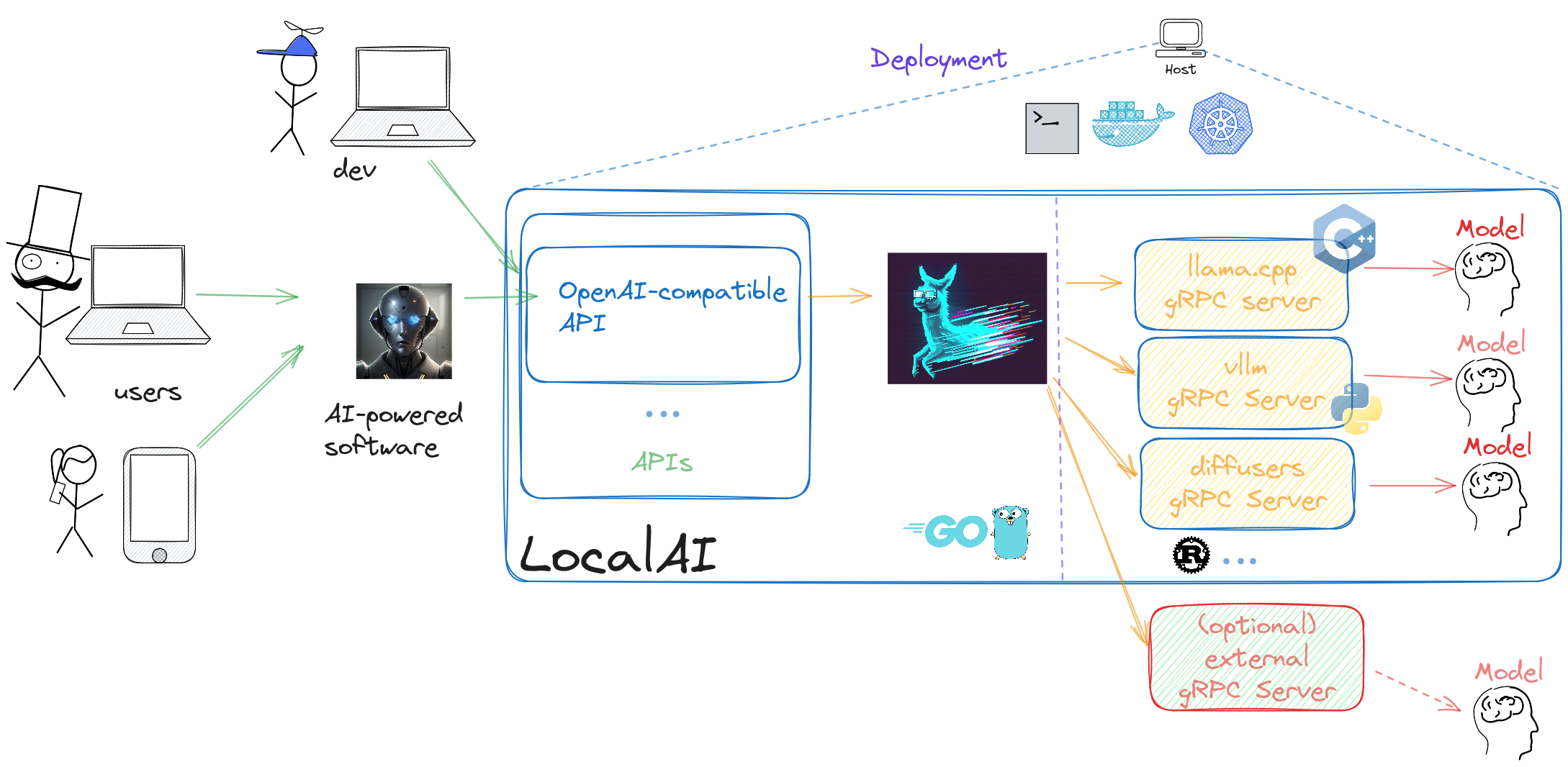
|
||||
|
||||
@@ -32,10 +32,10 @@ Otherwise, here are the links to the binaries:
|
||||
| MacOS (arm64) | [Download](https://github.com/mudler/LocalAI/releases/download/{{< version >}}/local-ai-Darwin-arm64) |
|
||||
|
||||
|
||||
{{% alert icon="⚡" context="warning" %}}
|
||||
{{% notice icon="⚡" context="warning" %}}
|
||||
Binaries do have limited support compared to container images:
|
||||
|
||||
- Python-based backends are not shipped with binaries (e.g. `bark`, `diffusers` or `transformers`)
|
||||
- MacOS binaries and Linux-arm64 do not ship TTS nor `stablediffusion-cpp` backends
|
||||
- Linux binaries do not ship `stablediffusion-cpp` backend
|
||||
{{% /alert %}}
|
||||
{{% /notice %}}
|
||||
@@ -7,21 +7,18 @@ url = '/reference/cli-reference'
|
||||
|
||||
Complete reference for all LocalAI command-line interface (CLI) parameters and environment variables.
|
||||
|
||||
> **Note:** All CLI flags can also be set via environment variables. Environment variables take precedence over CLI flags. See [.env files]({{%relref "docs/advanced/advanced-usage#env-files" %}}) for configuration file support.
|
||||
> **Note:** All CLI flags can also be set via environment variables. Environment variables take precedence over CLI flags. See [.env files]({{%relref "advanced/advanced-usage#env-files" %}}) for configuration file support.
|
||||
|
||||
## Global Flags
|
||||
|
||||
{{< table "table-responsive" >}}
|
||||
| Parameter | Default | Description | Environment Variable |
|
||||
|-----------|---------|-------------|----------------------|
|
||||
| `-h, --help` | | Show context-sensitive help | |
|
||||
| `--log-level` | `info` | Set the level of logs to output [error,warn,info,debug,trace] | `$LOCALAI_LOG_LEVEL` |
|
||||
| `--debug` | `false` | **DEPRECATED** - Use `--log-level=debug` instead. Enable debug logging | `$LOCALAI_DEBUG`, `$DEBUG` |
|
||||
{{< /table >}}
|
||||
|
||||
## Storage Flags
|
||||
|
||||
{{< table "table-responsive" >}}
|
||||
| Parameter | Default | Description | Environment Variable |
|
||||
|-----------|---------|-------------|----------------------|
|
||||
| `--models-path` | `BASEPATH/models` | Path containing models used for inferencing | `$LOCALAI_MODELS_PATH`, `$MODELS_PATH` |
|
||||
@@ -30,11 +27,9 @@ Complete reference for all LocalAI command-line interface (CLI) parameters and e
|
||||
| `--localai-config-dir` | `BASEPATH/configuration` | Directory for dynamic loading of certain configuration files (currently api_keys.json and external_backends.json) | `$LOCALAI_CONFIG_DIR` |
|
||||
| `--localai-config-dir-poll-interval` | | Time duration to poll the LocalAI Config Dir if your system has broken fsnotify events (example: `1m`) | `$LOCALAI_CONFIG_DIR_POLL_INTERVAL` |
|
||||
| `--models-config-file` | | YAML file containing a list of model backend configs (alias: `--config-file`) | `$LOCALAI_MODELS_CONFIG_FILE`, `$CONFIG_FILE` |
|
||||
{{< /table >}}
|
||||
|
||||
## Backend Flags
|
||||
|
||||
{{< table "table-responsive" >}}
|
||||
| Parameter | Default | Description | Environment Variable |
|
||||
|-----------|---------|-------------|----------------------|
|
||||
| `--backends-path` | `BASEPATH/backends` | Path containing backends used for inferencing | `$LOCALAI_BACKENDS_PATH`, `$BACKENDS_PATH` |
|
||||
@@ -50,13 +45,11 @@ Complete reference for all LocalAI command-line interface (CLI) parameters and e
|
||||
| `--watchdog-idle-timeout` | `15m` | Threshold beyond which an idle backend should be stopped | `$LOCALAI_WATCHDOG_IDLE_TIMEOUT`, `$WATCHDOG_IDLE_TIMEOUT` |
|
||||
| `--enable-watchdog-busy` | `false` | Enable watchdog for stopping backends that are busy longer than the watchdog-busy-timeout | `$LOCALAI_WATCHDOG_BUSY`, `$WATCHDOG_BUSY` |
|
||||
| `--watchdog-busy-timeout` | `5m` | Threshold beyond which a busy backend should be stopped | `$LOCALAI_WATCHDOG_BUSY_TIMEOUT`, `$WATCHDOG_BUSY_TIMEOUT` |
|
||||
{{< /table >}}
|
||||
|
||||
For more information on VRAM management, see [VRAM and Memory Management]({{%relref "docs/advanced/vram-management" %}}).
|
||||
For more information on VRAM management, see [VRAM and Memory Management]({{%relref "advanced/vram-management" %}}).
|
||||
|
||||
## Models Flags
|
||||
|
||||
{{< table "table-responsive" >}}
|
||||
| Parameter | Default | Description | Environment Variable |
|
||||
|-----------|---------|-------------|----------------------|
|
||||
| `--galleries` | | JSON list of galleries | `$LOCALAI_GALLERIES`, `$GALLERIES` |
|
||||
@@ -65,23 +58,19 @@ For more information on VRAM management, see [VRAM and Memory Management]({{%rel
|
||||
| `--models` | | A list of model configuration URLs to load | `$LOCALAI_MODELS`, `$MODELS` |
|
||||
| `--preload-models-config` | | A list of models to apply at startup. Path to a YAML config file | `$LOCALAI_PRELOAD_MODELS_CONFIG`, `$PRELOAD_MODELS_CONFIG` |
|
||||
| `--load-to-memory` | | A list of models to load into memory at startup | `$LOCALAI_LOAD_TO_MEMORY`, `$LOAD_TO_MEMORY` |
|
||||
{{< /table >}}
|
||||
|
||||
> **Note:** You can also pass model configuration URLs as positional arguments: `local-ai run MODEL_URL1 MODEL_URL2 ...`
|
||||
|
||||
## Performance Flags
|
||||
|
||||
{{< table "table-responsive" >}}
|
||||
| Parameter | Default | Description | Environment Variable |
|
||||
|-----------|---------|-------------|----------------------|
|
||||
| `--f16` | `false` | Enable GPU acceleration | `$LOCALAI_F16`, `$F16` |
|
||||
| `-t, --threads` | | Number of threads used for parallel computation. Usage of the number of physical cores in the system is suggested | `$LOCALAI_THREADS`, `$THREADS` |
|
||||
| `--context-size` | | Default context size for models | `$LOCALAI_CONTEXT_SIZE`, `$CONTEXT_SIZE` |
|
||||
{{< /table >}}
|
||||
|
||||
## API Flags
|
||||
|
||||
{{< table "table-responsive" >}}
|
||||
| Parameter | Default | Description | Environment Variable |
|
||||
|-----------|---------|-------------|----------------------|
|
||||
| `--address` | `:8080` | Bind address for the API server | `$LOCALAI_ADDRESS`, `$ADDRESS` |
|
||||
@@ -94,11 +83,9 @@ For more information on VRAM management, see [VRAM and Memory Management]({{%rel
|
||||
| `--disable-gallery-endpoint` | `false` | Disable the gallery endpoints | `$LOCALAI_DISABLE_GALLERY_ENDPOINT`, `$DISABLE_GALLERY_ENDPOINT` |
|
||||
| `--disable-metrics-endpoint` | `false` | Disable the `/metrics` endpoint | `$LOCALAI_DISABLE_METRICS_ENDPOINT`, `$DISABLE_METRICS_ENDPOINT` |
|
||||
| `--machine-tag` | | If not empty, add that string to Machine-Tag header in each response. Useful to track response from different machines using multiple P2P federated nodes | `$LOCALAI_MACHINE_TAG`, `$MACHINE_TAG` |
|
||||
{{< /table >}}
|
||||
|
||||
## Hardening Flags
|
||||
|
||||
{{< table "table-responsive" >}}
|
||||
| Parameter | Default | Description | Environment Variable |
|
||||
|-----------|---------|-------------|----------------------|
|
||||
| `--disable-predownload-scan` | `false` | If true, disables the best-effort security scanner before downloading any files | `$LOCALAI_DISABLE_PREDOWNLOAD_SCAN` |
|
||||
@@ -106,11 +93,9 @@ For more information on VRAM management, see [VRAM and Memory Management]({{%rel
|
||||
| `--use-subtle-key-comparison` | `false` | If true, API Key validation comparisons will be performed using constant-time comparisons rather than simple equality. This trades off performance on each request for resilience against timing attacks | `$LOCALAI_SUBTLE_KEY_COMPARISON` |
|
||||
| `--disable-api-key-requirement-for-http-get` | `false` | If true, a valid API key is not required to issue GET requests to portions of the web UI. This should only be enabled in secure testing environments | `$LOCALAI_DISABLE_API_KEY_REQUIREMENT_FOR_HTTP_GET` |
|
||||
| `--http-get-exempted-endpoints` | `^/$,^/browse/?$,^/talk/?$,^/p2p/?$,^/chat/?$,^/text2image/?$,^/tts/?$,^/static/.*$,^/swagger.*$` | If `--disable-api-key-requirement-for-http-get` is overridden to true, this is the list of endpoints to exempt. Only adjust this in case of a security incident or as a result of a personal security posture review | `$LOCALAI_HTTP_GET_EXEMPTED_ENDPOINTS` |
|
||||
{{< /table >}}
|
||||
|
||||
## P2P Flags
|
||||
|
||||
{{< table "table-responsive" >}}
|
||||
| Parameter | Default | Description | Environment Variable |
|
||||
|-----------|---------|-------------|----------------------|
|
||||
| `--p2p` | `false` | Enable P2P mode | `$LOCALAI_P2P`, `$P2P` |
|
||||
@@ -119,7 +104,6 @@ For more information on VRAM management, see [VRAM and Memory Management]({{%rel
|
||||
| `--p2ptoken` | | Token for P2P mode (optional) | `$LOCALAI_P2P_TOKEN`, `$P2P_TOKEN`, `$TOKEN` |
|
||||
| `--p2p-network-id` | | Network ID for P2P mode, can be set arbitrarily by the user for grouping a set of instances | `$LOCALAI_P2P_NETWORK_ID`, `$P2P_NETWORK_ID` |
|
||||
| `--federated` | `false` | Enable federated instance | `$LOCALAI_FEDERATED`, `$FEDERATED` |
|
||||
{{< /table >}}
|
||||
|
||||
## Other Commands
|
||||
|
||||
@@ -142,20 +126,16 @@ Use `local-ai <command> --help` for more information on each command.
|
||||
### Basic Usage
|
||||
|
||||
```bash
|
||||
# Start LocalAI with default settings
|
||||
./local-ai run
|
||||
|
||||
# Start with custom model path and address
|
||||
./local-ai run --models-path /path/to/models --address :9090
|
||||
|
||||
# Start with GPU acceleration
|
||||
./local-ai run --f16
|
||||
```
|
||||
|
||||
### Environment Variables
|
||||
|
||||
```bash
|
||||
# Using environment variables
|
||||
export LOCALAI_MODELS_PATH=/path/to/models
|
||||
export LOCALAI_ADDRESS=:9090
|
||||
export LOCALAI_F16=true
|
||||
@@ -165,7 +145,6 @@ export LOCALAI_F16=true
|
||||
### Advanced Configuration
|
||||
|
||||
```bash
|
||||
# Start with multiple models, watchdog, and P2P enabled
|
||||
./local-ai run \
|
||||
--models model1.yaml model2.yaml \
|
||||
--enable-watchdog-idle \
|
||||
@@ -176,6 +155,6 @@ export LOCALAI_F16=true
|
||||
|
||||
## Related Documentation
|
||||
|
||||
- See [Advanced Usage]({{%relref "docs/advanced/advanced-usage" %}}) for configuration examples
|
||||
- See [VRAM and Memory Management]({{%relref "docs/advanced/vram-management" %}}) for memory management options
|
||||
- See [Advanced Usage]({{%relref "advanced/advanced-usage" %}}) for configuration examples
|
||||
- See [VRAM and Memory Management]({{%relref "advanced/vram-management" %}}) for memory management options
|
||||
|
||||
@@ -8,29 +8,26 @@ url = "/model-compatibility/"
|
||||
|
||||
Besides llama based models, LocalAI is compatible also with other architectures. The table below lists all the backends, compatible models families and the associated repository.
|
||||
|
||||
{{% alert note %}}
|
||||
{{% notice note %}}
|
||||
|
||||
LocalAI will attempt to automatically load models which are not explicitly configured for a specific backend. You can specify the backend to use by configuring a model with a YAML file. See [the advanced section]({{%relref "docs/advanced" %}}) for more details.
|
||||
LocalAI will attempt to automatically load models which are not explicitly configured for a specific backend. You can specify the backend to use by configuring a model with a YAML file. See [the advanced section]({{%relref "advanced" %}}) for more details.
|
||||
|
||||
{{% /alert %}}
|
||||
{{% /notice %}}
|
||||
|
||||
## Text Generation & Language Models
|
||||
|
||||
{{< table "table-responsive" >}}
|
||||
| Backend and Bindings | Compatible models | Completion/Chat endpoint | Capability | Embeddings support | Token stream support | Acceleration |
|
||||
|----------------------------------------------------------------------------------|-----------------------|--------------------------|---------------------------|-----------------------------------|----------------------|--------------|
|
||||
| [llama.cpp]({{%relref "docs/features/text-generation#llama.cpp" %}}) | LLama, Mamba, RWKV, Falcon, Starcoder, GPT-2, [and many others](https://github.com/ggerganov/llama.cpp?tab=readme-ov-file#description) | yes | GPT and Functions | yes | yes | CUDA 11/12, ROCm, Intel SYCL, Vulkan, Metal, CPU |
|
||||
| [llama.cpp]({{%relref "features/text-generation#llama.cpp" %}}) | LLama, Mamba, RWKV, Falcon, Starcoder, GPT-2, [and many others](https://github.com/ggerganov/llama.cpp?tab=readme-ov-file#description) | yes | GPT and Functions | yes | yes | CUDA 11/12, ROCm, Intel SYCL, Vulkan, Metal, CPU |
|
||||
| [vLLM](https://github.com/vllm-project/vllm) | Various GPTs and quantization formats | yes | GPT | no | no | CUDA 12, ROCm, Intel |
|
||||
| [transformers](https://github.com/huggingface/transformers) | Various GPTs and quantization formats | yes | GPT, embeddings, Audio generation | yes | yes* | CUDA 11/12, ROCm, Intel, CPU |
|
||||
| [exllama2](https://github.com/turboderp-org/exllamav2) | GPTQ | yes | GPT only | no | no | CUDA 12 |
|
||||
| [MLX](https://github.com/ml-explore/mlx-lm) | Various LLMs | yes | GPT | no | no | Metal (Apple Silicon) |
|
||||
| [MLX-VLM](https://github.com/Blaizzy/mlx-vlm) | Vision-Language Models | yes | Multimodal GPT | no | no | Metal (Apple Silicon) |
|
||||
| [langchain-huggingface](https://github.com/tmc/langchaingo) | Any text generators available on HuggingFace through API | yes | GPT | no | no | N/A |
|
||||
{{< /table >}}
|
||||
|
||||
## Audio & Speech Processing
|
||||
|
||||
{{< table "table-responsive" >}}
|
||||
| Backend and Bindings | Compatible models | Completion/Chat endpoint | Capability | Embeddings support | Token stream support | Acceleration |
|
||||
|----------------------------------------------------------------------------------|-----------------------|--------------------------|---------------------------|-----------------------------------|----------------------|--------------|
|
||||
| [whisper.cpp](https://github.com/ggml-org/whisper.cpp) | whisper | no | Audio transcription | no | no | CUDA 12, ROCm, Intel SYCL, Vulkan, CPU |
|
||||
@@ -45,28 +42,23 @@ LocalAI will attempt to automatically load models which are not explicitly confi
|
||||
| [silero-vad](https://github.com/snakers4/silero-vad) with [Golang bindings](https://github.com/streamer45/silero-vad-go) | Silero VAD | no | Voice Activity Detection | no | no | CPU |
|
||||
| [neutts](https://github.com/neuphonic/neuttsair) | NeuTTSAir | no | Text-to-speech with voice cloning | no | no | CUDA 12, ROCm, CPU |
|
||||
| [mlx-audio](https://github.com/Blaizzy/mlx-audio) | MLX | no | Text-tospeech | no | no | Metal (Apple Silicon) |
|
||||
{{< /table >}}
|
||||
|
||||
## Image & Video Generation
|
||||
|
||||
{{< table "table-responsive" >}}
|
||||
| Backend and Bindings | Compatible models | Completion/Chat endpoint | Capability | Embeddings support | Token stream support | Acceleration |
|
||||
|----------------------------------------------------------------------------------|-----------------------|--------------------------|---------------------------|-----------------------------------|----------------------|--------------|
|
||||
| [stablediffusion.cpp](https://github.com/leejet/stable-diffusion.cpp) | stablediffusion-1, stablediffusion-2, stablediffusion-3, flux, PhotoMaker | no | Image | no | no | CUDA 12, Intel SYCL, Vulkan, CPU |
|
||||
| [diffusers](https://github.com/huggingface/diffusers) | SD, various diffusion models,... | no | Image/Video generation | no | no | CUDA 11/12, ROCm, Intel, Metal, CPU |
|
||||
| [transformers-musicgen](https://github.com/huggingface/transformers) | MusicGen | no | Audio generation | no | no | CUDA, CPU |
|
||||
{{< /table >}}
|
||||
|
||||
## Specialized AI Tasks
|
||||
|
||||
{{< table "table-responsive" >}}
|
||||
| Backend and Bindings | Compatible models | Completion/Chat endpoint | Capability | Embeddings support | Token stream support | Acceleration |
|
||||
|----------------------------------------------------------------------------------|-----------------------|--------------------------|---------------------------|-----------------------------------|----------------------|--------------|
|
||||
| [rfdetr](https://github.com/roboflow/rf-detr) | RF-DETR | no | Object Detection | no | no | CUDA 12, Intel, CPU |
|
||||
| [rerankers](https://github.com/AnswerDotAI/rerankers) | Reranking API | no | Reranking | no | no | CUDA 11/12, ROCm, Intel, CPU |
|
||||
| [local-store](https://github.com/mudler/LocalAI) | Vector database | no | Vector storage | yes | no | CPU |
|
||||
| [huggingface](https://huggingface.co/docs/hub/en/api) | HuggingFace API models | yes | Various AI tasks | yes | yes | API-based |
|
||||
{{< /table >}}
|
||||
|
||||
## Acceleration Support Summary
|
||||
|
||||
@@ -87,6 +79,6 @@ LocalAI will attempt to automatically load models which are not explicitly confi
|
||||
- **Quantization**: 4-bit, 5-bit, 8-bit integer quantization support
|
||||
- **Mixed Precision**: F16/F32 mixed precision support
|
||||
|
||||
Note: any backend name listed above can be used in the `backend` field of the model configuration file (See [the advanced section]({{%relref "docs/advanced" %}})).
|
||||
Note: any backend name listed above can be used in the `backend` field of the model configuration file (See [the advanced section]({{%relref "advanced" %}})).
|
||||
|
||||
- \* Only for CUDA and OpenVINO CPU/XPU acceleration.
|
||||
@@ -10,7 +10,6 @@ Release notes have been now moved completely over Github releases.
|
||||
|
||||
You can see the release notes [here](https://github.com/mudler/LocalAI/releases).
|
||||
|
||||
# Older release notes
|
||||
|
||||
## 04-12-2023: __v2.0.0__
|
||||
|
||||
@@ -74,7 +73,7 @@ From this release the `llama` backend supports only `gguf` files (see {{< pr "94
|
||||
|
||||
### Image generation enhancements
|
||||
|
||||
The [Diffusers]({{%relref "docs/features/image-generation" %}}) backend got now various enhancements, including support to generate images from images, longer prompts, and support for more kernels schedulers. See the [Diffusers]({{%relref "docs/features/image-generation" %}}) documentation for more information.
|
||||
The [Diffusers]({{%relref "features/image-generation" %}}) backend got now various enhancements, including support to generate images from images, longer prompts, and support for more kernels schedulers. See the [Diffusers]({{%relref "features/image-generation" %}}) documentation for more information.
|
||||
|
||||
### Lora adapters
|
||||
|
||||
@@ -137,7 +136,7 @@ The full changelog is available [here](https://github.com/go-skynet/LocalAI/rele
|
||||
|
||||
## 🔥🔥🔥🔥 12-08-2023: __v1.24.0__ 🔥🔥🔥🔥
|
||||
|
||||
This is release brings four(!) new additional backends to LocalAI: [🐶 Bark]({{%relref "docs/features/text-to-audio#bark" %}}), 🦙 [AutoGPTQ]({{%relref "docs/features/text-generation#autogptq" %}}), [🧨 Diffusers]({{%relref "docs/features/image-generation" %}}), 🦙 [exllama]({{%relref "docs/features/text-generation#exllama" %}}) and a lot of improvements!
|
||||
This is release brings four(!) new additional backends to LocalAI: [🐶 Bark]({{%relref "features/text-to-audio#bark" %}}), 🦙 [AutoGPTQ]({{%relref "features/text-generation#autogptq" %}}), [🧨 Diffusers]({{%relref "features/image-generation" %}}), 🦙 [exllama]({{%relref "features/text-generation#exllama" %}}) and a lot of improvements!
|
||||
|
||||
### Major improvements:
|
||||
|
||||
@@ -149,23 +148,23 @@ This is release brings four(!) new additional backends to LocalAI: [🐶 Bark]({
|
||||
|
||||
### 🐶 Bark
|
||||
|
||||
[Bark]({{%relref "docs/features/text-to-audio#bark" %}}) is a text-prompted generative audio model - it combines GPT techniques to generate Audio from text. It is a great addition to LocalAI, and it's available in the container images by default.
|
||||
[Bark]({{%relref "features/text-to-audio#bark" %}}) is a text-prompted generative audio model - it combines GPT techniques to generate Audio from text. It is a great addition to LocalAI, and it's available in the container images by default.
|
||||
|
||||
It can also generate music, see the example: [lion.webm](https://user-images.githubusercontent.com/5068315/230684766-97f5ea23-ad99-473c-924b-66b6fab24289.webm)
|
||||
|
||||
### 🦙 AutoGPTQ
|
||||
|
||||
[AutoGPTQ]({{%relref "docs/features/text-generation#autogptq" %}}) is an easy-to-use LLMs quantization package with user-friendly apis, based on GPTQ algorithm.
|
||||
[AutoGPTQ]({{%relref "features/text-generation#autogptq" %}}) is an easy-to-use LLMs quantization package with user-friendly apis, based on GPTQ algorithm.
|
||||
|
||||
It is targeted mainly for GPU usage only. Check out the [ documentation]({{%relref "docs/features/text-generation" %}}) for usage.
|
||||
It is targeted mainly for GPU usage only. Check out the [ documentation]({{%relref "features/text-generation" %}}) for usage.
|
||||
|
||||
### 🦙 Exllama
|
||||
|
||||
[Exllama]({{%relref "docs/features/text-generation#exllama" %}}) is a "A more memory-efficient rewrite of the HF transformers implementation of Llama for use with quantized weights". It is a faster alternative to run LLaMA models on GPU.Check out the [Exllama documentation]({{%relref "docs/features/text-generation#exllama" %}}) for usage.
|
||||
[Exllama]({{%relref "features/text-generation#exllama" %}}) is a "A more memory-efficient rewrite of the HF transformers implementation of Llama for use with quantized weights". It is a faster alternative to run LLaMA models on GPU.Check out the [Exllama documentation]({{%relref "features/text-generation#exllama" %}}) for usage.
|
||||
|
||||
### 🧨 Diffusers
|
||||
|
||||
[Diffusers]({{%relref "docs/features/image-generation#diffusers" %}}) is the go-to library for state-of-the-art pretrained diffusion models for generating images, audio, and even 3D structures of molecules. Currently it is experimental, and supports generation only of images so you might encounter some issues on models which weren't tested yet. Check out the [Diffusers documentation]({{%relref "docs/features/image-generation" %}}) for usage.
|
||||
[Diffusers]({{%relref "features/image-generation#diffusers" %}}) is the go-to library for state-of-the-art pretrained diffusion models for generating images, audio, and even 3D structures of molecules. Currently it is experimental, and supports generation only of images so you might encounter some issues on models which weren't tested yet. Check out the [Diffusers documentation]({{%relref "features/image-generation" %}}) for usage.
|
||||
|
||||
### 🔑 API Keys
|
||||
|
||||
@@ -201,11 +200,11 @@ Most notably, this release brings important fixes for CUDA (and not only):
|
||||
* fix: select function calls if 'name' is set in the request by {{< github "mudler" >}} in {{< pr "827" >}}
|
||||
* fix: symlink libphonemize in the container by {{< github "mudler" >}} in {{< pr "831" >}}
|
||||
|
||||
{{% alert note %}}
|
||||
{{% notice note %}}
|
||||
|
||||
From this release [OpenAI functions]({{%relref "docs/features/openai-functions" %}}) are available in the `llama` backend. The `llama-grammar` has been deprecated. See also [OpenAI functions]({{%relref "docs/features/openai-functions" %}}).
|
||||
From this release [OpenAI functions]({{%relref "features/openai-functions" %}}) are available in the `llama` backend. The `llama-grammar` has been deprecated. See also [OpenAI functions]({{%relref "features/openai-functions" %}}).
|
||||
|
||||
{{% /alert %}}
|
||||
{{% /notice %}}
|
||||
|
||||
The full [changelog is available here](https://github.com/go-skynet/LocalAI/releases/tag/v1.23.0)
|
||||
|
||||
@@ -219,15 +218,15 @@ The full [changelog is available here](https://github.com/go-skynet/LocalAI/rele
|
||||
* feat: backends improvements by {{< github "mudler" >}} in {{< pr "778" >}}
|
||||
* feat(llama2): add template for chat messages by {{< github "dave-gray101" >}} in {{< pr "782" >}}
|
||||
|
||||
{{% alert note %}}
|
||||
{{% notice note %}}
|
||||
|
||||
From this release to use the OpenAI functions you need to use the `llama-grammar` backend. It has been added a `llama` backend for tracking `llama.cpp` master and `llama-grammar` for the grammar functionalities that have not been merged yet upstream. See also [OpenAI functions]({{%relref "docs/features/openai-functions" %}}). Until the feature is merged we will have two llama backends.
|
||||
From this release to use the OpenAI functions you need to use the `llama-grammar` backend. It has been added a `llama` backend for tracking `llama.cpp` master and `llama-grammar` for the grammar functionalities that have not been merged yet upstream. See also [OpenAI functions]({{%relref "features/openai-functions" %}}). Until the feature is merged we will have two llama backends.
|
||||
|
||||
{{% /alert %}}
|
||||
{{% /notice %}}
|
||||
|
||||
## Huggingface embeddings
|
||||
|
||||
In this release is now possible to specify to LocalAI external `gRPC` backends that can be used for inferencing {{< pr "778" >}}. It is now possible to write internal backends in any language, and a `huggingface-embeddings` backend is now available in the container image to be used with https://github.com/UKPLab/sentence-transformers. See also [Embeddings]({{%relref "docs/features/embeddings" %}}).
|
||||
In this release is now possible to specify to LocalAI external `gRPC` backends that can be used for inferencing {{< pr "778" >}}. It is now possible to write internal backends in any language, and a `huggingface-embeddings` backend is now available in the container image to be used with https://github.com/UKPLab/sentence-transformers. See also [Embeddings]({{%relref "features/embeddings" %}}).
|
||||
|
||||
## LLaMa 2 has been released!
|
||||
|
||||
@@ -272,7 +271,7 @@ The former, ggml-based backend has been renamed to `falcon-ggml`.
|
||||
|
||||
### Default pre-compiled binaries
|
||||
|
||||
From this release the default behavior of images has changed. Compilation is not triggered on start automatically, to recompile `local-ai` from scratch on start and switch back to the old behavior, you can set `REBUILD=true` in the environment variables. Rebuilding can be necessary if your CPU and/or architecture is old and the pre-compiled binaries are not compatible with your platform. See the [build section]({{%relref "docs/getting-started/build" %}}) for more information.
|
||||
From this release the default behavior of images has changed. Compilation is not triggered on start automatically, to recompile `local-ai` from scratch on start and switch back to the old behavior, you can set `REBUILD=true` in the environment variables. Rebuilding can be necessary if your CPU and/or architecture is old and the pre-compiled binaries are not compatible with your platform. See the [build section]({{%relref "installation/build" %}}) for more information.
|
||||
|
||||
[Full release changelog](https://github.com/go-skynet/LocalAI/releases/tag/v1.21.0)
|
||||
|
||||
@@ -282,8 +281,8 @@ From this release the default behavior of images has changed. Compilation is not
|
||||
|
||||
### Exciting New Features 🎉
|
||||
|
||||
* Add Text-to-Audio generation with `go-piper` by {{< github "mudler" >}} in {{< pr "649" >}} See [API endpoints]({{%relref "docs/features/text-to-audio" %}}) in our documentation.
|
||||
* Add gallery repository by {{< github "mudler" >}} in {{< pr "663" >}}. See [models]({{%relref "docs/features/model-gallery" %}}) for documentation.
|
||||
* Add Text-to-Audio generation with `go-piper` by {{< github "mudler" >}} in {{< pr "649" >}} See [API endpoints]({{%relref "features/text-to-audio" %}}) in our documentation.
|
||||
* Add gallery repository by {{< github "mudler" >}} in {{< pr "663" >}}. See [models]({{%relref "features/model-gallery" %}}) for documentation.
|
||||
|
||||
### Container images
|
||||
- Standard (GPT + `stablediffusion`): `quay.io/go-skynet/local-ai:v1.20.0`
|
||||
@@ -295,7 +294,7 @@ From this release the default behavior of images has changed. Compilation is not
|
||||
|
||||
Updates to `llama.cpp`, `go-transformers`, `gpt4all.cpp` and `rwkv.cpp`.
|
||||
|
||||
The NUMA option was enabled by {{< github "mudler" >}} in {{< pr "684" >}}, along with many new parameters (`mmap`,`mmlock`, ..). See [advanced]({{%relref "docs/advanced" %}}) for the full list of parameters.
|
||||
The NUMA option was enabled by {{< github "mudler" >}} in {{< pr "684" >}}, along with many new parameters (`mmap`,`mmlock`, ..). See [advanced]({{%relref "advanced" %}}) for the full list of parameters.
|
||||
|
||||
### Gallery repositories
|
||||
|
||||
@@ -319,13 +318,13 @@ or a `tts` voice with:
|
||||
curl http://localhost:8080/models/apply -H "Content-Type: application/json" -d '{ "id": "model-gallery@voice-en-us-kathleen-low" }'
|
||||
```
|
||||
|
||||
See also [models]({{%relref "docs/features/model-gallery" %}}) for a complete documentation.
|
||||
See also [models]({{%relref "features/model-gallery" %}}) for a complete documentation.
|
||||
|
||||
### Text to Audio
|
||||
|
||||
Now `LocalAI` uses [piper](https://github.com/rhasspy/piper) and [go-piper](https://github.com/mudler/go-piper) to generate audio from text. This is an experimental feature, and it requires `GO_TAGS=tts` to be set during build. It is enabled by default in the pre-built container images.
|
||||
|
||||
To setup audio models, you can use the new galleries, or setup the models manually as described in [the API section of the documentation]({{%relref "docs/features/text-to-audio" %}}).
|
||||
To setup audio models, you can use the new galleries, or setup the models manually as described in [the API section of the documentation]({{%relref "features/text-to-audio" %}}).
|
||||
|
||||
You can check the full changelog in [Github](https://github.com/go-skynet/LocalAI/releases/tag/v1.20.0)
|
||||
|
||||
@@ -353,7 +352,7 @@ We now support a vast variety of models, while being backward compatible with pr
|
||||
### New features
|
||||
|
||||
- ✨ Added support for `falcon`-based model families (7b) ( [mudler](https://github.com/mudler) )
|
||||
- ✨ Experimental support for Metal Apple Silicon GPU - ( [mudler](https://github.com/mudler) and thanks to [Soleblaze](https://github.com/Soleblaze) for testing! ). See the [build section]({{%relref "docs/getting-started/build#Acceleration" %}}).
|
||||
- ✨ Experimental support for Metal Apple Silicon GPU - ( [mudler](https://github.com/mudler) and thanks to [Soleblaze](https://github.com/Soleblaze) for testing! ). See the [build section]({{%relref "installation/build#Acceleration" %}}).
|
||||
- ✨ Support for token stream in the `/v1/completions` endpoint ( [samm81](https://github.com/samm81) )
|
||||
- ✨ Added huggingface backend ( [Evilfreelancer](https://github.com/EvilFreelancer) )
|
||||
- 📷 Stablediffusion now can output `2048x2048` images size with `esrgan`! ( [mudler](https://github.com/mudler) )
|
||||
@@ -394,7 +393,7 @@ Two new projects offer now direct integration with LocalAI!
|
||||
|
||||
Support for OpenCL has been added while building from sources.
|
||||
|
||||
You can now build LocalAI from source with `BUILD_TYPE=clblas` to have an OpenCL build. See also the [build section]({{%relref "docs/getting-started/build#Acceleration" %}}).
|
||||
You can now build LocalAI from source with `BUILD_TYPE=clblas` to have an OpenCL build. See also the [build section]({{%relref "getting-started/build#Acceleration" %}}).
|
||||
|
||||
For instructions on how to install OpenCL/CLBlast see [here](https://github.com/ggerganov/llama.cpp#blas-build).
|
||||
|
||||
@@ -415,16 +414,13 @@ PRELOAD_MODELS=[{"url": "github:go-skynet/model-gallery/gpt4all-j.yaml", "name":
|
||||
`llama.cpp` models now can also automatically save the prompt cache state as well by specifying in the model YAML configuration file:
|
||||
|
||||
```yaml
|
||||
# Enable prompt caching
|
||||
|
||||
# This is a file that will be used to save/load the cache. relative to the models directory.
|
||||
prompt_cache_path: "alpaca-cache"
|
||||
|
||||
# Always enable prompt cache
|
||||
prompt_cache_all: true
|
||||
```
|
||||
|
||||
See also the [advanced section]({{%relref "docs/advanced" %}}).
|
||||
See also the [advanced section]({{%relref "advanced" %}}).
|
||||
|
||||
## Media, Blogs, Social
|
||||
|
||||
@@ -437,7 +433,7 @@ See also the [advanced section]({{%relref "docs/advanced" %}}).
|
||||
|
||||
- 23-05-2023: __v1.15.0__ released. `go-gpt2.cpp` backend got renamed to `go-ggml-transformers.cpp` updated including https://github.com/ggerganov/llama.cpp/pull/1508 which breaks compatibility with older models. This impacts RedPajama, GptNeoX, MPT(not `gpt4all-mpt`), Dolly, GPT2 and Starcoder based models. [Binary releases available](https://github.com/go-skynet/LocalAI/releases), various fixes, including {{< pr "341" >}} .
|
||||
- 21-05-2023: __v1.14.0__ released. Minor updates to the `/models/apply` endpoint, `llama.cpp` backend updated including https://github.com/ggerganov/llama.cpp/pull/1508 which breaks compatibility with older models. `gpt4all` is still compatible with the old format.
|
||||
- 19-05-2023: __v1.13.0__ released! 🔥🔥 updates to the `gpt4all` and `llama` backend, consolidated CUDA support ( {{< pr "310" >}} thanks to @bubthegreat and @Thireus ), preliminar support for [installing models via API]({{%relref "docs/advanced#" %}}).
|
||||
- 19-05-2023: __v1.13.0__ released! 🔥🔥 updates to the `gpt4all` and `llama` backend, consolidated CUDA support ( {{< pr "310" >}} thanks to @bubthegreat and @Thireus ), preliminar support for [installing models via API]({{%relref "advanced#" %}}).
|
||||
- 17-05-2023: __v1.12.0__ released! 🔥🔥 Minor fixes, plus CUDA ({{< pr "258" >}}) support for `llama.cpp`-compatible models and image generation ({{< pr "272" >}}).
|
||||
- 16-05-2023: 🔥🔥🔥 Experimental support for CUDA ({{< pr "258" >}}) in the `llama.cpp` backend and Stable diffusion CPU image generation ({{< pr "272" >}}) in `master`.
|
||||
|
||||
@@ -40,7 +40,7 @@ hero:
|
||||
ctaButton:
|
||||
icon: rocket_launch
|
||||
btnText: "Get Started"
|
||||
url: "/basics/getting_started/"
|
||||
url: "/installation/"
|
||||
cta2Button:
|
||||
icon: code
|
||||
btnText: "View on GitHub"
|
||||
|
||||
@@ -1,3 +1,3 @@
|
||||
module github.com/McShelby/hugo-theme-relearn.git
|
||||
module github.com/mudler/LocalAI/docs
|
||||
|
||||
go 1.19
|
||||
|
||||
110
docs/hugo.toml
Normal file
110
docs/hugo.toml
Normal file
@@ -0,0 +1,110 @@
|
||||
baseURL = 'https://localai.io/'
|
||||
languageCode = 'en-GB'
|
||||
defaultContentLanguage = 'en'
|
||||
|
||||
title = 'LocalAI'
|
||||
|
||||
# Theme configuration
|
||||
theme = 'hugo-theme-relearn'
|
||||
|
||||
# Enable Git info
|
||||
enableGitInfo = true
|
||||
enableEmoji = true
|
||||
|
||||
[outputs]
|
||||
home = ['html', 'rss', 'print', 'search']
|
||||
section = ['html', 'rss', 'print']
|
||||
page = ['html', 'print']
|
||||
|
||||
[markup]
|
||||
defaultMarkdownHandler = 'goldmark'
|
||||
[markup.tableOfContents]
|
||||
endLevel = 3
|
||||
startLevel = 1
|
||||
[markup.goldmark]
|
||||
[markup.goldmark.renderer]
|
||||
unsafe = true
|
||||
[markup.goldmark.parser.attribute]
|
||||
block = true
|
||||
title = true
|
||||
|
||||
[params]
|
||||
# Relearn theme parameters
|
||||
editURL = 'https://github.com/mudler/LocalAI/edit/master/docs/content/'
|
||||
description = 'LocalAI documentation'
|
||||
author = 'Ettore Di Giacinto'
|
||||
showVisitedLinks = true
|
||||
disableBreadcrumb = false
|
||||
disableNextPrev = false
|
||||
disableLandingPageButton = false
|
||||
titleSeparator = '::'
|
||||
disableSeoHiddenPages = true
|
||||
|
||||
# Additional theme options
|
||||
disableSearch = false
|
||||
disableGenerator = false
|
||||
disableLanguageSwitchingButton = true
|
||||
|
||||
# Theme variant - dark/blue style
|
||||
themeVariant = [ 'zen-dark' , 'neon', 'auto' ]
|
||||
|
||||
# ordersectionsby = 'weight'
|
||||
|
||||
[languages]
|
||||
[languages.en]
|
||||
title = 'LocalAI'
|
||||
languageName = 'English'
|
||||
weight = 10
|
||||
contentDir = 'content'
|
||||
[languages.en.params]
|
||||
landingPageName = '<i class="fa-fw fas fa-home"></i> Home'
|
||||
|
||||
# Menu shortcuts
|
||||
[[languages.en.menu.shortcuts]]
|
||||
name = '<i class="fas fa-fw fa-star"></i> Star us on GitHub'
|
||||
identifier = 'star-github'
|
||||
url = 'https://github.com/mudler/LocalAI'
|
||||
weight = 5
|
||||
|
||||
[[languages.en.menu.shortcuts]]
|
||||
name = '<i class="fab fa-fw fa-github"></i> GitHub'
|
||||
identifier = 'github'
|
||||
url = 'https://github.com/mudler/LocalAI'
|
||||
weight = 10
|
||||
|
||||
[[languages.en.menu.shortcuts]]
|
||||
name = '<i class="fab fa-fw fa-discord"></i> Discord'
|
||||
identifier = 'discord'
|
||||
url = 'https://discord.gg/uJAeKSAGDy'
|
||||
weight = 20
|
||||
|
||||
[[languages.en.menu.shortcuts]]
|
||||
name = '<i class="fab fa-fw fa-x-twitter"></i> X/Twitter'
|
||||
identifier = 'twitter'
|
||||
url = 'https://twitter.com/LocalAI_API'
|
||||
weight = 20
|
||||
|
||||
|
||||
# Module configuration for theme
|
||||
[module]
|
||||
[[module.mounts]]
|
||||
source = 'content'
|
||||
target = 'content'
|
||||
[[module.mounts]]
|
||||
source = 'static'
|
||||
target = 'static'
|
||||
[[module.mounts]]
|
||||
source = 'layouts'
|
||||
target = 'layouts'
|
||||
[[module.mounts]]
|
||||
source = 'data'
|
||||
target = 'data'
|
||||
[[module.mounts]]
|
||||
source = 'assets'
|
||||
target = 'assets'
|
||||
[[module.mounts]]
|
||||
source = '../images'
|
||||
target = 'static/images'
|
||||
[[module.mounts]]
|
||||
source = 'i18n'
|
||||
target = 'i18n'
|
||||
2
docs/layouts/partials/menu-footer.html
Normal file
2
docs/layouts/partials/menu-footer.html
Normal file
@@ -0,0 +1,2 @@
|
||||
<p>© 2023-2025 <a href="https://mudler.pm">Ettore Di Giacinto</a></p>
|
||||
|
||||
1
docs/themes/hugo-theme-relearn
vendored
1
docs/themes/hugo-theme-relearn
vendored
@@ -1 +0,0 @@
|
||||
9a020e7eadb7d8203f5b01b18756c72d94773ec9
|
||||
1
docs/themes/hugo-theme-relearn
vendored
Submodule
1
docs/themes/hugo-theme-relearn
vendored
Submodule
Submodule docs/themes/hugo-theme-relearn added at f69a085322
1
docs/themes/lotusdocs
vendored
1
docs/themes/lotusdocs
vendored
Submodule docs/themes/lotusdocs deleted from 975da91e83
18
go.mod
18
go.mod
@@ -6,18 +6,15 @@ toolchain go1.24.5
|
||||
|
||||
require (
|
||||
dario.cat/mergo v1.0.2
|
||||
fyne.io/fyne/v2 v2.7.0
|
||||
fyne.io/fyne/v2 v2.7.1
|
||||
github.com/Masterminds/sprig/v3 v3.3.0
|
||||
github.com/alecthomas/kong v1.12.1
|
||||
github.com/alecthomas/kong v1.13.0
|
||||
github.com/charmbracelet/glamour v0.10.0
|
||||
github.com/containerd/containerd v1.7.29
|
||||
github.com/ebitengine/purego v0.9.1
|
||||
github.com/fsnotify/fsnotify v1.9.0
|
||||
github.com/go-audio/wav v1.1.0
|
||||
github.com/go-skynet/go-llama.cpp v0.0.0-20240314183750-6a8041ef6b46
|
||||
github.com/gofiber/fiber/v2 v2.52.9
|
||||
github.com/gofiber/swagger v1.1.1
|
||||
github.com/gofiber/websocket/v2 v2.2.1
|
||||
github.com/gofrs/flock v0.13.0
|
||||
github.com/google/go-containerregistry v0.19.2
|
||||
github.com/google/uuid v1.6.0
|
||||
@@ -48,27 +45,25 @@ require (
|
||||
github.com/schollz/progressbar/v3 v3.18.0
|
||||
github.com/shirou/gopsutil/v3 v3.24.5
|
||||
github.com/streamer45/silero-vad-go v0.2.1
|
||||
github.com/stretchr/testify v1.11.1
|
||||
github.com/swaggo/echo-swagger v1.4.1
|
||||
github.com/swaggo/swag v1.16.6
|
||||
github.com/testcontainers/testcontainers-go v0.40.0
|
||||
github.com/tmc/langchaingo v0.1.14
|
||||
github.com/valyala/fasthttp v1.68.0
|
||||
go.opentelemetry.io/otel v1.38.0
|
||||
go.opentelemetry.io/otel/exporters/prometheus v0.60.0
|
||||
go.opentelemetry.io/otel/metric v1.38.0
|
||||
go.opentelemetry.io/otel/sdk/metric v1.38.0
|
||||
google.golang.org/grpc v1.76.0
|
||||
google.golang.org/protobuf v1.36.8
|
||||
google.golang.org/protobuf v1.36.10
|
||||
gopkg.in/yaml.v2 v2.4.0
|
||||
gopkg.in/yaml.v3 v3.0.1
|
||||
oras.land/oras-go/v2 v2.6.0
|
||||
)
|
||||
|
||||
require (
|
||||
github.com/fasthttp/websocket v1.5.3 // indirect
|
||||
github.com/ghodss/yaml v1.0.0 // indirect
|
||||
github.com/labstack/gommon v0.4.2 // indirect
|
||||
github.com/stretchr/testify v1.11.1 // indirect
|
||||
github.com/swaggo/files/v2 v2.0.2 // indirect
|
||||
github.com/valyala/fasttemplate v1.2.2 // indirect
|
||||
)
|
||||
@@ -140,7 +135,6 @@ require (
|
||||
github.com/pion/webrtc/v4 v4.1.2 // indirect
|
||||
github.com/prometheus/otlptranslator v0.0.2 // indirect
|
||||
github.com/rymdport/portal v0.4.2 // indirect
|
||||
github.com/savsgio/gotils v0.0.0-20240303185622-093b76447511 // indirect
|
||||
github.com/shirou/gopsutil/v4 v4.25.6 // indirect
|
||||
github.com/srwiley/oksvg v0.0.0-20221011165216-be6e8873101c // indirect
|
||||
github.com/srwiley/rasterx v0.0.0-20220730225603-2ab79fcdd4ef // indirect
|
||||
@@ -150,7 +144,7 @@ require (
|
||||
go.opentelemetry.io/auto/sdk v1.1.0 // indirect
|
||||
go.opentelemetry.io/contrib/instrumentation/net/http/otelhttp v0.61.0 // indirect
|
||||
go.uber.org/mock v0.5.2 // indirect
|
||||
go.yaml.in/yaml/v2 v2.4.2
|
||||
go.yaml.in/yaml/v2 v2.4.3
|
||||
go.yaml.in/yaml/v3 v3.0.4 // indirect
|
||||
golang.org/x/image v0.25.0 // indirect
|
||||
golang.org/x/net v0.46.0 // indirect; indirect (for websocket)
|
||||
@@ -211,7 +205,7 @@ require (
|
||||
github.com/google/gopacket v1.1.19 // indirect
|
||||
github.com/google/pprof v0.0.0-20250403155104-27863c87afa6 // indirect
|
||||
github.com/gorilla/css v1.0.1 // indirect
|
||||
github.com/gorilla/websocket v1.5.3 // indirect
|
||||
github.com/gorilla/websocket v1.5.3
|
||||
github.com/hashicorp/golang-lru v1.0.2 // indirect
|
||||
github.com/hashicorp/golang-lru/v2 v2.0.7 // indirect
|
||||
github.com/henvic/httpretty v0.1.4 // indirect
|
||||
|
||||
34
go.sum
34
go.sum
@@ -8,8 +8,8 @@ dmitri.shuralyov.com/app/changes v0.0.0-20180602232624-0a106ad413e3/go.mod h1:Yl
|
||||
dmitri.shuralyov.com/html/belt v0.0.0-20180602232347-f7d459c86be0/go.mod h1:JLBrvjyP0v+ecvNYvCpyZgu5/xkfAUhi6wJj28eUfSU=
|
||||
dmitri.shuralyov.com/service/change v0.0.0-20181023043359-a85b471d5412/go.mod h1:a1inKt/atXimZ4Mv927x+r7UpyzRUf4emIoiiSC2TN4=
|
||||
dmitri.shuralyov.com/state v0.0.0-20180228185332-28bcc343414c/go.mod h1:0PRwlb0D6DFvNNtx+9ybjezNCa8XF0xaYcETyp6rHWU=
|
||||
fyne.io/fyne/v2 v2.7.0 h1:GvZSpE3X0liU/fqstInVvRsaboIVpIWQ4/sfjDGIGGQ=
|
||||
fyne.io/fyne/v2 v2.7.0/go.mod h1:xClVlrhxl7D+LT+BWYmcrW4Nf+dJTvkhnPgji7spAwE=
|
||||
fyne.io/fyne/v2 v2.7.1 h1:ja7rNHWWEooha4XBIZNnPP8tVFwmTfwMJdpZmLxm2Zc=
|
||||
fyne.io/fyne/v2 v2.7.1/go.mod h1:xClVlrhxl7D+LT+BWYmcrW4Nf+dJTvkhnPgji7spAwE=
|
||||
fyne.io/systray v1.11.1-0.20250603113521-ca66a66d8b58 h1:eA5/u2XRd8OUkoMqEv3IBlFYSruNlXD8bRHDiqm0VNI=
|
||||
fyne.io/systray v1.11.1-0.20250603113521-ca66a66d8b58/go.mod h1:RVwqP9nYMo7h5zViCBHri2FgjXF7H2cub7MAq4NSoLs=
|
||||
git.apache.org/thrift.git v0.0.0-20180902110319-2566ecd5d999/go.mod h1:fPE2ZNJGynbRyZ4dJvy6G277gSllfV2HJqblrnkyeyg=
|
||||
@@ -37,10 +37,10 @@ github.com/alecthomas/assert/v2 v2.11.0 h1:2Q9r3ki8+JYXvGsDyBXwH3LcJ+WK5D0gc5E8v
|
||||
github.com/alecthomas/assert/v2 v2.11.0/go.mod h1:Bze95FyfUr7x34QZrjL+XP+0qgp/zg8yS+TtBj1WA3k=
|
||||
github.com/alecthomas/chroma/v2 v2.14.0 h1:R3+wzpnUArGcQz7fCETQBzO5n9IMNi13iIs46aU4V9E=
|
||||
github.com/alecthomas/chroma/v2 v2.14.0/go.mod h1:QolEbTfmUHIMVpBqxeDnNBj2uoeI4EbYP4i6n68SG4I=
|
||||
github.com/alecthomas/kong v1.12.1 h1:iq6aMJDcFYP9uFrLdsiZQ2ZMmcshduyGv4Pek0MQPW0=
|
||||
github.com/alecthomas/kong v1.12.1/go.mod h1:p2vqieVMeTAnaC83txKtXe8FLke2X07aruPWXyMPQrU=
|
||||
github.com/alecthomas/repr v0.4.0 h1:GhI2A8MACjfegCPVq9f1FLvIBS+DrQ2KQBFZP1iFzXc=
|
||||
github.com/alecthomas/repr v0.4.0/go.mod h1:Fr0507jx4eOXV7AlPV6AVZLYrLIuIeSOWtW57eE/O/4=
|
||||
github.com/alecthomas/kong v1.13.0 h1:5e/7XC3ugvhP1DQBmTS+WuHtCbcv44hsohMgcvVxSrA=
|
||||
github.com/alecthomas/kong v1.13.0/go.mod h1:wrlbXem1CWqUV5Vbmss5ISYhsVPkBb1Yo7YKJghju2I=
|
||||
github.com/alecthomas/repr v0.5.2 h1:SU73FTI9D1P5UNtvseffFSGmdNci/O6RsqzeXJtP0Qs=
|
||||
github.com/alecthomas/repr v0.5.2/go.mod h1:Fr0507jx4eOXV7AlPV6AVZLYrLIuIeSOWtW57eE/O/4=
|
||||
github.com/andybalholm/brotli v1.0.1/go.mod h1:loMXtMfwqflxFJPmdbJO0a3KNoPuLBgiu3qAvBg8x/Y=
|
||||
github.com/andybalholm/brotli v1.2.0 h1:ukwgCxwYrmACq68yiUqwIWnGY0cTPox/M94sVwToPjQ=
|
||||
github.com/andybalholm/brotli v1.2.0/go.mod h1:rzTDkvFWvIrjDXZHkuS16NPggd91W3kUSvPlQ1pLaKY=
|
||||
@@ -149,8 +149,6 @@ github.com/envoyproxy/go-control-plane v0.9.0/go.mod h1:YTl/9mNaCwkRvm6d1a2C3ymF
|
||||
github.com/envoyproxy/go-control-plane v0.9.1-0.20191026205805-5f8ba28d4473/go.mod h1:YTl/9mNaCwkRvm6d1a2C3ymFceY/DCBVvsKhRF0iEA4=
|
||||
github.com/envoyproxy/go-control-plane v0.9.4/go.mod h1:6rpuAdCZL397s3pYoYcLgu1mIlRU8Am5FuJP05cCM98=
|
||||
github.com/envoyproxy/protoc-gen-validate v0.1.0/go.mod h1:iSmxcyjqTsJpI2R4NaDN7+kN2VEUnK/pcBlmesArF7c=
|
||||
github.com/fasthttp/websocket v1.5.3 h1:TPpQuLwJYfd4LJPXvHDYPMFWbLjsT91n3GpWtCQtdek=
|
||||
github.com/fasthttp/websocket v1.5.3/go.mod h1:46gg/UBmTU1kUaTcwQXpUxtRwG2PvIZYeA8oL6vF3Fs=
|
||||
github.com/felixge/fgprof v0.9.3 h1:VvyZxILNuCiUCSXtPtYmmtGvb65nqXh2QFWc0Wpf2/g=
|
||||
github.com/felixge/fgprof v0.9.3/go.mod h1:RdbpDgzqYVh/T9fPELJyV7EYJuHB55UTEULNun8eiPw=
|
||||
github.com/felixge/httpsnoop v1.0.4 h1:NFTV2Zj1bL4mc9sqWACXbQFVBBg2W3GPvqp8/ESS2Wg=
|
||||
@@ -227,12 +225,6 @@ github.com/goccy/go-yaml v1.18.0/go.mod h1:XBurs7gK8ATbW4ZPGKgcbrY1Br56PdM69F7Lk
|
||||
github.com/godbus/dbus/v5 v5.0.4/go.mod h1:xhWf0FNVPg57R7Z0UbKHbJfkEywrmjJnf7w5xrFpKfA=
|
||||
github.com/godbus/dbus/v5 v5.1.0 h1:4KLkAxT3aOY8Li4FRJe/KvhoNFFxo0m6fNuFUO8QJUk=
|
||||
github.com/godbus/dbus/v5 v5.1.0/go.mod h1:xhWf0FNVPg57R7Z0UbKHbJfkEywrmjJnf7w5xrFpKfA=
|
||||
github.com/gofiber/fiber/v2 v2.52.9 h1:YjKl5DOiyP3j0mO61u3NTmK7or8GzzWzCFzkboyP5cw=
|
||||
github.com/gofiber/fiber/v2 v2.52.9/go.mod h1:YEcBbO/FB+5M1IZNBP9FO3J9281zgPAreiI1oqg8nDw=
|
||||
github.com/gofiber/swagger v1.1.1 h1:FZVhVQQ9s1ZKLHL/O0loLh49bYB5l1HEAgxDlcTtkRA=
|
||||
github.com/gofiber/swagger v1.1.1/go.mod h1:vtvY/sQAMc/lGTUCg0lqmBL7Ht9O7uzChpbvJeJQINw=
|
||||
github.com/gofiber/websocket/v2 v2.2.1 h1:C9cjxvloojayOp9AovmpQrk8VqvVnT8Oao3+IUygH7w=
|
||||
github.com/gofiber/websocket/v2 v2.2.1/go.mod h1:Ao/+nyNnX5u/hIFPuHl28a+NIkrqK7PRimyKaj4JxVU=
|
||||
github.com/gofrs/flock v0.13.0 h1:95JolYOvGMqeH31+FC7D2+uULf6mG61mEZ/A8dRYMzw=
|
||||
github.com/gofrs/flock v0.13.0/go.mod h1:jxeyy9R1auM5S6JYDBhDt+E2TCo7DkratH4Pgi8P+Z0=
|
||||
github.com/gogo/protobuf v1.1.1/go.mod h1:r8qH/GZQm5c6nD/R0oafs1akxWv10x8SbQlK7atdtwQ=
|
||||
@@ -396,8 +388,6 @@ github.com/kr/text v0.2.0 h1:5Nx0Ya0ZqY2ygV366QzturHI13Jq95ApcVaJBhpS+AY=
|
||||
github.com/kr/text v0.2.0/go.mod h1:eLer722TekiGuMkidMxC/pM04lWEeraHUUmBw8l2grE=
|
||||
github.com/kylelemons/godebug v1.1.0 h1:RPNrshWIDI6G2gRW9EHilWtl7Z6Sb1BR0xunSBf0SNc=
|
||||
github.com/kylelemons/godebug v1.1.0/go.mod h1:9/0rRGxNHcop5bhtWyNeEfOS8JIWk580+fNqagV/RAw=
|
||||
github.com/labstack/echo/v4 v4.13.3 h1:pwhpCPrTl5qry5HRdM5FwdXnhXSLSY+WE+YQSeCaafY=
|
||||
github.com/labstack/echo/v4 v4.13.3/go.mod h1:o90YNEeQWjDozo584l7AwhJMHN0bOC4tAfg+Xox9q5g=
|
||||
github.com/labstack/echo/v4 v4.13.4 h1:oTZZW+T3s9gAu5L8vmzihV7/lkXGZuITzTQkTEhcXEA=
|
||||
github.com/labstack/echo/v4 v4.13.4/go.mod h1:g63b33BZ5vZzcIUF8AtRH40DrTlXnx4UMC8rBdndmjQ=
|
||||
github.com/labstack/gommon v0.4.2 h1:F8qTUNXgG1+6WQmqoUWnz8WiEU60mXVVw0P4ht1WRA0=
|
||||
@@ -691,8 +681,6 @@ github.com/rymdport/portal v0.4.2 h1:7jKRSemwlTyVHHrTGgQg7gmNPJs88xkbKcIL3NlcmSU
|
||||
github.com/rymdport/portal v0.4.2/go.mod h1:kFF4jslnJ8pD5uCi17brj/ODlfIidOxlgUDTO5ncnC4=
|
||||
github.com/sashabaranov/go-openai v1.41.2 h1:vfPRBZNMpnqu8ELsclWcAvF19lDNgh1t6TVfFFOPiSM=
|
||||
github.com/sashabaranov/go-openai v1.41.2/go.mod h1:lj5b/K+zjTSFxVLijLSTDZuP7adOgerWeFyZLUhAKRg=
|
||||
github.com/savsgio/gotils v0.0.0-20240303185622-093b76447511 h1:KanIMPX0QdEdB4R3CiimCAbxFrhB3j7h0/OvpYGVQa8=
|
||||
github.com/savsgio/gotils v0.0.0-20240303185622-093b76447511/go.mod h1:sM7Mt7uEoCeFSCBM+qBrqvEo+/9vdmj19wzp3yzUhmg=
|
||||
github.com/schollz/progressbar/v3 v3.18.0 h1:uXdoHABRFmNIjUfte/Ex7WtuyVslrw2wVPQmCN62HpA=
|
||||
github.com/schollz/progressbar/v3 v3.18.0/go.mod h1:IsO3lpbaGuzh8zIMzgY3+J8l4C8GjO0Y9S69eFvNsec=
|
||||
github.com/sergi/go-diff v1.0.0/go.mod h1:0CfEIISq7TuYL3j771MWULgwwjU+GofnZX9QAmXWZgo=
|
||||
@@ -800,8 +788,6 @@ github.com/urfave/cli v1.22.10/go.mod h1:Gos4lmkARVdJ6EkW0WaNv/tZAAMe9V7XWyB60Nt
|
||||
github.com/urfave/cli v1.22.12/go.mod h1:sSBEIC79qR6OvcmsD4U3KABeOTxDqQtdDnaFuUN30b8=
|
||||
github.com/valyala/bytebufferpool v1.0.0 h1:GqA5TC/0021Y/b9FG4Oi9Mr3q7XYx6KllzawFIhcdPw=
|
||||
github.com/valyala/bytebufferpool v1.0.0/go.mod h1:6bBcMArwyJ5K/AmCkWv1jt77kVWyCJ6HpOuEn7z0Csc=
|
||||
github.com/valyala/fasthttp v1.68.0 h1:v12Nx16iepr8r9ySOwqI+5RBJ/DqTxhOy1HrHoDFnok=
|
||||
github.com/valyala/fasthttp v1.68.0/go.mod h1:5EXiRfYQAoiO/khu4oU9VISC/eVY6JqmSpPJoHCKsz4=
|
||||
github.com/valyala/fasttemplate v1.2.2 h1:lxLXG0uE3Qnshl9QyaK6XJxMXlQZELvChBOCmQD0Loo=
|
||||
github.com/valyala/fasttemplate v1.2.2/go.mod h1:KHLXt3tVN2HBp8eijSv/kGJopbvo7S+qRAEEKiv+SiQ=
|
||||
github.com/vbatts/tar-split v0.11.3 h1:hLFqsOLQ1SsppQNTMpkpPXClLDfC2A3Zgy9OUU+RVck=
|
||||
@@ -881,8 +867,8 @@ go.uber.org/tools v0.0.0-20190618225709-2cfd321de3ee/go.mod h1:vJERXedbb3MVM5f9E
|
||||
go.uber.org/zap v1.16.0/go.mod h1:MA8QOfq0BHJwdXa996Y4dYkAqRKB8/1K1QMMZVaNZjQ=
|
||||
go.uber.org/zap v1.27.0 h1:aJMhYGrd5QSmlpLMr2MftRKl7t8J8PTZPA732ud/XR8=
|
||||
go.uber.org/zap v1.27.0/go.mod h1:GB2qFLM7cTU87MWRP2mPIjqfIDnGu+VIO4V/SdhGo2E=
|
||||
go.yaml.in/yaml/v2 v2.4.2 h1:DzmwEr2rDGHl7lsFgAHxmNz/1NlQ7xLIrlN2h5d1eGI=
|
||||
go.yaml.in/yaml/v2 v2.4.2/go.mod h1:081UH+NErpNdqlCXm3TtEran0rJZGxAYx9hb/ELlsPU=
|
||||
go.yaml.in/yaml/v2 v2.4.3 h1:6gvOSjQoTB3vt1l+CU+tSyi/HOjfOjRLJ4YwYZGwRO0=
|
||||
go.yaml.in/yaml/v2 v2.4.3/go.mod h1:zSxWcmIDjOzPXpjlTTbAsKokqkDNAVtZO0WOMiT90s8=
|
||||
go.yaml.in/yaml/v3 v3.0.4 h1:tfq32ie2Jv2UxXFdLJdh3jXuOzWiL1fo0bu/FbuKpbc=
|
||||
go.yaml.in/yaml/v3 v3.0.4/go.mod h1:DhzuOOF2ATzADvBadXxruRBLzYTpT36CKvDb3+aBEFg=
|
||||
go4.org v0.0.0-20180809161055-417644f6feb5/go.mod h1:MkTOUMDaeVYJUOUsaDXIhWPZYa1yOyC1qaOBpL57BhE=
|
||||
@@ -1093,8 +1079,8 @@ google.golang.org/protobuf v1.22.0/go.mod h1:EGpADcykh3NcUnDUJcl1+ZksZNG86OlYog2
|
||||
google.golang.org/protobuf v1.23.0/go.mod h1:EGpADcykh3NcUnDUJcl1+ZksZNG86OlYog2l/sGQquU=
|
||||
google.golang.org/protobuf v1.23.1-0.20200526195155-81db48ad09cc/go.mod h1:EGpADcykh3NcUnDUJcl1+ZksZNG86OlYog2l/sGQquU=
|
||||
google.golang.org/protobuf v1.25.0/go.mod h1:9JNX74DMeImyA3h4bdi1ymwjUzf21/xIlbajtzgsN7c=
|
||||
google.golang.org/protobuf v1.36.8 h1:xHScyCOEuuwZEc6UtSOvPbAT4zRh0xcNRYekJwfqyMc=
|
||||
google.golang.org/protobuf v1.36.8/go.mod h1:fuxRtAxBytpl4zzqUh6/eyUujkJdNiuEkXntxiD/uRU=
|
||||
google.golang.org/protobuf v1.36.10 h1:AYd7cD/uASjIL6Q9LiTjz8JLcrh/88q5UObnmY3aOOE=
|
||||
google.golang.org/protobuf v1.36.10/go.mod h1:HTf+CrKn2C3g5S8VImy6tdcUvCska2kB7j23XfzDpco=
|
||||
gopkg.in/check.v1 v0.0.0-20161208181325-20d25e280405/go.mod h1:Co6ibVJAznAaIkqp8huTwlJQCZ016jof/cbN4VW5Yz0=
|
||||
gopkg.in/check.v1 v1.0.0-20180628173108-788fd7840127/go.mod h1:Co6ibVJAznAaIkqp8huTwlJQCZ016jof/cbN4VW5Yz0=
|
||||
gopkg.in/check.v1 v1.0.0-20201130134442-10cb98267c6c h1:Hei/4ADfdWqJk1ZMxUNpqntNwaWcugrBjAiHlqqRiVk=
|
||||
|
||||
@@ -19,6 +19,7 @@ import (
|
||||
|
||||
"github.com/mudler/LocalAI/pkg/oci"
|
||||
"github.com/mudler/LocalAI/pkg/utils"
|
||||
"github.com/mudler/LocalAI/pkg/xio"
|
||||
"github.com/rs/zerolog/log"
|
||||
)
|
||||
|
||||
@@ -49,17 +50,16 @@ func loadConfig() string {
|
||||
return HF_ENDPOINT
|
||||
}
|
||||
|
||||
func (uri URI) DownloadWithCallback(basePath string, f func(url string, i []byte) error) error {
|
||||
return uri.DownloadWithAuthorizationAndCallback(context.Background(), basePath, "", f)
|
||||
func (uri URI) ReadWithCallback(basePath string, f func(url string, i []byte) error) error {
|
||||
return uri.ReadWithAuthorizationAndCallback(context.Background(), basePath, "", f)
|
||||
}
|
||||
|
||||
func (uri URI) DownloadWithAuthorizationAndCallback(ctx context.Context, basePath string, authorization string, f func(url string, i []byte) error) error {
|
||||
func (uri URI) ReadWithAuthorizationAndCallback(ctx context.Context, basePath string, authorization string, f func(url string, i []byte) error) error {
|
||||
url := uri.ResolveURL()
|
||||
|
||||
if strings.HasPrefix(url, LocalPrefix) {
|
||||
rawURL := strings.TrimPrefix(url, LocalPrefix)
|
||||
if strings.HasPrefix(string(uri), LocalPrefix) {
|
||||
// checks if the file is symbolic, and resolve if so - otherwise, this function returns the path unmodified.
|
||||
resolvedFile, err := filepath.EvalSymlinks(rawURL)
|
||||
resolvedFile, err := filepath.EvalSymlinks(url)
|
||||
if err != nil {
|
||||
return err
|
||||
}
|
||||
@@ -175,6 +175,8 @@ func (s URI) LooksLikeOCIFile() bool {
|
||||
|
||||
func (s URI) ResolveURL() string {
|
||||
switch {
|
||||
case strings.HasPrefix(string(s), LocalPrefix):
|
||||
return strings.TrimPrefix(string(s), LocalPrefix)
|
||||
case strings.HasPrefix(string(s), GithubURI2):
|
||||
repository := strings.Replace(string(s), GithubURI2, "", 1)
|
||||
|
||||
@@ -311,11 +313,6 @@ func (uri URI) DownloadFileWithContext(ctx context.Context, filePath, sha string
|
||||
return oci.ExtractOCIImage(ctx, img, url, filePath, downloadStatus)
|
||||
}
|
||||
|
||||
// We need to check if url looks like an URL or bail out
|
||||
if !URI(url).LooksLikeHTTPURL() {
|
||||
return fmt.Errorf("url %q does not look like an HTTP URL", url)
|
||||
}
|
||||
|
||||
// Check for cancellation before starting
|
||||
select {
|
||||
case <-ctx.Done():
|
||||
@@ -326,6 +323,7 @@ func (uri URI) DownloadFileWithContext(ctx context.Context, filePath, sha string
|
||||
// Check if the file already exists
|
||||
_, err := os.Stat(filePath)
|
||||
if err == nil {
|
||||
log.Debug().Str("filePath", filePath).Msg("[downloader] File already exists")
|
||||
// File exists, check SHA
|
||||
if sha != "" {
|
||||
// Verify SHA
|
||||
@@ -350,12 +348,12 @@ func (uri URI) DownloadFileWithContext(ctx context.Context, filePath, sha string
|
||||
log.Debug().Msgf("File %q already exists. Skipping download", filePath)
|
||||
return nil
|
||||
}
|
||||
} else if !os.IsNotExist(err) {
|
||||
} else if !os.IsNotExist(err) || !URI(url).LooksLikeHTTPURL() {
|
||||
// Error occurred while checking file existence
|
||||
return fmt.Errorf("failed to check file %q existence: %v", filePath, err)
|
||||
return fmt.Errorf("file %s does not exist (%v) and %s does not look like an HTTP URL", filePath, err, url)
|
||||
}
|
||||
|
||||
log.Info().Msgf("Downloading %q", url)
|
||||
log.Info().Msgf("Downloading %s", url)
|
||||
|
||||
req, err := http.NewRequestWithContext(ctx, "GET", url, nil)
|
||||
if err != nil {
|
||||
@@ -365,7 +363,7 @@ func (uri URI) DownloadFileWithContext(ctx context.Context, filePath, sha string
|
||||
// save partial download to dedicated file
|
||||
tmpFilePath := filePath + ".partial"
|
||||
tmpFileInfo, err := os.Stat(tmpFilePath)
|
||||
if err == nil {
|
||||
if err == nil && uri.LooksLikeHTTPURL() {
|
||||
support, err := uri.checkSeverSupportsRangeHeader()
|
||||
if err != nil {
|
||||
return fmt.Errorf("failed to check if uri server supports range header: %v", err)
|
||||
@@ -383,22 +381,40 @@ func (uri URI) DownloadFileWithContext(ctx context.Context, filePath, sha string
|
||||
return fmt.Errorf("failed to check file %q existence: %v", filePath, err)
|
||||
}
|
||||
|
||||
// Start the request
|
||||
resp, err := http.DefaultClient.Do(req)
|
||||
if err != nil {
|
||||
// Check if error is due to context cancellation
|
||||
if errors.Is(err, context.Canceled) {
|
||||
// Clean up partial file on cancellation
|
||||
removePartialFile(tmpFilePath)
|
||||
return err
|
||||
var source io.ReadCloser
|
||||
var contentLength int64
|
||||
if _, e := os.Stat(uri.ResolveURL()); strings.HasPrefix(string(uri), LocalPrefix) || e == nil {
|
||||
file, err := os.Open(uri.ResolveURL())
|
||||
if err != nil {
|
||||
return fmt.Errorf("failed to open file %q: %v", uri.ResolveURL(), err)
|
||||
}
|
||||
return fmt.Errorf("failed to download file %q: %v", filePath, err)
|
||||
}
|
||||
defer resp.Body.Close()
|
||||
l, err := file.Stat()
|
||||
if err != nil {
|
||||
return fmt.Errorf("failed to get file size %q: %v", uri.ResolveURL(), err)
|
||||
}
|
||||
source = file
|
||||
contentLength = l.Size()
|
||||
} else {
|
||||
// Start the request
|
||||
resp, err := http.DefaultClient.Do(req)
|
||||
if err != nil {
|
||||
// Check if error is due to context cancellation
|
||||
if errors.Is(err, context.Canceled) {
|
||||
// Clean up partial file on cancellation
|
||||
removePartialFile(tmpFilePath)
|
||||
return err
|
||||
}
|
||||
return fmt.Errorf("failed to download file %q: %v", filePath, err)
|
||||
}
|
||||
//defer resp.Body.Close()
|
||||
|
||||
if resp.StatusCode >= 400 {
|
||||
return fmt.Errorf("failed to download url %q, invalid status code %d", url, resp.StatusCode)
|
||||
if resp.StatusCode >= 400 {
|
||||
return fmt.Errorf("failed to download url %q, invalid status code %d", url, resp.StatusCode)
|
||||
}
|
||||
source = resp.Body
|
||||
contentLength = resp.ContentLength
|
||||
}
|
||||
defer source.Close()
|
||||
|
||||
// Create parent directory
|
||||
err = os.MkdirAll(filepath.Dir(filePath), 0750)
|
||||
@@ -418,14 +434,15 @@ func (uri URI) DownloadFileWithContext(ctx context.Context, filePath, sha string
|
||||
}
|
||||
progress := &progressWriter{
|
||||
fileName: tmpFilePath,
|
||||
total: resp.ContentLength,
|
||||
total: contentLength,
|
||||
hash: hash,
|
||||
fileNo: fileN,
|
||||
totalFiles: total,
|
||||
downloadStatus: downloadStatus,
|
||||
ctx: ctx,
|
||||
}
|
||||
_, err = io.Copy(io.MultiWriter(outFile, progress), resp.Body)
|
||||
|
||||
_, err = xio.Copy(ctx, io.MultiWriter(outFile, progress), source)
|
||||
if err != nil {
|
||||
// Check if error is due to context cancellation
|
||||
if errors.Is(err, context.Canceled) {
|
||||
|
||||
@@ -20,7 +20,7 @@ var _ = Describe("Gallery API tests", func() {
|
||||
It("parses github with a branch", func() {
|
||||
uri := URI("github:go-skynet/model-gallery/gpt4all-j.yaml")
|
||||
Expect(
|
||||
uri.DownloadWithCallback("", func(url string, i []byte) error {
|
||||
uri.ReadWithCallback("", func(url string, i []byte) error {
|
||||
Expect(url).To(Equal("https://raw.githubusercontent.com/go-skynet/model-gallery/main/gpt4all-j.yaml"))
|
||||
return nil
|
||||
}),
|
||||
@@ -30,7 +30,7 @@ var _ = Describe("Gallery API tests", func() {
|
||||
uri := URI("github:go-skynet/model-gallery/gpt4all-j.yaml@main")
|
||||
|
||||
Expect(
|
||||
uri.DownloadWithCallback("", func(url string, i []byte) error {
|
||||
uri.ReadWithCallback("", func(url string, i []byte) error {
|
||||
Expect(url).To(Equal("https://raw.githubusercontent.com/go-skynet/model-gallery/main/gpt4all-j.yaml"))
|
||||
return nil
|
||||
}),
|
||||
@@ -39,7 +39,7 @@ var _ = Describe("Gallery API tests", func() {
|
||||
It("parses github with urls", func() {
|
||||
uri := URI("https://raw.githubusercontent.com/go-skynet/model-gallery/main/gpt4all-j.yaml")
|
||||
Expect(
|
||||
uri.DownloadWithCallback("", func(url string, i []byte) error {
|
||||
uri.ReadWithCallback("", func(url string, i []byte) error {
|
||||
Expect(url).To(Equal("https://raw.githubusercontent.com/go-skynet/model-gallery/main/gpt4all-j.yaml"))
|
||||
return nil
|
||||
}),
|
||||
|
||||
@@ -185,7 +185,7 @@ func (c *Client) ListFiles(repoID string) ([]FileInfo, error) {
|
||||
func (c *Client) GetFileSHA(repoID, fileName string) (string, error) {
|
||||
files, err := c.ListFiles(repoID)
|
||||
if err != nil {
|
||||
return "", fmt.Errorf("failed to list files: %w", err)
|
||||
return "", fmt.Errorf("failed to list files while getting SHA: %w", err)
|
||||
}
|
||||
|
||||
for _, file := range files {
|
||||
|
||||
Reference in New Issue
Block a user