Adds a model card for
[moonshotai/Kimi-K2.7-Code](https://huggingface.co/moonshotai/Kimi-K2.7-Code),
released 2026-06-12.

Same architecture as Kimi K2.6 (`kimi_k25`, 61 layers, official INT4),
so the card mirrors the existing `moonshotai--Kimi-K2.6.toml`. Sampling
defaults per the model card (temperature 1.0 / top_p 0.95 for thinking
mode).

**Vision:** the official repo ships MoonViT weights inline, so I
extracted the 335 `vision_tower.*` / `mm_projector.*` tensors
(unmodified bf16) into
[aidiffuser/Kimi-K2.7-Code-vision](https://huggingface.co/aidiffuser/Kimi-K2.7-Code-vision),
following the `exolabs/Kimi-K2.6-vision` format. The vision config is
byte-identical to K2.6's; the extraction script is included in the repo
for verification. Happy to have this re-hosted under the exolabs org if
you prefer — it's a one-line change to the card.

**Tested:** distributed serving on 2× Mac Studio M3 Ultra (512 GB),
tensor parallelism, text + thinking + image understanding all confirmed
working.

Co-authored-by: aidiffuser <your-noreply-email@users.noreply.github.com>
Co-authored-by: Claude Fable 5 <noreply@anthropic.com>
## Summary
Upgrade devalue from 5.5.0 to 5.6.2 to fix CVE-2026-22774.

## Vulnerability
| Field | Value |
|-------|-------|
| **ID** | CVE-2026-22774 |
| **Severity** | HIGH |
| **Scanner** | trivy |
| **Rule** | `CVE-2026-22774` |
| **File** | `dashboard/package-lock.json` |
| **Assessment** | Likely exploitable |

**Description**: devalue: devalue: Denial of Service due to excessive
resource consumption from untrusted input

## Evidence

**Scanner confirmation**: trivy rule `CVE-2026-22774` flagged this
pattern.

**Production code**: This file is in the production codebase, not
test-only code.

## Threat Model Context

This is a web service - vulnerabilities in request handlers are directly
exploitable by remote attackers.

## Changes
- `dashboard/package.json`
- `dashboard/package-lock.json`

## Verification
- [x] Build passes
- [x] Scanner re-scan confirms fix
- [x] LLM code review passed

---
*This change addresses a pattern flagged by static analysis. The code
path handles user-influenced input and the fix reduces the attack
surface against both manual and automated exploitation.*

---
*Automated security fix by [OrbisAI Security](https://orbisappsec.com)*
## Motivation
exo is now available as a Homebrew cask, so the README should show the
simplest macOS installation path alongside the existing DMG download.
Fixes https://github.com/exo-explore/exo/issues/2105https://github.com/exo-explore/exo/issues/176
## Changes
- Added `brew install --cask exo` to the macOS App section of
`README.md`
- Kept the existing DMG download link as the first installation option
## Why It Works
Adding the Homebrew cask command gives macOS users a
package-manager-managed installation path while preserving the existing
DMG download option.
## Test Plan
### Manual Testing
- Reviewed the rendered Markdown structure in `README.md`
### Automated Testing
- Not run. Documentation-only change.
## Related
- https://github.com/Homebrew/homebrew-cask/pull/265956
## Motivation

(I think it) Makes Evan's massive PR easier to merge later on

## Changes

- Renamed exo_pyo3_bindings to exo_rs
- Upgraded versions of pyo3-based dependencies
- Renamed PyFromSwarm to just FromSwarm, and PyNetworkingHandle to just
NetworkingHandle
## Motivation

Energy was reported as a single aggregate. Split into prefill vs.
generation so each phase can be analysed independently.

## Changes

- `PowerSampler`: `mark_prefill_done()` + `trapezoidal_energy_range()`
helper; `result()` now emits per-phase splits.
- `PowerUsage` / `NodePowerStats`: optional `prefill_*` / `generation_*`
fields (back-compat: `None` if unmarked).
- API marks the boundary on the first non-`PrefillProgressChunk`.
- `bench/exo_bench.py` surfaces the split in the log line and persists
`power_usage` to JSON.
- METHODOLOGY: one sentence + one bullet.

## Why It Works

First non-prefill chunk *is* the boundary. Anchoring a sample there and
interpolating power at the boundary makes phase energies sum exactly to
the unsplit total.

## Test Plan

### Manual Testing

`eco`-reserved nodes:
- M3 Ultra, Qwen3-VL-4B, pp=8192/tg=1024: server 1940 J vs client 1931 J
(+0.5 %)
- M4 Pro, Qwen3.6-27B, pp=16384/tg=2048: server 20,292 J vs client
20,221 J (+0.35 %)

### Automated Testing

5 new tests in `test_power_sampler.py` (range integrator,
splits-sum-to-total, `None`-when-unmarked, idempotency). 14/14 pass.
## Motivation

Partially fixes [this](https://github.com/exo-explore/exo/issues/2098)
issue. Removed erroneous logic for telling user to download when they
already downloaded.

Could not figure out about the "spontaneous crashes" in that issue,
author should consolidate more logs and open a new issue dedicated to
that. I believe
[this](74e9fe15e6)
commit solved some EventRouter-related crashes, which was mentioned in
[this](https://github.com/exo-explore/exo/issues/2098) issue, so it may
have already been solved. If not, should be re-submitted as a new issue.

## Changes

- Consolidated _resolve_and_validate_text_model and
_validate_image_model into one function: _validate_model_has_instance;
- + They already had virtually identical logic, it being different seems
to be an artifact of history
- + Added logic to ensure that _trigger_notify_user_to_download_model is
only called when no such model is downloaded, not just if there is no
instance of it
- Added a new `/instance/await` SSE streaming endpoint to wait for when
a model has an instance available. Complements instance-placement API,
so we can wait till that is done without client-side polling.
- Updated docs and a /tmp script to reflect some of the changes
- Updated dashboard `getModelForRequest` to only return model ID if an
instance exists for it, and updated bits to use `handleChatSend` instead
of `sendMessage` because that checks for if a model instance exists
first.

## Why It Works

The problem was that there was erroneous logging for model not
downloaded. I fixed that logic. The rest is extra.
## Motivation

Addresses [this](https://github.com/exo-explore/exo/issues/1931) issue.

## Changes

You can now launch Exo as a legacy SysV-style daemin (in the background)
with `--legacy-daemon` flag.
NOTE: don't use it if you're managing Exo with systemd or launchd

SIDE FIX: the macmon process not found trace is no longer displayed on
process shutdown via ctrl+c, that error is supressed.

## Why It Works

Because I used a daemonization library and tweaked it not to break
multiprocessing.

## Test Plan

I ran it in daemon mode, non daemon mode, etc., and pid locking +
inference + everything else works just fine.

Also ran it `ssh user@host -t 'cd exo && nohup nix run .#exo --
--legacy-daemon'` on a 4-node TB mac-mini cluster and the mDNS didn't
die
## Motivation

Trying to (partially) fix
[this](https://github.com/exo-explore/exo/issues/2101) issue.

## Changes

Changed channels (in channels.py) to support exception overriding.

Made EventRouter channels throw a subclass of the resource closed/broken
errors.

The current lifetime logic of EventRouter in event loop no longer blows
up because components that use channels from EventRouter now catch the
subclass exceptions in the run method: Worker, Master,
DownloadCoordinator, RunnerSupervisor.

Added logic to throw when API server exits without being asked to shut
down - this kill the sleep-forever in the task-group.
# Runner error handling

## Motivation

Runner failures were mostly surfaced as plain shutdown messages, which
made root cause hard to spot from API errors or runner status.

This adds a MVP path for preserving runner crash context and attaching
known stderr diagnostics to failure reports.

## Changes

- Added `RunnerTerminationError` for Python exceptions raised inside
runner bootstrap
- Changed runner bootstrap to send `Event | RunnerTerminationError` over
the private runner channel
- Moved public `RunnerFailed` emission back into supervisor
- Added stderr-only `RunnerDiagnosticCollector`
- + Added known diagnostics for Metal GPU timeout, ring socket receive
errno, and ring transport abort
- Added diagnostics to `RunnerFailed` and `ErrorChunk`
- Tweaked async process termination to join briefly before
terminate/kill
- Updated tests/fixtures for new failure payload shape
- Added Ruff VS Code formatter settings

## Why It Works

Runner child now reports raw-ish failure context to supervisor instead
of publishing failed status directly.

Supervisor still owns process lifecycle, exit code/signal handling,
in-flight task error chunks, and final runner status. Stderr diagnostics
stay best effort and only known root-cause variants are surfaced.

## Test Plan

### Manual Testing

Hardware: remote runner logs from e16/e11/e4/e2

What you did:
- inspected live runner stderr logs
- used observed Metal GPU timeout and ring socket errors as initial
diagnostic targets

### Automated Testing

- `nix flake check`
- supervisor test covers error chunk + failed status emission
- plan lifecycle test updated for failed runner diagnostics
- type/lint checks cover new runner channel union

---------

Co-authored-by: Evan Quiney <evanev7@gmail.com>
## Motivation

Streaming /v1/chat/completions responses emitted null for tool_calls,
function_call, name, and tool_call_id in every delta chunk. The OpenAI
streaming spec marks these fields as non-nullable — they must either
carry a
  real value or be absent entirely. Spec-correct clients doing
delta.get("tool_calls", []) receive None and crash with 'NoneType'
object is
  not iterable.

Root cause: the streaming serialisation path called model_dump_json()
without
exclude_none=True, while the request-parsing path already used it
correctly.
Three call sites in chat_completions.py and two in responses.py were
affected.

## Testing

Before — every delta carries explicit nulls:

  $ curl -sN -X POST http://localhost:52415/v1/chat/completions \
    -H 'Content-Type: application/json' \
-d
'{"model":"mlx-community/Qwen3.5-2B-MLX-8bit","messages":[{"role":"user","
  content":"hi"}],"max_tokens":3,"stream":true}' \
    | grep "^data: "
data:
{"id":"7c4dae10-...","choices":[{"index":0,"delta":{"role":"assistant","c

ontent":null,"reasoning_content":"Okay","name":null,"tool_calls":null,"tool_cal

l_id":null,"function_call":null},"logprobs":null,"finish_reason":null,"usage":n
  ull}],"usage":null,"service_tier":null}
data:
{"id":"7c4dae10-...","choices":[{"index":0,"delta":{"role":"assistant","c

ontent":null,"reasoning_content":",","name":null,"tool_calls":null,"tool_call_i

d":null,"function_call":null},"logprobs":null,"finish_reason":null,"usage":null
  }],"usage":null,"service_tier":null}
data:
{"id":"7c4dae10-...","choices":[{"index":0,"delta":{"role":"assistant","c
ontent":"
the","reasoning_content":null,"name":null,"tool_calls":null,"tool_cal

l_id":null,"function_call":null},"logprobs":null,"finish_reason":"length","usag
  e":{"prompt_tokens":11,...}}],"usage":null,"service_tier":null}
  data: [DONE]

  After — only populated fields are emitted:
data:
{"id":"demo","object":"chat.completion","created":...,"model":"mlx-commun

ity/Qwen3.5-2B-MLX-8bit","choices":[{"index":0,"delta":{"role":"assistant","rea
  soning_content":"Okay"}}]}
data:
{"id":"demo","object":"chat.completion","created":...,"model":"mlx-commun

ity/Qwen3.5-2B-MLX-8bit","choices":[{"index":0,"delta":{"role":"assistant","rea
  soning_content":","}}]}
data:
{"id":"demo","object":"chat.completion","created":...,"model":"mlx-commun

ity/Qwen3.5-2B-MLX-8bit","choices":[{"index":0,"delta":{"role":"assistant","con
tent":"
the"},"finish_reason":"length"}],"usage":{"prompt_tokens":11,"completio
  n_tokens":3,"total_tokens":14,...}}
  data: [DONE]
## Motivation

<!-- Why is this change needed? What problem does it solve? -->
<!-- If it fixes an open issue, please link to the issue here -->

When you first run `uv run exo` you get an error like :

`FileNotFoundError: [Errno 2] No such file or directory:
'/Users/heidar/.exo/models'`

Manually tested on Macbook Pro M1 32GB

Fixes issue - https://github.com/exo-explore/exo/issues/2090
## Motivation

We want to use log mining tools like
[Drain3](https://github.com/logpai/Drain3) to get standardized error
formats, but for that we should record runner stdout/stderr in a massive
append-only log to gather training data for such tools. Also useful for
future opt-in telemetry.

## Changes

The stdout/stderr from runner now splits into 3 tasks:
1) raw write to dedicated runner logs
2) sanitized line-by-line logging with log-guru
3) stub for further error-processing (i.e. turning lines into errors)

### Manual Testing
Works on 4x mac mini clusted connected as TB4 ring.
## Motivation

To fix https://github.com/exo-explore/exo/issues/2068

## Changes

Adds queue shutdown logic & hard-timeouts for closing server.

## Why It Works

Prevents API from hanging more than 5 seconds.
## Motivation

GLM 4.7 reuses the GLM 4 chat-template tokenizer, but the model card and
EOS-detection path didn't have an explicit mapping for it, so
OpenAI-compatible clients didn't see a clean stop and the runner emitted
follow-on role turns (e.g. \`<|user|>\` continuations after
\`<|assistant|>\`'s output).

## Changes

\`src/exo/worker/engines/mlx/utils_mlx.py\` — add the GLM 4 stop-token
IDs as the EOS set when the loaded model's tokenizer matches GLM 4 / 4.7
chat templates.

## Why It Works

The GLM 4 tokenizer's \`<|user|>\`, \`<|observation|>\`, and
\`<|endoftext|>\` IDs are stable across the GLM 4 / 4.7 line; treating
any of them as EOS lets the runner stop at the assistant turn boundary
the same way it stops at \`</s>\` for Llama-style models. No
prompt-template changes — only the stop set widens.

## Test Plan

### Automated Testing

New unit test
\`src/exo/worker/tests/unittests/test_mlx/test_eos_token_ids.py\`
covering: GLM 4 / 4.7 path returns the expected stop ID set; non-GLM
path returns the standard EOS only.

\`\`\`
src/exo/worker/tests/unittests/test_mlx/test_eos_token_ids.py ..
=== 2 passed in 0.01s ===
\`\`\`

\`uv run basedpyright\` and \`uv run ruff check\` both clean.

### Manual Testing

Hardware: 4-node Apple Silicon cluster, M5 Max master.

- Loaded \`mlx-community/GLM-4.7-Air-mlx-4bit\`, ran chat completion via
\`/v1/chat/completions\`. Before this fix the assistant turn ran on into
a synthetic \`<|user|>\` continuation; after the fix the response stops
cleanly at the assistant boundary.

---------

Co-authored-by: jw-wcv <101585096+jw-wcv@users.noreply.github.com>
Co-authored-by: Evan Quiney <evanev7@gmail.com>
## Motivation

Process-isolated runner crashes and C-extension failures can write
directly to fd-level stdout/stderr, bypassing Python/loguru. We need to
capture that output per runner process without polluting the main
process or other workers, and without breaking operation when the parent
stdio is detached.

## Changes

- Added `AsyncProcess`, a spawn-only multiprocessing wrapper that
redirects child stdout/stderr to pipes and exposes them as in-memory
`Receiver[bytes]`s
- Replaced runner-supervisor's raw `multiprocessing.Process` usage with
`AsyncProcess`
- Added `--no-stdio`, redirecting stdin/stdout/stderr to `/dev/null`
after logging is configured
- Disabled verbose MLX
- Added tests covering stdio capture, child crashes, repeated bad
children, SIGTERM/SIGKILL shutdown escalation, stdio detachment, and
spawning captured children from a stdio-detached parent

## Why It Works

The parent can redirect its own stdio fds to `/dev/null`, while
`AsyncProcess` installs fresh pipe fds over fd 1 and 2 inside each
spawned child. That keeps stdio-detached parents quiet while preserving
per-runner stdout/stderr capture. Runner shutdown is still bounded:
SIGTERM grace first, then SIGKILL escalation if needed.

Next direction: the runner supervisor currently drains captured output
and logs it as stdout/debug and stderr/warning. This should be split
into more useful process-isolated error reporting instead of just log
forwarding (regex match on errors to obtain "reason" string, best
effort).

## Test Plan

### Manual Testing

Ran on 4 Mac Minis in a Thunderbolt 4 ring, can see that runner's
stdout/stderr contents are being captured.

### Automated Testing

- Added async-process tests for fd-level stdout/stderr capture, Python
traceback capture, bounded-buffer output, child `exit`/abort, parent
stdio preservation, fd leak checks, spawn-context mp channels, and
SIGTERM/SIGKILL shutdown behavior
- Added stdio-detach tests proving stdio detaches to `/dev/null`, a
stdio-detached parent can still spawn and capture a child, and the same
stdio-detached parent can spawn/capture multiple children sequentially
- Updated runner-supervisor tests for the new `AsyncProcess.exitcode`
path
Ensure the directory for the PID file exists before creating it.

## Motivation

Fixes https://github.com/exo-explore/exo/issues/2074

## Changes

<!-- Describe what you changed in detail -->

## Why It Works

<!-- Explain why your approach solves the problem -->

## Test Plan

### Manual Testing
<!-- Hardware: (e.g., MacBook Pro M1 Max 32GB, Mac Mini M2 16GB,
connected via Thunderbolt 4) -->
<!-- What you did: -->
<!-- - -->

### Automated Testing
<!-- Describe changes to automated tests, or how existing tests cover
this change -->
<!-- - -->
## Motivation

EXO should be PID file locked, to prevent duplicate processes from
clobbering the log, right now this isn't the case.

## Changes

I added a wrapper around a Rust PID file lock library, and used it to
implement PID locking for EXO, with the PID file being in exo cache
directory.

## Test Plan

### Manual Testing
Tested on e11, trying to spawn duplicate EXO processes prevented.
## Motivation

No automated integration tests exist for exo. Manual testing against
real hardware clusters is slow and error-prone. We need a pytest
framework that deploys clusters via `eco`, runs inference scenarios, and
tears down cleanly.

## Changes

- **`tools/src/exo_tools/`** — New workspace member shared by bench,
eval, and tests:
- `client.py` — `ExoClient` HTTP client (extracted from
`bench/harness.py`)
- `harness.py` — instance lifecycle helpers (placement, wait-for-ready,
etc.)
- `cluster.py` — `EcoSession` for eco cluster lifecycle
(deploy/stop/start/release/logs/exec) with unique `USER=<prefix>-<uuid>`
per session and atexit/signal cleanup
- **`tests/integration/`** — 17 pytest tests across 5 files:
- `test_1node.py` — place, chat, multi-turn, delete, state/models
endpoints, cluster snapshot, download-from-scratch
- `test_2node.py` — parametrized tensor/jaccl + pipeline/ring inference
and multi-turn
- `test_4node.py` — parametrized 4-node pipeline/ring inference, cluster
state
- `test_resilience.py` — full disconnect/reconnect cycle (2-node →
disconnect → 1-node → reconnect → 2-node)
- `test_dashboard.py` — Playwright: dashboard loads, shows node info,
chat flow
- `helpers.py` — placement/inference helpers, re-exports from
`exo_tools`
- `conftest.py` — session-scoped cluster fixtures with constraint-based
eco reservations; `--hosts` override; `EXO_REF` env var for CI
deployments from a GitHub branch
- **`bench/`** — Updated imports from `exo_tools.client` /
`exo_tools.harness`
- **`pyproject.toml`** — Added `tools` workspace member, `playwright`
dev dep, `--ignore=tests/integration`

## Why It Works

Tests use `eco` for cluster lifecycle and `ExoClient` for API
interactions — same tools humans use. Session-scoped fixtures deploy
once per file. Unique eco users prevent test runs from interfering with
each other or manual usage.

## Test Plan

### Automated Testing

- `uv run pytest tests/integration/ -v -s` — full suite (~4-5 min, 17/17
passing)
- `uv run pytest tests/integration/ -v -s --hosts s4,s9,s10,s22` — pin
specific hosts
- `EXO_REF=main uv run pytest tests/integration/ -v` — deploy from a
GitHub branch (CI)
- `uv run pytest` — confirms integration tests are excluded from default
runs
## Why

The power sampler currently averages sampled wattage values
arithmetically. That can be materially wrong when sample intervals are
uneven: a short high-power spike gets the same weight as a long steady
interval. Energy should be computed by integrating power over time, and
average power should be derived from energy / elapsed time.

## How

- Store each power sample with its relative timestamp.
- Anchor the first sample at `t=0` and take a final sample at `elapsed`
when producing results.
- Integrate per-node power using the trapezoidal rule.
- Sum node energy for total cluster energy, then derive total average
system power from total energy / elapsed.
- Add focused unit tests for uneven sample intervals and the
single-sample fallback.

## Tests

- `uv run pytest src/exo/utils/tests/test_power_sampler.py`
- `uv run basedpyright`
- `uv run ruff check src/exo/utils/power_sampler.py
src/exo/utils/tests/test_power_sampler.py`
- `nix fmt`
## Why

Workers currently update their custom model-card cache by reacting to
`CustomModelCardAdded` / `CustomModelCardDeleted` events directly. That
is another snapshot footgun: a worker restored from State may never see
the historical add/delete event, so the durable State must include the
desired custom-card set.

## How

- Add `State.custom_model_cards`, keyed by `ModelId`.
- Reduce `CustomModelCardAdded` into State.
- Reduce `CustomModelCardDeleted` into State.
- Add focused reducer tests for add and delete.

This PR only makes custom cards durable in State. A follow-up PR will
make workers reconcile their on-disk custom-card cache from this state
instead of relying on those events directly.

## Tests

- `uv run pytest
src/exo/shared/tests/test_apply/test_apply_custom_model_cards.py
src/exo/shared/tests/test_state_serialization.py`
- `uv run pytest`
- `uv run ruff check src/exo/shared/types/state.py
src/exo/shared/apply.py
src/exo/shared/tests/test_apply/test_apply_custom_model_cards.py`
- `uv run basedpyright`
- `nix fmt`
## Summary

- Fixes a bug where `POST /place_instance` (and the dashboard UI) would
accept an MlxJaccl/RDMA instance spanning nodes whose
`nodeRdmaCtl.enabled` was `false`, because topology + placement
consulted Thunderbolt-derived RDMA edges without checking the per-node
`rdma_ctl` status.
- Three-layer fix: topology only emits `RDMAConnection` edges when both
endpoints have `nodeRdmaCtl.enabled = true`; flipping a node to disabled
immediately purges every RDMA edge touching it; `place_instance`
additionally rejects RDMA cycles containing any disabled or unobserved
node as a defense-in-depth check on the API/master path.

## Details

- `src/exo/shared/apply.py`
- `MacThunderboltConnections` case now filters out RDMA connections
whose source or sink lacks observed-and-enabled `rdma_ctl` status
(missing entry → treated as disabled).
- `RdmaCtlStatus` case now calls
`topology.remove_all_rdma_connections_touching(node_id)` when the node
reports disabled, so consumers don't have to wait for the next TB poll.
- `src/exo/shared/topology.py`
- New `Topology.remove_all_rdma_connections_touching(node_id)` removes
every RDMA edge incident to the node (incoming and outgoing) while
leaving socket edges intact.
- `src/exo/master/placement.py`
- `place_instance` accepts `node_rdma_ctl: Mapping[NodeId,
NodeRdmaCtlStatus] | None`. The `is_rdma_cycle` filter now also requires
`nodeRdmaCtl.enabled` for every node in the cycle. MlxJaccl placement
raises the existing "no RDMA-connected cycles available" error if no
qualifying cycle remains.
- `src/exo/api/main.py`, `src/exo/master/main.py`
  - Both placement entrypoints now pass `state.node_rdma_ctl` through.

## Tests

- `src/exo/shared/tests/test_apply/test_apply_rdma_gating.py` (new): six
unit tests covering enabled/disabled/missing combinations on apply, the
immediate-purge transition, and that purging RDMA edges leaves socket
edges untouched.
- `src/exo/master/tests/test_placement.py`: existing
`test_tensor_rdma_backend_connectivity_matrix` updated to pass
`node_rdma_ctl`. Two new tests assert MlxJaccl placement is rejected
when any cycle node is `enabled=false` or has no `rdma_ctl` entry.

## Test plan

- [x] `uv run basedpyright` — 0 errors
- [x] `uv run ruff check` — clean
- [x] `nix fmt`
- [x] `uv run pytest` — 429 passed, 1 skipped
- [ ] On a real mixed cluster (s15/s16 disabled, s17/s18 enabled),
confirm:
- [ ] `POST /place_instance` for an RDMA instance including s15 or s16
returns an error
  - [ ] An RDMA instance can still be placed across {s17, s18}
- [ ] `GET /state` shows no `sourceRdmaIface`/`sinkRdmaIface` on s15↔s16
connections
- [ ] Dashboard previews don't surface RDMA-spanning options that
include s15/s16

🤖 Generated with [Claude Code](https://claude.com/claude-code)

Co-authored-by: Claude Opus 4.7 (1M context) <noreply@anthropic.com>
If you have two machines and make two requests at the same time, it can
crash. This is because the tasks can sometimes end up in different
orders on different machines. We need to sort the tasks and
mx_all_gather_tasks already sorts the tasks but the code ignores that
ordering. The fix is to make sure the sort order is preserved.

The rest is written by Sonnet (reviewed by me):

Tensor-parallel inference requires that every rank enqueues tasks in the
same order before running agree_on_tasks collectives. The old
implementation filtered from _maybe_queue:

self._queue.extend(task for task in self._maybe_queue if task in agreed)
self._maybe_queue = [task for task in self._maybe_queue if task in
different]

Because _maybe_queue is independently ordered per-rank (tasks arrive via
gRPC in whatever order the API server sends them), two concurrent
requests could produce different _maybe_queue orderings on rank 0 vs
rank 1. The filter then preserved those different orders into _queue, so
each rank started processing tasks in a different sequence. The next mlx
collective (all_reduce, all_gather, etc.) on rank 0 corresponded to a
different task than on rank 1 → permanent deadlock.

Fix: extend from agreed directly. mx_all_gather_tasks returns agreed as
a list sorted by task_id on all ranks, so every rank appends the same
sequence regardless of local arrival order.

Applies to both SequentialGenerator and BatchGenerator.

## Motivation

`agree_on_tasks` is called on every rank after accumulating new requests
in
`_maybe_queue`. Its job is to run an `all_gather` collective so all
ranks agree
on which tasks to promote to `_queue` before the next inference step.

The old implementation re-imposed **local arrival order** when extending
`_queue`:

```python
self._queue.extend(task for task in self._maybe_queue if task in agreed)
```

`mx_all_gather_tasks` already returns `agreed` sorted by `task_id` — the
same
deterministic order on every rank. But iterating `self._maybe_queue`
instead of
`agreed` discarded that sort and substituted the local gRPC arrival
order, which
differs per rank under concurrent load. Two concurrent requests arriving
in
`[A, B]` order on rank 0 and `[B, A]` on rank 1 caused the first MLX
collective
in the next step to hang permanently: each rank was executing a
different task's
collective and would never match.

## Changes

`SequentialGenerator.agree_on_tasks` and
`BatchGenerator.agree_on_tasks`:

```python
# Before
self._queue.extend(task for task in self._maybe_queue if task in agreed)
self._maybe_queue = [task for task in self._maybe_queue if task in different]

# After
self._queue.extend(agreed)          # preserves mx_all_gather_tasks sort order
self._maybe_queue = list(different) # already in local order; filter was redundant
```

## Why It Works

`mx_all_gather_tasks` (in `utils_mlx.py`) computes the agreed set then
sorts by
`task_id`:

```python
agreed = [local_tasks[tid] for tid in sorted(agreed_ids)]
```

Because `task_id` is a UUID and the sort is lexicographic, every rank
produces
the same `agreed` list regardless of local arrival order. Using `agreed`
directly
preserves this guarantee. The `different` list (tasks not yet seen on
all ranks)
is built by iterating `tasks` in local order, which is already correct.

## Test Plan

### Manual Testing

**Hardware:** 2× Mac Studio M3 Ultra 512 GB, Thunderbolt 5 direct
bridge,
`MlxJaccl` RDMA tensor-parallel (`moonshotai/Kimi-K2.6`, 595 GB INT4, 61
layers).

- Sent concurrent streaming requests; confirmed all complete without
deadlock.
- This hardware configuration (sub-millisecond inter-node latency) is
the most
likely to trigger the race, as requests from separate HTTP connections
can
reach rank 0 and rank 1 in opposite order before `agree_on_tasks` runs.

### Automated Testing

All existing tests pass: `pytest src -m "not slow"
--import-mode=importlib`
— 422/422 passed. The existing `test_event_ordering.py` covers the
`agree_on_tasks` call path with a mock that returns tasks in consistent
order;
the race requires real distributed hardware to reproduce
deterministically.
we yielded nonsense chunks from engines; we didn't initialize the image
engine correctly. mostly rewrite of #2049

---------

Co-authored-by: ciaranbor <ciaranborourke-dev@proton.me>
## Motivation

The RDMA setup instructions were missing a step: after booting to
Recovery mode, users need to open Terminal from the Utilities menu
before they can run the `rdma_ctl` command. Without this step, users
following the instructions wouldn't know how to access a terminal in
Recovery mode. This step was already in the README just not in the UI
notifications.

## Changes

Added a missing instruction step — "Open Terminal from the Utilities
menu" — to three instances of the RDMA setup flow in
`dashboard/src/routes/+page.svelte`.

## Why It Works

N/A copy change only.

## Test Plan

### Manual Testing
Hardware: MacBook Pro M4 Max 48GB

### Automated Testing
No automated tests affected; this is a UI copy change only.

Co-authored-by: Sam Bradbury <sam@consultbradbury.com>
Fixes#2004.
`ClusterStateService` polls `/state` at 2 Hz via `URLSession.shared`,
which keeps an on-disk `URLCache` attached by default. Every polled
response body gets persisted under `~/Library/Caches/exolabs.EXO/`,
sustaining ~500–620 KB/sec of file-backed memory dirtied — far above
macOS's ~25 KB/sec per-process daily-average baseline. Six
microstackshot reports observed on a single Mac Studio M3 Ultra over
eight days, with one 15-hour run accumulating 34.36 GB of cache writes.
Heaviest stack on every diagnostic report (96–98% of samples):
```
_dispatch_workloop_worker_thread → _dispatch_block_async_invoke2 →
__CFURLCache::CreateAndStoreCacheNode → write
```
Full diagnostic data and analysis in #2004.
## What changed
`ClusterStateService` now defaults to an ephemeral, non-caching
`URLSession` instead of `URLSession.shared`. Cluster-state responses are
time-sensitive and small; nothing benefits from being cached on disk.
```swift
private static func makeNonCachingSession() -> URLSession {
let config = URLSessionConfiguration.ephemeral
config.urlCache = nil
config.requestCachePolicy = .reloadIgnoringLocalCacheData
return URLSession(configuration: config)
}
```
The existing per-request `request.cachePolicy =
.reloadIgnoringLocalCacheData` calls are kept as defense in depth — they
only affect read behavior, but harmless to leave alongside the
session-level config.
## Scope
- **Behavioral**: none. Polled requests still go out at the same
cadence; responses still parse the same; no semantic change to any API
surface.
- **Test injection**: the `session:` parameter remains in `init`, so
tests can still inject a custom mock session unchanged.
- **`BugReportService` and other `URLSession.shared` callers**:
untouched. If maintainers prefer an app-wide URLCache disable instead,
happy to switch the approach (issue body has the alternative spelled
out).
## Verification
Verified locally that compiling EXO with this change produces a working
menubar app and `ClusterStateService` continues to fetch state
correctly. After ~30 min of idle polling, no new entries in
`/Library/Logs/DiagnosticReports/EXO_*.diag` and no growth in
`~/Library/Caches/exolabs.EXO/`.
## Test plan
- [ ] Build EXO from this branch on macOS 26.4
- [ ] Launch, let cluster state polling run for 30+ min
- [ ] Confirm no new microstackshot diagnostic reports
- [ ] Confirm `~/Library/Caches/exolabs.EXO/Cache.db*` does not grow
🤖 Generated with [Claude Code](https://claude.com/claude-code)
Co-authored-by: Jordan Miller <jordan.d.miller@gmail.com>
## Motivation

- exo bursts ~200 HF Hub-API requests on every cold start, blowing past
the anonymous 500-req/5-min budget.
- The existing retry loop catches 429 generically and gives up in ~3s —
well before HF's reset window.
- `file_meta` and `_download_file` had no 429 handling at all (became
`AssertionError`).
- Disk file-list cache was bypassed on every process restart.

## Changes

All in `src/exo/download/download_utils.py` + tests.

- Parse `t=` from HF's `RateLimit` header on 429; sleep `min(t, 300s) +
jitter`.
- Handle 429 at all three call sites (`_fetch_file_list`, `file_meta`,
`_download_file`).
- `n_attempts`: 3 → 5.
- Disk cache now primary across restarts (24h mtime TTL).
- `?recursive=true` instead of N+1 subdir walks.

## Why It Works

`t=<seconds>` is HF's "wait this long and you'll be unblocked" —
sleeping that long lets the window reset. Disk-cache-as-primary plus
recursive listing cuts cold-start Hub-API traffic by ~10×.

## Test Plan

### Manual Testing

MacBook Pro M1 Max. Tripped the real HF 429. Pre-fix: failed in 3.4s.
Post-fix: slept (HF returned `t=158`) and recovered.

### Automated Testing

- New `test_rate_limit_handling.py` (19 tests) — header parsing,
retry-loop behaviour, plus HTTP-level coverage that mocks aiohttp to
return a 429 and asserts each call site raises
`HuggingFaceRateLimitError(retry_after=52.0)`.
- New `TestFileListCacheTTL` in `test_offline_mode.py` — fresh cache
hits, stale cache refetches.
- 421 tests pass; basedpyright / ruff / nix fmt clean.
## Summary

Follow-ups to #2003 based on feedback that the Share Bug Report window
felt visually weighty: too much padding above and below, and a
description editor that invited an essay rather than a one-liner.

## Changes (one file)

`app/EXO/EXO/Views/BugReportWindowController.swift`:

- **Auto-size the window to its content.** Switched from `NSHostingView`
+ fixed `contentRect: 480x380` + SwiftUI `frame(minHeight: 320)` to
`NSHostingController` with `sizingOptions = [.preferredContentSize,
.minSize]`. The fixed-min combo was centering the form in dead vertical
space.
- **Smaller, lower-pressure editor.** Field is now labeled `Description
(optional)` with a placeholder hint (`What were you doing when it
broke?`) inside the editor. Editor height fixed at 72pt (was 120pt min).
Replaced the long lead-in paragraph and headline with a single one-line
caption between field and buttons: `Diagnostic logs will be uploaded
with your report.`
- **Tighter spacing.** Outer padding 20 -> 16, root spacing 16 -> 12,
prompting-section spacing 12 -> 8.
- **Remove em dash from copy.**

`BugReportService` and the menu wiring are unchanged.

## Test plan

- [ ] Click `Share Bug Report...` from the menu bar.
- [ ] The window opens centered and sized to its content (no big empty
bands top/bottom).
- [ ] Description editor is visibly compact, with the placeholder hint
showing when empty.
- [ ] The optional-ness is conveyed by the field label (no separate help
paragraph).
- [ ] Caption `Diagnostic logs will be uploaded with your report.`
appears in `.caption` style under the editor, above the buttons.
- [ ] Resize the window: persists across re-opens (frame autosave still
works).
- [ ] Send/Cancel/Try Again/Done flows behave the same as before.

🤖 Generated with [Claude Code](https://claude.com/claude-code)

---------

Co-authored-by: Claude Opus 4.7 (1M context) <noreply@anthropic.com>
## Summary

- Adds a top-level **Share Bug Report…** menu item to the macOS popover
(between *Check for Updates* and *Quit*) with SF Symbol `ladybug`.
- Clicking it opens a dedicated resizable `NSWindow` ("Send a Bug
Report") that hosts the prompting / sending / success / failure flow.
- Removes the description-less duplicate from Settings → Debug Info, and
the dead `debugSection` it nominally lived behind.

## Why

PR #1959 added a user-description prompt to the bug-report flow, but its
trigger lived inside `ContentView.debugSection` — a view that's defined
but never rendered in the body. The path users actually hit was
`SettingsView.sendBugReportButton`, which called
`BugReportService.sendReport(isManual: true)` without ever passing
`userDescription`. So the description prompt was unreachable in the
built app.

## Approach

Per Apple HIG, an action that requires further input before completing
should open a dialog, not transform the menu inline. So:

- Add a top-level menu entry that ends in `…` (HIG: ellipsis indicates
"further input required").
- Move the prompting/sending/success/failure state machine into a
standalone `BugReportWindowController` modeled after the existing
`SettingsWindowController`.
- Single-instance window with frame-autosave name, sensible
`contentMinSize`, resizable, native button layout (`.cancelAction` /
`.defaultAction` keyboard shortcuts), light/dark-mode-correct
`.textBackgroundColor` and `.separatorColor`.
- Auto-focus the description field on open. `Try Again` from failure,
`Open GitHub Issue` + `Done` from success.

## Files

- `app/EXO/EXO/Views/BugReportWindowController.swift` (new) — controller
+ view.
- `app/EXO/EXO/EXOApp.swift` — wire `BugReportWindowController` as a
`@StateObject` and inject as environment object.
- `app/EXO/EXO/ContentView.swift` — replace inline state machine with
menu item that calls `bugReportWindowController.open()`. Remove
now-unused state, helpers, and dead `debugSection`.
- `app/EXO/EXO/Views/SettingsView.swift` — remove duplicate
`sendBugReportButton`, `sendBugReport()`, and related `@State`. Section
"Debug Info" keeps Thunderbolt / interface / RDMA info.

`BugReportService` is unchanged.

## Test plan

- [ ] Open the menu-bar popover → confirm **Share Bug Report…** appears
between *Check for Updates* and *Quit*, with a ladybug icon.
- [ ] Click it → a window titled "Send a Bug Report" appears, centered,
with the description editor focused.
- [ ] Resize the window → size persists across re-opens (frame
autosave).
- [ ] Type a description, press Return → upload succeeds, success card
with **Open GitHub Issue** + **Done** appears.
- [ ] Click **Open GitHub Issue** → browser opens with the description
pre-filled into the issue template.
- [ ] Send with empty description → upload still succeeds.
- [ ] Press Esc from the prompting state → window closes.
- [ ] On failure (e.g., offline) → error card with **Try Again** +
**Close** appears; Try Again returns to the editor with the description
preserved.
- [ ] Open the Settings window → Debug Info section is unchanged except
the Send Bug Report button is gone.

🤖 Generated with [Claude Code](https://claude.com/claude-code)

---------

Co-authored-by: Claude Opus 4.7 (1M context) <noreply@anthropic.com>
## Summary
- Adds a **Keep downloaded models (~/.exo/models)** checkbox to the
macOS uninstall confirmation dialog (Settings → Advanced → Danger Zone).
The full `~/.exo` directory is now removed on uninstall by default; if
the checkbox is checked, `~/.exo/models` is preserved.
- The standalone `app/EXO/uninstall-exo.sh` gains a matching
`--keep-models` flag and the same `~/.exo` cleanup so GUI and CLI flows
stay in sync. Resolves the user home via `$SUDO_USER` since the script
runs under `sudo`.
Previously, "Uninstall EXO" only cleaned up system-level components
(LaunchDaemon, network location, logs, app bundle) and left the entire
`~/.exo` directory behind. Now uninstalling actually removes EXO's user
data, with a one-click opt-out for the (potentially many GB) of
downloaded models.
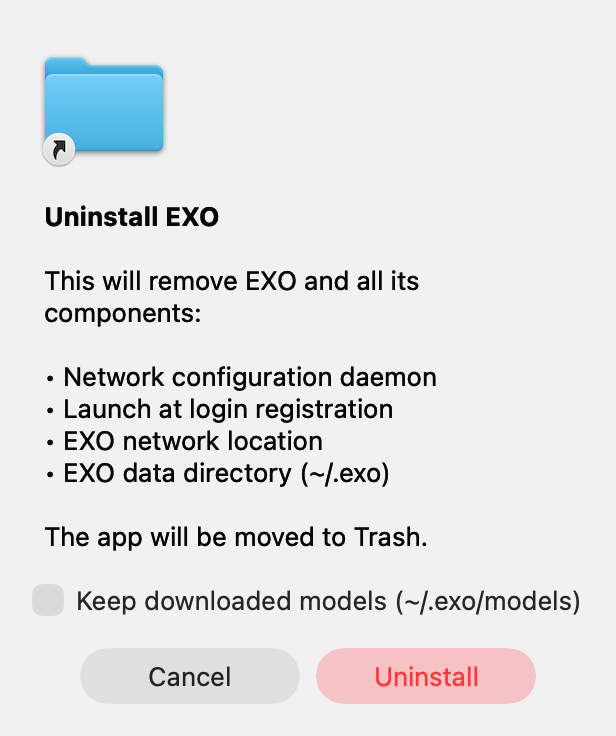
> Note: the rendered icon in the screenshot above is the generic system
folder icon because it was captured from a small standalone Swift binary
(no app bundle / icon resource). When triggered from the actual EXO.app,
the EXO app icon is shown.
## Test plan
- [ ] Build EXO.app locally; open Settings → Advanced → Danger Zone →
Uninstall EXO; confirm the new "Keep downloaded models (~/.exo/models)"
checkbox is present and unchecked by default.
- [ ] Uninstall with the checkbox **checked** → `~/.exo/models/`
survives, all other entries under `~/.exo` are gone, system components
removed, app moved to Trash.
- [ ] Uninstall with the checkbox **unchecked** → `~/.exo` is fully
removed.
- [ ] `sudo app/EXO/uninstall-exo.sh --keep-models` → `~/.exo/models/`
is preserved, the rest of `~/.exo` is removed.
- [ ] `sudo app/EXO/uninstall-exo.sh` (no flag) → `~/.exo` is fully
removed.
- [ ] `app/EXO/uninstall-exo.sh --help` prints usage and exits 0;
unknown args exit 2 with a usage hint.
🤖 Generated with [Claude Code](https://claude.com/claude-code)
---------
Co-authored-by: Claude Opus 4.7 (1M context) <noreply@anthropic.com>
Co-authored-by: Evan <evanev7@gmail.com>
## Summary

The standalone `app/EXO/uninstall-exo.sh` only knew about the legacy
filename `disable_bridge_enable_dhcp.sh`. On machines installed with
newer EXO versions, the current `/Library/Application
Support/EXO/disable_bridge.sh` was left behind, and the script then
reported `EXO support directory not empty, leaving in place`.

This PR makes the script try both filenames, removing whichever ones
exist. Tolerates **either**, **both**, or **neither** being present
without erroring.

The Swift `NetworkSetupHelper.makeUninstallScript()` already handles
both paths correctly, so the GUI uninstall flow is unaffected — this is
a script-only fix.

Caught while running an end-to-end uninstall on a real machine for
#1997.

## Test plan

Verified the new block in isolation against all four states:

- [x] both `disable_bridge.sh` and `disable_bridge_enable_dhcp.sh`
present → both removed
- [x] only `disable_bridge.sh` present → removed cleanly
- [x] only `disable_bridge_enable_dhcp.sh` present → removed cleanly
(legacy install)
- [x] neither present → prints the existing "already removed?" warning,
exits 0

🤖 Generated with [Claude Code](https://claude.com/claude-code)

Co-authored-by: Claude Opus 4.7 (1M context) <noreply@anthropic.com>
The load balancer counted ALL tasks (Complete, Cancelled, TimedOut,
Failed) instead of only Pending/Running ones. With 138 accumulated tasks
and only 7 active, routing decisions were based on historical
distribution, causing one node to appear permanently 'busier' and
starving the other of work.

Co-authored-by: Adam Durham <adam@example.com>
Co-authored-by: Claude Opus 4.6 (1M context) <noreply@anthropic.com>
## Motivation

Extend bench/eval tooling with robustness features, streaming support,
and align model configs with vllm eval for reproducible comparisons.

## Changes

- **exo_eval**: Checkpoint/resume (JSONL), instance health monitoring +
early abort, `top_k`/`min_p`/`enable_thinking` params, LCB
`--release-version`/`--offset`
- **exo_bench**: Streaming SSE (`--stream`), Kimi tokenizer fix for
transformers 5.x
- **Both tools**: Auto-detect running instances instead of requiring
`--skip-instance-setup`; `--fresh-instance` to override
- **harness**: SSE streaming client, `find_existing_instance()` shared
helper, removed download timeout, settle-timeout default 0→7200s
- **models.toml**: Added `enable_thinking`, aligned `max_tokens`/temps
with vllm, added new models
- **API**: Streaming SSE for `/bench/chat/completions`

## Why It Works

- Checkpoint/resume uses append-only JSONL + skip-on-load so interrupted
evals resume without re-running completed questions
- Health monitoring races an `asyncio.Event` against API calls for fast
abort when the instance dies
- Auto-detection queries `/state` for existing instances matching the
model ID before attempting placement
- Streaming reuses the existing `generate_chat_stream` infrastructure
from the regular chat endpoint
Upstream PR #1947 added `presence_penalty` and `frequency_penalty` to
`TextGenerationTaskParams` and the mlx-lm generator call sites, but
missed wiring them up in the API adapter so they were silently dropped
from incoming requests. This fixes the API mapping.

Co-authored-by: Adam Durham <adam@example.com>
## Motivation

The bug-report presigned-URL endpoint
(`https://reports.exolabs.net/presigned-urls`) was injected at build
time from the `EXO_BUG_REPORT_PRESIGNED_URL_ENDPOINT` GitHub Actions
secret into `Info.plist`, then read at runtime by `BugReportService`. It
isn't actually a secret — the POST body is just `{"keys":[...]}` with no
credential (see `app/EXO/EXO/Services/BugReportService.swift:136-142`),
abuse prevention lives server-side on the lambda, and the URL is already
visible in every publicly-distributed DMG's `Info.plist`. Treating it as
a repo secret added plumbing with no security benefit and broke local
dev builds — hitting **Send Bug Report** on an uncustomised `just
build-app` raised "Bug report endpoint is invalid".

## Changes

- `app/EXO/EXO/Info.plist`: replace
`$(EXO_BUG_REPORT_PRESIGNED_URL_ENDPOINT)` with the literal URL.
- `.github/workflows/build-app.yml`: drop the
`EXO_BUG_REPORT_PRESIGNED_URL_ENDPOINT` job-level env var and the
xcodebuild build-setting passthrough. No other workflow changes.

Swift code is unchanged — `BugReportService` still reads from
`Info.plist`, which leaves an escape hatch if anyone ever needs to
override via `xcodebuild EXOBugReportPresignedUrlEndpoint=...` without
recompiling.

Follow-up: the `EXO_BUG_REPORT_PRESIGNED_URL_ENDPOINT` repo secret can
now be deleted in the GitHub Actions settings UI.

## Why It Works

`Info.plist` variable substitution turns `$(FOO)` into whatever build
setting `FOO` resolves to. CI was setting `FOO` via xcodebuild; local
dev wasn't, so the key resolved to an empty string, which
`BugReportService.fetchPresignedUploadUrls` rejects via the
`!trimmedEndpointString.isEmpty` guard at `BugReportService.swift:131`.
Hardcoding the literal string removes the substitution entirely, so
every build — local or CI — gets the right value.

## Test Plan

### Manual Testing
<!-- Hardware: MacBook Pro (macOS app build via Xcode) -->
- `just build-app` with no extra env vars (reproduces the failure path
on `main`).
- `/usr/libexec/PlistBuddy -c "Print :EXOBugReportPresignedUrlEndpoint"
app/EXO/build/Build/Products/Debug/EXO.app/Contents/Info.plist` →
returns `https://reports.exolabs.net/presigned-urls` (was empty before
this change).
- `open app/EXO/build/Build/Products/Debug/EXO.app` → menubar → **Debug
Info** → **Send Bug Report** → type a description → **Send** → upload
succeeds and the **Create GitHub Issue** button appears (was failing
with "Bug report endpoint is invalid" before).
- Cross-check on the Slack side that the uploaded `report.json` lands
under `reports/YYYY/MM/DD/<ts>/` as before.

### Automated Testing
<!-- Describe changes to automated tests, or how existing tests cover
this change -->
- No new tests. This is a single-string change to `Info.plist` plus a
workflow cleanup. `nix flake check` in CI verifies formatting/lint for
the rest of the tree.

🤖 Generated with [Claude Code](https://claude.com/claude-code)

Co-authored-by: Claude Opus 4.7 (1M context) <noreply@anthropic.com>
## Motivation

When a new node joins, it might not have the cache.


Caveat:
This is potentially fallible if a new node joins and updates real
topology, but the API topology hasn't caught up with this fact and the
user queues up a new text generation. In practice, there is only a split
second where this is the case, and this is only for users of the
dashboard interface. We should fix this properly after the release.
## Motivation

When a user clicks **Send Bug Report** in the macOS app, we already give
them the option to add more context via an optional text field. But the
current prompt is just a terse label — `"What's the issue? (optional)"`
— which doesn't tell the user why bothering to fill it in matters. A
friendly one-line explanation increases the chance they'll describe what
went wrong, which is the single most useful signal when we triage the
resulting diagnostic bundle.

## Changes

- `app/EXO/EXO/ContentView.swift`: In the `.prompting` phase of
`sendBugReportButton`, replace the single label with a two-line
hierarchy:
  - Primary: `Tell us what went wrong (optional)`
- Helper: `A quick description of what you were doing and what happened
helps us track down the bug for you.`
- The helper uses `.caption2` + `.secondary` + `.opacity(0.8)` +
`.fixedSize(horizontal: false, vertical: true)` so it stays visually
subordinate and wraps cleanly inside the 340pt popover.

No changes to `BugReportService`, the `user_description` payload, or any
other flow.

## Why It Works

The optional description is already plumbed end-to-end (text editor →
`bugReportUserDescription` state → `BugReportService.sendReport(...,
userDescription:)` → `report.json`'s `user_description` field → GitHub
issue pre-fill). The only gap was user-facing motivation, so this is
purely a copy/layout tweak inside the existing `.prompting` case — no
new state, bindings, or service changes.

## Test Plan

### Manual Testing
<!-- Hardware: MacBook Pro (macOS app build via Xcode) -->
- Build the macOS app in Xcode (`app/EXO/EXO.xcodeproj`) and launch it.
- Open the menubar popover → expand **Debug Info** → click **Send Bug
Report**.
- Verify the new primary label and helper sentence both appear above the
text editor and wrap cleanly within the popover width.
- Leave the field empty → click **Send** → upload should succeed (no
`user_description` in payload, same as before).
- Fill in a description → click **Send** → upload succeeds and the
success card with **Create GitHub Issue** appears; clicking it opens
GitHub with the description pre-filled.
- Click **Cancel** from the prompting state → returns to idle.

### Automated Testing
<!-- Describe changes to automated tests, or how existing tests cover
this change -->
- No new automated tests. This is a SwiftUI copy/layout change; existing
`EXOTests` are smoke-level and don't cover `ContentView` view bodies,
and UI snapshot tests aren't worth adding for a two-line copy tweak.
- `nix fmt` reports 0 files changed after the edit; `nix flake check` in
CI will verify formatting/lint for the rest of the tree.

🤖 Generated with [Claude Code](https://claude.com/claude-code)

Co-authored-by: Claude Opus 4.7 (1M context) <noreply@anthropic.com>
## Summary
Adds a new **Pi** tab to the Integrations page (`/#/integrations`)
alongside the existing Claude Code, OpenCode, Codex, OpenClaw, Open
WebUI, n8n, and Firefox tabs.

[pi](https://pi.dev) (`@mariozechner/pi-coding-agent`) is a terminal
coding agent that supports custom OpenAI-compatible providers via
`~/.pi/agent/models.json`.
This tab gives users a copy-pasteable config to wire pi up to their exo
cluster.

## What's in the tab
- **Model selector** (shown when multiple models are running) — picks
the default model for the generated shell command.
- **Models Config card** — generates `~/.pi/agent/models.json`
registering `exo` as a custom provider:
     - `baseUrl` → `<apiUrl>/v1`
     - `api` → `openai-completions`
     - `apiKey` → `"exo"` (placeholder; exo ignores it)
- `compat.supportsDeveloperRole: false` and
`compat.supportsReasoningEffort: false`, per pi docs recommendation for
local OpenAI-compatible servers
- Auto-populates every running model with `id`, `contextWindow` (from
`/v1/models`), and `input: ["text", "image"]` for vision-capable models
- **Shell Command card** — `pi --provider exo --model <model>` for quick
launch.

The tab gracefully falls back to `your-model-id` when no models are
running, matching the behavior of the other tabs.

   ## Usage

   1. `npm install -g @mariozechner/pi-coding-agent`
   2. Paste the generated config into `~/.pi/agent/models.json`
3. Run `pi` and pick an exo model via `/model` — or run the shell
command directly

   ## Changes

- `dashboard/src/routes/integrations/+page.svelte` — adds `"Pi"` to the
`tabs` tuple, `piModel` state, `piModelsJson` + `piShellCommand`
derivations, and the tab content block.

   Single-file, scoped change — no backend or type changes.

   ## Testing

   - `cd dashboard && npm run build` — ✅ builds cleanly
   - `svelte-check` on the edited file — no new errors
- Manually verified the tab renders, the model selector updates the
generated JSON, and the config reflects `/v1/models` capabilities
(vision → `input: ["text","image"]`,
 `context_length` → `contextWindow`).

   ## Screenshots

<img width="1545" height="1236" alt="pi-tab"
src="https://github.com/user-attachments/assets/38aa179f-4ed9-4a1e-9783-d3baa7738263"
/>

