Hans-Christoph Steiner
6f07538cdc
Hans-Christoph Steiner
6f07538cdc
https://apt.izzysoft.de/fdroid/archive/com.futsch1.medtimer_28.apk:
2024-04-21 18:55:20 ERROR 404: Not Found.
https://apt.izzysoft.de/fdroid/archive/com.hardbacknutter.nevertoomanybooks_75.apk:
2024-04-21 18:55:20 ERROR 404: Not Found.
https://apt.izzysoft.de/fdroid/archive/com.jovial.jrpn15_20.apk:
2024-04-21 18:55:20 ERROR 404: Not Found.
https://apt.izzysoft.de/fdroid/archive/com.jovial.jrpn2_20.apk:
2024-04-21 18:55:20 ERROR 404: Not Found.
https://apt.izzysoft.de/fdroid/archive/com.logger.app_8.apk:
2024-04-21 18:55:21 ERROR 404: Not Found.
https://apt.izzysoft.de/fdroid/archive/com.lorenzovainigli.foodexpirationdates.foss_22.apk:
2024-04-21 18:55:21 ERROR 404: Not Found.
https://apt.izzysoft.de/fdroid/archive/com.openathena_36.apk:
2024-04-21 18:55:21 ERROR 404: Not Found.
https://apt.izzysoft.de/fdroid/archive/com.oppzippy.openscq30_21.apk:
2024-04-21 18:55:21 ERROR 404: Not Found.
https://apt.izzysoft.de/fdroid/archive/com.sanmer.mrepo_713.apk:
2024-04-21 18:55:21 ERROR 404: Not Found.
https://apt.izzysoft.de/fdroid/archive/com.starry.myne_325.apk:
2024-04-21 18:55:21 ERROR 404: Not Found.
https://apt.izzysoft.de/fdroid/archive/dev.imranr.obtainium_22602.apk:
2024-04-21 18:55:22 ERROR 404: Not Found.
https://apt.izzysoft.de/fdroid/archive/dev.sanmer.pi_137.apk:
2024-04-21 18:55:22 ERROR 404: Not Found.
https://apt.izzysoft.de/fdroid/archive/org.breezyweather_50108.apk:
2024-04-21 18:55:22 ERROR 404: Not Found.
2024-04-21 18:55:22,448 ERROR: no "icon" in org.breezyweather
2024-04-21 18:55:22,449 ERROR: no "icon" in com.lorenzovainigli.foodexpirationdates.foss
2024-04-21 18:55:22,449 ERROR: no "icon" in com.jovial.jrpn15
2024-04-21 18:55:22,450 ERROR: no "icon" in com.jovial.jrpn2
2024-04-21 18:55:22,450 ERROR: no "icon" in com.logger.app
2024-04-21 18:55:22,450 ERROR: no "icon" in com.futsch1.medtimer
2024-04-21 18:55:22,451 ERROR: no "icon" in com.sanmer.mrepo
2024-04-21 18:55:22,451 ERROR: no "icon" in com.starry.myne
2024-04-21 18:55:22,451 ERROR: no "icon" in com.hardbacknutter.nevertoomanybooks
2024-04-21 18:55:22,452 ERROR: no "icon" in dev.imranr.obtainium
2024-04-21 18:55:22,452 ERROR: no "icon" in com.openathena
2024-04-21 18:55:22,453 ERROR: no "icon" in com.oppzippy.openscq30
2024-04-21 18:55:22,453 ERROR: no "icon" in dev.sanmer.pi
2024-04-21 18:55:22,454 CRITICAL: Unknown exception found!
Traceback (most recent call last):
  File "/home/fdroid/code/fdroid/fdroidserver/fdroid", line 22, in <module>
    fdroidserver.__main__.main()
  File "/home/fdroid/code/fdroid/fdroidserver/fdroidserver/__main__.py", line 230, in main
    raise e
  File "/home/fdroid/code/fdroid/fdroidserver/fdroidserver/__main__.py", line 211, in main
    mod.main()
  File "/home/fdroid/code/fdroid/fdroidserver/fdroidserver/mirror.py", line 269, in main
    _run_wget(os.path.join(basedir, section, icondir), urls[icondir])
KeyError: 'icons'

F-Droid Server
Tools for maintaining an F-Droid repository system.
What is F-Droid Server?
fdroidserver is a suite of tools to publish and work with collections of Android apps (APK files) and other kinds of packages. It is used to maintain the f-droid.org application repository. These same tools can be used to create additional or alternative repositories for publishing, or to assist in creating, testing and submitting metadata to the f-droid.org repository, also known as fdroiddata.
For documentation, please see https://f-droid.org/docs.
In the beginning, fdroidserver was the complete server-side setup that ran f-droid.org. Since then, the website and other parts have been split out into their own projects. The name for this suite of tooling has stayed fdroidserver even though it no longer contains any proper server component.
Installing
There are many ways to install fdroidserver, including using a range of package managers. All of the options are documented on the website: https://f-droid.org/docs/Installing_the_Server_and_Repo_Tools
Tests
To run the full test suite:
tests/run-tests
To run the tests for individual Python modules, see the .TestCase files, e.g.:
tests/metadata.TestCase
It is also possible to run individual tests:
tests/metadata.TestCase MetadataTest.test_rewrite_yaml_special_build_params
There is a growing test suite that has good coverage on a number of key parts of this code base. It does not yet cover all the code, and there are some parts where the technical debt makes it difficult to write unit tests. New tests should be standard Python unittest test cases. Whenever possible, the old tests written in bash in tests/run-tests should be ported to Python.
This test suite has built over time a bit haphazardly, so it is not as clean, organized, or complete as it could be. We welcome contributions. The goal is to move towards standard Python testing patterns and to expand the unit test coverage. Before rearchitecting any parts of it, be sure to contact us to discuss the changes beforehand.
Additional tests for different linux distributions
These tests are also run on various configurations through GitLab CI. This is
only enabled for master@fdroid/fdroidserver because it takes longer to
complete than the regular CI tests. Most of the time you won't need to worry
about them, but sometimes it might make sense to also run them for your merge
request. In that case you need to remove these lines from .gitlab-ci.yml
and push this to a new branch of your fork.
Alternatively run them
locally
like this: gitlab-runner exec docker ubuntu_lts
Buildserver
The tests for the whole build server setup are entirely separate because they require at least 200 GB of disk space, and 8 GB of RAM. These test scripts are in the root of the project, all starting with jenkins- since they used to be run on https://jenkins.debian.net.
Documentation
The API documentation based on the docstrings gets automatically
published here on every commit
on the master branch.
It can be built locally via
pip install -e .[docs]
cd docs
sphinx-apidoc -o ./source ../fdroidserver -M -e
sphinx-autogen -o generated source/*.rst
make html
To additionally lint the code call
pydocstyle fdroidserver --count
When writing docstrings you should follow the numpy style guide.
Translation
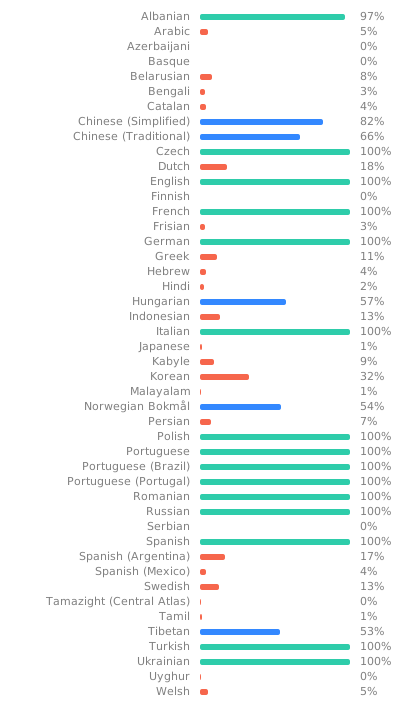
Everything can be translated. See Translation and Localization for more info.

View translation status for all languages.