Hans-Christoph Steiner
fdbfb4d1a2
Hans-Christoph Steiner
fdbfb4d1a2
If a git fetch/clone/submodule URL points to gitlab, github, bitbucket, etc
and that repo does not exist any more, those services will prompt the user
for a username/password so that the service can check if its a private
repo.  Private repos show up the same as non-existent repos.  This employs
two techniques for making sure that git never waits at those prompts.  It
instead should just fail immediately.  The buildserver has been hanging on
these prompts forever, until manually killed.  This change will apply to
updates both on the buildserver host, and the buildserver guest vm.

This uses the "insteadOf" git config option to rewrite URLs to always use
HTTPS and then include a fake username/password so that git will use those
in the prompts and fail immediately.  This trick has been in use on the
verification server for a long while and has been working well.  It has
also been used on jenkins.debian.net in the host.
https://f-droid.org/en/docs/Verification_Server/

It also includes GIT_TERMINAL_PROMPT, which also prevents the bad behavior,
which was added in git 2.3.
https://github.com/blog/1957-git-2-3-has-been-released
| CI Builds | fdroidserver | buildserver | fdroid build --all | publishing tools |
|---|---|---|---|---|
| Debian |  |
|||
| macOS & Ubuntu/LTS |  |
F-Droid Server
Server for F-Droid, the Free Software repository system for Android.
The F-Droid server tools provide various scripts and tools that are used to maintain the main F-Droid application repository. You can use these same tools to create your own additional or alternative repository for publishing, or to assist in creating, testing and submitting metadata to the main repository.
For documentation, please see https://f-droid.org/docs/, or you can find the source for the documentation in fdroid/fdroid-website.
What is F-Droid?
F-Droid is an installable catalogue of FOSS (Free and Open Source Software) applications for the Android platform. The client makes it easy to browse, install, and keep track of updates on your device.
Installing
There are many was to install fdroidserver, they are documented on the website: https://f-droid.org/docs/Installing_the_Server_and_Repo_Tools
All sorts of other documentation lives there as well.
Drozer Scanner
There is a new feature under development that can scan any APK in a repo, or any build, using Drozer. Drozer is a dynamic exploit scanner, it runs an app in the emulator and runs known exploits on it.
This setup requires specific versions of two Python modules: docker-py 1.9.0 and requests older than 2.11. Other versions might cause the docker-py connection to break with the containers. Newer versions of docker-py might have this fixed already.
For Debian based distributions:
apt-get install libffi-dev libssl-dev python-docker
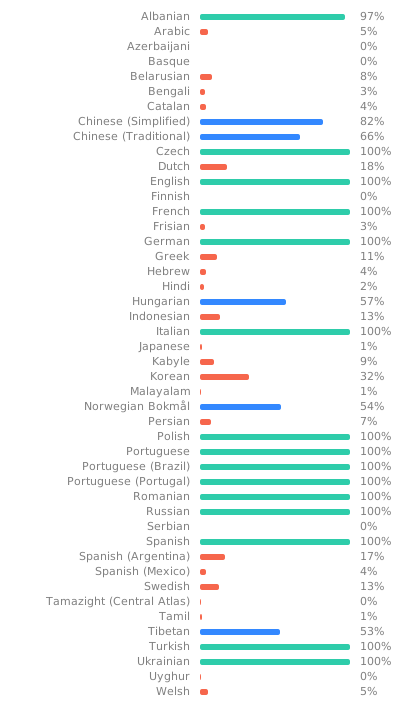
Translation
Everything can be translated. See
Translation and Localization
for more info.