 Jack Kavanaghandkwburns-kong
28e306bb0a
Jack Kavanaghandkwburns-kong
28e306bb0a
* poc: opt-in QuickJS sandbox for pre-request/after-response scripts

Adds settings.useQuickJsScriptSandbox (default off) and wires it into the
existing hidden-BrowserWindow dispatch point in concurrency.renderer.ts, so
scripts can optionally run in the QuickJS-WASM sandbox already used for
plugin template tags instead of the hidden window.

This PoC supports console, insomnia.environment/variables get/set, and
read-only insomnia.request; insomnia.sendRequest() and insomnia.test()/
pm.test() are not yet bridged and throw a clear error.

Full rollout plan (worker-boundary move, async host bridge, test-lifecycle
and request-mutation parity, security verification, telemetry/soak, and
eventually flipping the default to opt-out) is written up here:
https://gist.github.com/jackkav/3ebf8768bf84be024a3a138874919354

* fix: address Copilot review feedback on QuickJS script sandbox PoC

- Timeout error now reports the configured duration instead of an epoch
  deadline timestamp.
- insomnia.request is deep-frozen so mutation attempts are silently
  no-ops consistently, rather than appearing to succeed inside the
  script while never reaching the host.
- Fix operator-precedence bug in a test script (?? binds looser than +).
- Add an aria-label to the new sandbox toggle Switch for screen readers.

* poc: move QuickJS script execution to a dedicated Web Worker (PR 1)

Splits run-script-quickjs.ts into:
- quickjs-script-engine.ts: the pure QuickJS execution logic (unchanged
  behavior), runnable from anywhere.
- quickjs-script.worker.ts: a Web Worker entry point that runs the engine
  off the renderer's main thread.
- run-script-quickjs.ts: now a thin client that lazily creates the worker
  (only when useQuickJsScriptSandbox is actually used) and correlates
  postMessage/response pairs by id, matching the existing
  templating-handler.ts/templating.worker.ts pattern used for template
  tags.

A runaway script (e.g. an infinite loop) now blocks only the disposable
worker instead of the renderer's UI thread. A worker-level crash rejects
every in-flight call and the next call gets a fresh worker.

concurrency.renderer.ts is unchanged apart from continuing to import
runScriptInQuickJs by the same name/path.

Ref: PR 1 of the rollout plan — https://gist.github.com/jackkav/3ebf8768bf84be024a3a138874919354

* style: formatting pass on quickjs worker-client test

* poc: async host bridge + insomnia.sendRequest() parity for QuickJS sandbox (PR 2)

Bridges insomnia.sendRequest() to a real HTTP request instead of throwing,
reusing the existing insomnia-templating-worker-database:// fetch protocol
and its network.sendRequestWithoutSideEffects handler (the same one the
template-tag sandbox already uses) rather than adding a second protocol
scheme. This is the same fetch-to-custom-protocol pattern
templating.worker.ts uses to reach the main process from a dedicated Web
Worker, generalized to a second async host bridge inside
quickjs-script-engine.ts (a VM promise resolved off a real fetch(),
settled via executePendingJobs() — no asyncify).

- quickjs-script-engine.ts: installSendRequestBridge() + BOOTSTRAP's
  insomnia.sendRequest() now normalizes a URL string or a plain
  {url, method, headers, body} object, calls the bridge, and rebuilds a
  response object ({code, status, headers, body, responseTime, json(),
  text()}) — supports both the Postman-style (error, response) callback
  and awaiting the returned promise. insomnia.test()/pm.test() still
  throws (unchanged).
- run-script-quickjs.ts (client): fetches the templating-db auth token
  once via window.main.templatingDb.getAuthToken() (same pattern as
  ui/worker/templating-handler.ts) and forwards it on every postMessage.
- quickjs-script.worker.ts: passes the auth token through to the engine.

Known gaps (documented in quickjs-script-engine.ts, deferred to a later
parity PR): no auth/client-certs/cookies/multipart-or-urlencoded bodies,
and the response object doesn't yet match the hidden-window Response
class's full surface (chai assertions, originalRequest, cookies).

Ref: PR 2 of the rollout plan — https://gist.github.com/jackkav/3ebf8768bf84be024a3a138874919354

* Revert "poc: async host bridge + insomnia.sendRequest() parity for QuickJS sandbox (PR 2)"

This reverts commit 37d19c1da8.

* test: add e2e smoke test for QuickJS sandbox (PR 0 + PR 1 only)

Proves the opt-in QuickJS engine and Web Worker boundary work end to
end in the real Electron app, not just in vitest's mocked unit tests:

- console.log, insomnia.environment.get/set, and read-only
  insomnia.request all work through the real Worker/QuickJS pipeline
  (canary: `typeof require` confirms the script actually ran in
  QuickJS, not the legacy hidden-window engine).
- A runaway (`while(true){}`) script blocks only its dedicated Worker —
  the app UI stays responsive and interactive while it churns.

insomnia.sendRequest() (PR 2) is intentionally not exercised — it's
been split into its own WIP branch/PR (#10392) pending a real fix for
a QuickJSUseAfterFree crash that only reproduces under real Electron
timing.

Uses "testQueryParams", a request at the workspace root with no body
and no folder-inherited scripts. Every other candidate in this fixture
either references environment variables undefined until a script runs
(triggering Insomnia's "N environment variables are missing"
confirmation dialog) or inherits a folder-level after-response script
calling an API this minimal engine doesn't bridge, which turns an
otherwise-successful send into a displayed "Error" status. Asserting
via the Console tab (console.log output) instead of an echoed response
body sidesteps template rendering entirely.

Ref: PR 0/1 of the rollout plan — https://gist.github.com/jackkav/3ebf8768bf84be024a3a138874919354

* fix(scripting): guard __proto__/constructor/prototype keys in QuickJS env/var bridge (#10395)

A script-supplied "__proto__"/"constructor"/"prototype" key reaching the bridge's store object could rewire its prototype or shadow those names; the bridge now rejects these keys before assignment.

---------

Co-authored-by: kwburns-kong <kyle.burns@konghq.com>
Insomnia API Client






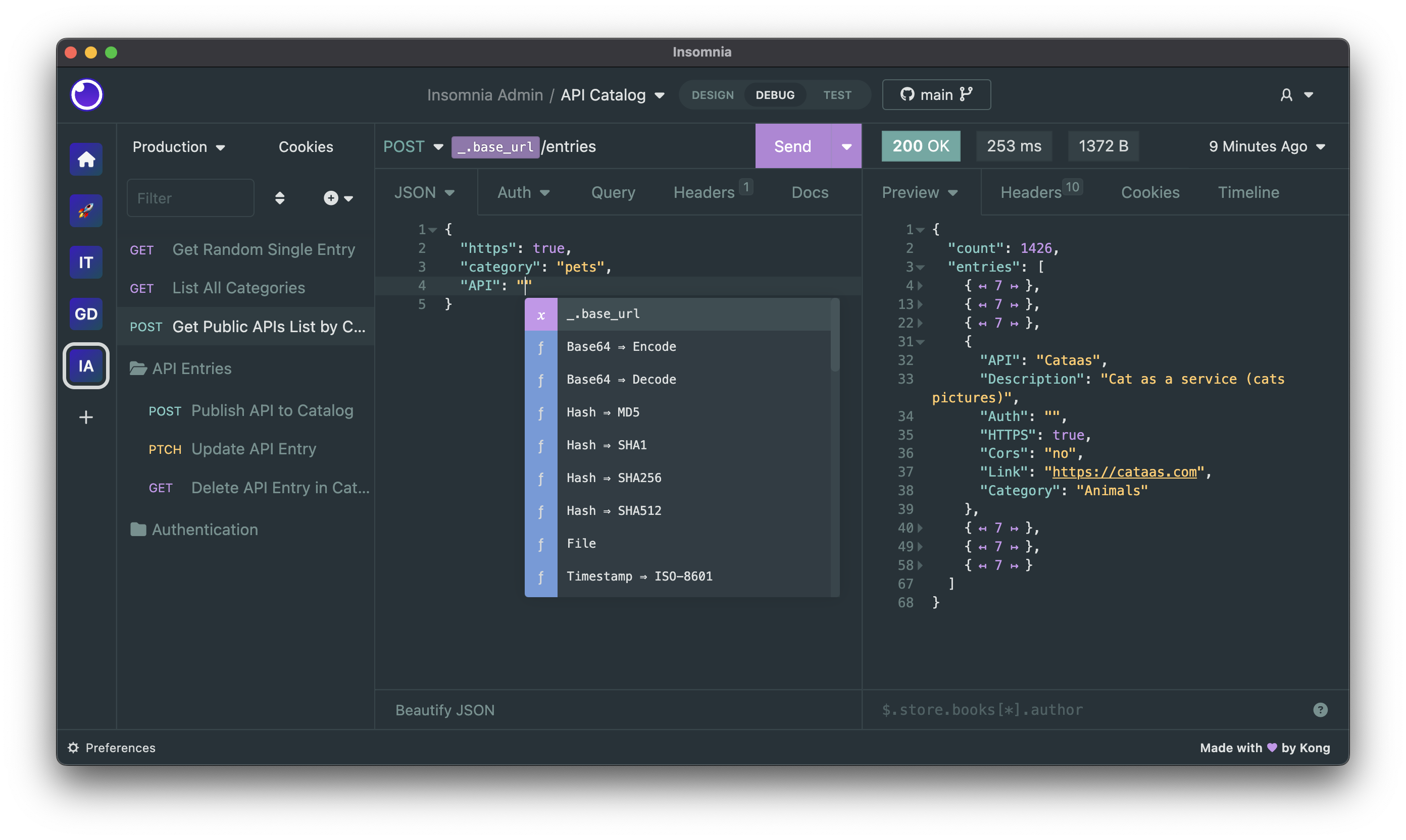
Insomnia is an open-source, cross-platform API client for GraphQL, REST, WebSockets, Server-Sent Events (SSE), gRPC and any other HTTP compatible protocol.
With Insomnia you can:
- Debug APIs using the most popular protocols and formats.
- Design APIs using the native OpenAPI editor and visual preview.
- Test APIs using native test suites and collection runner.
- Mock APIs using a cloud or self-hosted mocking server.
- Build CI/CD pipelines using the native Insomnia CLI for linting and testing.
- Collaborate with others using the many collaboration features.
- And more including the ability to use 3rd party plugins.
The following storage options are supported for your Insomnia projects, collections, design specs and all other resources:
- Local Vault: for 100% local storage of collections, design specs and every other resource.
- Git Sync: for Git storage using any 3rd party Git repository, without going through the cloud.
- Cloud Sync: for cloud collaboration, optionally end-to-end encrypted (E2EE) in the cloud.
Get started for free
Insomnia is available for Mac, Windows, and Linux and can be downloaded from the website:
Account & Subscriptions
You can use Insomnia without an account with the local Scratch Pad, or you can create an account for free to get access to the full capabilities of the product.
Even with an account, Insomnia only stores your projects and files accordingly to the storage backend that you have selected, which can be Local Vault, Cloud Sync, Git Sync or any combination of them. As such - for example - you have the freedom to choose to store sensitive projects 100% locally or in a Git repository, while still being able to collaborate on others in the cloud. It's the best of both worlds.
For added security, Insomnia also offers a Private Environments feature, where your environments configuration is always stored locally and never in the cloud, independently from the storage option that you have chosen for your project.
Premium features and support
Insomnia has a very generous free plan that will be satisfactory for most users, but if you need to get access to premium capabilities like unlimited collaboration, the Git Sync feature, the ability to create organizations for your projects, using a 3rd party IDP for logins (SAML, OIDC) and many other features, then you can explore the other subscription plans.
You can compare all subscription plans and get started for free.
Why does Insomnia require an account?
Insomnia does not require an account if you decide to use the local Scratch Pad, but to access most capabilities of the product we require an account. Your account data is securely stored in compliance with ISO27001, SOC 2 Type II, ISO27018, Gold CSA STAR regulations and in accordance with our terms of service and privacy policy.
We require an account to sustainably build and improve the product, and to make sure we can continue to offer the many core capabilities in a free and open-source distribution. While open source software is free to use, it is unfortunately not free to build, and our ability to continue working on Insomnia is dependent on our ability to convert a subset of free users (that need premium features) to become paying customers of our product.
If you are a user that cannot share API data like collections and design specifications to the cloud, this is still possible by selecting "Local Vault" as the storage of your Insomnia projects: having an Insomnia account is not tied to how you wish to store your sensitive API data (which can be stored 100% locally via Local Vault, on a 3rd party Git repository without any cloud storage via Git Sync, or in the cloud for ease of collaboration via Cloud Sync).
Bugs and Feature Requests
Have a bug or a feature request? First, read the issue guidelines and search for existing and closed issues. If your problem or idea is not addressed yet, please open a new issue.
For more generic product questions and feedback, join the Slack Team.
Contributing
Please read through our contributing guidelines and code of conduct. Included are directions for opening issues, coding standards, and notes on development.
Documentation
Check out our official Insomnia Documentation.
Develop Insomnia
Development on Insomnia can be done on Mac, Windows, or Linux as long as you have Node.js and Git. See the .nvmrc file located in the project for the correct Node version.
Initial Dev Setup
This repository is structured as a monorepo and contains many Node.JS packages. Each package has its own set of commands, but the most common commands are available from the root package.json and can be accessed using the npm run … command. Here are the only three commands you should need to start developing on the app.
# Install and Link Dependencies
npm i

# Run Lint
npm run lint

# Run type checking
npm run type-check

# Run Tests
npm test

# Start App with Live Reload
npm run dev

# Start App with both renderer process live reload and main process auto restart
npm run dev:autoRestart
Linux
If you are on Linux, you may need to install the following supporting packages:
Ubuntu/Debian
# Update library
sudo apt-get update

# Install font configuration library & support
sudo apt-get install libfontconfig-dev
Fedora
# Install libcurl for node-libcurl
sudo dnf install libcurl-devel
Also on Linux, if Electron is failing during the install process, run the following
# Clear Electron install conflicts
rm -rf ~/.cache/electron
Windows
If you are on Windows and have problems, you may need to install Windows Build Tools
Editor Requirements
You can use any editor you'd like, but make sure to have support/plugins for the following tools:
- ESLint - For catching syntax problems and common errors
- JSX Syntax - For React components
Develop Inso CLI
npm i- Start the compiler in watch mode:
npm run inso-start - Run:
./packages/insomnia-inso/bin/inso -v
Plugins
Search for, discover, and install plugins from the Insomnia Plugin Hub!
Community Projects
- Insomnia Documenter - Generate beautiful API documentation pages using the documenter plugin or your Insomnia export file.
- GitHub API Spec Importer - A complete set of GitHub REST API route specifications that can be imported straight into Insomnia.
- Swaggymnia - Generate Swagger documentation for your existing API in Insomnia.